
HBA & Storage Fabric Concepts Explained
Understanding the difference between an HBA and a RAID controller, and between FC protocols, is essential before specifying storage connectivity for a new server.
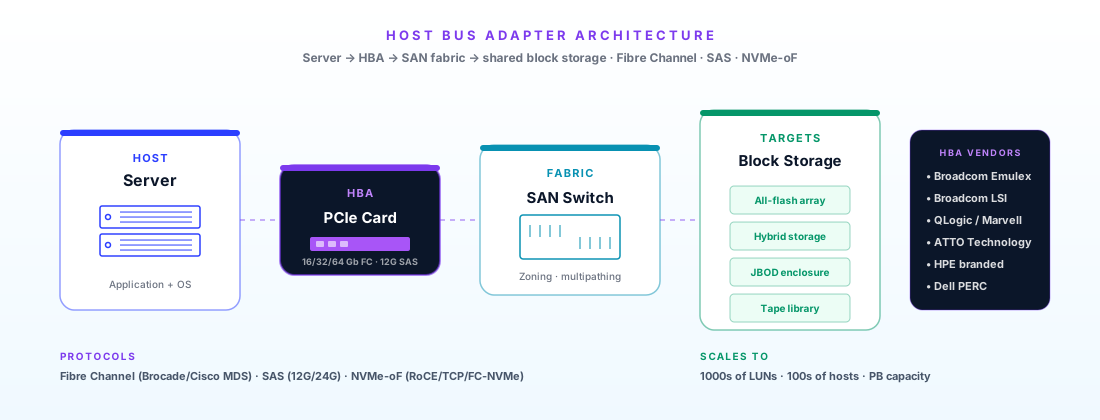
A Host Bus Adapter (HBA) presents storage to the server without any processing — it is a "dumb" pass-through that connects the server to the storage device or fabric. The OS or storage software manages the drives directly. A RAID controller sits between the server and drives and performs RAID operations in dedicated hardware, presenting a logical volume to the OS. For Fibre Channel SAN connections, always use an HBA — you never want RAID between the server and a storage array that manages its own RAID. For local SAS/SATA drive expansion, HBA in "IT mode" is required for ZFS/Ceph; RAID mode is used for simpler local storage.
Fibre Channel is a dedicated high-speed network protocol designed exclusively for storage block I/O, operating over optical fibre (and occasionally copper). FC provides inherently lossless, in-order delivery without the tuning complexity of lossless Ethernet for RDMA. FC SANs are highly mature — most enterprise storage arrays (Pure Storage, NetApp, HPE, Dell, Hitachi) support FC connectivity. FC generations: Gen 3 = 8Gb, Gen 5 = 16Gb, Gen 6 = 32Gb, Gen 7 = 64Gb. The FC fabric consists of the HBAs (in servers), FC switches (Brocade/Cisco MDS), and storage array FC ports.
Traditional Fibre Channel carried SCSI commands (FC-SCSI / FCP). FC-NVMe replaces SCSI with the NVMe command set over the same FC fabric — same switches, same optics, just a firmware/driver update on the HBAs and storage arrays. FC-NVMe achieves significantly lower latency than FC-SCSI because NVMe's command queue architecture is far more efficient than SCSI. Pure Storage FlashArray, NetApp AFF, and Dell PowerStore all support FC-NVMe. Existing 16Gb+ FC fabric infrastructure can support FC-NVMe without replacing switches or optics.
NVMe-oF extends NVMe over an IP network using RDMA (RoCEv2) or TCP as the transport, as an alternative to FC. NVMe/RDMA (RoCEv2) achieves latency comparable to FC-NVMe (10–20µs) but requires a lossless Ethernet fabric. NVMe/TCP runs over standard Ethernet without the lossless requirement — simpler to deploy but adds ~50µs of latency overhead from TCP processing. For new deployments with modern Ethernet infrastructure, NVMe/RDMA over 100GbE is increasingly chosen over FC due to lower total cost of ownership (no dedicated FC switches).
SAS HBAs can operate in two modes: IR (Integrated RAID) mode, where the card performs RAID, or IT (Initiator Target) mode, where the card is a pure passthrough and presents each drive directly to the host OS. For ZFS (TrueNAS, OpenZFS), Ceph, and software RAID, IT mode is mandatory — ZFS requires direct drive access to its own error correction and write path management. A RAID controller in IT mode is sometimes called a "flashed to IT mode" card. Broadcom 9405W, 9400-16i, and similar cards are common in storage server builds for exactly this purpose.
FC zoning is the Fibre Channel equivalent of VLANs — it defines which HBAs (initiators) can see which storage ports (targets) in the fabric. Without zoning, every server in the SAN can see every storage port, creating a security risk and potential for incorrect LUN masking. Hard zoning (by port number) is the standard — each server's HBA is zoned to specific storage array ports. This is configured on FC switches (Brocade or Cisco MDS), not on the HBAs themselves. Zoning is a mandatory step in any new FC SAN deployment.
Storage Protocol Comparison
FC, NVMe-oF, iSCSI, and SAS serve different deployment scenarios. Understanding which to use avoids costly infrastructure decisions.
| Protocol | Speed | Latency | Infrastructure | Maturity | Best Use Case |
|---|---|---|---|---|---|
| FC-SCSI (FCP) | 8–64Gb/s | 50–100µs | FC fabric (SFP+, FC switches) | Very high | Existing FC SAN — compatible with all storage arrays |
| FC-NVMe | 8–64Gb/s | 5–20µs | FC fabric (same as FC-SCSI) | High | Upgrade path for existing FC SAN to NVMe arrays |
| NVMe/RDMA (RoCEv2) | 25–400GbE | 10–20µs | Lossless Ethernet (PFC/ECN switches) | High | New deployments with 100GbE RDMA-capable NICs |
| NVMe/TCP | 25–400GbE | 50–200µs | Standard Ethernet (no special switches) | Growing | Simplest NVMe-oF deployment — lower latency than iSCSI |
| iSCSI (SCSI over TCP) | 1–100GbE | 200–500µs | Standard Ethernet | Very high | Legacy block storage — being replaced by NVMe/TCP in new builds |
| SAS (direct attach) | 12Gb/s per lane | <1µs | Direct SAS cables to drives/JBOD | Very high | Local JBODs, tape libraries, direct-attach SSD/HDD expansion |
Which HBA for Which Workload?
HBA selection depends on your storage architecture, protocol, and whether you have existing fabric infrastructure. Match the protocol to your storage array's supported connectivity options first.
HBA Specifications — FC, SAS & NVMe-oF
All specifications from official vendor datasheets. Contact Servnet for UK stock availability and OS compatibility verification for your specific server platform.
Broadcom Emulex LPe36002 64Gb Dual-Port FC HBA
Broadcom Emulex LPe31002 16Gb Dual-Port FC HBA
Marvell QLogic QLE2690 64Gb Dual-Port FC HBA
Marvell QLogic QLE2560 8Gb Single-Port FC HBA
Broadcom 9405W-16i Tri-Mode SAS/SATA/NVMe HBA
Broadcom SN1200E 16Gb FC NVMe-oF HBA
Frequently Asked Questions
Related Products & Storage Platforms
Need HBAs for your storage fabric?
We advise on HBA selection for Fibre Channel SANs, NVMe-oF deployments, and SAS expansion — verifying compatibility with your specific storage arrays, FC switches, and server platforms.
Request HBA Configuration AdviceTalk to a UK specialist
Get expert advice or a no-obligation quote — servers, storage, networking, maintenance, finance and cloud. We reply the same working day.