UK’s trusted IT infrastructure partner since 2003
sales@servnetuk.com
0800 987 4111
Servnet
ConfiguratorGet in Touch
Computing Components · SSD & NVMe

Enterprise NVMe SSD — U.2, M.2, E1.S & PCIe Gen5
Complete buyer guide & DWPD reference

The most common mistake in enterprise storage is specifying the wrong endurance rating or form factor. This guide explains DWPD, why enterprise drives differ from consumer SSDs, how to choose between PCIe Gen4 and Gen5, and which form factor matches your server backplane — before the specification table.

Get SSD Quote →NVMe-oF HBAs →
13.9 GB/s
Peak seq. read — Kioxia CM7-R PCIe 5.0
2,750K
Random 4K IOPS — CM7-R NVMe 2.0
3 DWPD
Max endurance — Micron 9400 PRO (5yr)
25.6 TB
Max U.2 capacity — Micron 9400 single drive
PCIe 5.0
2× bandwidth over PCIe Gen 4 per lane
Hot-swap
U.2 drives support live replacement
Key Concepts

Enterprise NVMe SSD Concepts Explained

These are the specifications that actually determine whether a drive is right for your workload — getting DWPD wrong can cause premature drive failure in production.

✍️
DWPD
Drive Writes Per Day

DWPD measures write endurance — how many times the full drive capacity can be overwritten per day over the warranty period (typically 5 years). A 3.84TB drive rated at 1 DWPD supports 3.84TB of writes per day for 5 years before reaching its rated endurance limit. Read-intensive (RI) drives are rated at 0.4 DWPD; mixed-use at 1–3 DWPD. Using a 0.4 DWPD drive in a write-heavy workload will exhaust the NAND cells prematurely and void warranty.

🏗️
TLC vs QLC NAND
Triple vs Quad Level Cell

TLC (Triple Level Cell) stores 3 bits per NAND cell — more durable and faster writes, but higher cost per TB. QLC (Quad Level Cell) stores 4 bits per cell — 25–33% cheaper per TB, but lower write endurance (typically 0.1–0.3 DWPD) and slower sustained writes. Enterprise QLC drives (used in read-intensive arrays like Pure Storage FlashArray//C) use large DRAM caches and SLC write buffers to mask the QLC write penalty in read-dominated workloads.

⚠️
Enterprise vs Consumer NVMe
Why the difference matters

Consumer NVMe drives (Samsung 990 Pro, WD Black) lack power loss protection (PLP), are rated for ~0.3 DWPD, have no hot-swap support, and have MTBF of ~1.5M hours. Enterprise NVMe drives (Samsung PM9A3, Micron 9400) include PLP capacitors that flush write buffers during power failure, are rated for 1–3 DWPD, support hot-swap (U.2), and carry 2M+ hour MTBF with 5-year warranties. Never use consumer SSDs in production servers.

PCIe Gen4 vs Gen5
Bandwidth and compatibility

PCIe Gen4 x4 provides 8 GB/s of raw bandwidth — enough for sequential reads up to ~7 GB/s (Samsung PM9A3). PCIe Gen5 x4 provides 16 GB/s — unlocking drives like the Kioxia CM7-R at 13.9 GB/s. PCIe Gen5 requires a Gen5-capable server (Intel Xeon 6, AMD EPYC 9005) and backplane. Gen5 drives will physically fit in a Gen4 backplane but will run at Gen4 speeds — you pay for Gen5 performance and receive Gen4. Confirm your backplane generation before ordering.

📐
U.2 vs M.2 vs EDSFF
Form factor selection

U.2 (SFF-8639, 2.5" 15mm) is the universal enterprise form factor — hot-swappable, supports drives up to 25.6TB, fits all mainstream server drive bays. M.2 is smaller, not hot-swappable, and limited to lower-capacity drives; used for boot/OS drives and compact edge servers. EDSFF (E1.S, E3.S — "Ruler" format) is the emerging high-density format in newer server models — higher drive count per U, more efficient thermal management, but requires a compatible EDSFF backplane.

🔗
NVMe-oF
NVMe over Fabrics

NVMe-oF extends the NVMe protocol over a network fabric (RDMA/RoCE, Fibre Channel, TCP) to enable sub-microsecond access to remote NVMe storage. It eliminates the SCSI translation overhead of traditional iSCSI or FC-SCSI SAN, bringing NVMe's latency advantage to networked storage. Requires NVMe-oF capable HBAs or NICs on the server side and NVMe-oF capable storage arrays (Pure Storage FlashArray, NetApp AFF, etc.) on the target side.
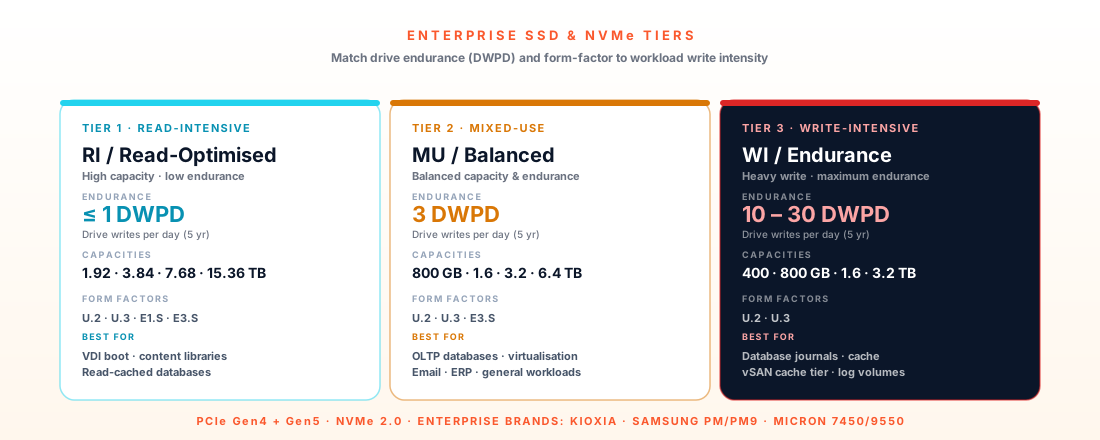
Enterprise SSD and NVMe tier comparison — read-intensive, mixed-use, write-intensive drives by endurance (DWPD) and form factor

NVMe Form Factor Comparison

Confirm your server backplane type before ordering — form factors are physically incompatible with each other. U.2 and E1.S are not interchangeable.

Form FactorConnectorHot-SwapMax CapacityPCIe GenBest For
U.2 (2.5" 15mm)SFF-8639 / PCIe x4Yes25.6 TBGen 4 / Gen 5Universal enterprise — mainstream server, all-flash array
M.2 22110M-key PCIe x4No3.84 TBGen 4 / Gen 5Boot drives, compact edge servers, low-power nodes
E1.S EDSFFPCIe x4 (Ruler)Yes15.36 TBGen 4 / Gen 5Dense storage (Dell R660/R760 E1.S backplane)
E3.S EDSFFPCIe x8 (Ruler)Yes61.44 TBGen 4 / Gen 5Hyperscale / capacity-optimised storage servers
Add-In Card (HHHL)PCIe x4/x8 slotNo15 TBGen 4 / Gen 5Low-latency compute-local storage (HPC, caching)
Selection Guide

Which NVMe Drive for Which Workload?

Match drive endurance to actual write workload, not to marketing tier. Over-specifying DWPD wastes budget; under-specifying shortens drive life below warranty period.

WorkloadEnduranceReasoningForm Factor
OLTP Database (MySQL, PostgreSQL, Oracle)Mixed-use (1–3 DWPD)Random write IOPS and write endurance are critical. Micron 9400 PRO at 3 DWPD handles write-heavy transaction workloads. Size capacity to hold the entire active dataset for best latency.U.2
AI Training Data PipelineMixed-use (1 DWPD)Sustained sequential read bandwidth matters most for loading training batches. 7 GB/s PCIe 4.0 drives handle most GPU training feeds. PCIe Gen5 only justified for very high model update frequencies.U.2
AI Inference (high-frequency serving)Read-intensive (0.4–1 DWPD)Inference loads models into VRAM once, then processes queries in memory. Storage I/O is low-frequency. RI drives are cost-effective — high capacity for model storage at minimum write endurance cost.U.2
Virtual Machine Boot / OS Volumes1 DWPD (small capacity)Boot drives see moderate mixed I/O. M.2 22110 in the server internal bay is cost-effective for OS/hypervisor. No need for hot-swap or large capacity — 960GB to 1.92TB per server is typical.M.2 22110
All-Flash Storage Array BackplaneRead-intensive (0.4 DWPD)Storage arrays (Pure, NetApp, Dell PowerStore) manage write distribution and wear levelling at the array level. RI drives are used even for mixed workloads because the array's data placement optimises writes across many drives.U.2
Dense Storage Server (60+ drives/2U)E1.S EDSFFEDSFF allows more drives per rack unit than U.2 in storage-optimised builds. Lower power per drive (12W vs 18–25W) reduces cooling requirements. Requires EDSFF backplane — common in Dell PowerEdge R660 and similar.E1.S
Product Specifications

Enterprise NVMe SSD Specifications

All performance figures are manufacturer-published datasheet values. DWPD ratings are over a 5-year warranty period unless stated otherwise.

💽
Samsung · U.2 · PCIe 4.0
MZWLO3T8HCLS-00A07

Samsung PM9A3 3.84TB U.2 NVMe

Capacity3.84 TB
Form FactorU.2 2.5" 15mm (SFF-8639)
InterfacePCIe 4.0 x4 · NVMe 1.4
Seq. Read7,000 MB/s
Seq. Write3,500 MB/s
Rnd Read (4K)1,500K IOPS
Rnd Write (4K)200K IOPS
Endurance1 DWPD (5-year warranty)
Power (active)18W typical
Also available960GB · 1.92TB · 7.68TB · 15.36TB
Best for: All-flash database and analytics — 7 GB/s reads make PM9A3 the standard for Dell PowerEdge and HPE ProLiant all-flash builds.
💽
Samsung · U.2 · PCIe 4.0
MZWLO7T6HELA-00A07

Samsung PM9A3 7.68TB U.2 NVMe (RI)

Capacity7.68 TB (Read-Intensive)
Form FactorU.2 2.5" 15mm (SFF-8639)
InterfacePCIe 4.0 x4 · NVMe 1.4
Seq. Read6,800 MB/s
Seq. Write2,000 MB/s
Rnd Read (4K)1,500K IOPS
Rnd Write (4K)100K IOPS
Endurance0.4 DWPD — read-intensive
Power (active)16W typical
Also available960GB · 1.92TB · 3.84TB · 15.36TB
Best for: Read-intensive AI inference, CDN, and analytics — high capacity at lower cost per TB where write workload is low.
💽
Micron · U.2 · PCIe 4.0
9400 PRO

Micron 9400 PRO 7.68TB U.2 NVMe

Capacity7.68 TB
Form FactorU.2 2.5" 15mm (SFF-8639)
InterfacePCIe 4.0 x4 · NVMe 1.4c
Seq. Read7,000 MB/s
Seq. Write7,000 MB/s (PRO)
Rnd Read (4K)1,500K IOPS
Rnd Write (4K)700K IOPS
Endurance3 DWPD — mixed-use/write-intensive
Power (active)25W typical
Also available3.84TB · 12.8TB · 25.6TB
Best for: Write-intensive workloads — AI training data pipelines, OLTP databases, Ceph storage nodes needing sustained write performance.
💽
Kioxia · U.2 · PCIe 5.0
KCM7XRUL3T84

Kioxia CM7-R 3.84TB U.2 NVMe

Capacity3.84 TB
Form FactorU.2 2.5" 15mm (SFF-8639)
InterfacePCIe 5.0 x4 · NVMe 2.0
Seq. Read13,900 MB/s
Seq. Write6,800 MB/s
Rnd Read (4K)2,750K IOPS
Rnd Write (4K)490K IOPS
Endurance1 DWPD — read-intensive
Power (active)20W typical
Also available1.92TB · 7.68TB · 15.36TB
Best for: PCIe Gen5 platforms (Intel Xeon 6, EPYC 9005) — 14 GB/s sequential for AI checkpoint loading and database buffer pools.
💽
Samsung · M.2 · PCIe 4.0
MZQL21T9HCJR-00A07

Samsung PM9A3 1.92TB M.2 22110 NVMe

Capacity1.92 TB
Form FactorM.2 22110 (22mm × 110mm)
InterfacePCIe 4.0 x4 · NVMe 1.4
Seq. Read7,000 MB/s
Seq. Write1,800 MB/s
Rnd Read (4K)1,400K IOPS
Rnd Write (4K)200K IOPS
Endurance1 DWPD (5-year warranty)
Power (active)8W typical
Also available480GB · 960GB · 3.84TB
Best for: Boot/OS drives, edge servers, and compact 1U platforms where U.2 bays are unavailable.
💽
Micron · E1.S · PCIe 4.0
MTFDKBG1T9TDZ

Micron 7500 MAX 1.6TB E1.S NVMe

Capacity1.6 TB
Form FactorE1.S EDSFF (Enterprise/Ruler)
InterfacePCIe 4.0 x4 · NVMe 1.4
Seq. Read6,900 MB/s
Seq. Write4,000 MB/s
Rnd Read (4K)1,400K IOPS
Rnd Write (4K)500K IOPS
Endurance3 DWPD — MAX variant
Power (active)12W typical
Also available800GB · 3.2TB — MAX and PRO
Best for: Intel Xeon 6 E1.S backplane configs (Dell R660/R760) — higher drive density per U than U.2 in storage-optimised builds.
Common Questions

Frequently Asked Questions

Q: What DWPD rating do I need for my workload?
For read-intensive workloads (less than 10% writes) — 0.4 DWPD is sufficient. For mixed workloads (40–60% writes) — 1 DWPD. For write-intensive workloads (databases, logging, AI training pipelines with heavy checkpointing) — 3 DWPD. As a rule of thumb: calculate your expected daily write volume in TB and divide by the drive capacity — if this exceeds the DWPD rating, the drive will exhaust its endurance before the warranty period ends.
Q: Do enterprise SSDs have a meaningful advantage over consumer SSDs in a server?
Yes — fundamentally. Enterprise SSDs include power loss protection (PLP) capacitors that flush write buffers to NAND in the event of sudden power loss. Without PLP, any in-flight writes are lost and the filesystem may be corrupted. Enterprise drives also support hot-swap (U.2), carry 2M+ hour MTBF ratings, have consistent latency under sustained load (no SLC buffer exhaustion drop), and come with 5-year warranties. These are not optional features for production workloads.
Q: Is PCIe Gen5 NVMe worth the premium today?
For most workloads, no — not yet. PCIe Gen4 at 7 GB/s sequential reads is sufficient for nearly all current database, AI inference, and virtualisation workloads. PCIe Gen5 (13.9 GB/s) provides meaningful gains only for workloads that are truly storage-I/O bound and already saturating Gen4 bandwidth. These currently include large AI model checkpoint loading, high-frequency trading systems, and compute-adjacent flash caching for HBM. The premium is substantial — evaluate whether your workload actually saturates Gen4 before upgrading.
Q: Can I use a PCIe Gen5 SSD in a PCIe Gen4 backplane?
Yes, physically — the U.2 SFF-8639 connector is the same for both generations. However, the drive will operate at Gen4 speeds, not Gen5. You will be paying the Gen5 price premium for Gen4 performance. The reverse is also true: a Gen4 SSD in a Gen5 backplane operates at Gen4 speeds. Match the drive generation to your backplane generation.
Q: Why does my drive feel slower after some time in production?
This is typically SLC cache exhaustion. Enterprise SSDs use a portion of their NAND in fast SLC (Single Level Cell) mode as a write buffer. When the SLC buffer fills (during sustained large writes), the drive must perform internal "fold" operations to move data from SLC to TLC/QLC NAND, while simultaneously handling incoming writes. This causes a temporary throughput drop to the raw TLC/QLC write speed. Enterprise drives are rated on their sustained performance after SLC exhaustion — consumer drives can drop to less than 10% of their advertised write speed in this condition.

Related Products & Storage Platforms

Need NVMe SSDs for a specific server or workload?

Confirm capacity, form factor, and endurance requirement — we verify server backplane compatibility (U.2, M.2, or EDSFF), match DWPD to your write workload, and provide UK stock lead time.

Request SSD Quote