
Why server RAM is fundamentally different from desktop RAM
Desktop and laptop systems use UDIMM (Unbuffered DIMM) — a simple, low-cost design with the DRAM chips connected directly to the CPU memory controller. This works fine when you have 2–4 DIMMs per system, but at server densities (8–24 DIMMs per CPU) the electrical load on the memory bus causes signal integrity problems and crashes.
Enterprise servers solve this by placing a register or buffer chip on the DIMM itself. This register isolates the DRAM chips from the memory bus, dramatically reducing the electrical load. The CPU only "sees" the register, not all 18+ DRAM chips behind it. This is what makes RDIMM (Registered DIMM) the universal standard for server memory.
DDR5 introduced on-DIMM power management (PMIC), doubled the internal burst length to 16, and moved to a differential clock architecture — all of which improve signal integrity at higher speeds. This is why DDR5 can scale to 6400 MT/s+ natively whereas DDR4 topped out at 3200 MT/s in server use.
DDR4 vs DDR5: Key Differences for Servers
Key rule: DDR5 is the only option for Intel Xeon 6 and AMD EPYC 9005 platforms. DDR4 is only relevant for older Intel Xeon 4th Gen (Sapphire Rapids) and AMD EPYC 9004 (Genoa) systems that were shipped with DDR4 configuration options.
Server Memory Concepts Explained
These are the terms that determine what memory your server can actually use — getting them wrong results in incompatibility or silent performance loss.
ECC memory detects and corrects single-bit memory errors in real time, preventing data corruption and system crashes. All enterprise server memory uses ECC — it is not optional. A server running without ECC will silently produce incorrect results when bit-flip events occur (typically caused by cosmic rays or electrical noise).
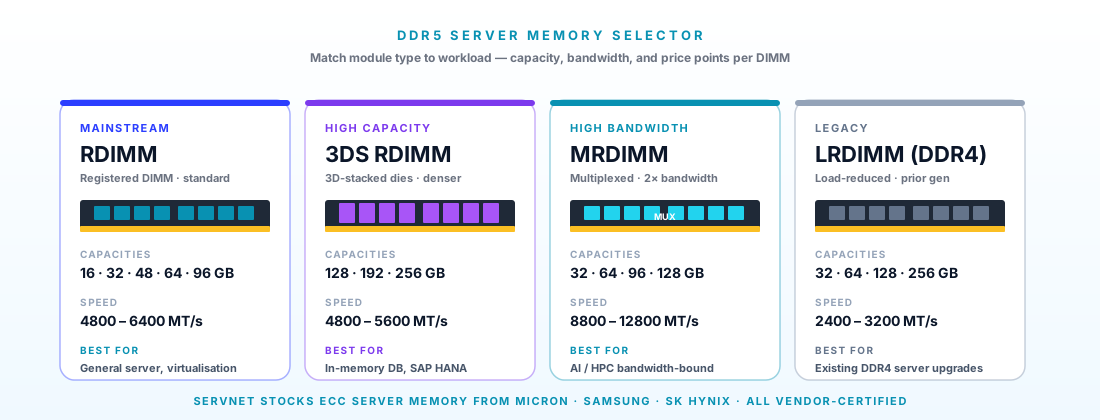
A register (also called a "buffer") on the DIMM sits between the CPU memory controller and the DRAM chips, reducing the electrical load on the memory bus. This allows more DIMMs per channel and higher capacities. All mainstream enterprise servers use RDIMMs. They operate at standard DDR5 speeds.
Goes further than RDIMM by also buffering the data signals (not just the address/command signals). This allows quad-rank and octa-rank DIMMs to operate without overloading the memory controller, enabling 256GB per slot. The trade-off is slightly higher latency and a small bandwidth reduction vs RDIMM at the same speed.
DDR5-4800 means 4,800 megatransfers per second. DDR5-5600 means 5,600 MT/s — 17% faster. The CPU platform determines the maximum speed: AMD EPYC 9005 (Turin) runs DDR5-5600 natively; Intel Xeon 6 E-core runs DDR5-5600; Intel Xeon 6 P-core supports DDR5-6400 with HBM options. Running faster DIMMs in an older platform just drops them to the platform max.
Each memory channel is an independent 64-bit bus between the CPU and DRAM. More channels = more parallel bandwidth. AMD EPYC 9005 has 12 channels (leading x86); Intel Xeon 6 P-core has 12 channels; E-core has 8. Populating all channels symmetrically is critical — an unbalanced configuration reduces bandwidth to that of the lowest-populated channel.
A "rank" is a set of DRAM chips that can be addressed simultaneously. Single-rank (1R) DIMMs are faster to access but lower capacity. Dual-rank (2R) adds capacity. Quad-rank and octa-rank (4R/8R) are only found in LRDIMMs. More ranks per channel can reduce maximum achievable speed — check your server's Memory Population Guide for limits.
UDIMM vs RDIMM vs LRDIMM — Which Do You Need?
Server platforms specify exactly which DIMM type they support. Using the wrong type will prevent the server from booting. RDIMM is the correct choice for 99% of enterprise servers — LRDIMM only when you genuinely need 256GB per slot.
How Much Memory Does Your Workload Actually Need?
Over-specifying wastes budget; under-specifying throttles performance or causes OOM crashes. This guide gives a starting point — always verify against your actual dataset and VM count before finalising.
Memory Specifications by CPU Platform
The CPU determines maximum DDR5 speed, channel count, and DIMM capacity. Running faster DIMMs than the platform supports simply drops them to the platform maximum — you pay for speed you cannot use.
DDR5 Server Memory Specifications
All specifications are manufacturer-published. Part numbers are OEM-independent — QVL-verified for Dell PowerEdge, HPE ProLiant, Lenovo ThinkSystem, and Supermicro platforms.
Samsung 64GB DDR5-4800 RDIMM
Samsung 64GB DDR5-5600 RDIMM
Micron 128GB DDR5-5600 RDIMM
Samsung 256GB DDR5-4800 LRDIMM
Micron 32GB DDR5-4800 RDIMM
Kingston 96GB DDR5-5600 RDIMM
Frequently Asked Questions
Related Products & Platforms
Need memory for a specific server model?
Provide your server model and current configuration — we confirm the compatible part number, available capacity options, and UK lead time.
Request Memory QuoteTalk to a UK specialist
Get expert advice or a no-obligation quote — servers, storage, networking, maintenance, finance and cloud. We reply the same working day.