UK’s trusted IT infrastructure partner since 2003
sales@servnetuk.com
0800 987 4111
Servnet
ConfiguratorGet in Touch
Computing Components · Processors

Intel Xeon 6 & AMD EPYC 9005 —
Complete buyer guide & specification reference

Choosing the wrong CPU for your workload is one of the most expensive infrastructure mistakes you can make — the wrong core type, insufficient memory channels, or inadequate PCIe lanes can bottleneck the entire server. This guide explains every key decision: P-core vs E-core, AMD vs Intel, NUMA, PCIe lanes for GPU servers, and built-in AI acceleration.

Get CPU Quote →DDR5 Memory Guide →
192
Cores — AMD EPYC 9965 (highest x86)
504 MB
L3 cache — Intel Xeon 6980P (record)
DDR5-6400
Max speed — EPYC 9005 / Xeon 6 P-core
128+
PCIe 5.0 lanes per CPU for 8× GPU builds
TSMC 3nm
AMD EPYC 9005 compute die process
AMX/VNNI
On-CPU AI matrix acceleration
Key Concepts

Server CPU Concepts Explained

These are the architectural decisions that determine whether a CPU is right for your workload — before looking at core count or price.

⚙️
P-core vs E-core

Intel's Xeon 6 ships in two distinct variants. P-cores (Performance cores) are full-featured cores with Hyper-Threading, large caches, and higher IPC — best for latency-sensitive, single-threaded-heavy workloads like EDA and databases. E-cores (Efficiency cores) are smaller, power-efficient cores optimised for throughput — they sacrifice per-core performance to pack more cores per watt, ideal for web serving, containers, and scale-out compute. P-cores and E-cores use different sockets and chipsets — they are not interchangeable on the same motherboard.

🔀
NUMA (Non-Uniform Memory Access)

In a 2-socket (2P) server, each CPU has its own memory channels. Memory connected to CPU 0 is "local" to CPU 0 and "remote" to CPU 1 — and accessing remote memory adds ~40–80ns extra latency. This is NUMA. NUMA-aware applications (databases, VMware, HPC solvers) pin workloads to a single socket and its local memory to avoid this penalty. Poorly configured VMs that straddle NUMA domains can see 20–30% performance degradation.

🧠
Memory Channels

The number of independent memory buses between the CPU and DRAM. More channels = more parallel bandwidth. AMD EPYC 9005 leads with 12 channels (vs Intel Xeon 6 E-core's 8 channels). Populating all channels symmetrically is critical — leaving channels empty reduces aggregate bandwidth. A 2P EPYC 9005 server with all 24 channels populated runs at ~700 GB/s aggregate memory bandwidth.

🔗
PCIe Lanes

PCIe lanes connect the CPU directly to GPUs, NVMe SSDs, and high-speed NICs. An 8× GPU server needs 8× PCIe x16 slots = 128 lanes, all from a single CPU. Both AMD EPYC 9005 and Intel Xeon 6 P-core provide 128–136 lanes — enough for 8-GPU configurations without needing PLX switches (which add latency). PCIe 5.0 doubles bandwidth over PCIe 4.0 per lane.

🤖
AMX / VNNI (AI on CPU)

Modern server CPUs include dedicated matrix computation hardware for AI inference without a GPU. Intel AMX (Advanced Matrix Extensions) accelerates BF16 and INT8 matrix operations directly in silicon. AMD Zen 5 doubles the AVX-512 execution width and includes VNNI instructions for INT8 neural network operations. These allow cost-effective AI inference on CPU-only nodes for smaller models (BERT, ResNet, text classification) where GPU provisioning isn't justified.

🏗️
CCD / IOD Architecture

AMD EPYC 9005 uses a chiplet design — multiple Compute Complex Dies (CCDs) built on TSMC 3nm, connected to a central I/O Die (IOD) on TSMC 6nm. Each CCD contains 24 Zen 5 cores and 48MB L3 cache. The EPYC 9965 has 8 CCDs = 192 cores. Intel Xeon 6 uses a different tiled architecture. Chiplet designs allow AMD to build extremely high core-count CPUs cost-effectively.
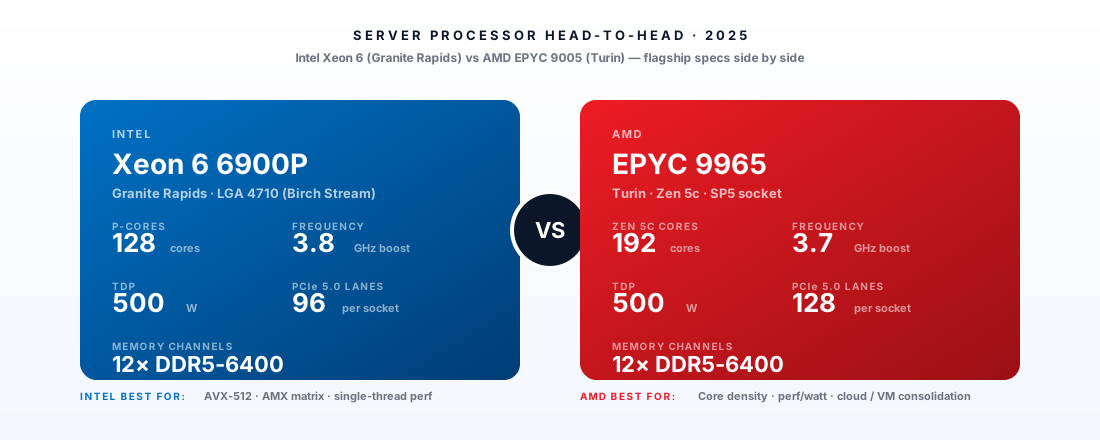
Server processor comparison — Intel Xeon 6 versus AMD EPYC 9005, cores, frequency, TDP, PCIe lanes, memory channels
Side by Side

Intel Xeon 6 vs AMD EPYC 9005 — Detailed Comparison

Data from Intel ARK and AMD product pages. Xeon 6 E-core and P-core are separate product lines with different sockets.

SpecificationXeon 6 E-coreXeon 6 P-coreAMD EPYC 9005
Max cores per socket144 E-cores128 P-cores192 (Zen 5)
Memory channels81212
Max DDR5 speedDDR5-5600DDR5-6400DDR5-6400
PCIe lanes80–96128–136128
CPU AI accelerationAMX + VNNIAMX 2nd GenVNNI + wide AVX-512
L3 cache (flagship)108 MB504 MB384 MB
Process node (compute)Intel 3Intel 3TSMC 3nm
Single-thread IPCLower (E-core)HighHigh (Zen 5)
GPU server (8× GPU)Not suited (low lanes)SuitableOptimal (EPYC 9575F)
NUMA per 2P server2 nodes2 nodes2 nodes

Highlighted values indicate platform strength in that category. Source: Intel ARK, AMD product specifications.

Workload Selection Guide

Which CPU Platform Suits Your Workload?

Recommendations based on architectural strengths — not marketing claims. Always benchmark your specific workload before finalising a procurement decision.

WorkloadRecommendedReasoning
VMware ESXi / vSphere VirtualisationAMD EPYC 9005Higher core counts give more vCPU headroom. 12-channel DDR5-6400 improves memory-intensive guest performance. NUMA-aware VM placement across 24 total channels in 2P is easier to optimise.
AI/ML Inference (GPU servers)AMD EPYC 9575FF-SKU higher clock speeds reduce the CPU-side bottleneck of data preprocessing, tokenisation, and inference batching that sits in front of the GPU. 128 PCIe lanes handles 8× PCIe 5.0 GPUs without bifurcation.
In-Memory Database (SAP HANA, Oracle)Intel Xeon 6 P-core504MB L3 cache keeps hot data pages near the CPU, dramatically reducing DRAM access latency for random-access database queries. AMX 2nd Gen accelerates in-database analytics. HANA is SAP-certified on Xeon platforms.
HPC / Scientific SimulationAMD EPYC 9005More memory channels (12 vs 8 for E-core) and higher aggregate bandwidth at DDR5-6400 benefit memory-bandwidth-bound HPC codes. 192 cores for MPI ranks. Zen 5 AVX-512 throughput improvements benefit scientific FP workloads.
Cloud / Containerised WorkloadsIntel Xeon 6 E-core144 E-cores at 330W provides the best threads-per-watt ratio for containerised workloads. Cloud providers maximise density — E-cores deliver more concurrent requests per joule for web services.
AI Training (LLMs, distributed)AMD EPYC 9005Higher memory bandwidth feeds GPU training pipelines. EPYC 9575F provides highest clocks for feeding 8× B200/H100 during dataset preprocessing and gradient accumulation.
Current Generation

Intel Xeon 6 & AMD EPYC 9005 Specifications

All figures from official Intel ARK and AMD product pages. TDP ranges (cTDP) apply where indicated. Contact Servnet for UK availability and configuration advice.

⚙️
Intel · Xeon 6 E-core (Sierra Forest)
Socket LGA4710
Density

Intel Xeon 6780E

Cores / Threads144 E-cores / 144 threads (no HT)
Base / Boost2.2 GHz / 3.2 GHz all-core
L3 Cache108 MB
TDP330W (configurable 250W–330W)
MemoryDDR5-5600 · 8-channel · 8TB max
PCIePCIe 5.0 · 96 lanes
SocketLGA4710 (P4S platform)
AI AccelerationAMX · VNNI
ProcessIntel 3
Best for: Cloud hosting, containers, scale-out compute — 144 E-cores at 330W provides exceptional threads-per-watt for parallel workloads.
⚙️
Intel · Xeon 6 P-core (Granite Rapids)
Socket LGA4677
Performance

Intel Xeon 6980P

Cores / Threads128 P-cores / 256 threads (HT)
Base / Boost2.0 GHz / 3.8 GHz Turbo
L3 Cache504 MB (largest server CPU L3 cache)
TDP500W (configurable 350W–500W)
MemoryDDR5-6400 · 12-channel (with HBM option) · 7.5TB max
PCIePCIe 5.0 · 136 lanes
SocketLGA4677 (Birch Stream / Eagle Stream)
AI AccelerationAMX 2nd Gen · VNNI · FP16 · BF16
ProcessIntel 3
Best for: AI inference, large databases, EDA — 504MB L3 eliminates DRAM latency for cache-resident workloads. AMX 2nd Gen for CPU-native BF16/FP16 matrix compute.
⚙️
AMD · EPYC 9005 (Turin) — Zen 5
Socket SP5
Max Cores

AMD EPYC 9965

Cores / Threads192 cores / 384 threads (Zen 5)
Base / Boost2.0 GHz / 3.7 GHz boost
L3 Cache384 MB (8× CCD, 48MB per CCD)
TDP500W (configurable 320W–500W)
MemoryDDR5-6400 · 12-channel · 6TB max (with LRDIMM)
PCIePCIe 5.0 · 128 lanes
SocketSP5
AI AccelerationVNNI · BF16 · FP16 — AVX-512 2× wider in Zen 5
ProcessTSMC 3nm (Zen 5 CCDs) + 6nm IOD
Best for: Highest core count in any x86 CPU — 192 Zen 5 cores for Kubernetes, HPC, and AI inference concurrency at scale.
⚙️
AMD · EPYC 9005 (Turin) — Zen 5
Socket SP5
AI / GPU Host

AMD EPYC 9575F (GPU-Optimised)

Cores / Threads128 cores / 256 threads (Zen 5)
Base / Boost3.3 GHz / 4.4 GHz (F-SKU high-frequency)
L3 Cache256 MB
TDP400W
MemoryDDR5-6400 · 12-channel
PCIePCIe 5.0 · 128 lanes — handles 8× PCIe 5.0 x16 GPUs
SocketSP5
AI AccelerationF-SKU higher base clock — reduces CPU-side AI serving bottleneck
PlatformSupermicro 8-GPU · Dell PowerEdge XE9680 · NVIDIA DGX B300
Best for: Host CPU for 8-GPU AI servers — higher frequency optimised for GPU data feeding, tokenisation, and concurrent serving across H100/B200 cards.
⚙️
AMD · EPYC 9005 (Turin) — Zen 5
Socket SP5
Balanced

AMD EPYC 9755

Cores / Threads128 cores / 256 threads (Zen 5)
Base / Boost2.7 GHz / 4.1 GHz
L3 Cache256 MB
TDP500W (configurable 320W–500W)
MemoryDDR5-6400 · 12-channel · 6TB max
PCIePCIe 5.0 · 128 lanes
SocketSP5
AI AccelerationVNNI · BF16 · FP16
ProcessTSMC 3nm + 6nm IOD
Best for: Balanced 2P configuration — 256 cores total with full 24-channel DDR5-6400 for virtualisation, HPC, and large-model AI inference.
⚙️
Intel · Xeon 6 E-core (Sierra Forest)
Socket LGA4710
Efficiency

Intel Xeon 6731E

Cores / Threads96 E-cores / 96 threads
Base / Boost2.4 GHz / 3.4 GHz
L3 Cache72 MB
TDP250W
MemoryDDR5-5600 · 8-channel
PCIePCIe 5.0 · 80 lanes
SocketLGA4710 (P4S)
AI AccelerationAMX · VNNI
ProcessIntel 3
Best for: Efficiency-focused compute — 96 E-cores at 250W for web, containerised workloads, and edge compute nodes.
Common Questions

Frequently Asked Questions

Q: Intel Xeon 6 E-core vs P-core — which is better?
Neither is universally better — they serve different purposes. E-cores (Sierra Forest) are efficiency-optimised: more threads per watt, lower per-core performance. Choose E-core for workloads that scale horizontally (containers, web, Kubernetes). P-cores (Granite Rapids) have higher IPC, Hyper-Threading, and the enormous 504MB L3 cache — choose P-core for latency-sensitive workloads (databases, EDA, per-core licensed software).
Q: AMD EPYC vs Intel Xeon — which should I choose?
For new deployments in 2024–2025: AMD EPYC 9005 wins on core count, memory channels, and memory bandwidth; Intel Xeon 6 P-core wins on L3 cache size and per-core performance for database workloads. AMD is generally more cost-effective at equivalent core counts. Intel has stronger ISV certification for specific enterprise software (SAP HANA, certain Oracle workloads). Both are excellent platforms.
Q: Does a higher core count always mean better performance?
No. More cores only improve performance for workloads that parallelise effectively. A single-threaded application (legacy software, some databases) will run slower on a 192-core CPU at 2.0 GHz base than on a 32-core CPU at 3.5 GHz base. Clock speed, IPC, and cache size matter as much as core count for serial workloads. Match core count to your actual concurrency requirements.
Q: What does configurable TDP (cTDP) mean?
CPUs like the AMD EPYC 9005 have a "TDP range" (e.g. 320W–500W). The server's BIOS can set the CPU to operate within this range. Running at 320W instead of 500W reduces power consumption and heat — useful in power-constrained environments — at the cost of reduced boost clock frequencies. Most cloud servers run at maximum TDP for peak performance; edge deployments often benefit from reduced TDP.
Q: How important is L3 cache for database workloads?
Extremely important. L3 cache is ~5–10ns latency vs DRAM's ~40–80ns. The Intel Xeon 6980P's 504MB L3 can cache a substantial portion of a hot OLTP dataset or index, effectively eliminating DRAM round-trips for the hottest data. This is why the Xeon 6 P-core outperforms AMD EPYC on per-socket database benchmarks despite fewer memory channels.
Q: What is AMX and can it replace a GPU for AI inference?
AMX (Advanced Matrix Extensions) is Intel's hardware matrix computation unit in Xeon 6, supporting BF16 and INT8 precision. For smaller AI models (BERT, RoBERTa, ResNet-50) running at low to moderate throughput, AMX-accelerated CPU inference can be cost-effective without provisioning a GPU. For large language models (7B+ parameters) or high-throughput production inference, a dedicated GPU accelerator is still orders of magnitude more efficient.

Related Products & Platforms

Need help choosing the right CPU platform?

We advise on CPU selection based on your actual workloads — virtualisation, AI, HPC, or database — and provide server configurations with matched memory, storage, and networking.

Request CPU Configuration Advice