
Business Password Generator
Create up to 100 strong, random passwords at once — generated entirely in your browser, never sent or stored. Built for IT admins, onboarding and bulk resets, with CSV export.
crypto.getRandomValues). Nothing is sent, logged or stored.Generating for a team? Use Download CSV, import into your password manager or encrypted vault, then delete the file. Never email passwords in plain text or keep them in an unprotected spreadsheet.
A password generator built by a security firm
Most online generators are anonymous tools you have to trust blindly. Ours is built the way credentials should be — provably, in your browser.
Web Crypto CSPRNG with unbiased rejection sampling — never Math.random. The same randomness class used for encryption keys.
No password is ever sent, logged or stored. No third-party scripts. Works offline. Your secrets never leave your device.
Generate up to 100 at once and download as CSV or .txt — built for IT admins doing onboarding and bulk resets.
Length to 64, character-set toggles, avoid look-alike characters, and guarantee at least one of each type.
See entropy in bits, a strength rating, and an estimated offline crack time update as you change the options.
From a 20+ year UK cyber-security partner — aligned to NCSC and NIST guidance and Cyber Essentials.
Why length beats complexity
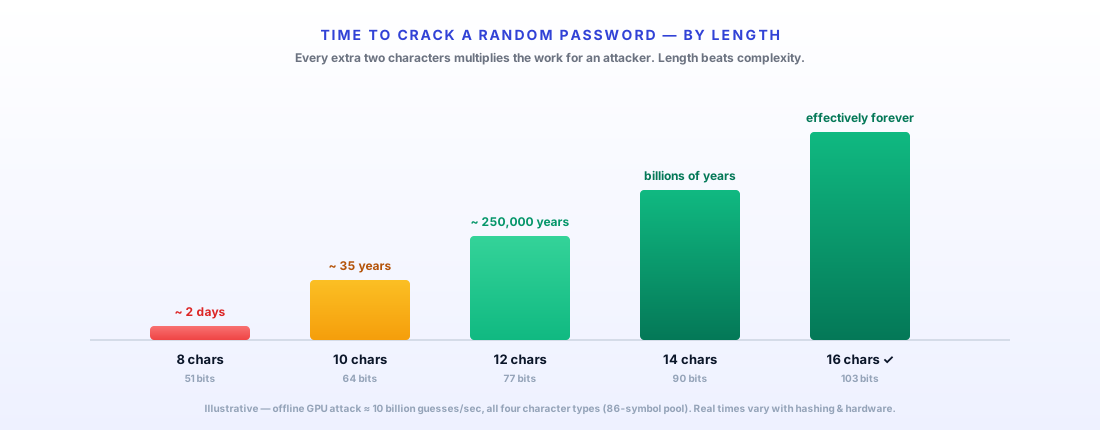
An attacker with a GPU can try ~10 billion guesses a second. Here is how long a random password survives, by length.
What makes a strong password (NCSC & NIST)
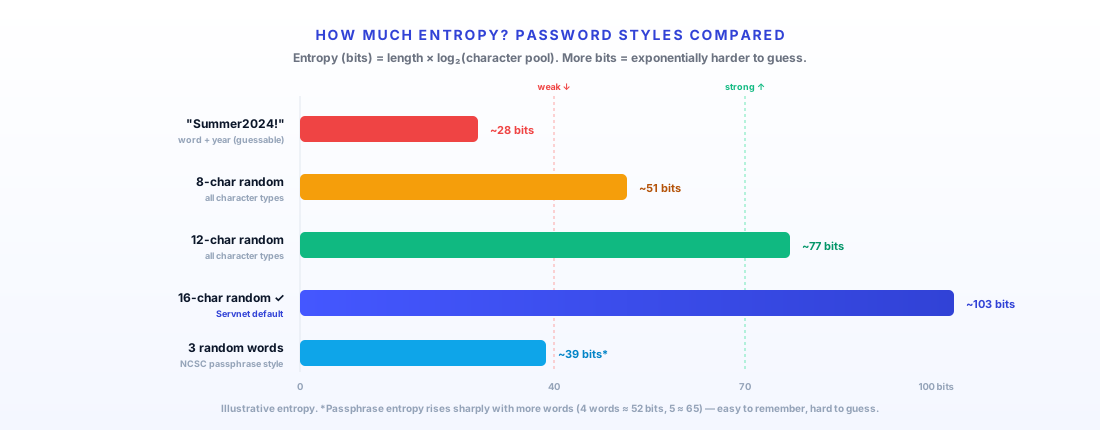
Modern guidance from the UK’s NCSC and NIST (SP 800-63B) is consistent: prioritise length and uniqueness over forced complexity rules, never reuse passwords, and back them with multi-factor authentication. A 16-character random password carries ~100 bits of entropy — beyond any realistic brute-force attack.
The weak point is almost never the maths — it’s humans reusing “Summer2024!” across accounts. A generator removes that bias entirely: every account gets a unique, high-entropy secret. That’s exactly what frameworks like Cyber Essentials expect.
Business Password Generator — FAQs
Yes — and it is built the way a cyber-security firm should build one. Every password is generated entirely in your browser using the Web Crypto API (crypto.getRandomValues), a cryptographically secure random number generator, with rejection sampling so there is no statistical bias. Nothing you generate is ever transmitted to our servers, logged, or stored — it never leaves your device. The page loads no third-party scripts. You can even disconnect from the internet and it still works.
Set the quantity (1–100) using the quick buttons or the number box, choose your length and character types, and click Generate. You will get a numbered list you can copy individually, copy all at once, or download as a CSV or plain-text file. This is built for IT administrators and businesses creating or resetting many accounts — onboarding a team, provisioning new starters, or bulk password resets.
Length is the single biggest factor — each extra character multiplies the effort to crack it. We default to 16 characters with upper- and lower-case letters, numbers and symbols, which gives roughly 100 bits of entropy and is effectively uncrackable by brute force. UK NCSC and NIST SP 800-63B guidance both favour long, unique, random passwords (or passphrases) over short complex ones that get reused. Every password from this tool is random and unique.
Yes. Reused and guessable passwords are the leading cause of account compromise. A generator removes human bias entirely, ensuring every account gets a unique, high-entropy password — which is also a requirement for frameworks like Cyber Essentials. Pair generated passwords with a password manager and multi-factor authentication (MFA) for defence in depth.
Import the CSV straight into your business password manager or encrypted vault, then securely delete the file. Never email passwords in plain text, store them in an unprotected spreadsheet, or share them over chat. If you need help choosing or rolling out a password manager and MFA, Servnet can advise as part of a cyber-security review.
Both can be strong; what matters is entropy and uniqueness. Random character passwords pack the most entropy per character and are ideal for machine-managed credentials stored in a vault. Passphrases — the NCSC "three random words" approach — are easier for a human to type and remember for the few passwords you cannot put in a manager. For bulk business account provisioning, random passwords plus a vault is the usual choice.
Yes. As a UK IT and cyber-security partner since 2003, Servnet helps businesses roll out password managers, enforce password policy across Active Directory, deploy MFA, and achieve Cyber Essentials and Cyber Essentials Plus certification. This free tool is one piece — talk to us about securing the whole estate.
Securing more than passwords?
A generator is one piece. Servnet helps UK businesses roll out password managers, enforce policy across Active Directory, deploy MFA, and achieve Cyber Essentials. Let’s secure the whole estate.
Talk to a UK specialist
Get expert advice or a no-obligation quote — servers, storage, networking, maintenance, finance and cloud. We reply the same working day.