
☁️ Azure Stack HCI vs Azure Stack HCI Stretched
Azure Stack HCI (Azure Local) vs Azure Stack HCI Stretched Cluster (22H2, legacy) compared across 25 matched specifications — scores, the full spec table and a verdict.

Azure Stack HCI vs Azure Stack HCI Stretched: performance overview
Scores based on quantifiable specification values (1-10 scale)
Detailed Specifications
| Specification | Azure Stack HCI (Azure Local) Microsoft | Azure Stack HCI Stretched Cluster (22H2, legacy) Microsoft |
|---|---|---|
| Key Metrics | ||
| Deployment topology | Single-site cluster | Two-site stretched cluster |
| Maximum nodes per cluster | 16 | 16 (even split, 8+8) |
| Recovery point objective (RPO) | N/A (single site) | Zero (synchronous Storage Replica) |
| Recovery time objective (RTO) | Local HA failover (seconds) | Automatic site failover via WSFC |
| Inter-site latency requirement | -- | ≤5ms RTT for synchronous; async if higher |
| Subscription pricing | From $10/core/month (optional Windows Server guest subscription +$23.30/core/month) | Same per-core licensing; doubles with node count across sites |
| Compute & Scale | ||
| Nodes per cluster | 2–16 | 2–16 (even number, split across two sites) |
| VMs per host | 1,024 | 1,024 |
| Cluster storage capacity | Up to 4 PB | Up to 4 PB (mirrored across sites halves usable) |
| Hypervisor | Hyper-V | Hyper-V |
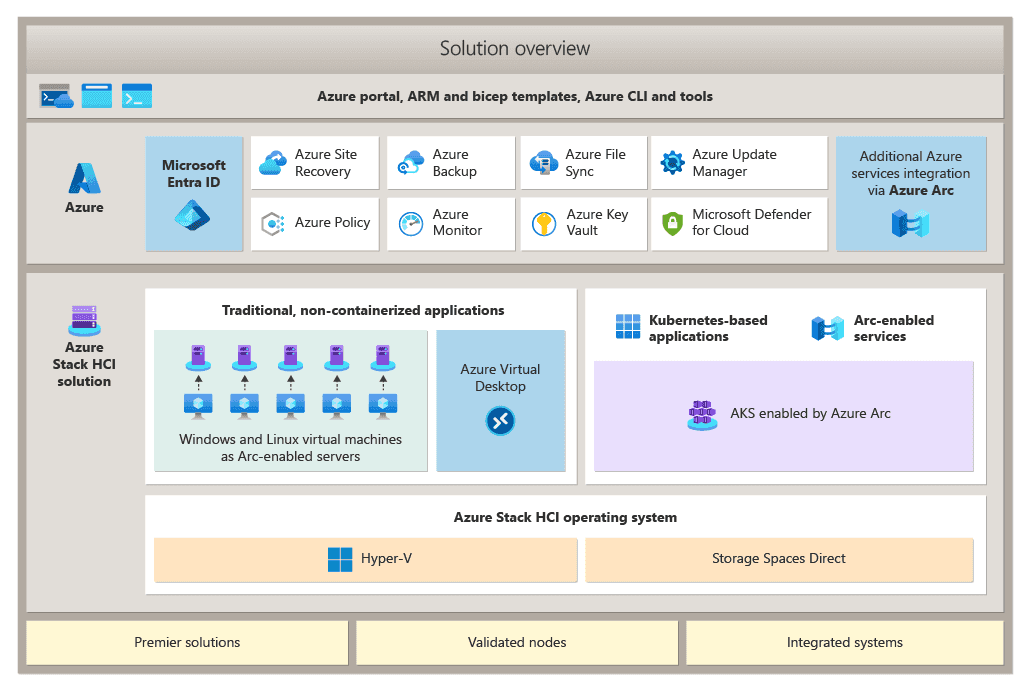
| Kubernetes | AKS enabled by Azure Arc | AKS enabled by Azure Arc |
| Storage & Replication | ||
| Storage fabric | Storage Spaces Direct (S2D) — NVMe/SSD/HDD | Storage Spaces Direct (S2D) per site |
| Cross-site replication | Not applicable | Storage Replica — synchronous or asynchronous |
| Replication mode | -- | Synchronous (zero RPO, ≤5ms) or asynchronous |
| Usable capacity overhead | Mirror or parity resilience within cluster | Additional ~50% overhead for cross-site mirror |
| Witness | Cloud or file-share witness | Cloud or file-share witness (third site recommended) |
| Resilience & DR | ||
| Node failure tolerance | 1–2 nodes depending on resiliency tier | 1–2 nodes per site |
| Site failure tolerance | None — single site | Full site loss with automatic VM failover |
| Failover automation | Local WSFC HA | WSFC site failover, no manual orchestration |
| Suitable for metro DR | No | Yes — within ~5ms (typically <100km fibre) |
| Management & Networking | ||
| Management plane | Azure portal + Windows Admin Center | Azure portal + Windows Admin Center (identical UX) |
| Azure Arc integration | Arc Resource Bridge, Arc VM management | Arc Resource Bridge, Arc VM management |
| Inter-site networking | -- | Layer 2 or routed L3; RDMA recommended; dedicated replication NICs |
| Hardware requirement | Validated Azure Stack HCI nodes | Validated Azure Stack HCI nodes — identical config both sites |
| Dedicated DR hardware | N/A | Not required — both sites run production |
Expert Analysis
The decision between standard Azure Stack HCI and the Stretched Cluster variant is not really a product choice — it is a DR architecture choice. Both run identical software, identical hypervisor, identical Azure Arc integration and identical per-core licensing. What you are buying with Stretched Cluster is synchronous, automatic, zero-RPO failover between two sites without bolting on a separate replication product like Azure Site Recovery or Veeam. Everything else — Storage Spaces Direct, AKS on Arc, portal management, VM density — is the same.
Standard Azure Stack HCI is the right default for the majority of UK deployments: branch infrastructure, a single data centre, edge sites, or workloads where DR is handled at the application layer (SQL Always On, AD multi-master, Kubernetes across regions) or via async replication to Azure. It is cheaper in usable capacity terms, simpler to network, and tolerates any latency you like to your DR target because it does not need one.
Stretched Cluster earns its complexity when the workload genuinely needs zero RPO and sub-minute RTO across two physical sites — typical use cases being NHS trust clinical systems across two hospital data centres, FCA-regulated trading or payments platforms, or manufacturing MES where a site loss must not lose in-flight transactions. The trade-offs are real: you need ≤5ms RTT (practically <100km of good fibre), dual-site dark fibre or wavelength services, identical hardware in both sites, and roughly half your raw capacity disappears into the cross-site mirror. Network design and witness placement become first-class problems.
Recommendation framework: pick standard Azure Stack HCI unless you can write down a specific RPO/RTO requirement that application-layer HA or async replication cannot meet. If you can — and you have the dark fibre and the budget for symmetric hardware in two sites — Stretched Cluster is materially cheaper and simpler than running two independent clusters plus a third-party replication tool, because the DR is in the platform.
Ready to proceed?
Not sure which one fits your environment?
Our UK specialists will recommend the right option for your workload and send itemised pricing — vendor-neutral, no obligation.
Response within 4 business hours · 20+ yr UK reseller
Want to compare different products or add more to this comparison?
Open Interactive Comparison Tool →Made your choice? Spread the cost.
Whichever you choose, you don't have to pay for it all upfront — finance your new hardware from £860/mo ex VAT on hire purchase or lease. Compare monthly payments and terms in seconds.
See finance from £860/mo →Indicative estimate · subject to change · no credit check at this stage · hire purchase, lease & subscription for UK businesses
Indicative illustration only. Servnet Limited is not authorised or regulated by the FCA and does not provide financial advice or arrange finance. All finance opportunities are referred to Number Eight Business Finance. Finance policy
Turn one workload into a node count across vSAN, Nutanix and Azure Local — then get the nodes quoted.
Related comparisons
Other head-to-heads featuring these models — useful if you’re still shortlisting.
Talk to a UK specialist
Get expert advice or a no-obligation quote — servers, storage, networking, maintenance, finance and cloud. We reply the same working day.