UK’s trusted IT infrastructure partner since 2003
Servnet
FinanceToolsConfiguratorGet in Touch
← Comparison Tool

🖥️ iMac 24 vs Mac mini + display

AI-powered analysis across 31 matched specifications

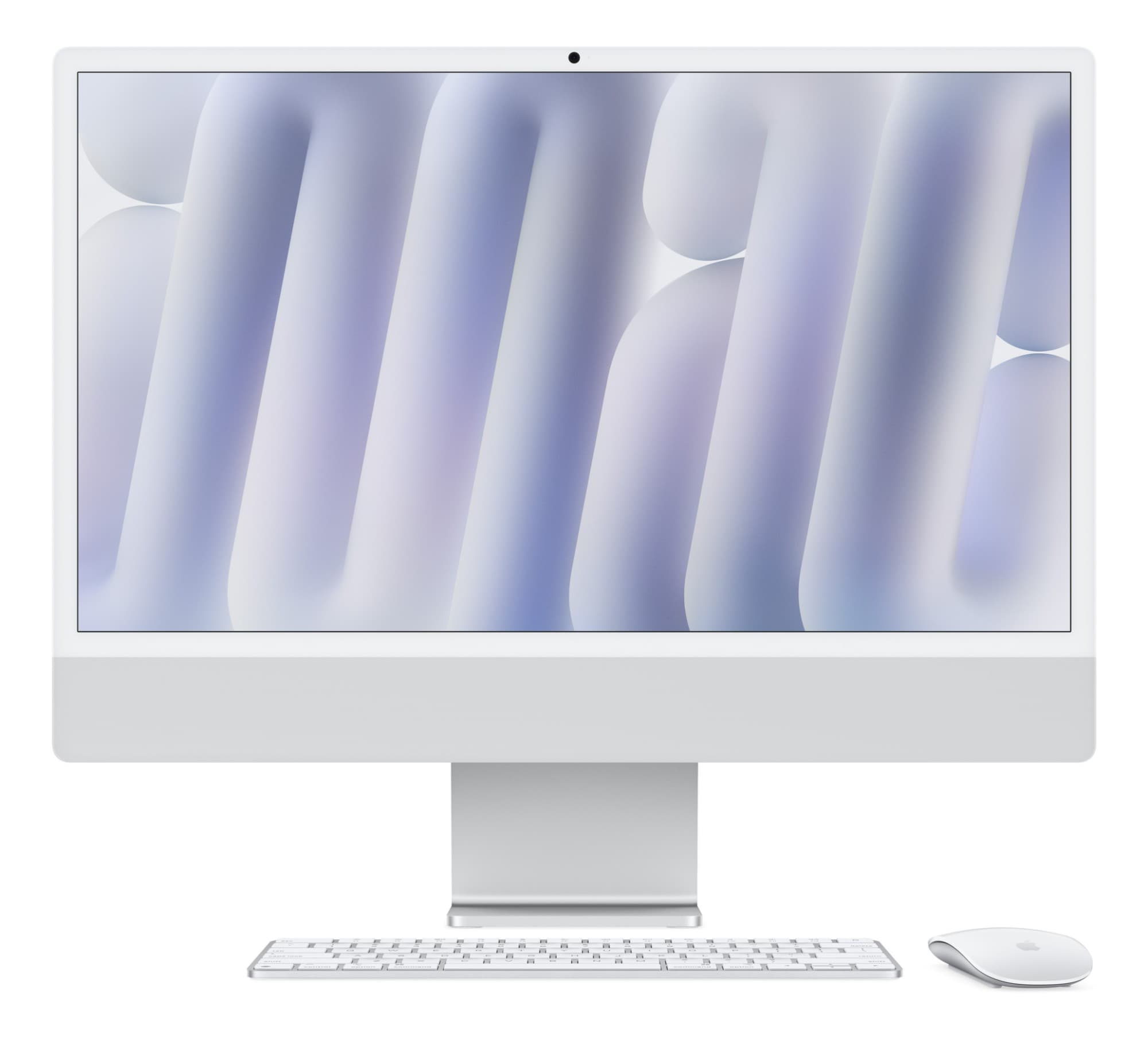
Apple iMac 24-inch with M4 chip in Silver — front view with colour-matched Magic Keyboard and Magic Mouse
iMac 24" (M4)
Apple
7.8
Overall Score
Front-of-house, hot-desk and general-productivity estates where one carton and one cable must produce a complete, video-call-ready workstation.
View Full Details
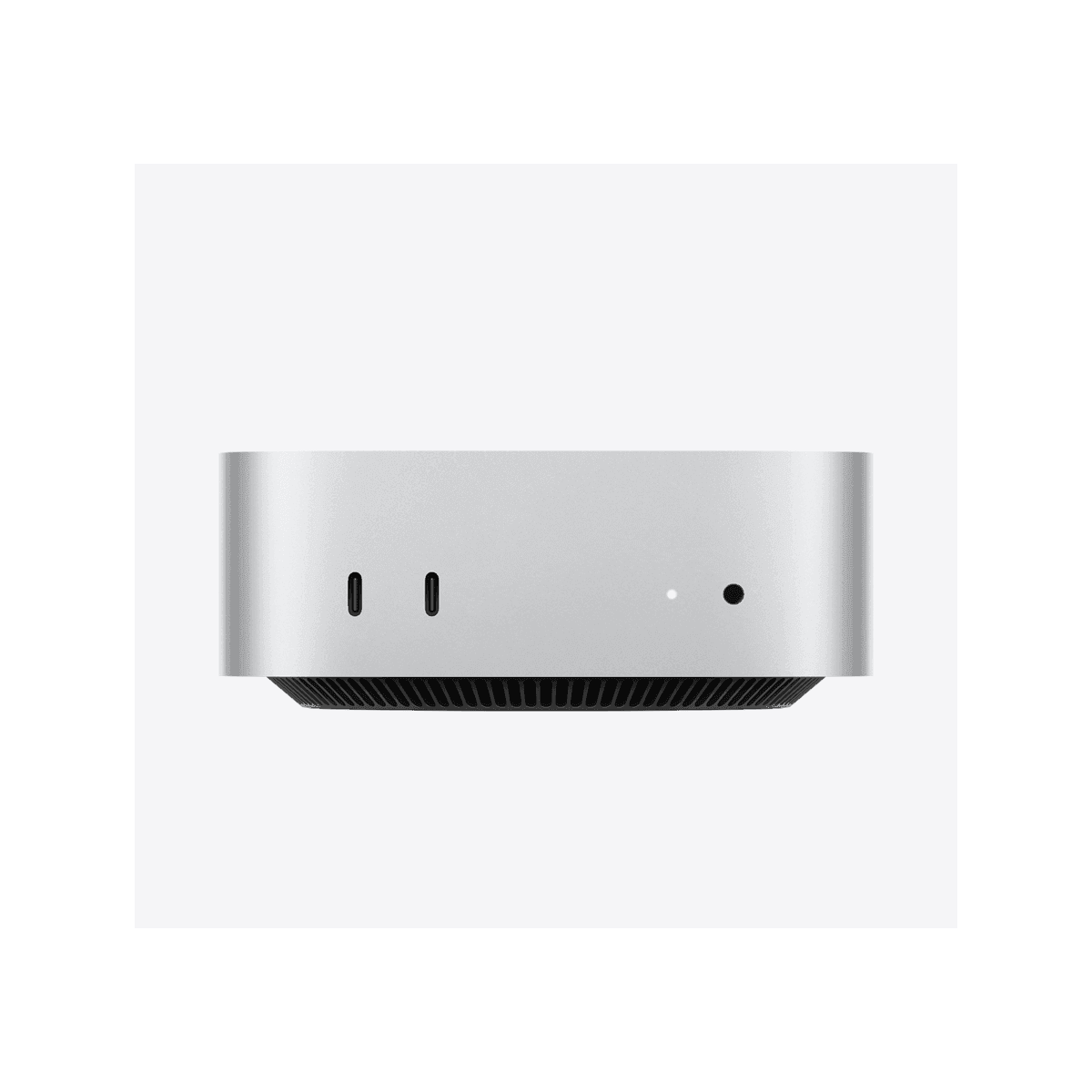
Apple Mac mini (M4) compact desktop computer, top-down angled view
Mac mini (M4 / M4 Pro)
Apple
7.8
Overall Score
Desks that need M4 Pro compute, 64 GB memory or a specific monitor — and refresh cycles where the display should outlive the computer.
View Full Details
Know which one you want? Get UK pricing.
Fleet or single unit — we quote like-for-like, same working day. No obligation.
Get a quote →

Performance Overview

Scores based on quantifiable specification values (1-10 scale)

Compute ceilingOut-of-the-box completenessDisplay & desk flexibilityCalls & audio as shippedLongevity & refresh path
iMac 24" (M4)
Mac mini (M4 / M4 Pro)
Compute ceiling
iMac 24" (M4)
7.0
Mac mini (M4 / M4 Pro)
9.2
Out-of-the-box completeness
iMac 24" (M4)
9.6
Mac mini (M4 / M4 Pro)
5.5
Display & desk flexibility
iMac 24" (M4)
6.5
Mac mini (M4 / M4 Pro)
9.3
Calls & audio as shipped
iMac 24" (M4)
9.3
Mac mini (M4 / M4 Pro)
6.0
Longevity & refresh path
iMac 24" (M4)
6.8
Mac mini (M4 / M4 Pro)
9.0

Detailed Specifications

Specification
iMac 24" (M4)
Apple
Mac mini (M4 / M4 Pro)
Apple
At a Glance
FormatAll-in-one — 4.5K display, M4 compute, camera and speakers in one slim enclosure, with colour-matched keyboard and mouse in the cartonModular — a 12.7 cm compute box; you choose the display, keyboard and mouse around it
Chip optionsApple M4 (8-core or 10-core CPU/GPU)Apple M4 (10-core) or M4 Pro (up to 14-core CPU, 20-core GPU)
Desk setupOne carton, one power cable — a complete desk out of the boxTwo or three purchases: mini + monitor (e.g. Studio Display 27" 5K) + keyboard and mouse
GenerationLaunched October 2024; Apple's current iMac in mid-2026Launched October 2024; Apple's current Mac mini in mid-2026
Compute Ceiling
ChipApple M4 — 8-core CPU/8-core GPU or 10-core CPU/10-core GPU, 16-core Neural EngineApple M4 (10-core CPU, 10-core GPU) or M4 Pro (up to 14-core CPU, 20-core GPU)
Unified memory16 GB standard; 24 GB or 32 GB at orderUp to 32 GB (M4) or 64 GB (M4 Pro)
Storage256 GB to 1 TB SSD; 2 TB on 10-core modelsUp to 8 TB SSD
Thunderbolt2× Thunderbolt/USB 4 (8-core) or 4× Thunderbolt 4 (10-core)3× Thunderbolt 4 (M4) or 3× Thunderbolt 5 (M4 Pro), plus 2× USB-C on the front
HDMINone — Thunderbolt/USB-C onlyHDMI 2.1
EthernetGigabit in the power adapter — standard on 10-core, configurable on 8-coreGigabit standard; 10 GbE option on either chip
External displaysUp to two (up to 6K at 60Hz) alongside the built-in panelM4: up to 3 (incl. 8K at 60Hz) · M4 Pro: up to 4
Display & Desk
DisplayBuilt in — 24" 4.5K Retina, 4480 × 2520 at 218 ppi, 500 nits, P3, True ToneNone built in — pair a monitor (e.g. Studio Display 27" 5K, 5120 × 2880, 600 nits)
Anti-glare optionNano-texture glass on 10-core configurationsMonitor-dependent — Studio Display offers a nano-texture glass option
Monitor freedomFixed — the 24" panel is part of the machineTotal — any HDMI or USB-C/Thunderbolt display, kept or upgraded independently
Footprint547 mm wide, 147 mm deep with stand; from 4.42 kg12.7 × 12.7 × 5 cm box, from 670 g — tucks behind the monitor or under the desk
ColoursSeven — Silver, Blue, Pink, Green, Purple, Orange, Yellow — with matching accessoriesOne — Silver; any colour on the desk comes from the monitor and peripherals you pair with it
Camera, Audio & Calls
Webcam12MP Center Stage camera with Desk View built in; 1080p videoNone — the Studio Display adds its own 12MP Center Stage camera with Desk View
SpeakersSix-speaker system with force-cancelling woofers and Spatial Audio (Dolby Atmos)From your monitor — Studio Display carries a matching six-speaker Spatial Audio system
MicrophonesStudio-quality three-mic array built inFrom your monitor — Studio Display has a studio-quality three-mic array
Call-readyOut of the box — no peripherals needed for video callsOnly once paired with a camera-equipped monitor or a separate webcam
What's in the Box
KeyboardColour-matched Magic Keyboard included (Touch ID on 10-core models)Not included — add any Bluetooth or USB keyboard
MouseColour-matched Magic Mouse includedNot included — add your preferred mouse or trackpad
DisplayBuilt inNot included — chosen and bought separately
CablesPower adapter and woven USB-C cable in the cartonBuilt-in PSU, so just a mains lead; Studio Display ships with a 1 m Thunderbolt 5 cable
Day-one deploymentUnbox, connect one cable, sign inAssemble from two or three boxes and cable the desk yourself
Longevity & Flexibility
Display lifecycleRetires with the computer — panel and compute are one unitOutlives the computer — a Studio Display can serve two or three Mac refreshes
Refresh pathReplace the whole all-in-oneSwap the 12.7 cm box; monitor, keyboard and mouse stay
Upgrades after purchaseNone — memory and storage are fixed at orderNone internally — memory and storage fixed at order, but the ceiling is higher
Reusing existing kitReplaces everything on the deskDrops into an existing monitor and peripheral estate
Warranty1-year limited; AppleCare+ for Business extends to 3 years1-year limited; AppleCare+ for Business extends to 3 years
OSmacOS Tahoe with Apple IntelligencemacOS Tahoe with Apple Intelligence
At a Glance
Format
iMac 24" (M4)All-in-one — 4.5K display, M4 compute, camera and speakers in one slim enclosure, with colour-matched keyboard and mouse in the carton
Mac mini (M4 / M4 Pro)Modular — a 12.7 cm compute box; you choose the display, keyboard and mouse around it
Chip options
iMac 24" (M4)Apple M4 (8-core or 10-core CPU/GPU)
Mac mini (M4 / M4 Pro)Apple M4 (10-core) or M4 Pro (up to 14-core CPU, 20-core GPU)
Desk setup
iMac 24" (M4)One carton, one power cable — a complete desk out of the box
Mac mini (M4 / M4 Pro)Two or three purchases: mini + monitor (e.g. Studio Display 27" 5K) + keyboard and mouse
Generation
iMac 24" (M4)Launched October 2024; Apple's current iMac in mid-2026
Mac mini (M4 / M4 Pro)Launched October 2024; Apple's current Mac mini in mid-2026
Compute Ceiling
Chip
iMac 24" (M4)Apple M4 — 8-core CPU/8-core GPU or 10-core CPU/10-core GPU, 16-core Neural Engine
Mac mini (M4 / M4 Pro)Apple M4 (10-core CPU, 10-core GPU) or M4 Pro (up to 14-core CPU, 20-core GPU)
Unified memory
iMac 24" (M4)16 GB standard; 24 GB or 32 GB at order
Mac mini (M4 / M4 Pro)Up to 32 GB (M4) or 64 GB (M4 Pro)
Storage
iMac 24" (M4)256 GB to 1 TB SSD; 2 TB on 10-core models
Mac mini (M4 / M4 Pro)Up to 8 TB SSD
Thunderbolt
iMac 24" (M4)2× Thunderbolt/USB 4 (8-core) or 4× Thunderbolt 4 (10-core)
Mac mini (M4 / M4 Pro)3× Thunderbolt 4 (M4) or 3× Thunderbolt 5 (M4 Pro), plus 2× USB-C on the front
HDMI
iMac 24" (M4)None — Thunderbolt/USB-C only
Mac mini (M4 / M4 Pro)HDMI 2.1
Ethernet
iMac 24" (M4)Gigabit in the power adapter — standard on 10-core, configurable on 8-core
Mac mini (M4 / M4 Pro)Gigabit standard; 10 GbE option on either chip
External displays
iMac 24" (M4)Up to two (up to 6K at 60Hz) alongside the built-in panel
Mac mini (M4 / M4 Pro)M4: up to 3 (incl. 8K at 60Hz) · M4 Pro: up to 4
Display & Desk
Display
iMac 24" (M4)Built in — 24" 4.5K Retina, 4480 × 2520 at 218 ppi, 500 nits, P3, True Tone
Mac mini (M4 / M4 Pro)None built in — pair a monitor (e.g. Studio Display 27" 5K, 5120 × 2880, 600 nits)
Anti-glare option
iMac 24" (M4)Nano-texture glass on 10-core configurations
Mac mini (M4 / M4 Pro)Monitor-dependent — Studio Display offers a nano-texture glass option
Monitor freedom
iMac 24" (M4)Fixed — the 24" panel is part of the machine
Mac mini (M4 / M4 Pro)Total — any HDMI or USB-C/Thunderbolt display, kept or upgraded independently
Footprint
iMac 24" (M4)547 mm wide, 147 mm deep with stand; from 4.42 kg
Mac mini (M4 / M4 Pro)12.7 × 12.7 × 5 cm box, from 670 g — tucks behind the monitor or under the desk
Colours
iMac 24" (M4)Seven — Silver, Blue, Pink, Green, Purple, Orange, Yellow — with matching accessories
Mac mini (M4 / M4 Pro)One — Silver; any colour on the desk comes from the monitor and peripherals you pair with it
Camera, Audio & Calls
Webcam
iMac 24" (M4)12MP Center Stage camera with Desk View built in; 1080p video
Mac mini (M4 / M4 Pro)None — the Studio Display adds its own 12MP Center Stage camera with Desk View
Speakers
iMac 24" (M4)Six-speaker system with force-cancelling woofers and Spatial Audio (Dolby Atmos)
Mac mini (M4 / M4 Pro)From your monitor — Studio Display carries a matching six-speaker Spatial Audio system
Microphones
iMac 24" (M4)Studio-quality three-mic array built in
Mac mini (M4 / M4 Pro)From your monitor — Studio Display has a studio-quality three-mic array
Call-ready
iMac 24" (M4)Out of the box — no peripherals needed for video calls
Mac mini (M4 / M4 Pro)Only once paired with a camera-equipped monitor or a separate webcam
What's in the Box
Keyboard
iMac 24" (M4)Colour-matched Magic Keyboard included (Touch ID on 10-core models)
Mac mini (M4 / M4 Pro)Not included — add any Bluetooth or USB keyboard
Mouse
iMac 24" (M4)Colour-matched Magic Mouse included
Mac mini (M4 / M4 Pro)Not included — add your preferred mouse or trackpad
Display
iMac 24" (M4)Built in
Mac mini (M4 / M4 Pro)Not included — chosen and bought separately
Cables
iMac 24" (M4)Power adapter and woven USB-C cable in the carton
Mac mini (M4 / M4 Pro)Built-in PSU, so just a mains lead; Studio Display ships with a 1 m Thunderbolt 5 cable
Day-one deployment
iMac 24" (M4)Unbox, connect one cable, sign in
Mac mini (M4 / M4 Pro)Assemble from two or three boxes and cable the desk yourself
Longevity & Flexibility
Display lifecycle
iMac 24" (M4)Retires with the computer — panel and compute are one unit
Mac mini (M4 / M4 Pro)Outlives the computer — a Studio Display can serve two or three Mac refreshes
Refresh path
iMac 24" (M4)Replace the whole all-in-one
Mac mini (M4 / M4 Pro)Swap the 12.7 cm box; monitor, keyboard and mouse stay
Upgrades after purchase
iMac 24" (M4)None — memory and storage are fixed at order
Mac mini (M4 / M4 Pro)None internally — memory and storage fixed at order, but the ceiling is higher
Reusing existing kit
iMac 24" (M4)Replaces everything on the desk
Mac mini (M4 / M4 Pro)Drops into an existing monitor and peripheral estate
Warranty
iMac 24" (M4)1-year limited; AppleCare+ for Business extends to 3 years
Mac mini (M4 / M4 Pro)1-year limited; AppleCare+ for Business extends to 3 years
OS
iMac 24" (M4)macOS Tahoe with Apple Intelligence
Mac mini (M4 / M4 Pro)macOS Tahoe with Apple Intelligence

Expert Analysis

Specs web-verified from manufacturer datasheets · Servnet-reviewed · Last reviewed 11 Jul 2026

This is less a spec contest than a philosophy choice. The iMac 24-inch is the finished article: lift it out of the carton, connect one power cable and the desk is done — display, compute, the best camera Apple fits to a Mac desktop, six speakers, and a colour-matched keyboard and mouse all accounted for. For reception areas, hot desks, classrooms and any deployment where dozens of identical, tidy workstations must appear overnight, that completeness is the whole point.

The Mac mini answers a different brief. Its ceiling is far higher — M4 Pro silicon with up to a 14-core CPU, 64 GB of unified memory, 8 TB of storage, Thunderbolt 5 and optional 10 Gigabit Ethernet — and the desk around it is entirely yours to define. Pair it with a Studio Display and you assemble what is effectively a modular iMac with a larger, brighter 5K panel; pair it with monitors you already own and nothing on the desk goes to waste. Crucially, when the little box is refreshed in three years, everything else stays put.

Our steer for UK buyers: standardise on the iMac where the work is general productivity and appearances matter, because nothing deploys a complete, presentable desk faster. Take the Mac mini route for developers, creative and data-heavy roles that need M4 Pro headroom, for estates with usable monitors already on desks, and for anyone who wants the display to outlive the computer. Plenty of organisations sensibly run both — iMacs front-of-house, minis where the workloads are heavier.

iMac 24" (M4)
Front-of-house, hot-desk and general-productivity estates where one carton and one cable must produce a complete, video-call-ready workstation.
Mac mini (M4 / M4 Pro)
Desks that need M4 Pro compute, 64 GB memory or a specific monitor — and refresh cycles where the display should outlive the computer.

Frequently asked questions

Which option has more performance headroom?

The Mac mini, decisively. Its M4 Pro option reaches a 14-core CPU and 20-core GPU with up to 64 GB of unified memory, 8 TB of storage, Thunderbolt 5 and optional 10 Gigabit Ethernet. The iMac tops out at the 10-core M4 with 32 GB and 2 TB. For admin, front-of-house and general productivity either is comfortable; for developers, video editors and data-heavy roles, the mini's ceiling matters.

What do I need to add to a Mac mini to match the iMac's desk?

Three things: a monitor, a keyboard and a mouse. The Studio Display 27-inch 5K is the closest match — it adds a 12MP Center Stage camera, six-speaker Spatial Audio and a three-mic array, so the finished desk equals the iMac's call kit with a larger, brighter 5K panel. Any HDMI or USB-C monitor also works, but a generic display usually means adding a webcam and speakers separately.

Which is better for video calls?

As shipped, the iMac — its 12MP Center Stage camera with Desk View, six speakers and three-mic array make every desk call-ready with nothing added. A Mac mini is only as call-ready as its peripherals: paired with the Studio Display it matches the iMac feature for feature, since the display carries the same 12MP camera, six speakers and mic array; paired with a basic monitor it needs a webcam and audio adding.

Which lasts longer on a business refresh cycle?

Memory and storage are fixed at order on both machines, so specify for the full service life either way. The structural difference comes at refresh time: a Mac mini desk lets the monitor, keyboard and mouse stay while you swap the small compute box — a Studio Display can outlast two or three Mac refreshes. An iMac is replaced as one unit, which trades flexibility for simpler asset counts and cabling.

Ready to proceed?

Not sure which one fits your environment?

Our UK specialists will recommend the right option for your workload and send itemised pricing — vendor-neutral, no obligation.

Response within 4 business hours · 20+ yr UK reseller

Mac mini (M4 / M4 Pro)
View Full Details →

Want to compare different products or add more to this comparison?

Open Interactive Comparison Tool →
💷 Spread the cost · IT finance

Made your choice? Spread the cost.

Whichever you choose, you don't have to pay for it all upfront — finance your new hardware from £79/mo ex VAT on hire purchase or lease. Compare monthly payments and terms in seconds.

See finance from £79/mo

Indicative estimate · subject to change · no credit check at this stage · hire purchase, lease & subscription for UK businesses

Indicative illustration only. Servnet Limited is not authorised or regulated by the FCA and does not provide financial advice or arrange finance. All finance opportunities are referred to Number Eight Business Finance. Finance policy

From
£79/mo
over 36 months · ex VAT · indicative estimate, subject to change

Other head-to-heads featuring these models — useful if you’re still shortlisting.

Talk to a UK specialist

Get expert advice or a no-obligation quote — servers, storage, networking, maintenance, finance and cloud. We reply the same working day.

or call 0800 987 4111