
Three KVM Models. Every Environment.
From single 4K servers in co-location to 64-server enterprise data centres and cost-effective SMB deployments.
Fourth-generation single-port 4K KVM over IP. HDMI native, fanless, 8 sessions, 3× faster virtual media. The highest-performance single-server access device Raritan makes.
- ✓4K@30fps / 1080p@60fps 4:4:4
- ✓Native HDMI (+ VGA/DVI/USB-C adapters)
- ✓Java-free browser access
- ✓Fanless — no moving parts
- ✓8 simultaneous sessions
- ✓Firmware v4.5.0 (Sep 2025)
- ✓FIPS AES + LDAP/AD/RADIUS
Enterprise multi-port IP KVM switch — 8 to 64 server ports, 8 remote users, HDMI/DVI/USB-C CIMs. FIPS AES, Smart Card/CAC, dual PSU. The fleet management KVM for data centres.
- ✓8, 16, 32, or 64 server ports
- ✓Up to 8 simultaneous remote users
- ✓HDMI · DVI · DisplayPort · USB-C CIMs
- ✓1080p@30fps full HD video
- ✓FIPS 140-2 AES-256 encryption
- ✓Smart Card / CAC authentication
- ✓Cascade to 1,000+ servers
Entry-to-mid-range IP KVM for SMB and mid-market. 8 or 32 ports, 4 remote users, 1080p, LDAP/AD. The most cost-effective route to professional Raritan KVM quality.
- ✓8 or 32 server ports
- ✓Up to 4 simultaneous users
- ✓1080p HD video
- ✓Absolute Mouse Synchronisation
- ✓LDAP / Active Directory auth
- ✓AES-encrypted sessions
- ✓CommandCenter compatible
From CIM to CommandCenter
How Raritan Dominion KVM connects your team to every server — securely, at BIOS level, from anywhere.
Connect Server CIMs
Plug a Raritan Computer Interface Module (CIM) into each server — connecting to USB keyboard/mouse and video (HDMI, DVI, DisplayPort, or VGA). CIMs connect to the Dominion KVM switch via standard Cat5/6 cabling.
CIMs are passive devices that draw power from the server's USB port — no external power supply required. They remain connected even when the switch is powered off, preserving the physical server connection at all times.
Access via Any Browser
Open a web browser on any workstation — Windows, Linux, or macOS — and navigate to the KVM switch IP address. No Java, no plugins, no client software installation. Full BIOS-level KVM access loads directly in the browser.
The HTML5 KVM viewer provides keyboard, video, and mouse control at BIOS level — accessible during pre-boot, OS installation, firmware updates, or OS failures. Resolution adapts automatically to the connected server's display output.
Authenticate Securely
Users authenticate via LDAP, Active Directory, or RADIUS — or local accounts. AES encryption secures all KVM sessions. Per-user access controls define which servers each user can access and with what permissions.
FIPS 140-2 validated AES encryption is applied to all traffic between browser and switch. Optional Smart Card/CAC authentication (KX III G2) supports government and regulated environments requiring hardware token authentication.
Mount Virtual Media
Attach USB drives or ISO files from the remote workstation to the target server as virtual devices. Install operating systems, run firmware update tools, execute diagnostic utilities — without physical access to the server room.
The KX IV-101 performs virtual media transfer at 3× the speed of the previous KX III generation, dramatically reducing the time for OS deployments and firmware updates over a KVM session.
Centralise with CommandCenter
Add all Raritan KVM switches to CommandCenter Secure Gateway for unified access across hundreds of switches and thousands of servers. Single-sign-on, centralised audit logs, session recording, and policy management from one web interface.
CommandCenter provides tiered/cascaded access — administrators log into CommandCenter once and see every server across every connected switch. No per-switch authentication required. Session videos can be recorded and retained for compliance.
Access from Anywhere
KVM sessions operate over LAN, WAN, or Internet with configurable bandwidth optimisation. Access a co-location server from a home office, manage a remote data centre from headquarters, or triage a production incident from a smartphone.
User-configurable bandwidth allows the KX IV-101 to adapt video quality to available network bandwidth — maintaining useful remote access even over constrained WAN links, while delivering full 4K quality on local high-bandwidth connections.
Dominion KX IV-101 — 4th Gen 4K KVM
Raritan's most advanced single-port KVM over IP. The fourth-generation design delivers true 4K at 30fps, 1080p at 60fps with 4:4:4 colour, and virtual media at 3× the speed of the previous generation — in a completely silent, fanless appliance with no moving parts.
Firmware version 4.5.0 released September 2025 — the KX IV-101 is actively developed and regularly updated with new features and security patches.

The Enterprise KVM Standard
True 4K Remote Access
The Dominion KX IV-101 delivers genuine 4K at 30fps — not upscaled or compressed. For graphical BIOS interfaces, server monitoring dashboards, and modern UIs, the quality difference versus 1080p KVM is immediately apparent.
FIPS 140-2 Enterprise Security
FIPS 140-2 validated AES encryption is standard across the Dominion enterprise range — not an expensive add-on. Government, defence, and financial sector organisations can deploy Raritan KVM with confidence in its cryptographic validation.
Java-Free — Always
All current Raritan Dominion switches provide full KVM functionality through a standard HTML5 browser — no Java runtime, no client installation, no browser plugin dependencies. Works on Windows, Linux, and macOS out of the box.
Absolute Mouse Synchronisation
Raritan's proprietary Absolute Mouse technology maintains perfect cursor synchronisation between local and remote screens regardless of OS, resolution, or server display settings — eliminating the constant offset correction required on competing KVM switches.
CommandCenter at Scale
CommandCenter Secure Gateway provides enterprise-wide KVM management — single-sign-on, centralised policies, session recording, and audit trails across hundreds of switches and thousands of servers from a single browser interface.
CIM Investment Protection
Raritan CIMs are compatible across the Dominion range. Starting with an LX II and growing to KX III G2 or adding CommandCenter preserves the entire CIM cabling investment — servers are simply reconnected to the new switch.

Secure KVM Access Starts Here
As a Raritan UK partner, Servnet supplies Dominion KVM switches, CIMs, accessories, and CommandCenter licences with UK-based support.
FAQs — sales, support and authorisation
Common questions about buying raritan from a UK partner.
Is Servnet a Raritan partner?
Yes — Servnet is a Raritan UK partner. We supply the Dominion KX IV, KX III and LX II series digital KVM-over-IP switches, Secure KVM, PX intelligent PDU, and the CommandCenter Secure Gateway centralised management software.
What's the difference between Dominion KX IV and KX III?
KX IV is 4K, 60 fps, dual-power, IPv6, smart-card-CAC compatible — for new deployments and high-density data halls. KX III is the proven 1080p workhorse — widely deployed, fully supported, lower price point. KX IV is recommended for any greenfield install.
Are Raritan Secure KVMs FIPS-certified?
Yes — Raritan Secure KVM Switches are NIAP PP 4.0 certified (Common Criteria) — the standard for handling multiple security classifications (e.g. SIPR / NIPR in defence environments). Models cover 2-port through 16-port single or dual-monitor configurations.
Do you supply Raritan PX rack PDUs?
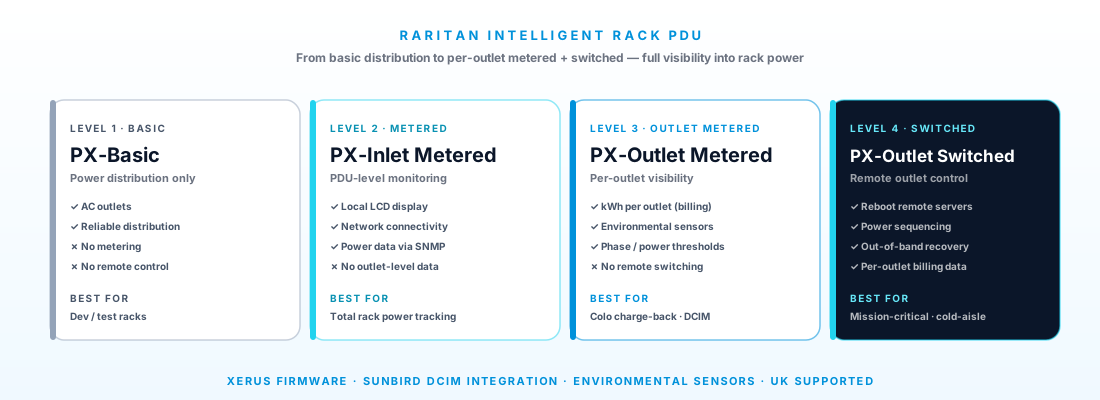
Yes — Raritan PX intelligent rack PDUs in iX7, iX8 and PX3-3000 series, all manageable from the same Raritan management plane as the KVMs.
Industries Servnet supports with this stack
IT, cybersecurity and managed services for UK central and local government, police forces, blue light…
IT infrastructure, cybersecurity and managed services for FCA-regulated firms — investment managers,…
IT, cybersecurity, OT and managed services for UK manufacturers, food & drink producers, automotive,…
Use Raritan as part of a complete solution
Talk to a UK specialist
Get expert advice or a no-obligation quote — servers, storage, networking, maintenance, finance and cloud. We reply the same working day.