UK’s trusted IT infrastructure partner since 2003
Servnet
FinanceToolsConfiguratorGet in Touch
Technical data sheet · ThinkEdge · compact edge server, single processor

Lenovo ThinkEdge SE100Specifications, configurations & comparisons

The ThinkEdge SE100 is a 2.1-litre, 142.3 mm-wide edge server with a soldered Intel Core Ultra processor, two SODIMM slots and M.2 storage. It can stand on a desk, hang on a wall, ceiling or DIN rail, or share a 1U rack enclosure with one or two others. This page maps its options, mounting kits, power adapters and environmental limits.

Edge1 socketCore UltraXClarity Controller 2
2.1Lbase node volume142.3 × 53 × 278 mm · 2.36 kg max
16coresCore Ultra 7 255H · 28 W base power
64GBDDR5 maximum2 × 32 GB CSODIMM or SODIMM
3M.2 SSDs1 boot + 2 NVMe data · 7.68 TB data
45°Ctop operating ambientASHRAE A4 · IP50 base node
75WGPU slot limitone low-profile card via a kit

Every figure checked against the Lenovo ThinkEdge SE100 Edge Server Product Guide (August 12, 2026)

Form factor
Edge · 1 socket
Processors
Core Ultra
Memory
2 × DDR5 SODIMM · up to 64 GB
Expansion
1 × PCIe
GPUs
Up to 1 · 2 listed
Boot
1 x M.2 2280 SATA/NVMe boot slot (PCIe 4.0 x4); no RAID
Management
XClarity Controller 2
01 — Overview

The SE100 at a glance

Our read of Lenovo’s documentation: where the SE100 is strong, and the limits worth knowing before you spec one.

Strengths

  • One node, many installations: on a desk, on a wall or ceiling through the VESA sleeve, on a DIN rail, or two or three to a 1U rack enclosure.
  • The base node meets ASHRAE A4 (5–45 °C) and IP50 dust protection, and its desk, wall, ceiling and DIN mounts are specified for 15 G operating shock and 0.15 Grms operating vibration.
  • System Lockdown Mode, managed from the ThinkShield Key Vault Portal, can ship the node locked and lock it again after tampering until an administrator re-authenticates it.
  • A single expansion kit adds either an NVIDIA RTX A1000 or RTX 2000E Ada for local inference, or a quad-1GbE or dual-10GBASE-T network card.
  • XClarity Controller 2 has its own rear RJ45 port, so a site without IT staff can still be managed remotely; the XCC2 Platinum upgrade adds remote console and virtual media.

Watch-outs

  • The processor is soldered and cannot be upgraded; the only choices are the 14-core Core Ultra 5 225H and 16-core Core Ultra 7 255H, neither with Hyper-Threading.
  • There are no ECC DIMMs. Memory is non-ECC SODIMM or CSODIMM, and Intel’s in-band ECC works only with one module or a pair of equal capacity.
  • Storage is M.2 only — no 2.5-inch drives, no hardware RAID and currently no Intel VROC — and data capacity stops at 2 × 3.84 TB.
  • The one expansion slot takes a GPU or a network card, not both. A GPU limits the node to 35 °C, the expansion kit is not IP50-rated, and the listed GPUs are unsupported under Windows 11 IoT Enterprise.
  • Power is external only, from 140 W or 300 W USB-C PD adapters, and the only supported hypervisor is KVM on Ubuntu 24.04 — no ESXi, Hyper-V or Xen.
Processors2 SKUs
Cores / CPU14–16
DIMM slots2
GPUsup to 1
PSU options2 · to 300 W
02 — Processors

2 supported processors, mapped

Two Intel Core Ultra Series 2 (Arrow Lake) processors are offered, each supplied soldered to its own SE100 system board: the Core Ultra 5 225H with 14 cores, a 1.70 GHz base and 18 MB of L3, and the Core Ultra 7 255H with 16 cores, a 2.00 GHz base and 24 MB. Both have a 28 W base power, turbo, two memory channels and no Hyper-Threading.

Processor landscape — cores × TDP

2 SKUs · 1 family
Lenovo ThinkEdge SE100: every supported processor by cores and TDP08160 W50 WCores per processorIntel Core Ultra 7 255H — 16 cores / 16 threads · 28 W · 2 GHz base · 24 MB cache · DDR5-6400Intel Core Ultra 5 225H — 14 cores / 14 threads · 28 W · 1.7 GHz base · 18 MB cache · DDR5-6400Intel Core Ultra 7 255H16 cores · 1.8 W/core — top SKU and most efficient
Core Ultra 2Bubble size = L3 cache · hover a bubble for the full SKU

Processor explorer

filter · sort · compare
ProcessorCores / threadsBaseL3 cacheTDPW / coreMemory
Intel Core Ultra 7 255H16 / 162 GHz24 MB28 W1.8DDR5-6400
Intel Core Ultra 5 225H14 / 141.7 GHz18 MB28 W2.0DDR5-6400
  • Lenovo marks turbo as supported but prints no turbo frequency; the 28 W figure is the processor base power.
  • Shared features include AVX2 and OpenVINO for AI, VT-x and VT-d, AES-NI, Trusted Execution Technology, Boot Guard and MBEC; Intel OS Guard is listed as planned.
  • Integrated Intel graphics (Xe2 architecture) drive two front HDMI 2.0 outputs and a USB-C DisplayPort at up to 3840 × 2160 at 60 Hz, separately from the XCC2 display.
  • Processors come only in factory builds or preconfigured models; there are no option part numbers for field upgrades.
03 — Memory

2 DDR5 DIMM slots

Two DDR5 slots, one per memory channel, take 16 or 32 GB modules: SODIMMs at 5600 MHz or CSODIMMs at 6400 MHz. A pair of 32 GB modules reaches the 64 GB maximum. Speeds and capacities cannot be mixed across the two channels, and none of the modules is ECC.

Capacity with every slot filled

by DIMM size
16 GB32 GB32 GB64 GB2 slots · 2 per processor · each tick = one DIMM

Rated memory speed

from the processor table
Processor familyUp to
Core Ultra6400 MT/s
  • In-band ECC, Intel’s software alternative to ECC DIMMs, works with a single module or two of the same capacity; a 16 GB plus 32 GB pair loses it.
  • Memory mirroring, rank sparing and SDDC (Chipkill) are not supported; the memory runs in independent mode.
  • Modules from different vendors may be mixed.
  • Lenovo’s temperature table supports every listed module across the full 5–45 °C range.
04 — Storage

Storage and boot

There are no drive bays. The system board has three M.2 sockets: one 2280 boot socket, a PCIe 4.0 x4 slot that also accepts SATA drives, and two NVMe data sockets that take 2280 or 22110 drives. Data drives of 2280 length need a holder, the two lengths cannot be mixed, and every listed SSD is non-hot-swap.

Controllers & boot

  • Onboard NVMe (M.2 slots attached directly to the processor) — Onboard NVMe (no hardware RAID), N/A cache. lp1995 L463 "No Hardware RAID support and currently no Intel VROC RAID support"; the storage is the M.2 slots only - one 2280 SATA/NVMe boot slot on PCIe 4.0 x4 (L474) and two NVMe data slots (L476). No storage-controller table in the guide.
  • 1 x M.2 2280 SATA/NVMe boot slot (PCIe 4.0 x4); no RAID — boot
  • Boot drives: 480 GB or 960 GB NVMe (7450 PRO or VA) or 480 GB or 960 GB SATA (ER3).
  • Data drives: 480 GB and 960 GB NVMe in 2280 length; 960 GB, 1.92 TB and 3.84 TB NVMe in 22110 length. Two 3.84 TB drives give the 7.68 TB maximum.
  • Temperature: with NVMe M.2 data drives Lenovo asks for ambient below 40 °C and with an NVMe boot drive below 35 °C, or performance may degrade.
  • Self-encrypting M.2 drives can be enabled at the factory (feature BYBS), independently of System Lockdown Mode, although the guide’s summary table lists SED, intrusion detection and UEFI passwords as unsupported.
  • There is no hardware RAID and, currently, no Intel VROC RAID, and Provisioning Manager’s RAID functions are not supported on this server.
05 — Accelerators & I/O

GPUs, PCIe and networking

GPUs need the SE100 Expansion Kit for Active Cooling GPU (C30F), which adds a PCIe 4.0 slot, x16 physical and x8 electrical, for one single-wide low-profile card of up to 75 W. Lenovo lists two cards: the NVIDIA RTX A1000 8GB and the RTX 2000E Ada 16GB. One low-profile GPU up to 75 W · 5–35 °C ambient only · not in the 1U3N enclosure.

NVIDIA RTX A1000 8GB PCIe Gen4 Active GPU

single-wide
8GB · up to 1

NVIDIA RTX 2000E Ada 16GB PCIe Active GPU

single-wide
16GB · up to 1

I/O topology

1 socket
CPUPCIe 4.02 ch · 2 DIMM1 × PCIe 4.0 x8 (x16 slot)expansion kit · HHHLGPU ≤ 75 W or NIC ≤ 25 Wone kit per node, not both2 × 1GbE RJ45 (rear)plus 1GbE RJ45 for XCC2Front serial RJ45 + 2 × HDMIUSB-C for XCC and OS display

The Core Ultra processor has two memory channels, and the boot M.2 socket runs at PCIe 4.0 x4. Networking is two rear 1GbE RJ45 ports plus a separate 1GbE port for the XCC2; the optional expansion kit adds one PCIe 4.0 x8 slot for either a GPU or a network adapter.

Network adapters Lenovo lists

3 options
AdapterPortsForm
2 x 1GbE RJ45 onboard + 1 x 1GbE RJ45 XCC management (rear)2 × 1GbEembedded
ThinkSystem Broadcom 5719 1GbE RJ45 4-Port PCIe Ethernet Adapter (via SE100 Expansion Kit for NIC Adapter, C30E)4 × 1GbEPCIe
ThinkSystem Broadcom 57416 10GBASE-T 2-Port PCIe Ethernet Adapter (via SE100 Expansion Kit for NIC Adapter, C30E)2 × 10GbEPCIe
  • Network kit (C30E): Broadcom 5719 4 × 1GbE or Broadcom 57416 2 × 10GBASE-T. The cards have no fan of their own, so the kit uses two blowers.
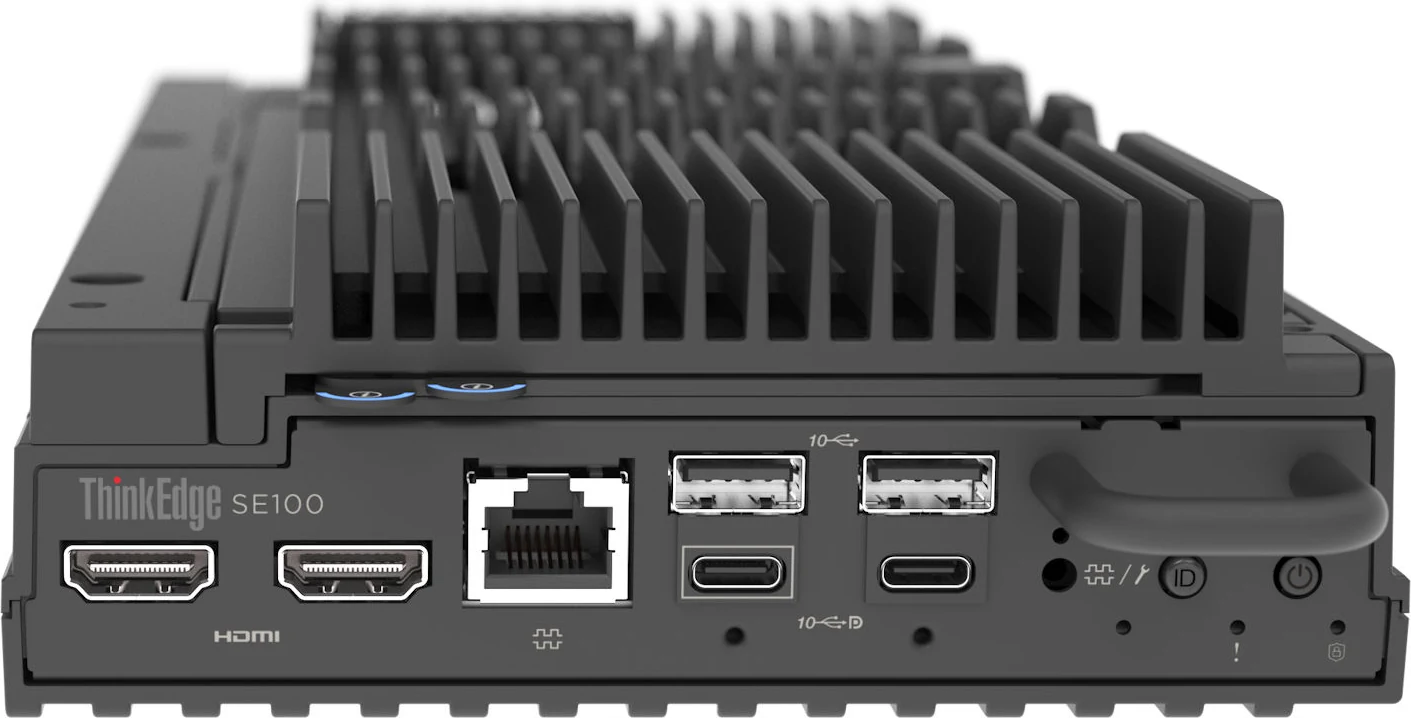
  • Front: 2 × HDMI 2.0, serial RJ45 (console, shared with the XCC), 2 × USB 3.2 Gen 2 Type-A and two USB-C 3.2 Gen 2 ports — one for the XCC display, one for the OS display — both with locking screws.
  • Rear: two USB-C power inputs (the second shared with XCC USB 2.0), 2 × USB 3.2 Type-A, 2 × 1GbE and the XCC management port.
  • Wireless networking is not supported.
  • Without an expansion kit, the expansion connector is closed with the Expansion Connection Cover (C30D).
06 — Power & cooling

2 power supplies, 140–300 W

The SE100 has no internal power supply. It runs from one or two external AC adapters that deliver 28 V over USB-C Power Delivery, and with two connected it is 1+1 redundant. Which adapter you need depends on how the node is mounted.

0500140 W — ThinkEdge 140W 230V/115V External Power Supply (C39R); desktop/VESA mode; 1 or 2 (1+1 redundant); USB-C PD 28V; efficiency not stated140DC300 W — ThinkEdge 300W 230V/115V External Power Supply (C3GQ); 1U2N/1U3N rack enclosure mode; feeds 2-3 nodes (140W/node for 1-2 nodes, 100W/node for 3); 1 or 2; efficiency not stated300DCWatts · dashed line = output at 100–120 V low line
AC
  • Desktop, wall, ceiling and DIN installations use the 140 W adapter (28 V, 5.0 A); the 300 W adapter is for the 1U2N and 1U3N rack enclosures only.
  • The 300 W adapter gives each node 140 W when feeding one or two nodes and 100 W each when feeding three (280 W over two ports, 300 W over three).
  • Both adapters accept 100–240 V at 50–60 Hz. The node itself accepts 20–28 V DC from adapters above 100 W that meet USB PD 3.0 or 3.1.
  • Ambient limits follow the adapter: under 45 °C with 140 W adapters, under 35 °C with 300 W adapters, and 5–35 °C whenever the node sits in a rack enclosure.
  • Cooling uses two non-hot-swap 6513 fans in the base node, enclosure fan modules in rack use, and two 5010 blowers with the network kit; fans are redundant but not hot-swap.
07 — Management, security & OS

Run it, secure it, choose the OS

Management

  • XClarity Controller 2 on an ASPEED AST2600, with a dedicated rear 1GbE management port
  • XCC2 Platinum upgrade (BRPJ): remote console, virtual media, System Guard, Neighbor Group and CNSA 1.0 strict mode
  • XClarity Administrator, Integrators, Essentials and Energy Manager
  • XClarity Mobile app over the rear USB-C management port
  • Redfish, IPMI 2.0, SNMPv3 and CIM-XML
  • MicroSD slot for XCC firmware and Remote Disc on Card storage (up to 4 GB)
  • Front UART, UID, error and activation LEDs, plus a pull-out network access tag

Security

  • System Lockdown Mode, managed by the ThinkShield Key Vault Portal (BYBR) or the XCC2 (BYBQ, default)
  • Standard chassis intrusion switch and a Kensington lock slot
  • Self-encrypting M.2 drives, enabled in the factory with BYBS
  • Caution: the guide’s summary table contradicts its security section, listing SED, intrusion detection and UEFI passwords as unsupported
  • TPM 2.0 with Secure Boot (AUK7); Nationz TPM not supported
  • Platform Firmware Resiliency Root of Trust (NIST SP 800-193)
  • Intel Trusted Execution Technology, Boot Guard, CET and Threat Detection Technology

Operating systems

  • Microsoft Windows 11 Enterprise and Windows 11 IoT Enterprise
  • Red Hat Enterprise Linux 9.6, 9.7, 9.8, 10.0, 10.1 and 10.2
  • Ubuntu 24.04 and 26.04 LTS
  • Hypervisor: KVM on Ubuntu 24.04 only — no ESXi, Xen or Hyper-V
08 — Compare

How the SE100 compares with its family

The SE100 sits beside the ThinkEdge SE455 V3, a much larger AMD EPYC edge server that takes up to six GPUs. Where the site has no need for an edge-hardened box, the ST45 V3 and ST50 V3 towers and the SR250 V3 1U rack server are Lenovo’s small conventional servers. The bars compare the limits in each model’s spec file.

SE100SE455 V3ST45 V3ST50 V3SR250 V3Cores / CPUSE100: 1616SE455 V3: 6464ST45 V3: 1616ST50 V3: 88SR250 V3: 88DIMM slotsSE100: 22SE455 V3: 66ST45 V3: 22ST50 V3: 44SR250 V3: 44Max memorySE100: 0.063 TB0.063SE455 V3: 0.75 TB0.75ST45 V3: 0.063 TB0.063ST50 V3: 0.125 TB0.125SR250 V3: 0.125 TB0.125Max drive baysSE100: 00SE455 V3: 88ST45 V3: 44ST50 V3: 44SR250 V3: 88Max GPUsSE100: 11SE455 V3: 66ST45 V3: 00ST50 V3: 00SR250 V3: 11Largest PSUSE100: 300 W300SE455 V3: 1,800 W1,800ST45 V3: 500 W500ST50 V3: 500 W500SR250 V3: 800 W800
This modelSiblings and successorEach value from that model’s own verified spec file · bars scale per column
09 — Use cases

Four builds that suit the SE100

Four SE100 builds for the retail, manufacturing and branch roles Lenovo aims it at, built from options our configurator permits for the SE100. The configurator models the boot M.2 socket; M.2 data drives and mounting kits are added when we quote.

Edge AI · video analytics

Camera-stream inference box

Lenovo targets the SE100 at video analytics, smart surveillance and edge AI in retail and manufacturing. The 16-core 255H with a 16 GB RTX 2000E Ada handles inference close to the cameras, on Ubuntu 24.04 from Lenovo’s support list.

  • 1 × Core Ultra 7 255H — 16 cores @ 2 GHz, 28 W
  • 2 × 32 GB CSODIMM at 6400 MHz — 64 GB
  • 480 GB M.2 NVMe boot SSD
  • NVIDIA RTX 2000E Ada 16GB in the GPU expansion kit
  • 2 × 140 W external adapters (1+1)
  • Ubuntu 24.04 LTS

GPU nodes are limited to 5–35 °C ambient, the expansion kit is not IP50-rated, and GPU nodes cannot go in the 1U3N enclosure.

Open this build in the configurator →
Retail · store server

In-store workload consolidation

Workload consolidation is one of Lenovo’s named SE100 targets, and KVM on Ubuntu 24.04 is its supported hypervisor. Two matched 32 GB SODIMMs keep in-band ECC, and a 10GBASE-T card gives the store a faster uplink than the onboard 1GbE ports.

  • 1 × Core Ultra 5 225H — 14 cores @ 1.7 GHz, 28 W
  • 2 × 32 GB SODIMM at 5600 MHz — 64 GB
  • 480 GB M.2 NVMe boot SSD
  • Broadcom 57416 2 × 10GBASE-T in the network expansion kit
  • 2 × 140 W external adapters (1+1)
  • Ubuntu 24.04 LTS (KVM host)

With the network kit fitted the node is no longer IP50-rated, and the slot cannot also take a GPU.

Open this build in the configurator →
Branch or factory rack

Three gateway nodes in 1U

The 1U3N enclosure puts three SE100 nodes and two shared 300 W adapters into one rack unit, each one a separate SE100 server — a way to run separate gateways or control workloads side by side in a comms cabinet.

  • 1 × Core Ultra 5 225H — 14 cores @ 1.7 GHz, 28 W
  • 2 × 16 GB CSODIMM at 6400 MHz — 32 GB per node
  • 480 GB M.2 NVMe boot SSD
  • 2 × 300 W external adapters, shared by the enclosure’s three nodes
  • Red Hat Enterprise Linux 9

In a rack enclosure the SE100 is rated for 5–35 °C, and with an NVMe boot drive Lenovo advises keeping the room below 30 °C. The 1U3N accepts nodes without expansion kits only.

Open this build in the configurator →
Industrial · DIN rail

Line-side controller at 45 °C

Kept to the base node, the SE100 retains its IP50 rating and the full ASHRAE A4 range up to 45 °C. A SATA boot SSD avoids the lower ambient limits Lenovo sets for NVMe M.2 drives, and the optional DIN Mount Kit (Extreme Shock & Vibe) fixes the node sleeve to a rail.

  • 1 × Core Ultra 5 225H — 14 cores @ 1.7 GHz, 28 W
  • 2 × 16 GB SODIMM at 5600 MHz — 32 GB
  • 2 × 140 W external adapters (1+1)
  • Ubuntu 24.04 LTS

The boot SSD is one of Lenovo’s listed ER3 SATA M.2 drives (480 GB or 960 GB), added on our quote: the 240 GB ER3 in our configurator appears in Lenovo’s temperature tables but not in its drive list. The DIN kit, node sleeve (C31B) and node fan kit are also added on the quote, and the 300 W adapter is not supported on a wall or DIN rail.

Open this build in the configurator →
10 — Refurbished alternatives

When a refurbished server makes more sense

Nothing in our refurbished Dell and HPE ranges matches a 2.1-litre node that can be screwed to a wall or clipped to a DIN rail. Where the site has a rack and a clean, cool room, though, a refurbished 1U server can take the same branch workloads with far more memory and drive bays.

14G · re-certified

Dell PowerEdge R440

  • 1U rack
  • 2 × Xeon Scalable · 16 DIMM slots
  • Up to 1 TB DDR4
  • 10 × 2.5" or 4 × 3.5" drives · iDRAC9

A branch or store with a rack and a cool room, where one server needs more memory and drive bays than the SE100 offers.

Configure a refurbished R440 →
Gen10 · re-certified

HPE ProLiant DL325 Gen10

  • 1U rack
  • 1 × AMD EPYC 7001, up to 32 cores
  • Up to 2 TB DDR4 · 16 DIMM slots
  • 10 × SFF / NVMe · iLO 5

Consolidating several edge workloads onto one single-socket host in a small comms room.

Configure a refurbished DL325 Gen10 →
11 — Full specifications

Lenovo ThinkEdge SE100 specifications

Chassis & mounting

Form factorEdge server · 1U high, short depth · Lenovo calls it both one-third and half the width of a traditional server
Machine types7DGR node (3-year warranty) · 7DGV 1U2N and 1U3N enclosures
Node dimensions142.3 × 53 × 278 mm (W × H × D) · 2.1 L · 2.36 kg maximum
With expansion kit214.2 × 53 × 278 mm · 3 kg maximum
With node sleeve439.4 × 111.6 × 345.7 mm (W × H × D) · 7.3 kg maximum
Rack enclosure1U · 434.2 × 43 × 734.3 mm · up to 13.9 kg (1U2N) or 15 kg (1U3N)
MountingDesktop · VESA wall or ceiling · DIN rail · 1U2N (nodes with expansion kits) · 1U3N (base nodes)
Cooling2 × 6513 node fans · enclosure fan modules · 2 × 5010 blowers with the network kit · none hot-swap

Processor

ProcessorOne Intel Core Ultra Series 2 (Arrow Lake), soldered
OptionsCore Ultra 5 225H (14 cores, 1.70 GHz) · Core Ultra 7 255H (16 cores, 2.00 GHz)
Base power28 W
GraphicsIntegrated Intel (Xe2) · up to 3840 × 2160 at 60 Hz

Memory

Slots2 (2 channels × 1 DIMM)
TypesTruDDR5 CSODIMM at 6400 MHz · SODIMM at 5600 MHz · non-ECC
Sizes16 GB or 32 GB
Maximum64 GB (2 × 32 GB)
ECCIn-band ECC with matched capacities only

Storage

Boot1 × M.2 2280, SATA or NVMe (PCIe 4.0 x4 socket)
Data2 × M.2 NVMe, 2280 or 22110 (not mixed)
Maximum data7.68 TB (2 × 3.84 TB)
RAIDNone — no hardware RAID, no VROC
2.5" / 3.5" drivesNot supported

Expansion & networking

Onboard2 × 1GbE RJ45 + 1 × 1GbE RJ45 for XCC (rear)
Expansion slot1 × PCIe 4.0, x16 physical / x8 electrical, HHHL, through a kit
Network adaptersBroadcom 5719 4 × 1GbE · Broadcom 57416 2 × 10GBASE-T (up to 25 W)
GPUsNVIDIA RTX A1000 8GB or RTX 2000E Ada 16GB (one, up to 75 W)
WirelessNot supported

Power

Adapters140 W (desk, wall, DIN) or 300 W (rack enclosures) · external · USB-C PD 28 V
Redundancy1+1 with two adapters
Adapter input100–240 V AC, 50–60 Hz

Ports

Front2 × HDMI 2.0 · serial RJ45 · 2 × USB 3.2 Gen 2 Type-A · 2 × USB-C 3.2 Gen 2
Rear2 × USB-C power (one shared with XCC USB 2.0) · 2 × USB 3.2 Type-A · 3 × 1GbE RJ45

Environment & warranty

Operating temperature5–45 °C (ASHRAE A4) · 5–35 °C in rack enclosures or with a GPU
Humidity8–90% operating, non-condensing · maximum dew point 24 °C
Altitude3,050 m maximum
Ingress protectionIP50 (base node; not with the PCIe expansion kit)
Operating shock / vibration15 G, 11 ms half-sine · 5–100 Hz, 0.15 Grms, 30 minutes
Acoustics (LpAm, typical)25.7 dBA idle · 34.1 dBA in operating profile 2 (100% CPU TDP)
Warranty3 years, CRU and onsite, 9 × 5 next business day
12 — FAQ

SE100 questions, answered from the documentation

How big is the Lenovo ThinkEdge SE100?

The base node is 142.3 mm wide, 53 mm high and 278 mm deep — 2.1 litres — and weighs up to 2.36 kg. The PCIe expansion kit widens it to 214.2 mm and 3 kg, and three bare nodes fit side by side in the 1U3N rack enclosure.

How can the SE100 be mounted?

On a desk on rubber feet, on a wall or ceiling via the VESA node sleeve, on a DIN rail with the DIN Mount Kit, or in a rack using the 1U2N enclosure (two nodes with expansion kits) or 1U3N enclosure (three nodes without). Rack enclosures use the 300 W adapter, which is not supported on a desk, wall or DIN rail.

What conditions can the SE100 operate in?

The base node is rated ASHRAE A4, 5–45 °C, with IP50 dust protection, 8–90% humidity and a 3,050 m altitude limit. GPUs, rack enclosures and 300 W adapters bring the ceiling down to 35 °C, NVMe M.2 data and boot drives call for below 40 °C and 35 °C to avoid performance loss, and the expansion kit is not IP50-rated.

What is the maximum memory of the SE100?

64 GB, from two 32 GB DDR5 modules — CSODIMMs at 6400 MHz or SODIMMs at 5600 MHz — in its two slots. ECC DIMMs are not supported; Intel’s in-band ECC needs a single module or two of the same capacity.

Which processors are available in the SE100?

Two, soldered at the factory: the Intel Core Ultra 5 225H with 14 cores and the Core Ultra 7 255H with 16 cores, both at 28 W base power without Hyper-Threading. The processor cannot be changed later.

How much storage does the SE100 support?

One M.2 2280 boot SSD, SATA or NVMe, and two M.2 NVMe data SSDs of up to 3.84 TB each, for 7.68 TB of data storage. There are no 2.5-inch bays and no RAID of any kind, hardware or VROC.

Can the SE100 take a GPU?

Yes, one, through the Active Cooling GPU expansion kit: an NVIDIA RTX A1000 8GB or RTX 2000E Ada 16GB, up to 75 W. A GPU node is limited to 35 °C ambient, cannot go in the 1U3N enclosure, and these GPUs are not supported under Windows 11 IoT Enterprise.

How is the SE100 powered?

By external 28 V USB-C Power Delivery adapters, one or two for 1+1 redundancy. The 140 W adapter serves desk, wall, ceiling and DIN installations; the 300 W adapter serves the rack enclosures, supplying 140 W per node for one or two nodes and 100 W each for three.

Which operating systems does the SE100 run?

Lenovo lists Windows 11 Enterprise and its IoT edition, RHEL 9.6 through 10.2, and Ubuntu 24.04 and 26.04 LTS. The only supported hypervisor is KVM on Ubuntu 24.04; ESXi, Hyper-V and Xen are not supported.

Is the ThinkEdge SE100 end of life?

Lenovo’s August 2026 product guide gives no end-of-service date and still lists current models and options for the SE100. It carries a three-year CRU and onsite warranty, and Lenovo Services sells extensions. Any lifecycle date Lenovo later sets for the SE100 will be picked up by our end-of-life tool.

Sources & verification

Where these figures come from

  • Lenovo ThinkEdge SE100 Edge Server Product Guide (August 12, 2026) — Standard specifications (Table 1), processors (Tables 4–5), memory (Table 6), drives (Table 7), expansion kits and adapters (Tables 8–9, 13), fans (Table 14), power (Tables 15–16), security and System Lockdown (Tables 25–29), mounting (Tables 30–36), OS support, dimensions, electrical specifications, operating environment (Tables 37–40) and warranty.

Specifications are extracted from Lenovo’s published documents and independently re-checked line by line. Configurations are quote-based; availability and exact options are confirmed at quotation. Last reviewed 2026-09-11.

Get a quote for the Lenovo ThinkEdge SE100

Tell us the workload and we’ll spec and price it — or build it in the configurator first.

Business enquiries only — please use your company email. Gmail, Hotmail and other personal addresses are not accepted.

We only ship hardware to the countries in the dropdown. Software and maintenance services are global.

We use these details to reply to your enquiry and prepare any quote. No marketing emails without your consent. Privacy Policy

Enquiring about: Lenovo ThinkEdge SE100

Response within 4 business hours · No obligation

Quote for
Lenovo ThinkEdge SE100
0800 987 4111

Talk to a UK specialist

Get expert advice or a no-obligation quote — servers, storage, networking, maintenance, finance and cloud. We reply the same working day.

or call 0800 987 4111