UK’s trusted IT infrastructure partner since 2003
Servnet
FinanceToolsConfiguratorGet in Touch
Technical data sheet · ThinkSystem entry tower · single-socket Intel Xeon

Lenovo ThinkSystem ST50 V3Specifications, configurations & comparisons

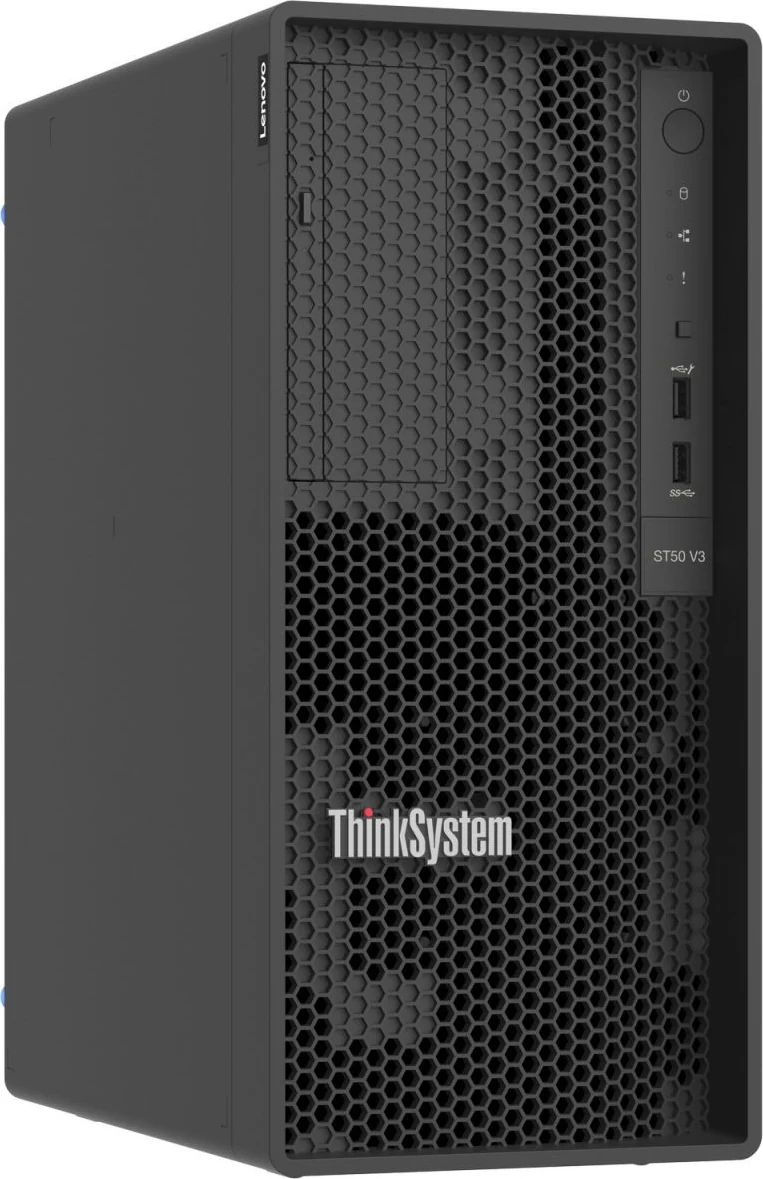
The ThinkSystem ST50 V3 is a 17-litre tower built around a single Intel processor — Xeon 6300, Xeon E-2400 or Pentium — with four UDIMM slots for 128 GB of ECC DDR5 and four non-hot-swap SATA drive positions. Unlike the AMD-based ST45 V3, it has an XClarity Controller 2 with its own network port. Lenovo pitches it at small and branch offices, banking and the public sector; below, its bays, slots, memory rules and management are set out in detail.

Tower1 socketPentiumXeon E-2400Xeon 6300XClarity Controller 2
8cores maximumXeon 6300 or E-2400 · up to 95 W
128GBDDR5 ceiling4 × 32 GB ECC UDIMM
4internal SATA bays3 × 3.5" + 1 × 2.5", non-hot-swap
3PCIe slots1 × Gen5 x16 + 2 × Gen4 x4
20.3dBAidle, typical builddeclared LpAm · light test build
11.96kgfully configured170 × 376 × 315 mm

Every figure checked against the Lenovo ThinkSystem ST50 V3 Server Product Guide (September 8, 2026)

Form factor
Tower · 1 socket
Processors
Pentium · Xeon E-2400 · Xeon 6300
Memory
4 × DDR5 UDIMM · up to 128 GB
Drive bays
Up to 4 · 2 backplane options
Expansion
3 × PCIe
Boot
ThinkSystem M.2 SATA/x4 NVMe 2-Bay Adapter
Management
XClarity Controller 2
01 — Overview

The ST50 V3 at a glance

Our read of Lenovo’s documentation: where the ST50 V3 is strong, and the limits worth knowing before you spec one.

Strengths

  • Out-of-band management in an entry tower: an XClarity Controller 2 with a dedicated 1GbE port, Redfish and IPMI, and a Platinum licence that adds remote console, virtual media and power capping.
  • Four UDIMM slots on two channels take 128 GB of ECC DDR5 — double the ST45 V3’s ceiling.
  • A 75 W PCIe 5.0 x16 slot beside two open-ended PCIe 4.0 x4 slots, plus two onboard 1GbE ports.
  • Low declared noise: 20.3 dBA idle and 35.1 dBA at full processor load for Lenovo’s light typical build (one 80 W processor, one DIMM, one HDD), and 27.6 and 40.6 dBA for its maximum build.
  • Firmware protection in an entry tower: a Platform Firmware Resiliency hardware Root of Trust (NIST SP 800-193), Secure Boot set at the factory or later, and an optional intrusion switch.

Watch-outs

  • Storage is SATA only and non-hot-swap: three 3.5-inch positions and one 2.5-inch SSD inside the case, with documented ceilings of 24 TB and 3.84 TB.
  • The M.2 boot adapter and the third 3.5-inch bay are mutually exclusive, because both are assembled at PCIe slot 3.
  • Memory runs at 4400 MHz at best whatever the DIMM rating, and at 3600 MHz with four dual-rank modules.
  • One fixed 300 W or 500 W supply and fixed fans, with no redundancy; the 300 W unit is not ErP Lot 9 compliant.
  • Lenovo’s CTO ordering table currently lists ten of the 18 processors in its features table — the G7400, E-2436 and eight Xeon 6300 models — so check availability before settling on another E-2400 or the G7400T.
Processors18 SKUs
Cores / CPU2–8
DIMM slots4
Backplanes2
Max bays4
PSU options2 · to 500 W
02 — Processors

18 supported processors, mapped

The ST50 V3 takes a single LGA 1700 processor. Lenovo’s features table lists 18: the two-core Pentium G7400 and G7400T, eight Xeon E-2400 and eight Xeon 6300 models, spanning 35 W to 95 W and up to 8 cores. Its CTO ordering table is narrower (see below), and no processor is available as a separate option kit.

Processor landscape — cores × TDP

18 SKUs · 3 families
Lenovo ThinkSystem ST50 V3: every supported processor by cores and TDP080 W50 W100 WCores per processorIntel Pentium G7400 — 2 cores · 46 W · 3.7 GHz base · 6 MB cache · DDR5-4400Intel Pentium G7400T — 2 cores · 35 W · 3.1 GHz base · 6 MB cache · DDR5-4400Intel Xeon E-2488 — 8 cores · 95 W · 3.2 GHz base · 24 MB cache · DDR5-4400Intel Xeon E-2478 — 8 cores · 80 W · 2.8 GHz base · 24 MB cache · DDR5-4400Intel Xeon E-2468 — 8 cores · 65 W · 2.6 GHz base · 24 MB cache · DDR5-4400Intel Xeon E-2486 — 6 cores · 95 W · 3.5 GHz base · 18 MB cache · DDR5-4400Intel Xeon E-2456 — 6 cores · 80 W · 3.3 GHz base · 18 MB cache · DDR5-4400Intel Xeon E-2436 — 6 cores · 65 W · 2.9 GHz base · 18 MB cache · DDR5-4400Intel Xeon E-2414 — 4 cores · 55 W · 2.6 GHz base · 12 MB cache · DDR5-4400Intel Xeon E-2434 — 4 cores · 55 W · 3.4 GHz base · 12 MB cache · DDR5-4400Intel Xeon 6369P — 8 cores · 95 W · 3.3 GHz base · 24 MB cache · DDR5-4400Intel Xeon 6357P — 8 cores · 80 W · 3 GHz base · 24 MB cache · DDR5-4400Intel Xeon 6353P — 8 cores · 65 W · 2.7 GHz base · 24 MB cache · DDR5-4400Intel Xeon 6349P — 6 cores · 95 W · 3.6 GHz base · 18 MB cache · DDR5-4400Intel Xeon 6337P — 6 cores · 80 W · 3.5 GHz base · 18 MB cache · DDR5-4400Intel Xeon 6333P — 6 cores · 65 W · 3.1 GHz base · 18 MB cache · DDR5-4400Intel Xeon 6315P — 4 cores · 55 W · 2.8 GHz base · 12 MB cache · DDR5-4400Intel Xeon 6325P — 4 cores · 55 W · 3.5 GHz base · 12 MB cache · DDR5-4400E-24888 cores — the top SKUE-24688.1 W/core — most efficient
Pentium 2Xeon E-2400 8Xeon 6300 8Bubble size = L3 cache · hover a bubble for the full SKU

Processor explorer

filter · sort · compare
ProcessorCores / threadsBaseL3 cacheTDPW / coreMemory
Intel Xeon E-248883.2 GHz24 MB95 W11.9DDR5-4400
Intel Xeon E-247882.8 GHz24 MB80 W10.0DDR5-4400
Intel Xeon E-246882.6 GHz24 MB65 W8.1DDR5-4400
Intel Xeon 6369P83.3 GHz24 MB95 W11.9DDR5-4400
Intel Xeon 6357P83 GHz24 MB80 W10.0DDR5-4400
Intel Xeon 6353P82.7 GHz24 MB65 W8.1DDR5-4400
Intel Xeon E-248663.5 GHz18 MB95 W15.8DDR5-4400
Intel Xeon E-245663.3 GHz18 MB80 W13.3DDR5-4400
Intel Xeon E-243662.9 GHz18 MB65 W10.8DDR5-4400
Intel Xeon 6349P63.6 GHz18 MB95 W15.8DDR5-4400
Intel Xeon 6337P63.5 GHz18 MB80 W13.3DDR5-4400
Intel Xeon 6333P63.1 GHz18 MB65 W10.8DDR5-4400
Intel Xeon E-241442.6 GHz12 MB55 W13.8DDR5-4400
Intel Xeon E-243443.4 GHz12 MB55 W13.8DDR5-4400
Intel Xeon 6315P42.8 GHz12 MB55 W13.8DDR5-4400
Intel Xeon 6325P43.5 GHz12 MB55 W13.8DDR5-4400
Intel Pentium G740023.7 GHz6 MB46 W23.0DDR5-4400
Intel Pentium G7400T23.1 GHz6 MB35 W17.5DDR5-4400
  • The CTO ordering table lists only the Pentium G7400, Xeon E-2436 and the eight Xeon 6300 parts; the other E-2400 models and the G7400T appear only in the features table.
  • Whatever the processor, memory is held to 4400 MHz. Xeon 6300 parts take only the 5600 MHz UDIMMs; Pentium and E-2400 parts also accept the 4800 MHz 32 GB module.
  • Xeon E-2400 processors connect to the C266 chipset over DMI 4.0 x8, Pentium processors over DMI 3.0 x4.
  • Intel Trusted Execution Technology is offered only with the Xeon E processors.
  • Lenovo can apply one of four UEFI operating modes in the factory and asks UK and EU customers to choose the one that meets ErP Lot 9.
03 — Memory

4 DDR5 DIMM slots

Each of the processor’s two DDR5 channels has two sockets, giving four UDIMM slots. Lenovo allows a single module, a pair or a full set of four matching modules (never three), and a pair goes in slots 1 and 3 so each channel has one. A 16 GB single-rank DIMM and two 32 GB dual-rank DIMMs (4800 and 5600 MHz) are listed, so four 32 GB modules give 128 GB.

Capacity with every slot filled

by DIMM size
16 GB64 GB32 GB128 GB4 slots · 4 per processor · each tick = one DIMM

Operating speed

per Lenovo memory tables
Processor1 DIMM / channel2 DIMMs / channel
All 18 processors (server limit)4400 MHz (1 or 2 DIMMs)4000 MHz (4 × 1R) · 3600 MHz (4 × 2R)
  • Lenovo quotes several figures: its key features mention 4800 MHz UDIMMs and its ST50 V2 comparison lists 5600 MHz (Xeon 6300) or 4800/5600 MHz (E-2400, Pentium), while the specifications, processor table and memory rules — and a note in that same comparison — hold operation to 4400 MHz, with both DIMM speeds running backward-compatible at that rate.
  • Only unbuffered ECC DIMMs are supported, with no memory mirroring or rank sparing.
  • All installed DIMMs must share one part number.
04 — Storage

2 backplane options, up to 4 bays

Four fixed positions inside the case, all non-hot-swap and SATA only: bay 0 (3.5-inch, standard), bay 1 (2.5-inch SSD) and bays 2 and 3 (3.5-inch, cage kits), plus a slim optical bay. Lenovo tops them out at 24 TB with three 8 TB HDDs and 3.84 TB with one SSD, and its key features state that SAS drives are not supported.

Headline layouts

front panel view

Front panel

Every position filled: 3.5-inch drives in bays 0, 2 and 3 and an SSD in bay 1, all inside the case and cabled to the onboard SATA ports or a RAID adapter. Bay 3’s cage is assembled at PCIe slot 3, so this layout has no M.2 boot adapter. (The 2.5-inch bay is not drawn.)

SAS/SATANVMeSAS/SATA + NVMe

Controllers & boot

  • Onboard 6Gb SATA - Intel VROC SATA RAID (RSTe) RAID 0/1/5 (AVV0) or AHCI/JBOD — Software RAID. onboard; RSTe not supported with hypervisors; Windows max 6-drive RSTe array
  • Onboard SATA Software RAID Mode for M.2 (BS7Q) RAID 0/1 — Software RAID. onboard, M.2 drives
  • ThinkSystem RAID 545-8i PCIe Gen4 12Gb Adapter — RAID. RAID 0,1; slots 1,2,3; no supercap
  • ThinkSystem RAID 540-8i PCIe Gen4 12Gb Adapter — RAID. RAID 0,1; slots 1,2,3; no supercap
  • Intel VROC SATA RAID (Intel RSTe) — Software RAID. Onboard SATA ports with Intel VROC SATA RAID (formerly Intel RSTe) software RAID - lp1907 L419, lp1907 L1264; not supported by virtualization hypervisors
  • ThinkSystem M.2 SATA/x4 NVMe 2-Bay Adapter (BM8X) in PCIe slot 3 (dummy PCIe card + cable kit 4Z57A88898); 2 x M.2 SATA SSDs only (no M.2 NVMe drives offered for this server); RAID 0/1 via onboard Intel VROC SATA software RAID for M.2 (BS7Q) — boot
  • Onboard SATA runs in AHCI (JBOD) mode or as Intel VROC SATA RAID (RSTe) with RAID 0, 1 and 5. Windows accepts RSTe arrays of up to six drives, and hypervisors may use the ports in AHCI mode only.
  • Adapters: the RAID 540-8i and RAID 545-8i, each RAID 0 and 1 in slot 1, 2 or 3, one per server and no supercap. Lenovo’s specifications table also mentions adapter RAID 5 and SAS HBAs, neither of which appears in its controller table.
  • The M.2 adapter (BM8X) sits on a dummy PCIe card in slot 3 and is cabled to the board — the slot carries no signal or power for it. Lenovo lists only M.2 SATA drives, 480 GB and 960 GB, for this server.
  • For the 3.5-inch bays Lenovo offers 7.2K SATA HDDs of 2 to 8 TB (including a 2 TB client model) and SATA SSDs of 480 GB to 3.84 TB; bay 1 takes the same SSD capacities in 2.5-inch form. An array cannot mix HDDs and SSDs.
  • Backup media are external: Lenovo lists the RDX External USB 3.0 Dock with 500 GB to 4 TB cartridges and no internal tape or RDX option.
  • The optical option is a 9 mm slim SATA DVD-RW in its own cage.

Every documented backplane

2 with drive bays
1x 2.5-inch NHS SATA SSD (bay 1, optional 2.5-inch…1x 2.5-inch NHS SATA SSD (bay 1, optional 2.5-inch HDD Cage Kit)13x 3.5-inch NHS SATA HDD/SSD (bay 0 std; bays 2,3 …3x 3.5-inch NHS SATA HDD/SSD (bay 0 std; bays 2,3 optional cage kits)3Bays · solid = front · dashed = rear · brighter = NVMe-only
2.5-inch3.5-inchEDSFF (E1.S / E3.S)
05 — I/O & networking

PCIe and networking

I/O topology

1 socket
CPUPCIe 5.0 / 4.02 ch · 4 DIMMSlot 2 · PCIe 5.0 x16FHHL · 75 W · closed-endedSlots 1, 3 · PCIe 4.0 x4FHHL · 25 W · open-ended2 × 1GbE (BCM5720)one port shareable with XCC2XCC2 · dedicated 1GbEAST2600 · Redfish · IPMI 2.0

The processor provides up to 16 PCIe 5.0 and 4 PCIe 4.0 lanes. At the rear, slot 2 is the PCIe 5.0 x16 slot (closed-ended, 75 W) and slots 1 and 3 are PCIe 4.0 x4 (open-ended, 25 W), all full-height and half-length. Networking starts with two 1GbE ports on a Broadcom BCM5720, and the XClarity Controller 2 has a third, dedicated port.

Network adapters Lenovo lists

5 options
AdapterPortsForm
Broadcom BCM5720 2 x 1GbE RJ45 onboard (one shareable with XCC) + dedicated XCC 1GbE port2 × 1GbEembedded
ThinkSystem Broadcom 5719 1GbE RJ45 4-Port PCIe Ethernet Adapter4 × 1GbEPCIe
ThinkSystem I350-T4 PCIe 1Gb 4-Port RJ45 Ethernet Adapter4 × 1GbEPCIe
ThinkSystem Broadcom 57416 10GBASE-T 2-Port PCIe Ethernet Adapter2 × 10GbEPCIe
ThinkSystem Intel X710-T4L 10GBase-T 4-Port PCIe Ethernet Adapter4 × 10GbEPCIe
  • Open-ended slots accept longer cards: an x8 card in slot 3 works with half of its edge connector unconnected, at reduced performance.
  • Lenovo calls slot 1 an x4 slot in its specifications table and an x1 physical slot in its I/O section; both give it x4 PCIe 4.0 and 25 W.
  • Network cards: Broadcom 5719 and Intel I350-T4 (4 × 1GbE, up to three each), Broadcom 57416 (2 × 10GBASE-T) and Intel X710-T4L (4 × 10GBASE-T), one each; all fit slots 1–3.
  • The BCM5720 supports teaming, 802.3ad aggregation, VLANs, jumbo frames to 9600 bytes, NetQueue/VMQ and Wake-on-LAN.
  • No GPU, external SAS, Fibre Channel or flash storage adapter is supported.
06 — Power & cooling

2 power supplies, 300–500 W

A single fixed unit — 300 W Gold or 500 W Platinum — running from 110 V or 220 V AC; there is no redundant or hot-swap option. The 500 W unit is the one that meets ErP Lot 9, and Lenovo also describes it as Energy Star certified.

0500300 W Gold — ATX-300W (BMFL); not ErP Lot 9 compliant; 110/220V AC300DC500 W Platinum — ThinkSystem 500W Platinum ATX (BMTC); Energy Star / ErP Lot 9 compliant500PlatinumWatts · dashed line = output at 100–120 V low line
AC
  • Input current: 3.88 A at 100–127 V or 1.69 A at 200–240 V for 300 W models; 6.13 A or 2.7 A for 500 W models.
  • Heat output ranges from 104 W (354 BTU per hour) in the minimum configuration to 296 W (1009 BTU per hour) at maximum.
  • Cooling uses fixed, variable-speed fans — front drive-bay and rear system fans and a fan on the processor heat sink — with a rear-fan kit offered as a field upgrade.
  • Declared sound pressure: 20.3 dBA idle and 35.1 dBA at 100 % CPU for the typical configuration, 27.6 and 40.6 dBA for the maximum one; sound power 3.4 to 5.4 bels. The typical test build is light — an 80 W processor, one 16 GB DIMM, one 3.5-inch HDD and the optical drive on the 300 W supply — and the maximum build has a 95 W processor, four 32 GB DIMMs, four drives and a 1GbE card on the 500 W supply.
  • With M.2 drives of 960 GB or less the room must stay at 35 °C or below; above its supported temperature the server shuts down and will not restart until the room cools.
07 — Management, security & OS

Run it, secure it, choose the OS

Management

  • XClarity Controller 2 on an AST2600 BMC (dual-core Arm Cortex-A7, 1.2 GHz)
  • Dedicated rear 1GbE XCC2 port; one onboard port can also carry management traffic
  • XCC2 Platinum licence: remote console, virtual media, power capping, System Guard, Neighbor Group
  • IPMI 2.0 (IPMI-over-LAN off by default), SNMPv3, CIM-XML, REST and Redfish
  • XClarity Provisioning Manager (F1) · XClarity Essentials OneCLI, UpdateXpress, BOMC
  • XClarity Administrator and XClarity Energy Manager
  • XClarity One Mobile over the front USB 2.0 port · front operator panel LEDs

Security

  • Platform Firmware Resiliency hardware Root of Trust (NIST SP 800-193)
  • TPM 2.0 · Nationz TPM plug-in module for China
  • UEFI Secure Boot, enabled at the factory (BPKQ) or left for the customer (BPKR)
  • Intel Boot Guard, TME/MKTME and OS Guard · TXT with Xeon E only
  • Self-encrypting drives with IBM Security Key Lifecycle Manager
  • Padlock loop, rear Kensington slot and optional chassis intrusion switch
  • NIST SP 800-147B compliant

Operating systems

  • Microsoft Windows Server 2022 and 2025
  • Red Hat Enterprise Linux 8.10, 9.4–9.8 and 10.0–10.2
  • SUSE Linux Enterprise Server 15 SP5–SP7 and 16 (SP6 onward under the Xeon 6300 list)
  • Ubuntu 24.04 and 26.04 LTS (22.04 also listed under the Xeon 6300 heading)
  • VMware ESXi 8.0 U3, 9.0 and 9.1 (8.0 U2 with Pentium or Xeon E) · factory preload available
08 — Compare

ST50 V2 → ST50 V3

Lenovo compares the ST50 V3 with the ST50 V2 and the first ST50. The 17-litre chassis carries over from the V2, but the V3 changes processor platform, moves to DDR5, adds a fourth drive position, a PCIe 5.0 slot and a second onboard port, and swaps Intel AMT for an XClarity Controller.

Previous generationThinkSystem ST50 V2
This modelThinkSystem ST50 V3
Chassis
1-socket entry tower, 17 litres
Processors
Xeon E-2300, up to 8C / 95 W · Pentium
Xeon 6300 or E-2400, up to 8C / 95 W · Pentium
Chipset
Intel C256
Intel C266
Memory
4 × DDR4 UDIMM · 128 GB · 3200 MHz
4 × DDR5 UDIMM · 128 GB · 4800/5600 MHz DIMMs run at up to 4400 MT/s
Drive bays
Up to 3: 2 × 3.5" + 1 × 2.5" SSD
Up to 4: 3 × 3.5" + 1 × 2.5" SSD
Boot
1 × M.2 NVMe (2280)
2 × M.2 SATA on a slot-3 adapter, VROC RAID 0/1
Software RAID
Intel VROC 6.x
Intel VROC 8.x (no NVMe RAID)
Onboard network
1 × 1GbE (Intel I219-LM)
2 × 1GbE (Broadcom BCM5720) + XCC2 port
Management
Intel AMT 15 · LXPM Lite (USB)
XClarity Controller 2 · PFR Root of Trust
PCIe slots
3 (x16, x4, x1) · Gen4 x16 needs Xeon E-2300
3 (x4, x16, x4) · Gen5 x16
Front USB
USB-C 10 Gb/s · 2 × 5 Gb/s · 2 × 10 Gb/s · audio jacks
1 × USB 3.2 G1 · 1 × USB 2.0 (XClarity Mobile)
Rear I/O
4 × USB 5 Gb/s · 2 × DP · serial · 1GbE · audio out
4 × USB 5 Gb/s · VGA · serial · XCC port · 2 × 1GbE
Power
300 W Gold or 500 W Platinum, fixed

Source: Lenovo Press LP1907 (ST50 V3 product guide), Table 1 — Comparing the ST50 V3 to the ST50s.

The ST50 V3 family side by side

The ST50 V3 shares its 17-litre chassis and fixed supplies with the AMD-based ST45 V3, which offers up to 16 EPYC cores but stops at 64 GB and has no XClarity Controller. Above both sit the single-socket ST250 V3 and the dual-socket ST650 V3 towers; the SR250 V3 is the 1U rack model on the same processor families. Bars compare each model’s own spec file.

ST50 V3ST45 V3ST250 V3ST650 V3SR250 V3Cores / CPUST50 V3: 88ST45 V3: 1616ST250 V3: 88ST650 V3: 3232SR250 V3: 88DIMM slotsST50 V3: 44ST45 V3: 22ST250 V3: 44ST650 V3: 3232SR250 V3: 44Max memoryST50 V3: 0.125 TB0.125ST45 V3: 0.063 TB0.063ST250 V3: 0.125 TB0.125ST650 V3: 4 TB4SR250 V3: 0.125 TB0.125Max drive baysST50 V3: 44ST45 V3: 44ST250 V3: 1616ST650 V3: 3232SR250 V3: 88Max GPUsST50 V3: 00ST45 V3: 00ST250 V3: 11ST650 V3: 88SR250 V3: 11Largest PSUST50 V3: 500 W500ST45 V3: 500 W500ST250 V3: 800 W800ST650 V3: 2,600 W2,600SR250 V3: 800 W800
This modelSiblings and successorEach value from that model’s own verified spec file · bars scale per column

Head-to-head comparisons

Every figure on this page, set against the machines buyers weigh it up with.

09 — Use cases

Three builds that suit the ST50 V3

Three builds for offices that want a managed server without a rack, using only ST50 V3 parts from our configurator. The onboard SATA controller, the single fixed supply and the slot-3 choice between M.2 and a third 3.5-inch bay shape each one; cage kits and cabling are confirmed at quotation.

Small office

Entry directory and print server

For directory, DNS, DHCP and print services in a small office: a Pentium G7400 — one of the ten processors in Lenovo’s CTO ordering table — with 32 GB and two mirrored 4 TB drives. The XClarity Controller 2 still watches the hardware and raises alerts without the Platinum upgrade.

  • 1 × Intel Pentium G7400 — 2 cores, 3.7 GHz, 46 W
  • 2 × 16 GB TruDDR5-5600 ECC UDIMM — 32 GB (runs at 4400 MHz)
  • 2 × 4 TB 3.5-inch 7.2K SATA HDD, non-hot-swap — VROC RAID 1 on the onboard ports, 4 TB usable
  • Onboard 2 × 1GbE (BCM5720) + dedicated XCC2 port
  • 300 W Gold fixed supply
  • Windows Server 2025

The Pentium has no Intel TXT, which Lenovo offers only with Xeon E, and only the 500 W Platinum supply meets ErP Lot 9, so pick it where that rule applies.

Open this build in the configurator →
Small virtualisation

Four-slot VMware ESXi host

Lenovo lists ESXi 8.0 U3, 9.0 and 9.1 for Xeon 6300 builds and will preload ESXi at the factory. An eight-core, 95 W Xeon 6369P with every slot holding 32 GB gives 128 GB for a handful of VMs. Under a hypervisor the onboard ports work only as AHCI, so the drives run from a RAID 540-8i: a mirrored pair of 8 TB drives plus a 1.92 TB SSD.

  • 1 × Xeon 6369P — 8 cores @ 3.3 GHz, 95 W
  • 4 × 32 GB TruDDR5-5600 ECC UDIMM — 128 GB (3600 MHz with four dual-rank DIMMs)
  • 2 × 8 TB 3.5-inch 7.2K SATA HDD — RAID 1 on the adapter, 8 TB usable
  • 1 × 1.92 TB 2.5-inch SATA SSD in bay 1
  • RAID 540-8i PCIe Gen4 adapter (RAID 0/1)
  • Intel X710-T4L 4 × 10GBase-T PCIe adapter
  • 500 W Platinum fixed supply
  • VMware ESXi 8.0 (U3 with Xeon 6300)

One fixed supply and non-hot-swap drives make this a non-redundant host: a supply or disk failure means downtime. The RAID card and the 10GbE card take two of the three slots, and the X710-T4L is limited to one per server.

Open this build in the configurator →
Backup target

Office backup server, 16 TB usable

A Windows backup target for a small office: three 8 TB drives reach Lenovo’s 24 TB ceiling and, in onboard VROC RAID 5, leave 16 TB for backup data, while a 480 GB SSD in the 2.5-inch bay carries the operating system. A 10GBASE-T card shortens nightly jobs, and Lenovo’s external RDX USB 3.0 dock can take rotated cartridges off site.

  • 1 × Xeon 6325P — 4 cores @ 3.5 GHz, 55 W
  • 2 × 16 GB TruDDR5-5600 ECC UDIMM — 32 GB
  • 3 × 8 TB 3.5-inch 7.2K SATA HDD in bays 0, 2 and 3 — VROC RAID 5, 16 TB usable
  • 1 × 480 GB 2.5-inch SATA SSD in bay 1 — operating system
  • Broadcom 57416 2 × 10GBASE-T PCIe adapter
  • 500 W Platinum fixed supply
  • Windows Server 2025

Filling bay 3 rules out the M.2 boot adapter, which is why the OS goes on the SSD. The RDX dock is an external USB option added at quotation and is not part of this build.

Open this build in the configurator →
10 — Refurbished alternatives

When a refurbished server makes more sense

Our refurbished stock covers Dell and HPE only, so there is no re-certified ThinkSystem tower to offer. The alternatives below are larger two-socket DDR4 machines for buyers who value memory, bays and a management processor more than a small footprint.

Gen10 · re-certified

HPE ProLiant ML350 Gen10

  • Tower / 4U rack · one or two sockets
  • 24 DIMM slots · up to 3 TB DDR4
  • Up to 24 × SFF or 12 × LFF
  • iLO 5

For a site that wants to stay with a tower but needs two sockets, up to 3 TB of memory and room for 24 small drives.

Configure a refurbished ML350 Gen10 →
Gen10 · re-certified

HPE ProLiant DL360 Gen10

  • 1U rack · two sockets
  • 24 DIMM slots · up to 3 TB DDR4
  • 10 × SFF / NVMe
  • iLO 5

If the ST50 V3 was going into a rack anyway and NVMe bays and memory headroom matter more than a desk-side case.

Configure a refurbished DL360 Gen10 →
11 — Full specifications

Lenovo ThinkSystem ST50 V3 specifications

Chassis & cooling

Form factorTower, 17-litre chassis · 5U in a rack with the optional Rack Mount Kit
Machine types7DF4 (1-year warranty) · 7DF3 (3-year warranty)
DimensionsW 170 mm · H 376 mm with stand (370 mm without) · D 315 mm
Weight11.96 kg fully configured
CoolingFixed, variable-speed front and rear system fans + processor heat-sink fan
ChipsetIntel C266

Processor

SocketOne LGA 1700
FamiliesXeon 6300 (8) · Xeon E-2400 (8) · Pentium G7400 / G7400T
Cores2 to 8
TDP35 W to 95 W
PCIe lanesUp to 16 × PCIe 5.0 + 4 × PCIe 4.0

Memory

Slots4 × DDR5 ECC UDIMM on 2 channels
Modules16 GB 1Rx8 (5600 MHz) · 32 GB 2Rx8 (4800 or 5600 MHz)
Speed4400 MHz (1–2 DIMMs) · 4000 MHz (4 × 1R) · 3600 MHz (4 × 2R)
Maximum128 GB (4 × 32 GB)
ProtectionECC · no mirroring or rank sparing

Storage

BaysBay 0 3.5" (standard) · bay 1 2.5" SSD · bays 2–3 3.5" · all internal, non-hot-swap SATA
Maximum24 TB (3 × 8 TB HDD) · 3.84 TB (one 2.5" SSD)
OnboardIntel VROC SATA RAID 0/1/5 or AHCI
AdaptersRAID 540-8i or RAID 545-8i (RAID 0, 1), slots 1–3
Boot2 × M.2 SATA on the BM8X adapter in slot 3 · VROC RAID 0/1 · not with bay 3
Optical / backupSlim SATA DVD-RW · external RDX USB 3.0 dock

Expansion & networking

PCIeSlot 2: PCIe 5.0 x16, 75 W · slots 1 and 3: PCIe 4.0 x4, 25 W, open-ended · all FHHL
Onboard LAN2 × 1GbE RJ-45 (Broadcom BCM5720) + dedicated XCC2 port
Network cardsBroadcom 5719 · Intel I350-T4 · Broadcom 57416 · Intel X710-T4L
Not supportedGPUs · external SAS · Fibre Channel · flash storage adapters

Power

SupplyOne fixed unit, no redundancy
Options300 W Gold · 500 W Platinum (ErP Lot 9)
Input110 V or 220 V AC
Heat output104 W (354 BTU/hr) to 296 W (1009 BTU/hr)

Ports & video

FrontUSB 3.2 Gen 1 · USB 2.0 (XClarity Mobile)
Rear4 × USB 3.2 Gen 1 · VGA · serial · XCC2 RJ-45 · 2 × 1GbE · NMI button
VideoG200 with 16 MB in the XCC2 · up to 1920 × 1200 at 60 Hz

Environment & warranty

ASHRAEClass A2: 10–35 °C operating
Maximum altitude3,050 m
Acoustics (LpAm)20.3 dBA idle · 35.1 dBA at 100 % CPU (light typical test build)
Warranty1 or 3 years by machine type · CRU and onsite, 9 × 5 next business day
12 — FAQ

ST50 V3 questions, answered from the documentation

What is the maximum memory of the Lenovo ThinkSystem ST50 V3?

128 GB, using four 32 GB ECC UDIMMs across the processor’s two channels. One, two or four identical modules are supported; memory runs at 4400 MHz with one or two DIMMs and at 3600 MHz with four dual-rank DIMMs, whatever their rated speed.

Which processors does the ST50 V3 support?

Lenovo’s features table lists 18 single-socket parts: eight Xeon 6300, eight Xeon E-2400 and the Pentium G7400 and G7400T, from 2 to 8 cores and 35 W to 95 W. Its CTO ordering table currently names ten of them — the G7400, the E-2436 and the eight Xeon 6300 models.

How many drives does the ST50 V3 hold, and are they hot-swap?

Four at most: three 3.5-inch SATA drives and one 2.5-inch SATA SSD, all non-hot-swap and mounted inside the case. Adding the M.2 boot adapter costs the third 3.5-inch bay, because both use slot 3. Three 8 TB HDDs give Lenovo’s stated maximum of 24 TB.

Can the ST50 V3 be managed remotely?

Yes. Its XClarity Controller 2 has a dedicated rear 1GbE port and supports Redfish, IPMI 2.0 and SNMPv3, and one onboard port can also carry management traffic. The optional XCC2 Platinum licence adds remote console, virtual media, power capping and System Guard.

What PCIe slots does the ST50 V3 have, and does it support a GPU?

Three full-height, half-length slots: slot 2 is PCIe 5.0 x16 at 75 W, and slots 1 and 3 are open-ended PCIe 4.0 x4 at 25 W. Lenovo supports no GPU in this server, and slot 3 is also where the M.2 adapter or the third drive-bay kit goes.

What power supply does the ST50 V3 use?

A single fixed supply, 300 W Gold or 500 W Platinum, on 110 V or 220 V AC. There is no redundant option; the 500 W unit is the ErP Lot 9-compliant choice.

How big, heavy and loud is the ST50 V3?

It is 170 mm wide, 376 mm tall on its stand and 315 mm deep, and weighs 11.96 kg fully configured. Its declared sound pressure is 20.3 dBA at idle and 35.1 dBA with the processor fully loaded, measured on a light typical build with one DIMM and one HDD.

How does the ST50 V3 differ from the ST45 V3?

The two share a 17-litre case, four drive positions at most and the choice of a fixed 300 W or 500 W supply. The ST50 V3 runs Intel processors of up to 8 cores, takes 128 GB in four slots, adds a PCIe 5.0 x16 slot, two 1GbE ports and an XClarity Controller, and boots from M.2 SATA drives on a slot-3 adapter. The AMD-based ST45 V3 offers up to 16 cores but 64 GB, USB-key management only and two M.2 NVMe sockets on its system board.

What changed from the ST50 V2?

Lenovo’s comparison shows DDR5 in place of DDR4 at the same 128 GB, Xeon 6300 or E-2400 instead of E-2300, a fourth drive position, two M.2 SATA boot drives instead of one M.2 NVMe, a PCIe 5.0 x16 slot, a second onboard 1GbE port and an XClarity Controller where the V2 had Intel AMT. The chassis and 300 W or 500 W supplies are unchanged.

Is the Lenovo ThinkSystem ST50 V3 end of life?

Its product guide still lists orderable processors, drives and regional models and gives no end-of-sale or end-of-service date. Machine type 7DF4 carries one year of base warranty and 7DF3 three, and longer cover can be bought from Lenovo Services; any date Lenovo publishes will appear in our end-of-life checker.

Sources & verification

Where these figures come from

  • Lenovo ThinkSystem ST50 V3 Server Product Guide (September 8, 2026) — Key features, ST50 V3 vs ST50 V2 and ST50 (Table 1), standard specifications (Table 2), processors (Tables 13–14), UEFI modes (Table 15), memory (Table 16 and rules), drive bays and M.2 (Tables 17, 24), controllers (Table 19), drives (Tables 21–23), RDX and optical (Tables 25–26), I/O, network adapters (Table 29), power (Table 30), management, security, rack kit (Tables 39–40), OS support, dimensions (Table 42), electrical and operating environment; Figures 1, 3 and 4 (images).
  • Lenovo ThinkSystem ST45 V3 Server Product Guide — Table 2 (ST45 V3 vs ST50 V3) for the ST45 V3 contrasts in the family intro and FAQ.

Specifications are extracted from Lenovo’s published documents and independently re-checked line by line. Configurations are quote-based; availability and exact options are confirmed at quotation. Last reviewed 2026-09-11.

Get a quote for the Lenovo ThinkSystem ST50 V3

Tell us the workload and we’ll spec and price it — or build it in the configurator first.

Business enquiries only — please use your company email. Gmail, Hotmail and other personal addresses are not accepted.

We only ship hardware to the countries in the dropdown. Software and maintenance services are global.

We use these details to reply to your enquiry and prepare any quote. No marketing emails without your consent. Privacy Policy

Enquiring about: Lenovo ThinkSystem ST50 V3

Response within 4 business hours · No obligation

Quote for
Lenovo ThinkSystem ST50 V3
0800 987 4111

Talk to a UK specialist

Get expert advice or a no-obligation quote — servers, storage, networking, maintenance, finance and cloud. We reply the same working day.

or call 0800 987 4111