UK’s trusted IT infrastructure partner since 2003
Servnet
FinanceToolsConfiguratorGet in Touch
Technical data sheet · ThinkSystem V3 · tower, single-socket

Lenovo ThinkSystem ST250 V3Specifications, configurations & comparisons

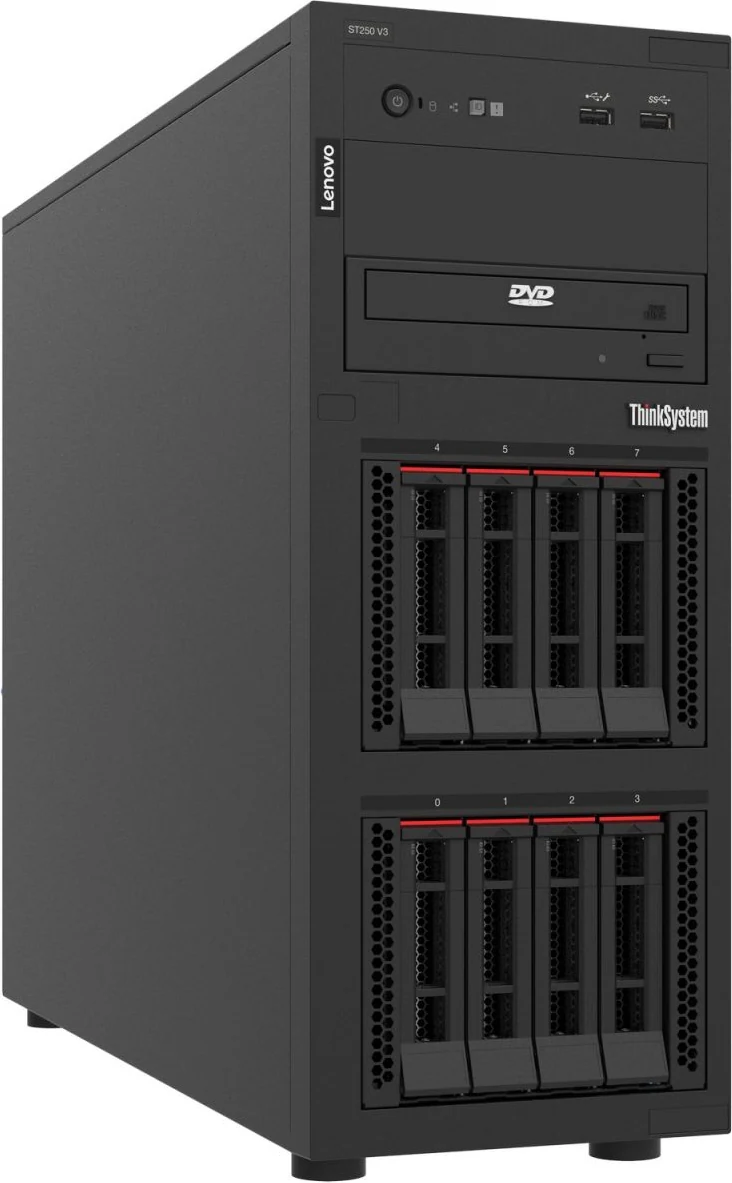
The ThinkSystem ST250 V3 is Lenovo’s single-socket office tower: one Xeon 6300, Xeon E-2400 or Pentium processor, up to 128 GB of ECC DDR5, and room for 16 small or eight large drives plus optical or RDX media. Lenovo pitches it at small businesses, branch offices, retail, education, banking and the public sector. This page maps its storage combinations, slots, power options and rack conversion.

Tower1 socketPentiumXeon E-2400Xeon 6300XClarity Controller 2
8cores maximumXeon 6300 or E-2400 · 95 W max
128GBECC DDR5 ceiling4 × 32 GB UDIMM
162.5" hot-swap baysor 8 × 3.5", or 8 × 2.5" + 4 × 3.5"
4full-height PCIe slots1 × Gen5 x16 + 3 × Gen4 x4
25.25" media baysDVD-RW or internal RDX dock
30.5dBAidle sound pressuretypical configuration (LpAm)

Every figure checked against the Lenovo ThinkSystem ST250 V3 Server Product Guide (August 25, 2026)

Form factor
Tower · 1 socket
Processors
Pentium · Xeon E-2400 · Xeon 6300
Memory
4 × DDR5 UDIMM · up to 128 GB
Drive bays
Up to 16 · 6 backplane options
Expansion
4 × PCIe
GPUs
Up to 1 · 4 listed
Boot
M.2 · 3 boot options
Management
XClarity Controller 2
01 — Overview

The ST250 V3 at a glance

Our read of Lenovo’s documentation: where the ST250 V3 is strong, and the limits worth knowing before you spec one.

Strengths

  • Built for the office floor: Lenovo declares 30.5 dBA idle and 33.2 dBA at full processor load for its typical configuration.
  • Up to 16 hot-swap 2.5-inch or eight 3.5-inch drives — or eight 2.5-inch and four 3.5-inch together — in a tower 176 mm wide.
  • Two 5.25-inch media bays take DVD-RW drives or an internal RDX dock for removable backup.
  • Four full-height slots, one of them a 75 W PCIe 5.0 x16 slot for a GPU such as the RTX A1000.
  • Physical security for open offices: a padlock loop for the side panel, a Kensington slot, and an optional lockable front door and intrusion switch.

Watch-outs

  • Three of the four slots are PCIe 4.0 x4 with a 25 W limit, and there is no OCP slot.
  • Memory peaks at 128 GB across four UDIMMs and falls to 3600 MT/s when all four hold 32 GB modules; every fan is fixed rather than hot-swap.
  • The M.2 boot adapter goes only in slot 4 and cannot coexist with an optical drive, because the two share a connector.
  • The 300 W fixed supply rules out a GPU, is not ErP Lot 9 compliant and caps the processor at 80 W — less if a media drive is fitted.
  • The storage table builds the 16-bay and hybrid layouts with 16-port or paired adapters, yet the controller table currently lists only two 8-port RAID cards, one of each.
Processors18 SKUs
Cores / CPU2–8
DIMM slots4
Backplanes6
Max bays16
GPUsup to 1
PSU options4 · to 800 W
02 — Processors

18 supported processors, mapped

The ST250 V3 takes one LGA 1700 processor from 18 listed SKUs — two Pentium Gold, eight Xeon E-2400 and eight Xeon 6300 — spanning two to eight cores and a 35–95 W TDP range. Both of Lenovo’s processor tables list all 18, and none is sold as a separate option kit.

Processor landscape — cores × TDP

18 SKUs · 3 families
Lenovo ThinkSystem ST250 V3: every supported processor by cores and TDP080 W50 W100 WCores per processorIntel Pentium G7400 — 2 cores · 46 W · 3.7 GHz base · 6 MB cache · DDR5-4400Intel Pentium G7400T — 2 cores · 35 W · 3.1 GHz base · 6 MB cache · DDR5-4400Intel Xeon E-2488 — 8 cores · 95 W · 3.2 GHz base · 24 MB cache · DDR5-4400Intel Xeon E-2478 — 8 cores · 80 W · 2.8 GHz base · 24 MB cache · DDR5-4400Intel Xeon E-2468 — 8 cores · 65 W · 2.6 GHz base · 24 MB cache · DDR5-4400Intel Xeon E-2486 — 6 cores · 95 W · 3.5 GHz base · 18 MB cache · DDR5-4400Intel Xeon E-2456 — 6 cores · 80 W · 3.3 GHz base · 18 MB cache · DDR5-4400Intel Xeon E-2436 — 6 cores · 65 W · 2.9 GHz base · 18 MB cache · DDR5-4400Intel Xeon E-2414 — 4 cores · 55 W · 2.6 GHz base · 12 MB cache · DDR5-4400Intel Xeon E-2434 — 4 cores · 55 W · 3.4 GHz base · 12 MB cache · DDR5-4400Intel Xeon 6369P — 8 cores · 95 W · 3.3 GHz base · 24 MB cache · DDR5-4400Intel Xeon 6357P — 8 cores · 80 W · 3 GHz base · 24 MB cache · DDR5-4400Intel Xeon 6353P — 8 cores · 65 W · 2.7 GHz base · 24 MB cache · DDR5-4400Intel Xeon 6349P — 6 cores · 95 W · 3.6 GHz base · 18 MB cache · DDR5-4400Intel Xeon 6337P — 6 cores · 80 W · 3.5 GHz base · 18 MB cache · DDR5-4400Intel Xeon 6333P — 6 cores · 65 W · 3.1 GHz base · 18 MB cache · DDR5-4400Intel Xeon 6315P — 4 cores · 55 W · 2.8 GHz base · 12 MB cache · DDR5-4400Intel Xeon 6325P — 4 cores · 55 W · 3.5 GHz base · 12 MB cache · DDR5-4400E-24888 cores — the top SKUE-24688.1 W/core — most efficient
Pentium 2Xeon E-2400 8Xeon 6300 8Bubble size = L3 cache · hover a bubble for the full SKU

Processor explorer

filter · sort · compare
ProcessorCores / threadsBaseL3 cacheTDPW / coreMemory
Intel Xeon E-248883.2 GHz24 MB95 W11.9DDR5-4400
Intel Xeon E-247882.8 GHz24 MB80 W10.0DDR5-4400
Intel Xeon E-246882.6 GHz24 MB65 W8.1DDR5-4400
Intel Xeon 6369P83.3 GHz24 MB95 W11.9DDR5-4400
Intel Xeon 6357P83 GHz24 MB80 W10.0DDR5-4400
Intel Xeon 6353P82.7 GHz24 MB65 W8.1DDR5-4400
Intel Xeon E-248663.5 GHz18 MB95 W15.8DDR5-4400
Intel Xeon E-245663.3 GHz18 MB80 W13.3DDR5-4400
Intel Xeon E-243662.9 GHz18 MB65 W10.8DDR5-4400
Intel Xeon 6349P63.6 GHz18 MB95 W15.8DDR5-4400
Intel Xeon 6337P63.5 GHz18 MB80 W13.3DDR5-4400
Intel Xeon 6333P63.1 GHz18 MB65 W10.8DDR5-4400
Intel Xeon E-241442.6 GHz12 MB55 W13.8DDR5-4400
Intel Xeon E-243443.4 GHz12 MB55 W13.8DDR5-4400
Intel Xeon 6315P42.8 GHz12 MB55 W13.8DDR5-4400
Intel Xeon 6325P43.5 GHz12 MB55 W13.8DDR5-4400
Intel Pentium G740023.7 GHz6 MB46 W23.0DDR5-4400
Intel Pentium G7400T23.1 GHz6 MB35 W17.5DDR5-4400
  • Memory is held to 4400 MHz in this server regardless of the processor’s or the DIMM’s rating.
  • Choose 5600 MHz UDIMMs with a Xeon 6300; the 4800 MHz 32 GB module works only with Pentium and Xeon E-2400 parts.
  • The supply sets the processor ceiling: 95 W with the 500 W fixed or 800 W hot-swap units, 80 W with the 300 W fixed unit.
  • The heat sink carries its own fan. With an 80 W heat sink, ambient can reach 45 °C for processors up to 60 W and 40 °C up to 70 W.
  • Lenovo leaves any integrated processor graphics unused and disables Intel AMT; video comes from the XCC2 or a GPU card.
03 — Memory

4 DDR5 DIMM slots

Four UDIMM slots sit on two DDR5 channels, two per channel. One, two or four identical ECC UDIMMs are supported, and a pair is split across the channels in slots 1 and 3. With one module per channel memory runs at 4400 MT/s; filling all four drops it to 4000 MT/s with single-rank or 3600 MT/s with dual-rank modules.

Capacity with every slot filled

by DIMM size
16 GB64 GB32 GB128 GB4 slots · 4 per processor · each tick = one DIMM

Operating speed

per Lenovo memory tables
Processor1 DIMM / channel2 DIMMs / channel
Pentium · Xeon E-2400 · Xeon 63004400 MT/s4000 MT/s (1R) · 3600 MT/s (2R)
  • Lenovo lists a 16 GB single-rank UDIMM and two 32 GB dual-rank UDIMMs (4800 and 5600 MHz); four 32 GB modules give the 128 GB maximum.
  • Three DIMMs is not a supported quantity, and modules with different part numbers cannot be mixed.
  • Neither memory mirroring nor rank sparing is available.
04 — Storage

6 backplane options, up to 16 bays

Two stacked drive cages take hot-swap 2.5-inch or 3.5-inch backplanes, or simple-swap 3.5-inch bracket plates, across 12 documented configurations; every server must have drive bays. Hot-swap layouts run SAS or SATA through a RAID adapter or SATA only on the onboard ports, while simple-swap layouts are SATA, with an NVMe option.

Headline layouts

front panel view

Front panel

Config 11: two 8-bay 2.5-inch backplanes. Lenovo cables them to a 16-port adapter or two 8-port adapters — see the controller note below. The documented ceiling is 122.88 TB with 7.68 TB SATA SSDs.

SAS/SATANVMeSAS/SATA + NVMe

Controllers & boot

  • Onboard 6Gb SATA (8 ports) - Intel VROC SATA RAID (RSTe) RAID 0/1/10/5/50 (AVV0) or AHCI/JBOD — Software RAID. onboard; up to 8 drives (6 if ODD installed); NVMe not RAID-capable via VROC; RSTe not supported with hypervisors
  • ThinkSystem RAID 940-8i 4GB Flash PCIe Gen4 12Gb Adapter — RAID, 4GB cache. slots 2,3,4; supercap included
  • ThinkSystem RAID 545-8i PCIe Gen4 12Gb Adapter — RAID. slots 2,3,4; no supercap
  • Intel VROC SATA RAID (Intel RSTe) — Software RAID. Onboard SATA ports with Intel VROC SATA RAID (formerly Intel RSTe) software RAID - lp1803 L459, lp1803 L1690; not supported by virtualization hypervisors
  • ThinkSystem M.2 SATA/x4 NVMe 2-Bay Adapter (BM8X, software RAID) in slot 4 — boot
  • ThinkSystem M.2 RAID B540i-2i SATA/NVMe Adapter (BYFF, hardware RAID 0/1 via SAS3808N) in slot 4 — boot
  • M.2 cable kit 4Z57A88898 (dummy PCIe card + cables); M.2 mutually exclusive with optical drives — boot
  • The eight onboard SATA ports run up to eight SATA drives, or six once an optical drive is fitted, because two ports are then reserved for media.
  • Onboard VROC SATA RAID offers RAID 0, 1, 10, 5 and 50. Hypervisors can use the ports only in AHCI mode, and Windows allows at most six drives per RSTe array.
  • Controller caveat: the configuration table uses 16-port or paired 8-port adapters for the 16-bay and hybrid layouts, but the current controller table lists only the RAID 940-8i (4 GB flash) and RAID 545-8i, one of each — we confirm the controller for those layouts when we quote.
  • Config 12 is the hybrid: eight 2.5-inch and four 3.5-inch hot-swap bays behind a RAID adapter.
  • Lenovo’s configuration table labels the NVMe layout with one NVMe drive, while its specifications and backplane description give two.

Every documented backplane

6 with drive bays
ThinkSystem ST250 V2 2.5-inch SATA/SAS 8-Bay Backp…ThinkSystem ST250 V2 2.5-inch SATA/SAS 8-Bay Backplane Kit (B41E) - hot-swap8ST250 3.5-inch SS Bracket Plate Kit HDD 0-3 (BN14)…ST250 3.5-inch SS Bracket Plate Kit HDD 0-3 (BN14) - lower simple-swap, 4 drives4ST250 4x3.5-inch SS Bracket Plate Kit HDD 4-5 (BMP…ST250 4x3.5-inch SS Bracket Plate Kit HDD 4-5 (BMPZ) - upper simple-swap, 2 drives (with ODD)4ST250 4x3.5-inch SS Bracket Plate Kit HDD 4-7 (BN1…ST250 4x3.5-inch SS Bracket Plate Kit HDD 4-7 (BN15) - upper simple-swap, 4 drives4ThinkSystem ST250 V2 3.5-inch SATA/SAS 4-Bay Backp…ThinkSystem ST250 V2 3.5-inch SATA/SAS 4-Bay Backplane Kit (B41D) - hot-swap4Upper simple-swap 4-drive backplane 2x SATA + 2x N…Upper simple-swap 4-drive backplane 2x SATA + 2x NVMe/SATA (BWLW)4Bays · solid = front · dashed = rear · brighter = NVMe-only
2.5-inch3.5-inchEDSFF (E1.S / E3.S)
05 — Accelerators & I/O

GPUs, PCIe and networking

One GPU fits, in slot 2 — the PCIe 5.0 x16, 75 W slot. Lenovo lists four NVIDIA cards: RTX A400, RTX A1000, T400 and T1000. A GPU needs the 500 W fixed or an 800 W hot-swap supply, slot 3 must stay empty for cooling, and Windows or ESXi cannot be factory-installed alongside it. One GPU in slot 2 (up to 75 W), with slot 3 left empty.

NVIDIA RTX A400 4GB PCIe Gen4 Active GPU

single-wide
4GB · up to 1

NVIDIA RTX A1000 8GB PCIe Gen4 Active GPU

single-wide
8GB · up to 1

NVIDIA T1000 8GB PCIe Active GPU

single-wide
8GB · up to 1

NVIDIA T400 4GB PCIe Active GPU

single-wide
4GB · up to 1

I/O topology

1 socket
CPUPCIe 5.0 / 4.02 ch · 4 DIMMSlot 2 · PCIe 5.0 x16FHHL · 75 W · GPU slotSlots 1, 3, 4 · PCIe 4.0 x4FHHL · 25 W · 1 and 3 open-endedOnboard 2 × 1GbE (BCM5720)one port shareable with XCC2XCC2 · rear 1GbE portdedicated · Redfish · IPMI 2.0

Lenovo gives the processor a budget of 16 PCIe 5.0 lanes and 4 PCIe 4.0 lanes at most, alongside its two DDR5 memory channels. At the rear that becomes one PCIe 5.0 x16 slot and three PCIe 4.0 x4 slots, all full-height and half-length, alongside two onboard 1GbE ports and a dedicated management port.

Network adapters Lenovo lists

7 options
AdapterPortsForm
Broadcom BCM5720 2 x 1GbE RJ45 onboard (one shareable with XCC) + dedicated XCC 1GbE port2 × 1GbEembedded
ThinkSystem Broadcom 5719 1GbE RJ45 4-Port PCIe Ethernet Adapter4 × 1GbEPCIe
ThinkSystem I350-T4 PCIe 1Gb 4-Port RJ45 Ethernet Adapter4 × 1GbEPCIe
ThinkSystem Broadcom 57416 10GBASE-T 2-Port PCIe Ethernet Adapter2 × 10GbEPCIe
ThinkSystem Intel X710-T4L 10GBase-T 4-Port PCIe Ethernet Adapter4 × 10GbEPCIe
ThinkSystem Broadcom 57414 10/25GbE SFP28 2-port PCIe Ethernet Adapter2 × 25GbEPCIe
ThinkSystem Intel E810-DA2 10/25GbE SFP28 2-Port PCIe Ethernet Adapter2 × 25GbEPCIe
  • Slots 1 and 3 are open-ended, so longer cards fit but run with fewer lanes. The summary table calls slot 1 a physical x4 connector; the I/O section calls it x1.
  • Slot 4 is x4 electrically in an x8 connector, and it is the only home for the M.2 boot adapter.
  • NIC placement varies by card: the Broadcom 57416 and 57414 fit slots 1 and 4 only, the X710-T4L slots 2 to 4; each card type is limited to two.
  • There is no OCP slot. RAID adapters go in slot 2, 3 or 4; external SAS storage uses up to two 440-8e HBAs, and Fibre Channel is not supported.
  • An internal USB 3.0 port on the system board connects the RDX dock.
06 — Power & cooling

4 power supplies, 300–800 W

There are three power routes: a fixed 300 W Gold supply, a fixed 500 W Platinum supply, or one or two 800 W CRPS hot-swap units (Platinum or Titanium) that form a redundant pair when two are installed. All four accept 110 V or 220 V AC.

05001000300 W Gold — ATX-300W (BMFL); not ErP Lot 9; no GPU support with this PSU300DC500 W Platinum — ThinkSystem 500W Platinum ATX (BMTC); Energy Star / ErP Lot 9500Platinum800 W Platinum — ThinkSystem 800W 230V/115V Platinum CRPS Hot-Swap v1.4 (BWM5); max 2; 240V DC PRC only800Platinum800 W Titanium — ThinkSystem 800W 230V/115V Titanium CRPS Hot-Swap v1.4 (BWM3); max 2; ErP Lot 9; 240V DC PRC only800TitaniumWatts · dashed line = output at 100–120 V low line
AC
  • With the 300 W unit there is no GPU; Lenovo’s limits are an 80 W processor with M.2 and no media drive, or 70 W / 60 W with a media drive and no M.2.
  • The 500 W fixed and 800 W hot-swap supplies allow a 95 W processor, one GPU and the full 16-bay, eight-LFF or hybrid front. That same maximum-configuration column marks optical and tape drives as not supported; only the 300 W columns with a 70 W or 60 W processor allow them.
  • Lenovo’s power-supply table marks the 500 W Platinum and 800 W Titanium units as ErP Lot 9 compliant and the 300 W Gold and 800 W Platinum units as not, although its specifications table describes the 800 W Platinum hot-swap option as compliant.
  • Input current at 100–127 V / 200–240 V: 5 A / 2.5 A for 300 W, 7 A / 3.5 A for 500 W and 10 A / 5 A for 800 W models.
  • Cooling is two front fans on the drive cages (one with a single cage), one rear fan and the heat-sink fan, all fixed and variable-speed. Heat output runs from 484 BTU/h (141 W) to 1397 BTU/h (409 W).
07 — Management, security & OS

Run it, secure it, choose the OS

Management

  • XClarity Controller 2 — the management section names a Pilot4 XE401 BMC (dual-core Arm Cortex-A9); the security list cites an AST2600
  • Dedicated rear 1GbE XCC port; one onboard port can also carry management traffic
  • XCC2 Platinum upgrade (software licence): remote console, virtual media, power capping, System Guard — the key features and Table 2 instead name XCC Advanced for remote control
  • XClarity Provisioning Manager (F1) · XClarity Essentials OneCLI, UpdateXpress, BOMC
  • XClarity Administrator, Integrator plugins and Energy Manager
  • Redfish, IPMI 2.0 (IPMI-over-LAN disabled by default), SNMPv3, CIM-XML
  • XClarity One Mobile through the front USB 2.0 port

Security

  • TPM 2.0 · Nationz TPM plug-in module for China
  • Platform Firmware Resiliency (NIST SP 800-193) · NIST SP 800-147B compliant
  • UEFI Secure Boot, factory-enabled (BPKQ) or left off for later (BPKR)
  • Padlock loop for the side panel and a rear Kensington slot
  • Optional lockable front door (B41K) and chassis intrusion switch (B4LS)
  • Intel Boot Guard, SGX and TME/MKTME · TXT with Xeon E
  • Self-encrypting drives with IBM SKLM key management

Operating systems

  • Microsoft Windows Server 2022 and 2025
  • Red Hat Enterprise Linux 8.8–8.10, 9.2–9.8 and 10.0–10.2 (a shorter list with Xeon 6300)
  • SUSE Linux Enterprise Server 15 SP5–SP7 and 16 (SP6 onward in the Xeon 6300 list)
  • Ubuntu 22.04, 24.04 and 26.04 LTS
  • VMware ESXi 8.0 U2, 8.0 U3, 9.0 and 9.1 (8.0 U3 onward with Xeon 6300) · factory preload available
  • The two OS lists are headed “Pentium or Xeon E” and “Pentium or Xeon 6300”, so for Pentium the older releases appear in only one of them
08 — Compare

ST250 V2 → ST250 V3

Lenovo compares the ST250 V3 with the ST250 V2 and the first ST250. The chassis layout carries over — the same bay counts, two media bays and four slots — while the V3 adds DDR5, a PCIe 5.0 x16 slot, larger supplies and a second NVMe bay in the simple-swap cage.

Previous generationThinkSystem ST250 V2
This modelThinkSystem ST250 V3
Form factor
Tower, convertible to 5U rack
Processors
Xeon E-2300, up to 8 cores / 95 W · Pentium
Xeon 6300 or E-2400, up to 8 cores / 95 W · Pentium
Chipset
Intel C256
Intel C266
Memory
4 × DDR4 UDIMM, up to 128 GB
4 × DDR5 UDIMM, up to 128 GB
Drive bays
8 × 3.5" HS, 16 × 2.5" HS, 8 × 3.5" SS, or 7 × 3.5" SS + 1 NVMe
8 × 3.5" HS, 16 × 2.5" HS, 8 × 3.5" SS, or 6 × 3.5" SS + 2 NVMe
PCIe slots
4 (x4, x16, x4, x4) · x16 slot PCIe 4.0
4 (x4, x16, x4, x4) · x16 slot PCIe 5.0
Rear USB
4 × USB 3.2 Gen 2 (10 Gb/s)
4 × USB 3.2 Gen 1 (5 Gb/s)
Power supplies
250 W or 300 W fixed, or 550 W hot-swap
300 W or 500 W fixed, or 800 W hot-swap

Source: Lenovo Press LP1803 (ST250 V3 product guide), Table 1 — Comparing the ST250 V3 to the ST250s.

The ST250 V3 family side by side

The 1U SR250 V3 has the same 18-processor features table (its ordering table lists ten), 128 GB UDIMM ceiling and XCC2 management, but trades drive count and media bays for a 561 mm rack chassis. Below the ST250 V3, the ST50 V3 and ST45 V3 towers use non-hot-swap drives; above it, the ST650 V3 tower takes one or two processors. Bars compare each model’s own spec-file limits.

ST250 V3SR250 V3ST50 V3ST45 V3ST650 V3Cores / CPUST250 V3: 88SR250 V3: 88ST50 V3: 88ST45 V3: 1616ST650 V3: 3232DIMM slotsST250 V3: 44SR250 V3: 44ST50 V3: 44ST45 V3: 22ST650 V3: 3232Max memoryST250 V3: 0.125 TB0.125SR250 V3: 0.125 TB0.125ST50 V3: 0.125 TB0.125ST45 V3: 0.063 TB0.063ST650 V3: 4 TB4Max drive baysST250 V3: 1616SR250 V3: 88ST50 V3: 44ST45 V3: 44ST650 V3: 3232Max GPUsST250 V3: 11SR250 V3: 11ST50 V3: 00ST45 V3: 00ST650 V3: 88Largest PSUST250 V3: 800 W800SR250 V3: 800 W800ST50 V3: 500 W500ST45 V3: 500 W500ST650 V3: 2,600 W2,600
This modelSiblings and successorEach value from that model’s own verified spec file · bars scale per column

Head-to-head comparisons

Every figure on this page, set against the machines buyers weigh it up with.

09 — Use cases

Three builds that suit the ST250 V3

Three tower specifications for offices, back rooms and branch sites, assembled from the ST250 V3 parts in our configurator. Cards are tied to particular slots in this chassis, so every build names its slot plan; the supply rating and room temperature limits are rechecked for the exact parts at quotation.

Small office

First office server

For a first server in a small office: a four-core, 55 W Xeon E-2434 with 32 GB and four 4 TB SATA drives in hot-swap trays, run from the onboard SATA ports with VROC RAID. Lenovo’s limits allow this load on the 300 W fixed supply.

  • 1 × Intel Xeon E-2434 — 4 cores, 3.4 GHz, 55 W
  • 2 × 16 GB TruDDR5 ECC UDIMM — 32 GB (4400 MT/s)
  • 4 × 4 TB 3.5-inch SATA HDD, hot-swap
  • Onboard 6 Gb SATA ports, no RAID adapter (Lenovo offers VROC RSTe RAID or AHCI on them)
  • Onboard 2 × 1GbE
  • 300 W Gold fixed supply
  • Windows Server 2025

The 300 W supply cannot power a GPU and is not ErP Lot 9 compliant — pick the 500 W Platinum unit if either matters. Windows accepts RSTe arrays of up to six drives.

Open this build in the configurator →
Backup & archive

Eight-bay backup server

Eight 3.5-inch hot-swap bays filled with 20 TB SATA drives give 160 TB raw behind a RAID 940-8i. The lower media bay is the home Lenovo gives an internal RDX dock for removable, rotated copies, subject to the power-table caveat below.

  • 1 × Xeon 6333P — 6 cores @ 3.1 GHz, 65 W
  • 2 × 16 GB TruDDR5 ECC UDIMM — 32 GB (4400 MT/s)
  • 8 × 20 TB 3.5-inch SATA HDD on two hot-swap backplanes — 160 TB raw
  • RAID 940-8i with 4 GB flash
  • Broadcom 57416 2 × 10GBASE-T PCIe (slot 1 or 4)
  • 800 W Titanium CRPS hot-swap supply — fit two for redundancy
  • Windows Server 2025

Drives of 20 TB or more hold the room to 35 °C. Lenovo’s configuration table pairs the eight-LFF hot-swap layout with an X350-generation 8-port adapter, so we confirm the RAID 940-8i pairing before quoting. Lenovo’s power table marks optical and tape drives as not supported in its 500 W / 800 W maximum configuration, so an RDX dock alongside 800 W supplies is confirmed with Lenovo before it is added.

Open this build in the configurator →
Graphics & light AI

Tower with a professional GPU

An NVIDIA RTX A1000 in the PCIe 5.0 x16 slot, an eight-core Xeon E-2488 at 3.2 GHz and 128 GB of memory suit GPU-accelerated applications on site, with four SATA SSDs on a RAID 545-8i and 25GbE networking.

  • 1 × Intel Xeon E-2488 — 8 cores, 3.2 GHz, 95 W
  • NVIDIA RTX A1000 8 GB in slot 2 (PCIe 5.0 x16)
  • 4 × 32 GB TruDDR5 ECC UDIMM — 128 GB (3600 MT/s, four dual-rank modules)
  • 4 × 1.92 TB SATA SSD in an 8-bay 2.5-inch cage
  • RAID 545-8i in slot 4
  • Broadcom 57414 2 × 25GbE in slot 1
  • 800 W Titanium CRPS hot-swap supply
  • Ubuntu Server 24.04 LTS

Slot 3 must stay empty beside a GPU, which is why the RAID card sits in slot 4 and the NIC in slot 1 — and it leaves no slot for M.2. A GPU, a 95 W processor or a 25GbE card each hold ambient temperature to 35 °C. Lenovo’s configuration table pairs the 8-bay 2.5-inch backplane with an X350-8i adapter, so we confirm the RAID 545-8i pairing when quoting.

Open this build in the configurator →
10 — Refurbished alternatives

When a refurbished server makes more sense

Lenovo ThinkSystem isn’t in our refurbished configurators. The closest re-certified alternative to an entry tower is HPE’s two-socket ML350 Gen10; if the server is going into a rack anyway, Dell’s 1U R440 is another DDR4-era option.

Gen10 · re-certified

HPE ProLiant ML350 Gen10

  • Tower or 4U rack · two sockets
  • 24 DIMM slots · up to 3 TB DDR4
  • Up to 24 × SFF or 12 × LFF
  • iLO 5

Sites that want a tower but need more cores, memory or drives than a single-socket entry server offers.

Configure a refurbished ML350 Gen10 →
14G · re-certified

Dell PowerEdge R440

  • 1U rack · two sockets
  • 16 DIMM slots · up to 1 TB DDR4
  • 10 × 2.5" or 4 × 3.5"
  • iDRAC9

When the “tower” will really sit in a rack, and more memory headroom matters more than media bays.

Configure a refurbished R440 →
11 — Full specifications

Lenovo ThinkSystem ST250 V3 specifications

Chassis & cooling

Form factorTower · 5U in a rack with the optional Rack Mount Kit (4U server on a 1U tray)
Machine types7DCE (3-year warranty) · 7DCF (1-year warranty)
Dimensions (W × H × D)176 × 444 × 578 mm including feet
WeightUp to 23.95 kg (3.5-inch) or 15.81 kg (2.5-inch), fully configured
FansTwo front (one with a single cage), one rear, one on the heat sink · all fixed
ChipsetIntel C266
Acoustics (LpAm, typical)30.5 dBA idle · 33.2 dBA at 100 % CPU
Rack kit4XF7A78620 · full-out ball-bearing rails with CMA · 665–900 mm between flanges · option part only

Processor

SocketOne LGA 1700
FamiliesPentium Gold G7400 / G7400T · Xeon E-2400 · Xeon 6300
Cores2 to 8
TDP35 W to 95 W
PCIe lanesUp to 16 × PCIe 5.0 + 4 × PCIe 4.0 per processor

Memory

Slots4 × DDR5 UDIMM on 2 channels
DIMMs16 GB (1R) and 32 GB (2R) ECC UDIMM
Speed4400 MT/s (1–2 DIMMs) · 4000 MT/s (4 × 1R) · 3600 MT/s (4 × 2R)
Maximum128 GB (4 × 32 GB)
ProtectionECC · no mirroring or rank sparing

Storage

Front bays16 × 2.5" HS, 8 × 3.5" HS, 8 × 2.5" + 4 × 3.5" HS, or up to 8 × 3.5" simple-swap
NVMe2 × 3.5" simple-swap bays (onboard, no NVMe RAID)
Raw maximum122.88 TB (16 × 7.68 TB SATA SSD) · 176 TB (8 × 22 TB HDD)
ControllersOnboard SATA (RAID 0/1/10/5/50) · RAID 940-8i 4 GB · RAID 545-8i
Boot2 × M.2 on the BM8X or B540i-2i adapter, slot 4 only
Media bays2 × 5.25" half-height: DVD-RW (up to 2) or RDX dock (lower bay)

Expansion & networking

PCIe slotsSlot 2: PCIe 5.0 x16, 75 W · slots 1, 3, 4: PCIe 4.0 x4, 25 W · all FHHL
Onboard LAN2 × 1GbE RJ45 (Broadcom BCM5720) + dedicated XCC2 port
OCPNone
External storage440-8e SAS HBA (up to 2) · no Fibre Channel
GPUOne of RTX A400, RTX A1000, T400 or T1000, in slot 2

Power

Supplies300 W Gold fixed · 500 W Platinum fixed · 1 or 2 × 800 W CRPS hot-swap (Platinum or Titanium)
RedundancyTwo hot-swap supplies form a redundant pair; fixed supplies are single
Input110 V or 220 V AC
Heat output141 W minimum · 409 W maximum

Ports & video

FrontUSB 3.2 Gen 1 · USB 2.0 (XCC)
Rear4 × USB 3.2 Gen 1 · VGA · serial · 1GbE XCC · 2 × 1GbE · NMI pinhole
InternalUSB 3.0 (for the RDX dock)
VideoG200, 16 MB, in the XCC2 · up to 1920 × 1200 at 60 Hz

Environment & warranty

ASHRAEA2; some models A3 and A4 (the standard-specifications table mentions A3 only)
Ambient limits45 °C: CPU ≤ 60 W + 80 W heat sink · 40 °C: ≤ 70 W + 80 W heat sink · 35 °C: ≤ 80 W + 80 W or ≤ 95 W + 95 W heat sink, or a GPU, M.2 ≤ 480 GB, U.2/U.3, 25GbE or 3.5" drives of 20 TB+ · 30 °C: 960 GB M.2
Maximum altitude3,050 m
Warranty1 or 3 years by machine type · CRU and onsite, 9 × 5 next business day
12 — FAQ

ST250 V3 questions, answered from the documentation

What is the maximum memory of the Lenovo ThinkSystem ST250 V3?

128 GB, from four 32 GB ECC UDIMMs. In that four-module layout the dual-rank DIMMs run at 3600 MT/s; with one or two modules memory runs at 4400 MT/s. One, two or four identical DIMMs are supported.

How many drives does the ST250 V3 take?

Up to 16 × 2.5-inch or 8 × 3.5-inch hot-swap drives, or eight 2.5-inch and four 3.5-inch together. Simple-swap versions take up to eight 3.5-inch SATA drives, or six SATA plus two NVMe. Two M.2 boot drives can be added in slot 4.

Does the ST250 V3 have optical or backup drive bays?

Yes — two half-height 5.25-inch bays for up to two DVD-RW drives, or one DVD drive and an internal RDX dock in the lower bay. With the onboard SATA controller, fitting an optical drive limits the server to six drives, and optical drives cannot be combined with M.2 boot. Lenovo’s power table allows optical or tape only in its 300 W columns, so we confirm media drives against the chosen supply.

Can the ST250 V3 be mounted in a rack?

Yes, with the ThinkSystem ST45/ST50/ST250 Series Rack Mount Kit, sold only as an option part. The server occupies 4U on its side and the kit’s tray adds 1U, so it takes 5U; the rails include a cable management arm.

Does the ST250 V3 support a GPU?

One, in slot 2: an NVIDIA RTX A400, RTX A1000, T400 or T1000. It needs the 500 W fixed or an 800 W hot-swap supply, and slot 3 must be left empty for cooling.

Which power supplies can the ST250 V3 use?

A fixed 300 W Gold or 500 W Platinum supply, or one or two 800 W CRPS hot-swap supplies in Platinum or Titanium. Only the hot-swap option gives a redundant pair. The 300 W unit supports no GPU and lower-TDP processors.

How loud is the ST250 V3?

Lenovo declares a sound pressure of 30.5 dBA idle and 33.2 dBA at full processor load in its typical configuration, and 35.9 dBA in its maximum test configuration. Sound power ranges from 4.6 to 5.1 bels.

How does the ST250 V3 differ from the SR250 V3?

Their processor-features tables list the same 18 processors, and both have a 128 GB UDIMM ceiling and XCC2 management. The SR250 V3 is a 1U rack server, 561 mm deep, with eight 2.5-inch or four 3.5-inch bays, up to two low-profile slots and only 800 W hot-swap supplies in its ordering table. The ST250 V3 adds bays, media bays and full-height slots.

What changed from the ST250 V2?

The V3 moves from Xeon E-2300 and DDR4 to Xeon E-2400 or Xeon 6300 with DDR5, upgrades the x16 slot to PCIe 5.0, and replaces the 550 W hot-swap supply with an 800 W unit. Bay counts, media bays and slot count stay the same, but its four rear USB ports are 5 Gb/s rather than 10 Gb/s.

Is the Lenovo ThinkSystem ST250 V3 end of life?

Not according to the ST250 V3 product guide, which still gives part numbers and feature codes for new orders and names no end-of-service date. Machine type 7DCF comes with one year of base warranty and 7DCE with three, and Lenovo sells service upgrades on top; check the end-of-life checker linked below for any date Lenovo announces later.

Sources & verification

Where these figures come from

  • Lenovo ThinkSystem ST250 V3 Server Product Guide (August 25, 2026) — ST250 V3 vs ST250 series (Table 1), standard specifications (Table 2), processors (Tables 13–14), memory (Table 16 and rules), backplanes and storage configurations (Tables 17–18), M.2 (Table 22), controllers (Table 26), media bays (Tables 37, 39), I/O, NICs (Table 42), GPUs (Table 44), power (Tables 45–46), security, rack kit (Tables 55–56), OS support, dimensions (Table 58) and operating environment.
  • Lenovo ThinkSystem SR250 V3 Server Product Guide — SR250 V3 depth, bays, slots and power supplies quoted in the family intro and FAQ.

Specifications are extracted from Lenovo’s published documents and independently re-checked line by line. Configurations are quote-based; availability and exact options are confirmed at quotation. Last reviewed 2026-09-11.

Get a quote for the Lenovo ThinkSystem ST250 V3

Tell us the workload and we’ll spec and price it — or build it in the configurator first.

Business enquiries only — please use your company email. Gmail, Hotmail and other personal addresses are not accepted.

We only ship hardware to the countries in the dropdown. Software and maintenance services are global.

We use these details to reply to your enquiry and prepare any quote. No marketing emails without your consent. Privacy Policy

Enquiring about: Lenovo ThinkSystem ST250 V3

Response within 4 business hours · No obligation

Quote for
Lenovo ThinkSystem ST250 V3
0800 987 4111

Talk to a UK specialist

Get expert advice or a no-obligation quote — servers, storage, networking, maintenance, finance and cloud. We reply the same working day.

or call 0800 987 4111