What is the difference between the Dell PowerEdge R740 and the R740xd?
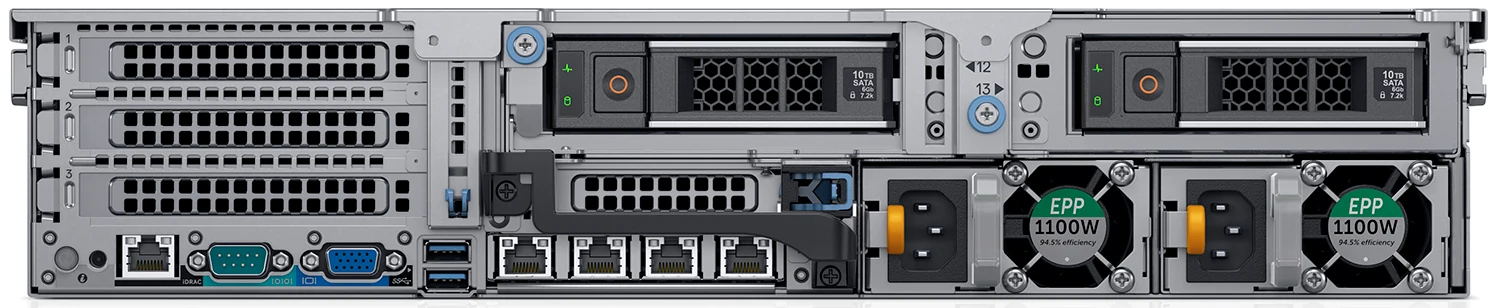
Storage, almost entirely. Dell documents both machines in one guide, and the R740 is given front drive bays only — eight or sixteen 2.5-inch, or eight 3.5-inch. The R740xd adds a wider front of twenty-four 2.5-inch or twelve 3.5-inch bays, a four-drive tray in the middle of the chassis and a rear module of two 3.5-inch or four 2.5-inch bays. A handful of smaller differences follow from that: the xd cannot take an internal optical drive, it is listed with a mono-form HBA350i the R740 is not, and it weighs several kilograms more when loaded.
How many drives does a PowerEdge R740xd hold?
Dell never prints a single number. It quotes three ceilings separately: up to twenty-four 2.5-inch or twelve 3.5-inch at the front, up to four in the mid-chassis tray, and up to four 2.5-inch or two 3.5-inch at the rear. Adding them together is reasonable arithmetic but it is not a figure Dell publishes, and the combination you can actually fit depends on which riser configuration is in the machine.
Does the R740xd support NVMe drives?
Yes — the generational comparison table puts up to twenty-four NVMe drives against this pair, which is the single biggest storage change from the R730xd it replaced. Two things come with that: accelerator support drops to a maximum of two cards on an NVMe configuration, and Dell flags NVMe builds of this model as an exception to the 30 °C inlet temperature it otherwise recommends.
What is the maximum memory of a PowerEdge R740xd?
Three terabytes across its twenty-four DDR4 slots, using 128 GB LRDIMMs. Intel Optane DC persistent memory raises that: up to 6.14 TB of persistent memory on its own, or 7.68 TB counting the LRDIMMs installed alongside it, with one DRAM module and one persistent module per channel. NVDIMM-N is a separate option again, twelve modules for 192 GB, and it requires its own battery.
Do the rear drive bays cost PCIe slots?
Yes, and this is the trade-off worth understanding before you buy. Dell tabulates eight riser configurations and marks only three of them as leaving rear storage possible: the no-riser build, riser 1B with 2B, and riser 1B with 2C. None of those three gives more than four PCIe slots, and the only x16 slot among them is low-profile and half-length. The configurations that reach seven or eight slots all rule rear drives out.
Which processors does the R740xd take?
The guide carries one processor table for both models — 111 SKUs covering the 1st and 2nd generations of Intel Xeon Scalable, from six-core Bronze parts up to twenty-eight cores, with no restriction specific to the xd anywhere in the document. Four -U parts (6208U, 6209U, 6210U and 6212U) are single-socket only, a restriction carried over from the R640 guide rather than stated in this one.
Can a PowerEdge R740xd take GPUs?
Only within tight limits. Cards are permitted on the 24 × 2.5-inch chassis and nowhere else, the envelope is up to three 300 W double-width or six 150 W single-width parts, and an NVMe front cuts that to two. The one GPU named by model in the whole guide is the NVIDIA M10, itself capped at two. Our refurbished configurator carries no accelerator options for this model, so a GPU build is quoted by hand.
What power supplies does the R740xd use?
Pairs of hot-plug units, fully redundant. Six Platinum AC ratings are documented, spanning 495 W at the bottom of the range to 2400 W at the top; Titanium is a single part at 750 W; a Gold unit covers −48 V to −60 V DC racks, and two mixed-mode HVDC parts are sold only into China and Japan. The Titanium unit is the most efficient of the set, at 96 % under half load.
Is the Dell PowerEdge R740xd still available, and is it end of life?
Not as a new server — this is a 2017 14th-generation platform and Dell stopped building it generations ago. We supply it refurbished and re-certified, which is what the configurator on this page quotes. Dell publishes support dates per service tag rather than per model, so an individual unit’s entitlement depends on its tag; our end-of-life checker tracks the dates that are published.
Can the R740xd take an internal optical or tape drive?
No to both. The guide states plainly that this model takes no internal optical drive, where the R740 beside it offers DVD-ROM or DVD+ROM. Neither machine takes an internal tape drive. External tape is supported — RD1000 over USB, LTO-5, LTO-6 and LTO-7 SAS units, and the rack-mount TL and ML libraries.