UK’s trusted IT infrastructure partner since 2003
Servnet
FinanceToolsConfiguratorGet in Touch
Technical data sheet · ThinkSystem V3 · 2U single-socket AMD

Lenovo ThinkSystem SR655 V3Specifications, configurations & comparisons

The ThinkSystem SR655 V3 puts a full-size 2U chassis — front, mid and rear drive zones, ten PCIe slots and room for three double-wide GPUs — behind a single AMD EPYC 9004 or 9005 processor. This data sheet maps what one socket and 12 DIMMs can and cannot drive, which storage and GPU layouts Lenovo supports, and the thermal rules that come with them.

2U Rack1 socketAMD EPYC 9005AMD EPYC 9004XClarity Controller 2
160cores on one socketEPYC 9845 (Zen 5c), 390 W
3TBDDR5 ceiling12 × 256 GB 3DS RDIMM, 1 per channel
402.5" drive bays24 front · 8 mid · 8 rear
32NVMe drivesor 24 without lane oversubscription
10PCIe slots10 rear, or 6 rear + 2 front, plus OCP
3double-wide GPUsor 8 single-wide NVIDIA L4

Every figure checked against the Lenovo ThinkSystem SR655 V3 Server Product Guide (August 27, 2026)

Form factor
2U Rack · 1 socket
Processors
AMD EPYC 9005 · AMD EPYC 9004
Memory
12 × DDR5 RDIMM · up to 3 TB
Drive bays
Up to 40 · 27 backplane options
Expansion
10 × PCIe · 1 × OCP 3.0
GPUs
Up to 8 · 8 listed
Boot
M.2 · 4 boot options
Management
XClarity Controller 2
01 — Overview

The SR655 V3 at a glance

Our read of Lenovo’s documentation: where the SR655 V3 is strong, and the limits worth knowing before you spec one.

Strengths

  • A whole 2U storage chassis on one processor: drive bays at the front, in the middle and at the rear reach 40 × 2.5-inch or 20 × 3.5-inch, and up to 32 of the 2.5-inch bays can be NVMe through switch adapters, or 24 when each drive needs its own x4 link.
  • Lenovo lists 45 EPYC processors across the 9005 and 9004 families — from the 8-core EPYC 9015 to the 160-core EPYC 9845, with TDPs up to 400 W.
  • Twelve DDR5 channels, each with its own DIMM slot, reach 6400 MHz on 5th Gen EPYC and hold up to 3 TB.
  • Eight single-wide NVIDIA L4 cards, or three double-wide GPUs that take slots 2, 5 and 7, fit alongside a single processor of up to 300 W.
  • The optional Processor Neptune Core Module carries all of the processor’s heat away in water through an open loop, so the fans only have to deal with the rest of the system.

Watch-outs

  • GPU builds cannot use a processor above 300 W, cannot have mid or rear drive bays, and Controlled GPUs ship only on the “for AI” base models.
  • Riser 3 (slots 7–8) is available only with no rear drives and no more than four NVMe or AnyBay bays on the onboard ports; front slots take the same connectors and disconnect the rear OCP slot.
  • Inlet air is capped at 30 °C with GPUs, 320–400 W processors, or mid/rear bays; some combinations — such as a 240–300 W processor with mid or rear bays, or a 24-bay front with GPUs — drop to 25 °C.
  • Memory stops at 12 DIMMs: 3 TB needs the 256 GB 3DS RDIMM from the 5th Gen table, the largest 4th Gen DIMM is 128 GB, and mirroring and rank sparing are not supported.
  • Power capping is not available even with XCC2 Platinum, and once Platform Secure Boot is active the EPYC processor is tied to that server’s firmware signing key.
Processors45 SKUs
Cores / CPU8–160
DIMM slots12
Backplanes27
Max bays40
GPUsup to 8
PSU options10 · to 2,600 W
02 — Processors

45 supported processors, mapped

Lenovo lists 45 processors for the SR655 V3: 25 from the 5th Gen EPYC 9005 family (21 Zen 5, 4 Zen 5c) and 20 from the 4th Gen EPYC 9004 family (18 “Genoa”, 2 “Bergamo”), with core counts from 8 to 160 and TDPs between 125 W and 400 W. Each is supplied as a single processor. The chart and the sortable table that follow cover every one of them.

Processor landscape — cores × TDP

45 SKUs · 2 families
Lenovo ThinkSystem SR655 V3: every supported processor by cores and TDP081624324048566472808896104112120128136144152160100 W150 W200 W250 W300 W350 W400 WCores per processorAMD EPYC 9845 — 160 cores / 320 threads · 390 W · 2.1 GHz base · 320 MB cache · DDR5-6400AMD EPYC 9825 — 144 cores / 288 threads · 390 W · 2.2 GHz base · 384 MB cache · DDR5-6400AMD EPYC 9745 — 128 cores / 256 threads · 400 W · 2.4 GHz base · 256 MB cache · DDR5-6400AMD EPYC 9655 — 96 cores / 192 threads · 400 W · 2.6 GHz base · 384 MB cache · DDR5-6400AMD EPYC 9655P — 96 cores / 192 threads · 400 W · 2.6 GHz base · 384 MB cache · DDR5-6400AMD EPYC 9645 — 96 cores / 192 threads · 320 W · 2.3 GHz base · 256 MB cache · DDR5-6400AMD EPYC 9565 — 72 cores / 144 threads · 400 W · 3.15 GHz base · 384 MB cache · DDR5-6400AMD EPYC 9575F — 64 cores / 128 threads · 400 W · 3.3 GHz base · 256 MB cache · DDR5-6400AMD EPYC 9555 — 64 cores / 128 threads · 360 W · 3.2 GHz base · 256 MB cache · DDR5-6400AMD EPYC 9555P — 64 cores / 128 threads · 360 W · 3.2 GHz base · 256 MB cache · DDR5-6400AMD EPYC 9535 — 64 cores / 128 threads · 300 W · 2.4 GHz base · 256 MB cache · DDR5-6400AMD EPYC 9475F — 48 cores / 96 threads · 400 W · 3.65 GHz base · 256 MB cache · DDR5-6400AMD EPYC 9455 — 48 cores / 96 threads · 300 W · 3.15 GHz base · 256 MB cache · DDR5-6400AMD EPYC 9455P — 48 cores / 96 threads · 300 W · 3.15 GHz base · 256 MB cache · DDR5-6400AMD EPYC 9365 — 36 cores / 72 threads · 300 W · 3.4 GHz base · 192 MB cache · DDR5-6400AMD EPYC 9375F — 32 cores / 64 threads · 320 W · 3.8 GHz base · 256 MB cache · DDR5-6400AMD EPYC 9355 — 32 cores / 64 threads · 280 W · 3.55 GHz base · 256 MB cache · DDR5-6400AMD EPYC 9355P — 32 cores / 64 threads · 280 W · 3.55 GHz base · 256 MB cache · DDR5-6400AMD EPYC 9335 — 32 cores / 64 threads · 210 W · 3 GHz base · 128 MB cache · DDR5-6400AMD EPYC 9275F — 24 cores / 48 threads · 320 W · 4.1 GHz base · 256 MB cache · DDR5-6400AMD EPYC 9255 — 24 cores / 48 threads · 200 W · 3.25 GHz base · 128 MB cache · DDR5-6400AMD EPYC 9175F — 16 cores / 32 threads · 320 W · 4.2 GHz base · 512 MB cache · DDR5-6400AMD EPYC 9135 — 16 cores / 32 threads · 200 W · 3.65 GHz base · 64 MB cache · DDR5-6400AMD EPYC 9115 — 16 cores / 32 threads · 125 W · 2.6 GHz base · 64 MB cache · DDR5-6400AMD EPYC 9015 — 8 cores / 16 threads · 125 W · 3.6 GHz base · 64 MB cache · DDR5-6400AMD EPYC 9754 — 128 cores / 256 threads · 360 W · 2.25 GHz base · 256 MB cache · DDR5-4800AMD EPYC 9734 — 112 cores / 224 threads · 340 W · 2.2 GHz base · 256 MB cache · DDR5-4800AMD EPYC 9654 — 96 cores / 192 threads · 360 W · 2.4 GHz base · 384 MB cache · DDR5-4800AMD EPYC 9654P — 96 cores / 192 threads · 360 W · 2.4 GHz base · 384 MB cache · DDR5-4800AMD EPYC 9634 — 84 cores / 168 threads · 290 W · 2.25 GHz base · 384 MB cache · DDR5-4800AMD EPYC 9554 — 64 cores / 128 threads · 360 W · 3.1 GHz base · 256 MB cache · DDR5-4800AMD EPYC 9554P — 64 cores / 128 threads · 360 W · 3.1 GHz base · 256 MB cache · DDR5-4800AMD EPYC 9534 — 64 cores / 128 threads · 280 W · 2.45 GHz base · 256 MB cache · DDR5-4800AMD EPYC 9474F — 48 cores / 96 threads · 360 W · 3.6 GHz base · 256 MB cache · DDR5-4800AMD EPYC 9454 — 48 cores / 96 threads · 290 W · 2.75 GHz base · 256 MB cache · DDR5-4800AMD EPYC 9454P — 48 cores / 96 threads · 290 W · 2.75 GHz base · 256 MB cache · DDR5-4800AMD EPYC 9374F — 32 cores / 64 threads · 320 W · 3.85 GHz base · 256 MB cache · DDR5-4800AMD EPYC 9354 — 32 cores / 64 threads · 280 W · 3.25 GHz base · 256 MB cache · DDR5-4800AMD EPYC 9354P — 32 cores / 64 threads · 280 W · 3.25 GHz base · 256 MB cache · DDR5-4800AMD EPYC 9334 — 32 cores / 64 threads · 210 W · 2.7 GHz base · 128 MB cache · DDR5-4800AMD EPYC 9274F — 24 cores / 48 threads · 320 W · 4.05 GHz base · 256 MB cache · DDR5-4800AMD EPYC 9224 — 24 cores / 48 threads · 200 W · 2.5 GHz base · 64 MB cache · DDR5-4800AMD EPYC 9254 — 24 cores / 48 threads · 200 W · 2.9 GHz base · 128 MB cache · DDR5-4800AMD EPYC 9174F — 16 cores / 32 threads · 320 W · 4.1 GHz base · 256 MB cache · DDR5-4800AMD EPYC 9124 — 16 cores / 32 threads · 200 W · 3 GHz base · 64 MB cache · DDR5-4800EPYC 9845160 cores · 2.4 W/core — top SKU and most efficient
AMD EPYC 9005 25AMD EPYC 9004 20Bubble size = L3 cache · hover a bubble for the full SKU

Processor explorer

filter · sort · compare
ProcessorCores / threadsBaseL3 cacheTDPW / coreMemory
AMD EPYC 9845160 / 3202.1 GHz320 MB390 W2.4DDR5-6400
AMD EPYC 9825144 / 2882.2 GHz384 MB390 W2.7DDR5-6400
AMD EPYC 9745128 / 2562.4 GHz256 MB400 W3.1DDR5-6400
AMD EPYC 9754128 / 2562.25 GHz256 MB360 W2.8DDR5-4800
AMD EPYC 9734112 / 2242.2 GHz256 MB340 W3.0DDR5-4800
AMD EPYC 965596 / 1922.6 GHz384 MB400 W4.2DDR5-6400
AMD EPYC 9655P96 / 1922.6 GHz384 MB400 W4.2DDR5-6400
AMD EPYC 964596 / 1922.3 GHz256 MB320 W3.3DDR5-6400
AMD EPYC 965496 / 1922.4 GHz384 MB360 W3.8DDR5-4800
AMD EPYC 9654P96 / 1922.4 GHz384 MB360 W3.8DDR5-4800
AMD EPYC 963484 / 1682.25 GHz384 MB290 W3.5DDR5-4800
AMD EPYC 956572 / 1443.15 GHz384 MB400 W5.6DDR5-6400
AMD EPYC 9575F64 / 1283.3 GHz256 MB400 W6.3DDR5-6400
AMD EPYC 955564 / 1283.2 GHz256 MB360 W5.6DDR5-6400
AMD EPYC 9555P64 / 1283.2 GHz256 MB360 W5.6DDR5-6400
AMD EPYC 953564 / 1282.4 GHz256 MB300 W4.7DDR5-6400
AMD EPYC 955464 / 1283.1 GHz256 MB360 W5.6DDR5-4800
AMD EPYC 9554P64 / 1283.1 GHz256 MB360 W5.6DDR5-4800
AMD EPYC 953464 / 1282.45 GHz256 MB280 W4.4DDR5-4800
AMD EPYC 9475F48 / 963.65 GHz256 MB400 W8.3DDR5-6400
AMD EPYC 945548 / 963.15 GHz256 MB300 W6.3DDR5-6400
AMD EPYC 9455P48 / 963.15 GHz256 MB300 W6.3DDR5-6400
AMD EPYC 9474F48 / 963.6 GHz256 MB360 W7.5DDR5-4800
AMD EPYC 945448 / 962.75 GHz256 MB290 W6.0DDR5-4800
AMD EPYC 9454P48 / 962.75 GHz256 MB290 W6.0DDR5-4800
AMD EPYC 936536 / 723.4 GHz192 MB300 W8.3DDR5-6400
AMD EPYC 9375F32 / 643.8 GHz256 MB320 W10.0DDR5-6400
AMD EPYC 935532 / 643.55 GHz256 MB280 W8.8DDR5-6400
AMD EPYC 9355P32 / 643.55 GHz256 MB280 W8.8DDR5-6400
AMD EPYC 933532 / 643 GHz128 MB210 W6.6DDR5-6400
AMD EPYC 9374F32 / 643.85 GHz256 MB320 W10.0DDR5-4800
AMD EPYC 935432 / 643.25 GHz256 MB280 W8.8DDR5-4800
AMD EPYC 9354P32 / 643.25 GHz256 MB280 W8.8DDR5-4800
AMD EPYC 933432 / 642.7 GHz128 MB210 W6.6DDR5-4800
AMD EPYC 9275F24 / 484.1 GHz256 MB320 W13.3DDR5-6400
AMD EPYC 925524 / 483.25 GHz128 MB200 W8.3DDR5-6400
AMD EPYC 9274F24 / 484.05 GHz256 MB320 W13.3DDR5-4800
AMD EPYC 922424 / 482.5 GHz64 MB200 W8.3DDR5-4800
AMD EPYC 925424 / 482.9 GHz128 MB200 W8.3DDR5-4800
AMD EPYC 9175F16 / 324.2 GHz512 MB320 W20.0DDR5-6400
AMD EPYC 913516 / 323.65 GHz64 MB200 W12.5DDR5-6400
AMD EPYC 911516 / 322.6 GHz64 MB125 W7.8DDR5-6400
AMD EPYC 9174F16 / 324.1 GHz256 MB320 W20.0DDR5-4800
AMD EPYC 912416 / 323 GHz64 MB200 W12.5DDR5-4800
AMD EPYC 90158 / 163.6 GHz64 MB125 W15.6DDR5-6400
  • For 6400 MHz memory a 5th Gen processor needs one of the DIMMs Lenovo marks as 6400 MHz-capable plus up-to-date system firmware; otherwise the memory clock settles at 6000 MHz.
  • The P-suffix SKUs (9354P, 9454P, 9554P, 9654P, 9355P, 9455P, 9555P, 9655P) have the same cores, clocks, cache and TDP in Lenovo’s tables as the matching non-P parts.
  • Heatsink choice follows TDP: higher-TDP processors use a performance heatsink with two satellite heatsinks joined by liquid-filled copper tubes.
  • Standard single-rotor fans are allowed only up to 240 W TDP (with no GPUs, 3DS RDIMMs, 100GbE adapters, 12 × 3.5-inch front, or mid/rear bays); anything else needs Performance fans.
  • Group E processors (320–400 W cTDP) hold the server to 30 °C inlet air; the 9754, 9734, 9654(P), 9554(P) and 9174F drop to 25 °C behind a 24 × 2.5-inch or 12 × 3.5-inch front with no mid or rear bays.
03 — Memory

12 DDR5 DIMM slots

The single processor drives 12 DDR5 channels with one DIMM slot on each, so the server tops out at 12 DIMMs. Supported DIMM counts are one, two, four, six, eight, ten or all twelve, and Lenovo recommends filling all 12 channels with identical parts. Memory speed tops out at 6400 MHz on 5th Gen EPYC and 4800 MHz on 4th Gen.

Capacity with every slot filled

by DIMM size
16 GB192 GB32 GB384 GB64 GB768 GB96 GB1.1 TB128 GB1.5 TB256 GB3 TB5th Gen only12 slots · 12 per processor · each tick = one DIMM

Rated memory speed

from the processor table
Processor familyUp to
AMD EPYC 90056400 MT/s
AMD EPYC 90044800 MT/s
  • The DIMM lists are split by generation: 6400 MHz parts work only with 5th Gen processors and 4800 MHz parts only with 4th Gen. The 128 GB 5600 MHz RDIMM in the 4th Gen table runs at 4800 MHz.
  • The 256 GB 3DS RDIMM appears only in the 5th Gen table, so a 4th Gen server reaches 1.5 TB (12 × 128 GB).
  • Mixing 9x4 with 10x4 RDIMMs, x4 with x8, or 16Gb, 24Gb and 32Gb DRAM is not allowed, nor 128 GB with 256 GB 3DS RDIMMs; at most two capacities per processor.
  • SDDC works with x4 DIMMs but not 9x4; memory mirroring and rank sparing are not offered.
  • When a GPU is added later, every empty DIMM slot must carry a DIMM filler to keep airflow right.
04 — Storage

27 backplane options, up to 40 bays

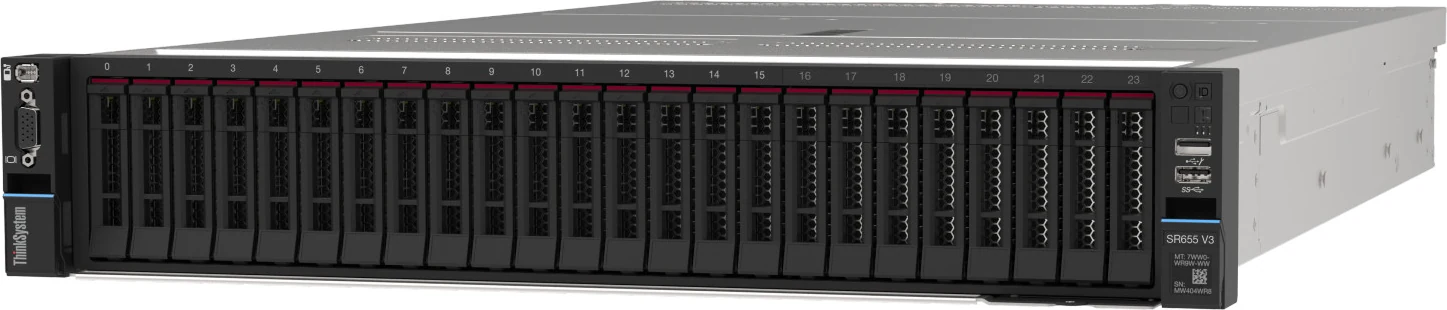
Drives sit in three zones: up to 12 × 3.5-inch or 24 × 2.5-inch at the front, 4 × 3.5-inch or 8 × 2.5-inch in the middle (reached with the top cover off) and up to 4 × 3.5-inch or 8 × 2.5-inch at the rear, plus two 7mm boot drives. All of them are hot-swap. The headline layouts below are complete configurations from Lenovo’s storage tables; the chart after them plots the individual backplane kits they are built from.

Headline layouts

front panel view

Front panel

Rear module

Lenovo config 33: three 8-bay SAS/SATA front backplanes, two 4-bay SAS/SATA mid backplanes (not drawn) and the 8-bay rear backplane — 40 drives, run through a 48-port internal expander plus a RAID adapter or HBA.

SAS/SATANVMeSAS/SATA + NVMe

Controllers & boot

  • On Board SATA AHCI Mode — Onboard (no RAID). Onboard controllers; RAID levels: None
  • Non RAID NVMe — Onboard (no RAID). Onboard controllers; RAID levels: None
  • 440-8i SAS/SATA PCIe Gen4 12Gb HBA — HBA. 12Gb SAS/6Gb SATA HBA - Broadcom PCIe Gen 4; RAID levels: None
  • 440-16i SAS/SATA PCIe Gen4 12Gb HBA — HBA. 12Gb SAS/6Gb SATA HBA - Broadcom PCIe Gen 4; RAID levels: None
  • 440-16i SAS/SATA PCIe Gen4 12Gb Internal HBA — HBA. 12Gb SAS/6Gb SATA HBA - Broadcom PCIe Gen 4; internal CFF (cabled)
  • RAID 540-8i PCIe Gen4 12Gb Adapter — RAID. 12Gb SAS/6Gb SATA RAID adapters - Broadcom PCIe Gen 4 (RAID 940 adapters support Tri-Mode); RAID levels: 0, 1, 10 No
  • RAID 540-16i PCIe Gen4 12Gb Adapter — RAID. 12Gb SAS/6Gb SATA RAID adapters - Broadcom PCIe Gen 4 (RAID 940 adapters support Tri-Mode)
  • RAID 940-8i 4GB Flash PCIe Gen4 12Gb Adapter — RAID, 4GB cache. 12Gb SAS/6Gb SATA RAID adapters - Broadcom PCIe Gen 4 (RAID 940 adapters support Tri-Mode); RAID levels: 0, 1, 10, 5, 50, 6, 60
  • M.2 SATA/NVMe 2-Bay Enablement Kit (4Y37A09738) — boot
  • M.2 SATA/x4 NVMe 2-Bay Adapter (4Y37A79663) — boot
  • M.2 NVMe 2-Bay RAID Adapter (4Y37A09750) — boot
  • M.2 RAID B540i-2i SATA/NVMe Adapter (4Y37A90063) — boot
All 23 controllers and 4 boot options
  • RAID 940-8i 8GB Flash PCIe Gen4 12Gb Adapter — RAID, 8GB cache. 12Gb SAS/6Gb SATA RAID adapters - Broadcom PCIe Gen 4 (RAID 940 adapters support Tri-Mode); RAID levels: 0, 1, 10, 5, 50, 6, 60
  • RAID 940-16i 4GB Flash PCIe Gen4 12Gb Adapter — RAID, 4GB cache. 12Gb SAS/6Gb SATA RAID adapters - Broadcom PCIe Gen 4 (RAID 940 adapters support Tri-Mode); RAID levels: 0, 1, 10, 5, 50, 6, 60
  • RAID 940-16i 8GB Flash PCIe Gen4 12Gb Adapter — RAID, 8GB cache. 12Gb SAS/6Gb SATA RAID adapters - Broadcom PCIe Gen 4 (RAID 940 adapters support Tri-Mode); RAID levels: 0, 1, 10, 5, 50, 6, 60
  • RAID 940-16i 8GB Flash PCIe Gen4 12Gb Internal Adapter — RAID, 8GB cache. 12Gb SAS/6Gb SATA RAID adapters - Broadcom PCIe Gen 4 (RAID 940 adapters support Tri-Mode); internal CFF (cabled)
  • RAID 940-32i 8GB Flash PCIe Gen4 12Gb Adapter — RAID, 8GB cache. 12Gb SAS/6Gb SATA RAID adapters - Broadcom PCIe Gen 4 (RAID 940 adapters support Tri-Mode)
  • 48 port 12Gb Internal Expander — SAS Expander. 12Gb SAS/6Gb SATA expanders; internal CFF (cabled)
  • RAID 940-8i 4GB Flash PCIe Gen4 12Gb Adapter for U.3 — RAID, 4GB cache. Tri-Mode (U.3 NVMe) variant
  • RAID 940-8i 8GB Flash PCIe Gen4 12Gb Adapter for U.3 — RAID, 8GB cache. Tri-Mode (U.3 NVMe) variant
  • RAID 940-16i 4GB Flash PCIe Gen4 12Gb Adapter for U.3 — RAID, 4GB cache. Tri-Mode (U.3 NVMe) variant
  • RAID 940-16i 8GB Flash PCIe Gen4 12Gb Adapter for U.3 — RAID, 8GB cache. Tri-Mode (U.3 NVMe) variant
  • PCIe Gen5 NVMe Retimer Adapter (4 drives) — NVMe Retimer. NVMe using x4 interface; RAID levels: None
  • 4-Port PCIe Gen4 NVMe Retimer Adapter (4 drives) — NVMe Retimer. NVMe using x4 interface; RAID levels: None
  • 1611-8P PCIe Gen4 Switch Adapter (8 drives) — NVMe Switch. NVMe using x4 interface
  • RAID 540-8i for M.2/7mm NVMe Boot Enablement — RAID. CTO feature (max 1): RAID 540-8i operating in Tri-Mode, installed in PCIe slot 3, required for RAID-1 on NVMe drives in the M.2 SATA/x4 NVMe 2-Bay Adapter (4Y37A79663) or the 7mm SATA/NVMe 2-Bay Rear Enablement Kit v2 (BU0N); cannot be used with other drive bays (not even M.2 when used for 7mm); M.2 RAID and 7mm RAID are mutually exclusive
  • ThinkSystem 440-16e SAS/SATA PCIe Gen4 12Gb HBA — HBA. External SAS HBA (JBOD to external enclosures/tape), part 4Y37A09724 feature B8P7 - lp1610 L3566
  • The processor’s integrated SATA and NVMe controllers are JBOD-only; up to 12 NVMe drives attach directly, and more go through retimer or switch adapters.
  • Tri-Mode on the RAID 940-8i and 940-16i lets U.3 NVMe share a controller with SAS and SATA drives — AnyBay backplanes only, one PCIe lane per NVMe drive, U.2 excluded, enabled with feature CH5Z.
  • The two 7mm drives take the place of slot 3 or slot 6, never both, and must be both SATA or both NVMe; 7mm RAID and M.2 RAID cannot be combined.
  • Mid backplanes take their power from a riser, so a mid-bay build may need Riser 1 or Riser 2; mid bays also rule out full-length adapters and every GPU, and 2.5-inch mid backplanes go in as a matched pair.
  • Lenovo rules out cluster use for both SAS-expander fronts (BQ2S, 12 × 3.5-inch; BQ2T, 24 × 2.5-inch). Choosing 3.5-inch front bays also gives up the internal cabled-adapter position, because the bays occupy that space.

Every documented backplane

24 with drive bays
2U 24x2.5" SAS/SATA with Rear 4-Bay Expander Backp…2U 24x2.5" SAS/SATA with Rear 4-Bay Expander Backplane242U 2.5" 6 SAS/SATA+2 NVMe Backplane2U 2.5" 6 SAS/SATA+2 NVMe Backplane82U 8x2.5" AnyBay Gen5 Backplane2U 8x2.5" AnyBay Gen5 Backplane82U 8x2.5" NVMe Gen5 Backplane2U 8x2.5" NVMe Gen5 Backplane82U 8x2.5" SAS/SATA Backplane2U 8x2.5" SAS/SATA Backplane82U 8x2.5" SAS/SATA Rear Backplane2U 8x2.5" SAS/SATA Rear Backplane82U/4U 8x2.5" AnyBay Backplane2U/4U 8x2.5" AnyBay Backplane82U/4U 8x2.5" NVMe Backplane2U/4U 8x2.5" NVMe Backplane82U 6x2.5" SAS/SATA+2 AnyBay Backplane2U 6x2.5" SAS/SATA+2 AnyBay Backplane62U 6x2.5" SAS/SATA+2 AnyBay Gen5 Backplane2U 6x2.5" SAS/SATA+2 AnyBay Gen5 Backplane62U 6x2.5" SAS/SATA+2 NVMe Gen5 Backplane2U 6x2.5" SAS/SATA+2 NVMe Gen5 Backplane61U/2U 4x2.5" AnyBay Backplane1U/2U 4x2.5" AnyBay Backplane42U 4x2.5" Middle NVMe Backplane2U 4x2.5" Middle NVMe Backplane42U 4x2.5" Middle NVMe Gen5 Backplane2U 4x2.5" Middle NVMe Gen5 Backplane42U 4x2.5" SAS/SATA Backplane2U 4x2.5" SAS/SATA Backplane42U 4x2.5" SAS/SATA Middle Backplane2U 4x2.5" SAS/SATA Middle Backplane44x2.5" AnyBay Gen5 Backplane4x2.5" AnyBay Gen5 Backplane42U 12x3.5" SAS/SATA with Rear 4-Bay Expander Backp…2U 12x3.5" SAS/SATA with Rear 4-Bay Expander Backplane122U 8x3.5" SAS/SATA Backplane2U 8x3.5" SAS/SATA Backplane82U 8x3.5" SAS/SATA+4 AnyBay Backplane2U 8x3.5" SAS/SATA+4 AnyBay Backplane82U 8x3.5" SAS/SATA+4 NVMe Backplane2U 8x3.5" SAS/SATA+4 NVMe Backplane81U/2U 4x3.5" SAS/SATA Backplane1U/2U 4x3.5" SAS/SATA Backplane42U 4x3.5" SAS/SATA Middle Backplane2U 4x3.5" SAS/SATA Middle Backplane42U 2x3.5" SAS/SATA Rear Backplane2U 2x3.5" SAS/SATA Rear Backplane2Bays · solid = front · dashed = rear · brighter = NVMe-only
2.5-inch3.5-inchEDSFF (E1.S / E3.S)
05 — Accelerators & I/O

GPUs, PCIe and networking

Double-wide GPUs go in slots 2, 5 and 7, each blocking the slot beside it (1, 4 or 8); the single-wide NVIDIA L4 can use slots 1–7 and the front slots 11 and 12. Every GPU in the server must be the same model. Controlled GPUs are sold only on “for AI” base models and non-controlled ones only on the general-purpose models. The L4 always needs a PCIe Gen5 slot, and the L40 and L40S need one with 5th Gen processors. Up to 8 × single-wide L4 or 3 × double-wide, with a processor of 300 W or less and no mid or rear drive bays.

Not TCE Controlled NVIDIA L4 24GB PCIe Gen4 Passive GPU

single-wide
24GB · up to 8

Not TCE Controlled NVIDIA L40S 48GB PCIe Gen4 Passive GPU

double-wide
48GB · up to 3

Not TCE Controlled NVIDIA RTX PRO 6000 Blackwell Max-Q Workstation Edition 96GB PCIe Gen5 Active GPU

double-wide
96GB · up to 3

Not TCE Controlled NVIDIA L40 48GB PCIe Gen4 Passive GPU

double-wide
48GB · up to 3

Not TCE No NVIDIA A16 64GB Gen4 PCIe Passive GPU

double-wide
64GB · up to 3

Not TCE Controlled NVIDIA RTX PRO 4500 Blackwell Workstation Edition 32GB PCIe Gen5 Active GPU

double-wide
32GB · up to 3

Not TCE No NVIDIA RTX 4500 Ada 24GB PCIe Active GPU

double-wide
24GB · up to 3

Not TCE Controlled NVIDIA A30 24GB PCIe Gen4 Passive GPU

double-wide
24GB · up to 3

I/O topology

64 lanes per CPU
CPU64 × PCIe 5.012 ch · 12 DIMMUp to 10 rear PCIe slots4 risers · 6 FH + 4 LP, or 8 FH2 × front PCIe x16 slotsFHHL · Gen4 or Gen5 · ≤16 baysOCP 3.0 SFF · PCIe 4.0 x16rear or front, never bothXCC2 dedicated RJ45 port10/100/1000 · Redfish · IPMI 2.0

Of the 128 PCIe 5.0 lanes on each supported EPYC, Lenovo’s guide says 64 serve PCIe and NVMe devices. Riser 1 (slots 1–3) and Riser 2 (slots 4–6) plug into the system board; Riser 3 (slots 7–8) and Riser 4 (slots 9–10) are cabled to system-board ports, and the front slots use those same connectors.

Network adapters Lenovo lists

32 options
AdapterPortsForm
Broadcom 5719 1GbE RJ45 4-port OCP Ethernet Adapter4 × 1GbEOCP 3.0
Intel I350 1GbE RJ45 4-Port OCP Ethernet Adapter V24 × 1GbEOCP 3.0
Broadcom 57412 10GBase-T 4-Port OCP Ethernet Adapter4 × 10GBase-TOCP 3.0
Broadcom 57416 10GBASE-T 2-port OCP Ethernet Adapter2 × 10GBASE-TOCP 3.0
Intel X710-T2L 10GBASE-T 2-port OCP Ethernet Adapter2 × 10GBASE-TOCP 3.0
Intel X710-T4L 10GBase-T 4-Port OCP Ethernet Adapter4 × 10GBase-TOCP 3.0
Broadcom 57414 10/25GbE SFP28 2-Port OCP Ethernet Adapter2 × 10/25GbEOCP 3.0
Broadcom 57504 10/25GbE SFP28 4-Port OCP Ethernet Adapter4 × 10/25GbEOCP 3.0
Intel E810-DA2 10/25GbE SFP28 2-Port OCP Ethernet Adapter2 × 10/25GbEOCP 3.0
Intel E810-DA4 10/25GbE SFP28 4-Port OCP Ethernet Adapter4 × 10/25GbEOCP 3.0
Mellanox ConnectX-6 Lx 10/25GbE SFP28 2-port OCP Ethernet Adapter2 × 10/25GbEOCP 3.0
Broadcom 57508 100GbE QSFP56 2-Port OCP Ethernet Adapter2 × 100GbEOCP 3.0
Broadcom 5719 1GbE RJ45 4-Port PCIe Ethernet Adapter4 × 1GbEPCIe
I350-T4 PCIe 1Gb 4-Port RJ45 Ethernet Adapter4 × 1GbPCIe
Broadcom 57412 10GBase-T 4-Port PCIe Ethernet Adapter4 × 10GBase-TPCIe
Broadcom 57416 10GBASE-T 2-Port PCIe Ethernet Adapter2 × 10GBASE-TPCIe
Intel X710-T2L 10GBase-T 2-Port PCIe Ethernet Adapter2 × 10GBase-TPCIe
Intel X710-T4L 10GBase-T 4-Port PCIe Ethernet Adapter4 × 10GBase-TPCIe
Broadcom 57414 10/25GbE SFP28 2-port PCIe Ethernet Adapter2 × 10/25GbEPCIe
Broadcom 57504 10/25GbE SFP28 4-port PCIe Ethernet Adapter4 × 10/25GbEPCIe
Intel E810-DA2 10/25GbE SFP28 2-Port PCIe Ethernet Adapter2 × 10/25GbEPCIe
Intel E810-DA4 10/25GbE SFP28 4-Port PCIe Ethernet Adapter4 × 10/25GbEPCIe
Mellanox ConnectX-6 Lx 10/25GbE SFP28 2-port PCIe Ethernet Adapter2 × 10/25GbEPCIe
Broadcom 57508 100GbE QSFP56 2-Port PCIe 4 Ethernet Adapter2 × 100GbEPCIe
Mellanox ConnectX-6 Dx 100GbE QSFP56 2-port PCIe Ethernet Adapter2 × 100GbEPCIe
Mellanox ConnectX-6 HDR100/100GbE QSFP56 1-port PCIe VPI Adapter1 × HDR100/100GbEPCIe
Mellanox ConnectX-6 HDR/200GbE QSFP56 1-port PCIe 4 VPI Adapter1 × HDR/200GbEPCIe
NVIDIA ConnectX-7 NDR200/200GbE QSFP112 2-port PCIe Gen5 x16 InfiniBand Adapter2 × NDR200/200GbEPCIe
NVIDIA BlueField-3 B3220 VPI QSFP112 2P 200G PCIe Gen5 x16 with Tin Plating Connector2 × 200GbEPCIe
NVIDIA ConnectX-7 NDR400 OSFP 1-port PCIe Gen5 VPI Adapter1 × NDR400PCIe
NVIDIA ConnectX-8 8240 400GbE / 400Gb/s IB QSFP112 2-port PCIe Gen6 x16 (Generic FW)2 × 400GbEPCIe
Cornelis CN5000 Omni-Path 1-Port QSFP112 HFI SuperNIC (Generic FW)1 × 400Gb Omni-PathPCIe
  • Up to nine slots can run at PCIe 5.0. The Riser 3/4 kit that supplies ten rear slots provides Gen4 slots, despite “Gen5” in its feature name.
  • Riser 3 needs a build with no rear drives and no more than four NVMe or AnyBay bays on the onboard NVMe ports.
  • Front slots work only alongside Riser 1 and Riser 2, and the lockable security bezel cannot be fitted with them.
  • The x8 slots are open-ended and physically accept x16 cards.
  • Builds with a 2.5-inch front have a spare internal mounting area for a cabled RAID card or HBA, wired to an x8 connector, so no rear slot is spent on storage.
06 — Power & cooling

10 power supplies, 750–2,600 W

Lenovo offers ten hot-swap power supplies spanning 750–2600 W: Titanium units at 750, 1100, 1800 and 2600 W, Platinum units at 750, 1100, 1800 and 2400 W, plus a single DC option rated 1100 W at −48 V. A server takes up to two for redundancy, and both must be the same model.

050010001500200025003000750 W Platinum — AC input power - 80 PLUS Platinum efficiency; input 230V/115V; max quantity 2750Platinum750 W Titanium — AC input power - 80 PLUS Titanium efficiency; input 230V; max quantity 2750Titanium750 W Titanium — AC input power - 80 PLUS Titanium efficiency; input 230V; max quantity 2750Titanium1100 W n/a (DC input) — -48V DC input power; input -48V DC; max quantity 21100DC1100 W Platinum — AC input power - 80 PLUS Platinum efficiency; input 230V/115V; max quantity 21100Platinum1100 W Titanium — AC input power - 80 PLUS Titanium efficiency; input 230V; max quantity 21100Titanium1800 W Platinum — AC input power - 80 PLUS Platinum efficiency; input 230V; max quantity 21800Platinum1800 W Titanium — AC input power - 80 PLUS Titanium efficiency; input 230V; max quantity 21800Titanium2400 W Platinum — input 230V; max quantity 22400Platinum2600 W Titanium — AC input power - 80 PLUS Titanium efficiency; input 230V; max quantity 22600TitaniumWatts · dashed line = output at 100–120 V low line
AC−48 V DC
  • In Lenovo’s power table the 110 V column reads “Yes” for just two units, the 750 W and 1100 W Platinum; every other AC supply needs 220 V.
  • Inlets differ by rating: C14 on every supply to 1800 W, C20 on the 2400 W and 2600 W models.
  • Rear depth grows with the supply: flange-to-handle depth is 732 mm for units up to 1100 W, rising to 755 mm for the 1800 W supply and 781 mm for the 2400 W.
  • Up to six 60 mm hot-swap fans give N+1 redundancy; four suffice without Riser 3. Standard fans are single-rotor 17K RPM, Performance fans dual-rotor 21K RPM.
  • On a low-range 100–127 V feed the 1100 W unit must be paired with a cord rated over 10 A; 10 A cords are not supported. Chinese customers can also run any of the AC supplies from 240 V DC.
07 — Management, security & OS

Run it, secure it, choose the OS

Management

  • XClarity Controller 2 (XCC2) on an ASPEED AST2600 BMC
  • XCC2 Platinum: remote console, virtual media, System Guard, CNSA 1.0 Enterprise Strict Security, Neighbor Group (no power capping)
  • Dedicated rear RJ45 management port · optional Redundant System Management Port Adapter in the rear OCP slot
  • IPMI 2.0 (IPMI-over-LAN off by default), SNMPv3, CIM-XML, Redfish
  • XClarity Provisioning Manager (UEFI, F1 at boot)
  • XClarity One cloud management · XClarity Energy Manager
  • XClarity Mobile over USB · optional External Diagnostics Handset
  • Optional Integrated Diagnostics Panel on 8- and 16-bay 2.5-inch fronts

Security

  • Platform Firmware Resiliency hardware Root of Trust (NIST SP 800-193)
  • Integrated TPM 2.0 · Nationz TPM 2.0 in China only
  • AMD Platform Secure Boot — on by default; can be ordered disabled and enabled later
  • UEFI Secure Boot — set in the factory or enabled later (cannot then be turned off)
  • AMD SEV, SEV-ES, SEV-SNP and TSME
  • System Guard component-change detection (XCC2 Platinum)
  • Self-encrypting drives with IBM Security Key Lifecycle Manager
  • NIST SP 800-147B compliant
  • Optional chassis intrusion switch and lockable front bezel

Operating systems

  • Microsoft Windows Server 2019, 2022 and 2025
  • Windows 10 and 11 (workstation base models; limited adapters and drives)
  • Red Hat Enterprise Linux 8, 9 and 10
  • SUSE Linux Enterprise Server 15 and 16
  • Ubuntu 22.04, 24.04 and 26.04 LTS (20.04 with 4th Gen)
  • VMware ESXi 8.0, 9.0 and 9.1 (7.0 U3 with 4th Gen) · factory preload available
08 — Compare

SR655 → SR655 V3

Lenovo’s product guide compares the SR655 V3 with the original SR655. The move to DDR5 brings 12 memory channels at one DIMM each instead of eight channels at two, and PCIe 5.0 replaces PCIe 4.0 at the same 64 lanes per processor.

Previous generationThinkSystem SR655
This modelThinkSystem SR655 V3
Processor
1 × 2nd or 3rd Gen EPYC · up to 64 cores · 280 W
1 × 4th or 5th Gen EPYC · up to 160 cores · 400 W
PCIe lanes per CPU
64 × PCIe 4.0
64 × PCIe 5.0
Memory
DDR4 to 2933 MHz · 8 channels · 16 DIMMs (2 DPC)
DDR5 to 6400 MHz · 12 channels · 12 DIMMs (1 DPC)
Maximum memory
2 TB (16 × 128 GB)
3 TB (12 × 256 GB)
Drive bays
20 × 3.5" or up to 32 × 2.5"
20 × 3.5" or 40 × 2.5"
Onboard NVMe ports
16
12
Boot devices
2 × internal M.2
2 × internal M.2 · 2 × rear 7mm hot-swap
PCIe slots
Up to 8, all full-height
Up to 10 (6 FH + 4 LP) or 8 FH · up to 9 at Gen5
OCP 3.0
Rear, PCIe 4.0 x16
Rear or front, PCIe 4.0 x16
Management
ASPEED AST2500 BMC · limited XClarity
XClarity Controller 2 · full XClarity toolset

Source: Lenovo Press LP1610 (SR655 V3 product guide), Table 2 — Comparing the SR655 V3 to the SR655.

The SR655 V3 family side by side

The SR655 V3 is one of Lenovo’s AMD EPYC V3 rack servers: the SR635 V3 is its 1U single-socket counterpart, the SR645 V3 (1U) and SR665 V3 (2U) take up to two sockets, and the SR675 V3 is a 3U model; the Intel-based SR650 V3 shares the 2U drive-zone design. Each bar below uses the limits recorded in that model’s spec file.

SR655 V3SR635 V3SR645 V3SR665 V3SR675 V3SR650 V3Cores / CPUSR655 V3: 160160SR635 V3: 160160SR645 V3: 160160SR665 V3: 160160SR675 V3: 160160SR650 V3: 6464DIMM slotsSR655 V3: 1212SR635 V3: 1212SR645 V3: 2424SR665 V3: 2424SR675 V3: 2424SR650 V3: 3232Max memorySR655 V3: 3 TB3SR635 V3: 3 TB3SR645 V3: 6 TB6SR665 V3: 6 TB6SR675 V3: 6 TB6SR650 V3: 8 TB8Max drive baysSR655 V3: 4040SR635 V3: 1616SR645 V3: 1616SR665 V3: 4040SR675 V3: 88SR650 V3: 4040Max GPUsSR655 V3: 88SR635 V3: 55SR645 V3: 55SR665 V3: 77SR675 V3: 88SR650 V3: 88Largest PSUSR655 V3: 2,600 W2,600SR635 V3: 1,800 W1,800SR645 V3: 1,800 W1,800SR665 V3: 2,600 W2,600SR675 V3: 2,600 W2,600SR650 V3: 2,600 W2,600
This modelSiblings and successorEach value from that model’s own verified spec file · bars scale per column

Head-to-head comparisons

Every figure on this page, set against the machines buyers weigh it up with.

09 — Use cases

Five builds that suit the SR655 V3

Five builds that play to what a single-socket 2U can do, each assembled only from options our configurator allows on the SR655 V3. Open one to change it; at quotation we check the exact combination against Lenovo’s storage matrix, riser and thermal rules.

Software-defined storage

Hybrid NVMe and SATA storage node

Sixteen front bays split between an NVMe tier and a SATA SSD tier, both wired to the processor’s own ports, so the storage software receives raw drives with no RAID card in the way. A 32-core 5th Gen part leaves headroom for erasure coding and replication traffic over four 25GbE ports.

  • 1 × AMD EPYC 9355 — 32 cores @ 3.55 GHz, 280 W
  • 12 × 64 GB TruDDR5 6400 MHz — 768 GB, every channel filled
  • 8 × 7.68 TB NVMe U.3 on an 8-bay NVMe backplane
  • 8 × 3.84 TB SATA SSD on an 8-bay SAS/SATA backplane
  • Onboard SATA and NVMe ports — no RAID adapter
  • 2 × 480 GB M.2 NVMe boot
  • Intel E810-DA4 4 × 25GbE OCP 3.0
  • 2 × 1100 W Titanium
  • Red Hat Enterprise Linux 9

This matches Lenovo config 20 (8 SAS/SATA + 8 NVMe front bays on onboard ports). The onboard controllers are JBOD-only, so drive redundancy is the storage software’s job, and a 280 W processor calls for the Performance fans.

Open this build in the configurator →
Backup & archive

20-bay LFF backup target

The 3.5-inch chassis filled in all three zones — twelve front, four mid and four rear bays — for 400 TB of raw SATA capacity behind one 16-port RAID controller. A 200 W, 16-core processor is plenty for a backup repository and stays under the TDP line where mid and rear bays would force a 25 °C room.

  • 1 × AMD EPYC 9135 — 16 cores @ 3.65 GHz, 200 W
  • 20 × 20 TB 3.5-inch SATA HDD — 400 TB raw
  • 12 front + 4 mid + 4 rear 3.5-inch bays (Lenovo config 9)
  • RAID 940-16i with 8 GB flash cache
  • 12 × 32 GB TruDDR5 6400 MHz — 384 GB
  • Broadcom 57504 4 × 25GbE OCP 3.0
  • 2 × 1100 W Titanium
  • Windows Server 2025

Mid and rear bays mean Performance fans and a 30 °C inlet limit, and rear drives rule out Riser 3. Lenovo excludes the x4 M.2 adapter from this layout, so we confirm the boot device when we quote.

Open this build in the configurator →
AI inference

Three-GPU inference server

Three double-wide NVIDIA RTX PRO 6000 Blackwell Max-Q cards give 288 GB of GPU memory (3 × 96 GB) in slots 2, 5 and 7. The 48-core EPYC 9455 sits exactly at the 300 W ceiling Lenovo sets for GPU builds, and a 100GbE OCP adapter keeps networking out of the GPU slots.

  • 1 × AMD EPYC 9455 — 48 cores @ 3.15 GHz, 300 W
  • 3 × NVIDIA RTX PRO 6000 Blackwell Max-Q 96 GB, double-wide
  • 12 × 64 GB TruDDR5 6400 MHz — 768 GB
  • 8-bay 2.5-inch SAS/SATA front with 4 × 3.84 TB SATA SSD
  • 2 × 480 GB M.2 NVMe boot
  • Broadcom 57508 2 × 100GbE OCP 3.0
  • 2 × 2600 W Titanium
  • Ubuntu Server 24.04 LTS

The RTX PRO 6000 is a Controlled GPU, so it ships only on a “for AI” base model. GPU servers take no mid or rear drives and are limited to 30 °C inlet air, and the third card needs Riser 3, which allows at most four NVMe or AnyBay bays on the onboard ports.

Open this build in the configurator →
OLTP database

High-clock transaction database

The EPYC 9175F pairs 16 cores at 4.2 GHz base with 512 MB of L3 cache, and Lenovo’s benchmark table lists SR655 V3 TPC-E records for one-socket performance. Eight U.3 NVMe drives sit under hardware RAID through a Tri-Mode RAID 940 on an AnyBay backplane.

  • 1 × AMD EPYC 9175F — 16 cores @ 4.2 GHz, 320 W
  • 12 × 96 GB TruDDR5 6400 MHz — 1,152 GB
  • 8 × 3.84 TB NVMe U.3 on an 8-bay AnyBay backplane
  • RAID 940-8i with 8 GB flash, running Tri-Mode
  • 2 × 480 GB M.2 NVMe boot
  • Broadcom 57414 2 × 25GbE OCP 3.0
  • 2 × 1100 W Titanium
  • Windows Server 2025

At 320 W the 9175F is a Group E processor, so inlet air is limited to 30 °C and Performance fans are required. In Tri-Mode each NVMe drive links to the controller over a single PCIe lane.

Open this build in the configurator →
Virtualisation

160-core consolidation host

One EPYC 9845 brings 160 cores and 320 threads, and twelve 256 GB 3DS RDIMMs take the server to its full 3 TB — a large VM host without a second socket. Lenovo’s benchmark table includes a VMmark 4 result for one-socket servers in a matched pair.

  • 1 × AMD EPYC 9845 — 160 cores @ 2.1 GHz, 390 W
  • 12 × 256 GB TruDDR5 3DS RDIMM — 3 TB
  • 8 × 7.68 TB NVMe U.3 on onboard NVMe ports
  • 2 × 480 GB M.2 NVMe boot
  • Broadcom 57508 2 × 100GbE OCP 3.0
  • 2 × 1800 W Titanium
  • VMware ESXi 9.0

3DS RDIMMs and a 390 W processor both call for Performance fans, and the Group E processor limits inlet air to 30 °C. A 256 GB 3DS RDIMM added later must follow Lenovo support tip TT3220.

Open this build in the configurator →
10 — Refurbished alternatives

When a refurbished server makes more sense

We don’t offer refurbished Lenovo ThinkSystem through our configurator, so these are the closest re-certified AMD EPYC alternatives from Dell and HPE. All three are DDR4 platforms, which suits budgets where a proven previous-generation platform does the job.

Gen10 Plus · re-certified

HPE ProLiant DL385 Gen10 Plus

  • 2U · two sockets
  • 32 DIMM slots · up to 8 TB DDR4
  • Up to 24 × SFF or 12 × LFF
  • EPYC 7002/7003 · DDR4-3200 · PCIe 4.0 · iLO 5

The nearest 2U AMD match for storage or VM work that fits in 24 SFF or 12 LFF bays and gains from 32 DIMM slots.

Configure a refurbished DL385 Gen10 Plus →
Gen10 Plus · re-certified

HPE ProLiant DL325 Gen10 Plus

  • 1U · one socket
  • 16 DIMM slots · up to 4 TB DDR4
  • Up to 10 × SFF / NVMe
  • EPYC 7002/7003 · 128 PCIe 4.0 lanes · iLO 5

Keeps the single-socket AMD model for per-socket licensing or compute nodes, in 1U with ten SFF bays instead of a full 2U drive chassis.

Configure a refurbished DL325 Gen10 Plus →
14G · re-certified

Dell PowerEdge R7425

  • 2U · two sockets
  • 32 DIMM slots · up to 4 TB DDR4
  • Up to 24 × 2.5" or 12 × 3.5"
  • EPYC 7001 · GPU-capable · iDRAC9

A lower-cost AMD 2U for analytics, virtualisation or light GPU work when first-generation EPYC is enough.

Configure a refurbished R7425 →
11 — Full specifications

Lenovo ThinkSystem SR655 V3 specifications

Chassis & cooling

Form factor2U rack server
Machine types7D9E (3-year warranty) · 7D9F (1-year warranty)
Dimensions (W × H × D)445 × 87 × 766 mm · 482 mm across the EIA flanges
WeightUp to 38.8 kg
FansUp to 6 hot-swap 60 mm, N+1 · Standard 17K RPM single-rotor or Performance 21K RPM dual-rotor
Liquid coolingOptional Processor Neptune Core Module (open loop, factory-installed only; slot 6 lost)
ChipsetNone — platform controller functions are in the processor

Processor

SocketsOne
Families5th Gen AMD EPYC 9005 (“Turin”) · 4th Gen AMD EPYC 9004 (“Genoa”, “Bergamo”)
CoresUp to 160 (9005) · up to 128 (9004)
Maximum TDP400 W (9005) · 360 W (9004)
PCIe lanes128 × PCIe 5.0, 64 available for PCIe and NVMe devices
Memory channels12 DDR5

Memory

Slots12 DDR5 · 12 channels × 1 DIMM
TypesTruDDR5 RDIMM (x4, x8, 9x4) and 3DS RDIMM · no UDIMM or LRDIMM
DIMM sizes16, 32, 64, 96, 128 and 256 GB
SpeedUp to 6400 MHz (5th Gen) · up to 4800 MHz (4th Gen)
Maximum3 TB (12 × 256 GB 3DS RDIMM)
ProtectionECC, SDDC (x4, not 9x4), Bounded Fault, patrol/demand scrubbing, Post Package Repair · no mirroring or rank sparing
Persistent memoryNot supported

Storage

Front8 or 12 × 3.5" · 8, 16 or 24 × 2.5" (SAS/SATA, NVMe or AnyBay; Gen4 or Gen5 NVMe)
Mid-chassis4 × 3.5" or 8 × 2.5" hot-swap (top cover removed)
Rear2 or 4 × 3.5" · 4 or 8 × 2.5" · plus 2 × 7mm
Maximum20 × 3.5" or 40 × 2.5" · up to 32 NVMe (24 without oversubscription)
BootInternal M.2 module (1 or 2 drives) · 2 × rear 7mm hot-swap
OnboardSATA and NVMe controllers in the processor (JBOD) · 12 direct NVMe ports
AdaptersRAID 540 / 940 (8, 16 or 32 ports, up to 8 GB flash) · 440 HBAs · 48-port expander · NVMe retimer and switch adapters

Expansion & networking

PCIe slotsUp to 10: 10 rear, or 6 rear + 2 front x16
PCIe 5.0 slotsUp to 9
OCP1 × OCP 3.0 SFF, PCIe 4.0 x16, rear or front
InternalCabled RAID adapter / HBA bay (2.5-inch chassis)
SerialOptional RS-232 COM port bracket in a rear slot

Accelerators

GPU envelopeUp to 8 × single-wide or 3 × double-wide
Double-wide slots2, 5 and 7
CXLCXL 1.1 ready

Power

SuppliesUp to two hot-swap, redundant, identical
AC Titanium750, 1100, 1800 and 2600 W (230 V)
AC Platinum750 and 1100 W (230 V / 115 V) · 1800 and 2400 W (230 V)
DC1100 W, −48 V DC

Ports & video

Front1 × USB 3.2 Gen 1 · 1 × USB 2.0 (also XCC) · external diagnostics port · optional VGA
Rear3 × USB 3.2 Gen 1 · 1 × VGA · 1 × 1GbE XCC management · optional DB-9 serial
Internal1 × USB 3.2 Gen 1
Video16 MB, integrated in XCC2 · up to 1920 × 1200 at 60 Hz

Environment & warranty

ASHRAEClass A2 in most configurations; A3, A4 or H1 depending on hardware
Operating temperature10–35 °C (A2)
Warranty1 or 3 years by model · customer-replaceable units and onsite, 9 × 5 next business day
12 — FAQ

SR655 V3 questions, answered from the documentation

What is the maximum memory of the Lenovo ThinkSystem SR655 V3?

3 TB, using twelve 256 GB 3DS RDIMMs — one in each of the processor’s 12 memory channels. That DIMM is listed only for 5th Gen EPYC; the largest 4th Gen option is 128 GB, so a 4th Gen server reaches 1.5 TB. There are no second-DIMM-per-channel slots to add later.

Which processors does the SR655 V3 support?

Lenovo lists 45 single AMD EPYC processors: 25 from the 5th Gen 9005 family and 20 from the 4th Gen 9004 family, ranging from 8-core to 160-core parts rated 125–400 W. The largest is the 160-core EPYC 9845 at 390 W; the fastest-clocked base part is the 16-core 9175F at 4.2 GHz.

How many drives can the SR655 V3 hold?

Across its three zones the ceiling is 40 × 2.5-inch drives (front 24, middle 8, rear 8) or 20 × 3.5-inch drives (front 12, middle 4, rear 4). Boot drives come on top: two rear 7mm bays and an internal M.2 module. Up to 32 of the 2.5-inch drives can be NVMe using switch adapters, or 24 with no lane oversubscription.

How many GPUs does the SR655 V3 support?

Up to eight single-wide NVIDIA L4 cards, or three double-wide GPUs seated in slots 2, 5 and 7. Lenovo lists the L4, L40S, L40, A16, A30, RTX 4500 Ada, RTX PRO 4500 Blackwell and RTX PRO 6000 Blackwell Max-Q. GPU builds need a processor of 300 W or less and cannot use mid or rear drive bays.

Does having one processor limit PCIe expansion?

Lenovo gives each supported EPYC 128 PCIe 5.0 lanes, 64 of them available for PCIe and NVMe devices, and the server still offers up to 10 PCIe slots plus OCP 3.0 — up to nine at PCIe 5.0. The real trade-offs are between slots and drives: Riser 3 excludes rear drives, and front slots replace Riser 3 and 4.

How does the SR655 V3 differ from the SR665 V3 and SR635 V3?

The SR665 V3 uses the same 2U drive design (20 × 3.5-inch or 40 × 2.5-inch) but takes one or two processors, 24 DIMMs (6 TB) and up to 12 PCIe slots. The SR635 V3 is the 1U single-socket model: 12 DIMMs and 3 TB like the SR655 V3, but up to 12 × 2.5-inch bays, no 3.5-inch bays, five PCIe slots and four single-width GPUs of up to 75 W.

What power supplies are available for the SR655 V3?

Ten hot-swap options: 750, 1100, 1800 and 2600 W Titanium, 750, 1100, 1800 and 2400 W Platinum, and one DC choice rated 1100 W at −48 V. Just two of them, the 750 W and 1100 W Platinum units, accept 110 V. A server holds two supplies at most, and a pair must be identical.

How big and heavy is the SR655 V3?

Lenovo gives 445 × 87 × 766 mm (W × H × D) — 482 mm wide at the EIA flanges — and a maximum weight of 38.8 kg. Lenovo’s enhanced slide rails apply when a server of 34 kg or more ships installed in a rack, such as a build with 20 × 3.5-inch HDDs.

What changed from the original SR655 to the SR655 V3?

Processor support jumps two EPYC generations, from 2nd/3rd Gen to 4th/5th Gen, and the core ceiling rises from 64 to 160; from DDR4-2933 with 16 DIMMs to DDR5-6400 with 12 DIMMs on 12 channels, and from 2 TB to 3 TB. PCIe moves to 5.0 at 64 lanes, 2.5-inch bays rise from 32 to 40, the OCP slot can be at the front, and XClarity Controller 2 replaces the AST2500-based controller.

Is the Lenovo ThinkSystem SR655 V3 end of life?

No end-of-service date appears in Lenovo’s product guide, which still lists current processors and options, including changes marked as new in July 2026. An individual machine is covered for as long as its warranty or Lenovo service agreement runs, and if Lenovo announces withdrawal or support-end dates, our end-of-life checker will list them.

Sources & verification

Where these figures come from

Specifications are extracted from Lenovo’s published documents and independently re-checked line by line. Configurations are quote-based; availability and exact options are confirmed at quotation. Last reviewed 2026-09-11.

Get a quote for the Lenovo ThinkSystem SR655 V3

Tell us the workload and we’ll spec and price it — or build it in the configurator first.

Business enquiries only — please use your company email. Gmail, Hotmail and other personal addresses are not accepted.

We only ship hardware to the countries in the dropdown. Software and maintenance services are global.

We use these details to reply to your enquiry and prepare any quote. No marketing emails without your consent. Privacy Policy

Enquiring about: Lenovo ThinkSystem SR655 V3

Response within 4 business hours · No obligation

Quote for
Lenovo ThinkSystem SR655 V3
0800 987 4111

Talk to a UK specialist

Get expert advice or a no-obligation quote — servers, storage, networking, maintenance, finance and cloud. We reply the same working day.

or call 0800 987 4111