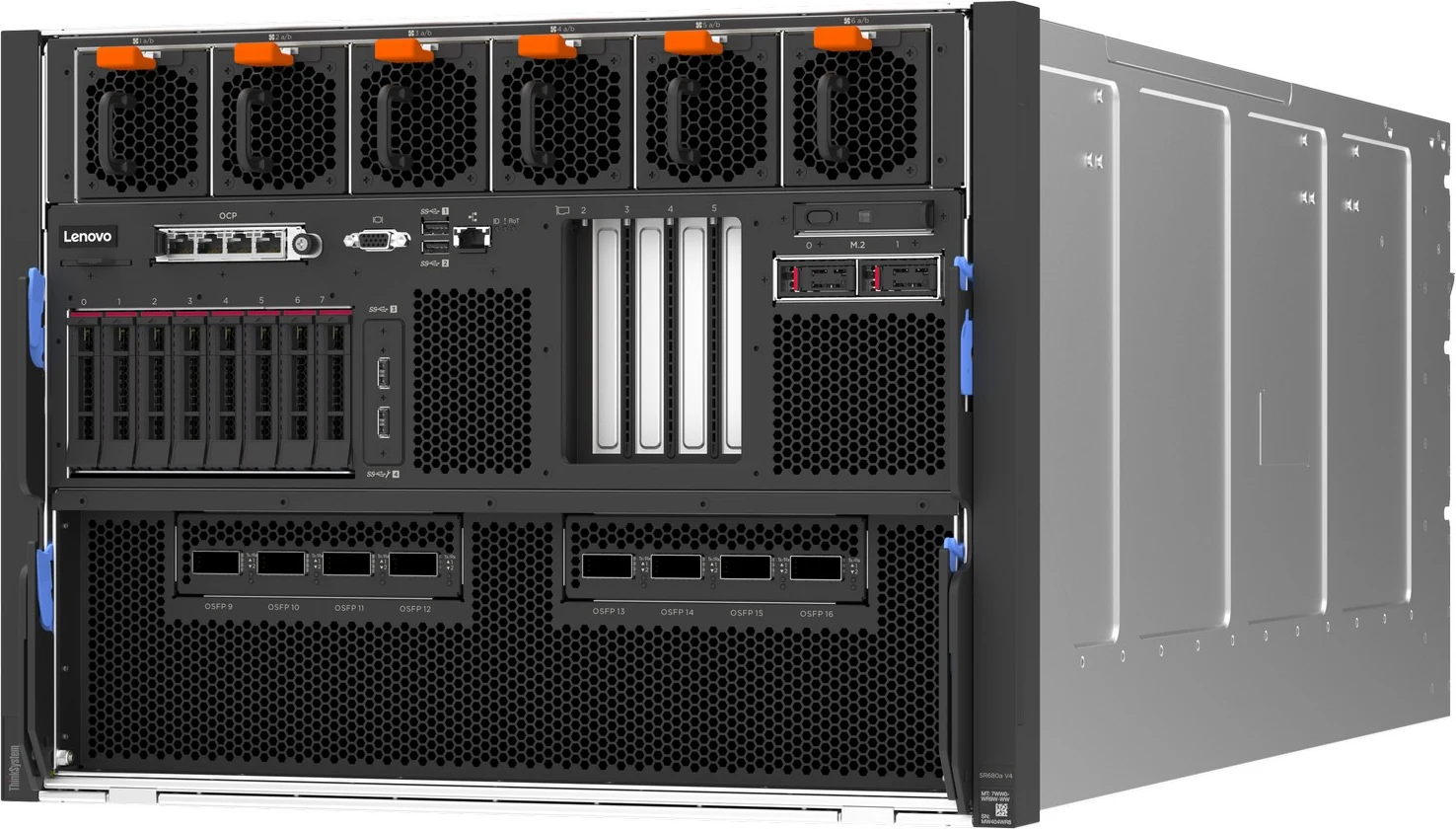
The ThinkSystem SR680a V4 is Lenovo’s air-cooled 8U host for an NVIDIA HGX B300 eight-GPU board, driven by two Xeon 6700P processors. Its defining trait is that the GPU fabric ships inside the box: eight ConnectX-8 switches on the GPU board feed eight 800Gb/s OSFP cages at the front. This page maps the GPU complex, the cabling and power choices, and the memory rules around it.
Our read of Lenovo’s documentation: where the SR680a V4 is strong, and the limits worth knowing before you spec one.
Strengths
+The HGX B300 NVL8 board carries eight SXM6 B300 GPUs, each with 288 GB of HBM3e at 7.7 TB/s and 1100 W, linked to one another over a 1.8 TB/s NVLink full mesh.
+Scale-out networking is integrated: eight ConnectX-8 switches on the GPU board, reached over PCIe 6.0 x16, drive eight front OSFP cages at 800Gb/s InfiniBand or Ethernet each, so the fabric does not consume the four PCIe slots.
+All data and management ports sit at the front — the OSFP cages, four PCIe 5.0 x16 slots, the OCP slot, USB, video and the XCC3 port; the rear carries only the fans and the power supplies, where the line cords connect.
+Two power paths: 3200 W AC supplies with N+1 redundancy, or 3800 W HVAC/HVDC supplies that reach N+N when all eight are fitted and fed above 249 V AC or 260 V DC.
+Against the SR680a V3, Lenovo lists up to 86 cores instead of 64, DDR5 up to 6400 MHz instead of 5600, hot-swap front M.2 boot with integrated RAID, and XCC3 with OpenBMC.
Watch-outs
!Only eight 2.5-inch NVMe bays remain, half the V3’s sixteen, and they run as JBOD on onboard ports with no RAID and no VROC.
!Pick the supply type at order: Lenovo does not support upgrading a 3200 W server to 3800 W supplies later, and the 3200 W units give N+1 only.
!Memory rules are tight: 64 GB and 96 GB DIMMs are accepted only as a full set of 32, so the 6400 MHz one-DIMM-per-channel speed is reachable only with sixteen 128 GB DIMMs.
!Weighing up to 124.7 kg, it mounts on a static shelf rail that cannot slide out, takes no cable-management arm and must leave the rack for service; Lenovo requires a material lift for single-person service and allows five per cabinet.
!Lenovo lists just two operating systems (RHEL 9.6 and Ubuntu 24.04 LTS), and says its NBD and 4-hour onsite targets do not apply to GPU-related service calls.
Processors6 SKUs
Cores / CPU48–86
DIMM slots32
Backplanes1
Max bays8
GPUsup to 8
PSU options2 · to 3,800 W
02 — Processors
6 supported processors, mapped
Two Xeon 6700P-series processors with Performance-cores are mandatory; Lenovo does not support a one-socket SR680a V4. Six SKUs are listed, all factory-installed (CTO) only, from the 48-core 270 W 6740P to the 86-core 350 W 6787P. Each brings eight DDR5 channels, 88 PCIe lanes and four UPI 2.0 links at 24 GT/s.
Processor landscape — cores × TDP
6 SKUs · 1 family
Xeon 6 P-core 6Bubble size = L3 cache · hover a bubble for the full SKU
Processor explorer
filter · sort · compare
Processor
Cores / threads
Base
L3 cache
TDP
W / core
Memory
Intel Xeon 6 6787P
86 / 172
2 GHz
336 MB
350 W
4.1
DDR5-6400
Intel Xeon 6 6767P
64 / 128
2.4 GHz
336 MB
350 W
5.5
DDR5-6400
Intel Xeon 6 6776P
64 / 128
2.3 GHz
336 MB
350 W
5.5
DDR5-6400
Intel Xeon 6 6760P
64 / 128
2.2 GHz
320 MB
330 W
5.2
DDR5-6400
Intel Xeon 6 6747P
48 / 96
2.7 GHz
288 MB
330 W
6.9
DDR5-6400
Intel Xeon 6 6740P
48 / 96
2.1 GHz
288 MB
270 W
5.6
DDR5-6400
The 6747P has the highest base clock of the six at 2.7 GHz (3.9 GHz turbo); the 6787P trades base clock (2.0 GHz) for the core count.
L3 cache runs from 288 MB (6740P, 6747P) to 336 MB (6767P, 6776P, 6787P).
Built-in accelerators differ by SKU: the 6747P, 6767P and 6787P carry four each of QAT, DLB, DSA and IAA engines; the 6740P, 6760P and 6776P carry two of each. All support Intel AMX.
Lenovo’s processor table rates four of the six for MRDIMMs at 8000 MHz, but the SR680a V4 memory table offers RDIMMs only.
SGX enclave size is 512 GB on the 6747P, 6767P, 6776P and 6787P and 128 GB on the 6740P and 6760P.
Nine UEFI presets can be set at the factory, from General Computing – Power Efficiency (the default) through HPC, Low Latency and two virtualisation profiles to database profiles.
03 — Memory
32 DIMM slots, 16 per processor
There are 32 DIMM slots, 16 per processor, on eight channels with two DIMMs each. Populating a single DIMM on each channel allows 6400 MHz; filling both positions lowers the ceiling to 5200 MHz. Three x4 RDIMMs are offered — 64, 96 and 128 GB — and every installed DIMM must be the same part number.
The only one-DIMM-per-channel build is sixteen 128 GB RDIMMs, which keeps memory at 6400 MHz but halves capacity compared with 32 of them.
Protection covers ECC, SDDC and ADDDC on x4 DIMMs, and memory mirroring; the feature list adds patrol/demand scrubbing, Bounded Fault, on-die ECC, ECS and Post Package Repair.
No 3DS RDIMMs, MRDIMMs or persistent memory appear among the options.
04 — Storage
1 backplane option, up to 8 bays
A single 8-bay 2.5-inch NVMe backplane sits at the front. It is always fitted, even when a server is ordered with no drives, and each bay has a PCIe 5.0 x4 link. Boot moves to a separate pair of front-accessible, hot-swap M.2 carriers with RAID built into the kit.
Headline layouts
front panel view
Front panel
The only drive layout: one CTO-only 8-bay NVMe backplane (C46P) on onboard PCIe 5.0 x4 ports, JBOD only. With eight 15.36 TB SSDs the ceiling is 122.88 TB. Two hot-swap M.2 drives sit separately at the front.
SAS/SATANVMeSAS/SATA + NVMe
Controllers & boot
Onboard PCIe 5.0 x4 NVMe ports (integrated into the processor) — HBA. JBOD only; no RAID support; VROC RAID not supported on the 2.5-inch drives
ThinkSystem M.2 RAID B550p-2HS SATA/NVMe Enablement Kit — Boot. Front hot-swap M.2; NVMe only (x1 lane per drive); integrated Broadcom RAID; max qty 1
ThinkSystem M.2 RAID B540p-2HS SATA/NVMe Adapter — Boot. Front hot-swap M.2; SATA and NVMe (x1 lane per drive); integrated Broadcom RAID; max qty 1
ThinkSystem M.2 RAID B550p-2HS SATA/NVMe Enablement Kit (2 x M.2 NVMe, front hot-swap, integrated Broadcom RAID) — boot
ThinkSystem M.2 RAID B540p-2HS SATA/NVMe Adapter (2 x M.2 SATA/NVMe, front hot-swap, integrated Broadcom RAID) — boot
Lenovo lists 24 U.2 PCIe 5.0 NVMe SSDs from 1.6 TB to 15.36 TB (PM9D5a, PM9D3a, CD8P and VA models, Mixed Use and Read Intensive), each marked SED-capable and allowed in all eight bays.
The onboard NVMe controller supports JBOD only; there is no RAID and no VROC for the 2.5-inch drives.
M.2 boot uses one kit: the B550p-2HS (NVMe only) or the B540p-2HS (SATA or NVMe), both with an integrated Broadcom RAID controller and an x1 lane to each drive.
Listed M.2 drives are the VA 960 GB and 1.92 TB hot-swap NVMe and the 7450 PRO 960 GB; the non-hot-swap model becomes hot-swappable in the front carrier.
Feature CES1 makes a CTO order encryption-ready (SED drives and XCC3 Premier required); it is not for vSAN or Nutanix and does not switch encryption on at the factory.
Lenovo’s architecture text routes the eight NVMe drives through PCIe switches (four per processor in the block diagram), while the storage section describes the NVMe controller as integrated into the processor.
05 — Accelerators & I/O
GPUs, PCIe and networking
The GPUs are not options in slots: the lower half of the chassis holds one ThinkSystem NVIDIA HGX B300 NVL8 1100W 8-GPU Board (CTO only, maximum one), and the B300 GPU Base feature code defines the model. Each SXM6 B300 has 288 GB of HBM3e at 7.7 TB/s, a 1100 W TDP and up to seven 34 GB MIG instances; Lenovo quotes 18,000 teraFLOPS of FP4 and 9,000 of FP8 per GPU with sparsity. Lenovo’s per-GPU interconnect row gives 1.8 TB/s of NVLink in a full mesh between the GPUs and 256 GB/s over PCIe Gen6 x16, and also lists 450 GB/s as “NVLink to CPUs”. One HGX B300 NVL8 board: 8 × B300, 288 GB HBM3e each (2,304 GB in total), air-cooled.
All expansion is at the front. The OCP slot (slot 1) and PCIe slots 2 and 4 hang off CPU 1; slots 3 and 5 off CPU 2 — each a PCIe 5.0 x16 link, the PCIe slots full-height half-length. Separately, eight OSFP cages connect to the eight ConnectX-8 switches on the GPU board for GPU Direct traffic. Each Xeon 6700P has eight memory channels and 88 PCIe lanes, and the two sockets share four UPI 2.0 links at 24 GT/s.
ThinkSystem NVIDIA Bluefield-3 B3240 2P 400G PCIe Gen5 x16 Crypto Enabled (Generic FW) with Tin Plating Connector
2 × 400Gb Ethernet/InfiniBand
PCIe
8x integrated NVIDIA ConnectX-8 800Gb/s OSFP interfaces (InfiniBand or Ethernet) on the HGX GPU board, GPU Direct
8 × 800Gb/s
embedded
Each GPU and each OSFP cage attaches to a ConnectX-8 switch over PCIe 6.0 x16; every NVLink connection between GPUs is rated at 128 GB/s bidirectional.
Supported OSFP optics are an NDRx2 OSFP800 multimode twin transceiver (two 400Gb connections) and an 800G XDR single-mode solo transceiver, plus NDR multimode and XDR single-mode fibre and OSFP800 copper cables.
In the PCIe slots, the X710-T2L/T4L, ConnectX-6 Lx and Dx, Broadcom 57608 and ConnectX-7 NDR400 adapters go in any of slots 2–5, up to four of each.
BlueField-3 DPUs are limited to two: the B3220 in slots 2 and 5, the B3240 in slots 2 and 4. Each needs a power cable, which CTO orders add automatically.
The OCP slot takes a ConnectX-6 Lx 2 × 25GbE or ConnectX-6 Dx 2 × 100GbE adapter.
06 — Power & cooling
2 power supplies, 3,200–3,800 W
Six or eight identical CRPS Premium hot-swap supplies, all 80 PLUS Titanium, sit at the rear. The 3200 W AC unit (C19 inlet) needs 200–240 V AC — its part name reads 230V/115V, but Lenovo’s table marks 115 V as unsupported — and is N+1 redundant with six or eight fitted. The 3800 W HVAC/HVDC unit (Anderson 2007G inlet) is N+1 with six or eight, and N+N only with eight on an input above 249 V AC or 260 V DC.
AC277 VAC / HVDC
Moving an installed server from 3200 W to 3800 W supplies is not supported, because the internal power architecture differs.
3200 W unit input current: 15 A at 200 V AC, where output is limited to 2700 W; 15.3 A at 230 V; 14.5 A at 240 V AC, and 14.5 A on 240 V DC in China only.
The 3800 W unit takes AC from 200 to 277 V, or DC from 240 to 380 V. It draws 16 A at 200 V AC (2900 W maximum output), 15.3 A at 230 V AC (3200 W), 14.4 A at 277 V AC, 14.5 A at 240 V DC (3200 W), 12.4 A at 336 V DC and 10.9 A at 380 V DC.
Lenovo does not offer zero-output standby for these supplies. Cords are C19-to-C20 or C19 line cords for the 3200 W unit and C20- or 2316G-to-2007G cords for the 3800 W unit.
Cooling is 21 hot-swap dual-rotor fans, N+1 rotor-redundant: six 60 mm front fans (20.9K RPM peak) for the CPU shuttle and fifteen 80 mm rear fans (19.5K RPM) for GPUs, drives and PCIe switches, plus a fan in each supply. Maximum airflow is 1777 CFM.
The guide gives no system power-draw figure; Lenovo’s DCSC configurator sizes supplies through Lenovo Capacity Planner.
07 — Management, security & OS
Run it, secure it, choose the OS
Management
XClarity Controller 3 (XCC3) on an ASPEED AST2600 BMC, OpenBMC-based
XCC3 Premier standard: remote console, virtual media, power capping, System Guard, Neighbor Group, CNSA 1.0 strict mode
Front 10/100/1000 RJ45 management port · OCP adapter can share a port via NC-SI
IPMI 2.0 (IPMI-over-LAN off by default), SNMPv3, CIM-XML, Redfish, HTML5 web UI
DC-SCM System I/O Board with MicroSD port (up to 4 GB of RDOC storage)
Integrated diagnostics panel with pull-out LCD · XClarity One Mobile over USB
XClarity One, Administrator, Orchestrator and Energy Manager (licence included with Premier)
V4 settings format needs OneCLI 5.x, UpdateXpress 5.x and BOMC 14.x or later
Security
Platform Firmware Resiliency hardware Root of Trust (NIST SP 800-193)
Integrated TPM 2.0 on the Root of Trust module
UEFI Secure Boot — factory-enabled (BPKQ) or left off (BPKR); once on it cannot be turned off
Intel TDX, Total Memory Encryption (Multi-Key) and Boot Guard
System Guard component-change detection (XCC3 Premier)
SED drives with KMIP key managers (IBM SKLM, Thales KeySecure)
NIST SP 800-147B compliant
Operating systems
Red Hat Enterprise Linux 9.6
Ubuntu 24.04 LTS
No Windows Server or VMware ESXi in the guide’s support list
08 — Compare
SR680a V3 → SR680a V4
Lenovo’s guide sets the V4 against the SR680a V3. The chassis stays 8U and memory stays at 32 DIMMs and 4 TB, but the processors, GPUs, networking model, boot storage, ports and power all change — and the drive count halves.
Previous generationThinkSystem SR680a V3
This modelThinkSystem SR680a V4
Processors
2 × 5th Gen Xeon Scalable · up to 64 cores · 350 W
Source: Lenovo Press LP2264 (SR680a V4 product guide), Table 1 — Comparing the SR680a V4 to the previous generation SR680a V3.
The SR680a V4 family side by side
Lenovo’s 8-GPU line splits by cooling and host CPU: the SR680a V4 (Xeon 6, B300) and SR680a V3 (5th Gen Xeon, B200) are air-cooled 8U Intel systems, the SR685a V3 is the air-cooled 8U AMD EPYC system with MI300X or H200, and the SR780a V3 is the 5U Neptune water-cooled Intel system. The SR675 V3 and SR650a V4 carry PCIe GPUs instead of an HGX board. Each bar reflects that model’s verified spec file.
This modelSiblings and successorEach value from that model’s own verified spec file · bars scale per column
Head-to-head comparisons
Every figure on this page, set against the machines buyers weigh it up with.
Three ways to specify the SR680a V4, each built only from parts our configurator allows for it. The GPU board, the OSFP cages and the drive backplane are fixed; the decisions are processor, memory population, the front slots and the power path. Lenovo’s M.2 boot pair (960 GB or 1.92 TB drives) and the OSFP optics are added at quotation.
AI training
Maximum-memory B300 training node
Two 86-core 6787P processors and all 32 slots filled with 128 GB RDIMMs give 172 cores and 4 TB of host memory to keep eight B300s fed. The integrated OSFP cages carry the GPU fabric, which frees a front slot for a BlueField-3 DPU on the storage and control network, and 3800 W supplies make N+N redundancy possible.
32 × 128 GB TruDDR5 RDIMM — 4 TB, two per channel at 5200 MHz
8 × 7.68 TB 2.5-inch NVMe for dataset staging — 61.44 TB raw
NVIDIA BlueField-3 B3220 2 × 200G DPU in a front PCIe slot
8 × 3800 W HVAC/HVDC Titanium CRPS Premium supplies
Ubuntu 24.04 LTS
N+N needs all eight 3800 W supplies on an input above 249 V AC or 260 V DC; below that they are N+1. The B3220 fits only slots 2 or 5. A server ordered with 3200 W supplies cannot later be upgraded to 3800 W, so the power path is an order-time decision.
Sixteen 128 GB RDIMMs are the only population that keeps one DIMM per channel, so host memory runs at 6400 MHz rather than 5200. The 6747P has the highest base clock in the list (2.7 GHz) for the CPU-side work of serving, and 3200 W AC supplies suit a 230 V AC room.
2 × Xeon 6 6747P — 48 cores @ 2.7 GHz, 330 W each
NVIDIA HGX B300 NVL8 board
16 × 128 GB TruDDR5 RDIMM — 2 TB, one per channel at 6400 MHz
Each B300 splits into as many as seven 34 GB MIG instances, so one server can present up to 56 MIG instances to separate teams or jobs. Sixty-four-core 6760P processors and 3 TB of RAM handle the extra host-side load, and a Broadcom 57608 gives 2 × 200GbE or 1 × 400GbE of north-south bandwidth.
2 × Xeon 6 6760P — 64 cores @ 2.2 GHz, 330 W each
NVIDIA HGX B300 NVL8 board — up to 7 MIG instances per GPU
The 96 GB DIMM is supported only as a full set of 32. Lenovo handles GPU-related onsite service on a commercially reasonable basis rather than to its NBD or 4-hour targets, so consider onsite spares.
1–2 front hot-swap M.2 2280 NVMe · B550p-2HS or B540p-2HS with Broadcom RAID
Expansion & networking
PCIe slots
4 × PCIe 5.0 x16 FHHL, front
OCP
1 × OCP 3.0, PCIe 5.0 x16, front (slot 1)
GPU Direct
8 × OSFP cages, 800Gb/s each
Adapters
Up to 25/100GbE OCP; 10/25/100/200/400Gb PCIe; up to 2 × BlueField-3
Power
Supplies
6 or 8 identical CRPS Premium hot-swap, 80 PLUS Titanium
3200 W AC
200–240 V AC · C19 · N+1
3800 W HVAC/HVDC
AC 200–277 V / DC 240–380 V · Anderson 2007G · N+1, or N+N with 8
Field change
3200 W → 3800 W not supported
Ports & management
Front
4 × USB 3 (5 Gb/s; one for XCC), video port, 1GbE XCC RJ45
Rear
None
Video
16 MB in XCC3 · up to 1920 × 1200 at 60 Hz
Management
XCC3 Premier (AST2600, OpenBMC) · LCD diagnostics panel
Environment & warranty
ASHRAE
Class A2: 10–35 °C operating, derated above 900 m
Maximum altitude
3,050 m
Humidity
8–80 % operating, dew point up to 21 °C
Rack
Fixed L-shelf rail · no CMA · up to 5 per 42U or 48U rack
Warranty
3 years, CRU and onsite, 9 × 5 next business day
11 — FAQ
SR680a V4 questions, answered from the documentation
Which GPUs does the Lenovo ThinkSystem SR680a V4 use?
One NVIDIA HGX B300 NVL8 board with eight SXM6 B300 GPUs, the only GPU option Lenovo lists for this model. Each GPU has 288 GB of HBM3e (2,304 GB across the board) and a 1100 W TDP, and the eight are joined by a 1.8 TB/s NVLink full mesh. The server is air-cooled.
How does the SR680a V4 connect to a GPU cluster fabric?
Through eight OSFP cages at the front, each wired to one of eight ConnectX-8 switches built into the GPU board and rated at 800Gb/s InfiniBand or Ethernet with GPU Direct. You buy transceivers or cables, not adapters, for that network. The four PCIe slots and the OCP slot remain free for storage, control-plane or management networking.
What is the maximum memory of the SR680a V4?
Four terabytes, using 32 × 128 GB RDIMMs at two DIMMs per channel, which run at up to 5200 MHz. The alternatives are 32 × 64 GB (2 TB), 32 × 96 GB (3 TB) or 16 × 128 GB (2 TB); the last is the only one-DIMM-per-channel build and runs at up to 6400 MHz. All DIMMs must be identical.
Which processors does the SR680a V4 support?
Two Xeon 6700P-series processors are required: the 6740P, 6747P, 6760P, 6767P, 6776P or 6787P, from 48 to 86 cores and 270 W to 350 W. All six are factory-installed only, and a one-processor configuration is not supported.
How much local storage does the SR680a V4 hold?
Eight 2.5-inch PCIe 5.0 NVMe bays, up to 122.88 TB with 15.36 TB drives, run as JBOD on onboard ports without RAID or VROC. Boot uses one or two hot-swap M.2 NVMe drives at the front; with two fitted, the M.2 kit’s integrated Broadcom RAID can mirror them.
What power supplies does the SR680a V4 need?
Six or eight identical 80 PLUS Titanium CRPS Premium supplies: 3200 W AC units on C19 inlets, which are N+1 only, or 3800 W HVAC/HVDC units on Anderson 2007G inlets. The 3800 W units reach N+N with all eight fitted and an input above 249 V AC or 260 V DC. Lenovo does not support changing from 3200 W to 3800 W supplies after purchase.
How big and heavy is the SR680a V4, and how many fit in a rack?
The chassis is 8U, measures 447 × 351 × 924 mm (W × H × D) and weighs up to 124.7 kg. It sits on a fixed L-shaped shelf rail with no cable management arm and cannot be serviced in the rack. No more than five fit in one 42U or 48U cabinet under Lenovo’s rules, and single-person service calls for a material lift.
What changed from the SR680a V3?
In Lenovo’s side-by-side table the core ceiling rises from 64 to 86 with Xeon 6, memory speed from 5600 to 6400 MHz, HGX B300 in place of B200, H200 or H100, and integrated ConnectX-8 OSFP ports instead of eight GPU Direct adapter slots. General-purpose slots go from two to four plus a new OCP slot, and it gains hot-swap M.2, XCC3 and a 3800 W HVAC/HVDC option. Drive bays drop from 16 to 8 and every port moves to the front.
How does the SR680a V4 differ from the SR780a V3 and SR685a V3?
The SR780a V3 is a 5U system that water-cools its CPUs, GPUs and NVLink switches with HGX H100 or B200, while the SR685a V3 is an air-cooled 8U AMD EPYC system offering MI300X or HGX H200. Both use PCIe adapters in eight front slots for GPU networking, where the SR680a V4 has ConnectX-8 built into its GPU board.
Is the Lenovo ThinkSystem SR680a V4 end of life?
No. Lenovo’s product guide, updated on 28 August 2026, lists orderable parts, marks none as withdrawn and gives no end-of-service date for the model. Coverage runs with each unit’s three-year warranty or service contract; our end-of-life checker will record official dates when Lenovo issues them.
Sources & verification
Where these figures come from
Lenovo ThinkSystem SR680a V4 Server (August 28, 2026) — Key features, SR680a V4 vs SR680a V3 (Table 1), architecture, standard specifications (Table 2), models (Tables 3–4), processors (Tables 5–7), memory (Table 8), GPUs (Tables 9–10), storage (Tables 11–16), I/O and OSFP (Tables 18–22), cooling (Table 23), power (Table 24 and electrical specifications), management, security, rack installation, OS support, dimensions (Table 35), operating environment and warranty.
Specifications are extracted from Lenovo’s published documents and independently re-checked line by line. Configurations are quote-based; availability and exact options are confirmed at quotation. Last reviewed 2026-09-11.