UK’s trusted IT infrastructure partner since 2003
Servnet
FinanceToolsConfiguratorGet in Touch
Technical data sheet · ThinkSystem V4 · 2U front-GPU server, 1 or 2 sockets

Lenovo ThinkSystem SR650a V4Specifications, configurations & comparisons

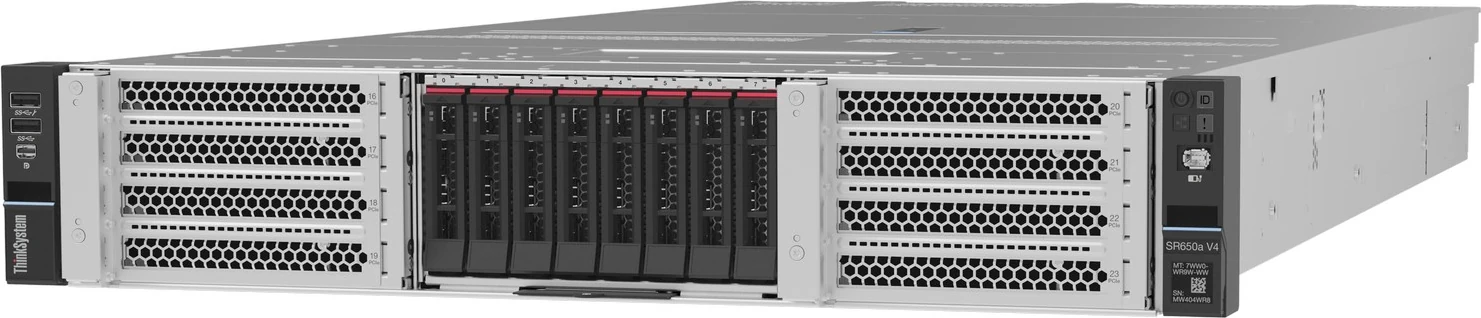
The ThinkSystem SR650a V4 is Lenovo’s configurable 2U GPU server for Xeon 6 P-core processors: the accelerators sit in eight front-accessible PCIe 5.0 slots, leaving the rear of the chassis for networking. This data sheet sets out which NVIDIA cards fit where, the 600 W and 450 W rules, the cooling, power and slot trade-offs, and how the platform differs from the fixed SR650i V4 build.

2U Rack1 or 2 socketsXeon 6 P-coreXClarity Controller 3
8single-wide GPUsNVIDIA L4 · front slots 16–23
4double-wide GPUsup to 450 W each · or 2 at 600 W
86cores per processorXeon 6 6787P · 27 SKUs listed
8TBDDR5 ceiling32 × 256 GB 3DS RDIMM
6rear PCIe 5.0 slots1–6 by storage layout · + 2 OCP
3,200Wlargest PSUTitanium CRPS Premium · 230 V

Every figure checked against the Lenovo ThinkSystem SR650a V4 and SR650i V4 Servers (August 27, 2026)

Form factor
2U Rack · 2 sockets
Processors
Xeon 6 P-core
Memory
32 × DDR5 RDIMM · up to 8 TB
Drive bays
Up to 8 · 4 backplane options
Expansion
14 × PCIe · 2 × OCP 3.0
GPUs
Up to 8 · 6 listed
Boot
M.2 · 7 boot options
Management
XClarity Controller 3
01 — Overview

The SR650a V4 at a glance

Our read of Lenovo’s documentation: where the SR650a V4 is strong, and the limits worth knowing before you spec one.

Strengths

  • One 2U chassis spans eight low-profile L4 cards, four double-wide cards of up to 450 W, or a pair of 600 W H200 NVL or RTX PRO 6000 Blackwell GPUs, all in PCIe 5.0 front slots.
  • Because the GPUs occupy the front, the six rear PCIe 5.0 slots and both OCP 3.0 slots remain available for 200 or 400 Gb networking, a BlueField-3 DPU, Fibre Channel or external SAS.
  • A pair of H200 NVL cards can be joined with Lenovo’s optional two-way NVLink bridge, one bridge per pair.
  • An RTX PRO 6000 Blackwell server can be re-kitted after delivery from a 600 W pair to a 450 W quartet, or back again; the system firmware resets the GPU power limit at boot.
  • Behind the GPUs Lenovo offers 27 Xeon 6 P-core processors of up to 86 cores, 8 TB of DDR5 or 8000 MT/s MRDIMMs, and optional open-loop water cooling for the processors.

Watch-outs

  • Local storage stops at eight front bays, 2.5-inch or E3.S; unlike the SR650 V4 there are no 3.5-inch, mid-chassis or rear drive bays.
  • Only passively cooled GPUs are allowed, every card in a server must be identical, and each GPU in Lenovo’s table is marked as controlled, so what can be shipped depends on the destination market.
  • Two is the ceiling for 600 W cards, and they only run with the 600 W risers for slots 21 and 23, the 600 W riser cages and air duct, and 24K Ultra fans.
  • Riser 6 is wired to the second processor, so a one-socket build — including the six R1S-only processors such as the 6781P — keeps just four front slot positions in Riser 7.
  • Rear slot count falls anywhere from six to one with the storage layout and processor count, the chassis is 924 mm deep, and supplies of 2000 W and above need 230 V.
Processors27 SKUs
Cores / CPU8–86
DIMM slots32
Backplanes4
Max bays8
GPUsup to 8
PSU options14 · to 3,200 W
02 — Processors

27 supported processors, mapped

Lenovo lists 27 Xeon 6 processors with Performance-cores: ten 6500-series parts and seventeen 6700-series parts, spanning 8–86 cores and TDPs of 135–350 W. Every one has eight DDR5 channels and 88 PCIe lanes, and all but the single-socket parts link to a partner over four UPI 2.0 connections at 24 GT/s. In a GPU build the processor chiefly feeds the accelerators, so slot count and memory speed often matter more than peak cores.

Processor landscape — cores × TDP

27 SKUs · 1 family
Lenovo ThinkSystem SR650a V4: every supported processor by cores and TDP0816243240485664728088100 W150 W200 W250 W300 W350 WCores per processorIntel Xeon 6 6787P — 86 cores / 172 threads · 350 W · 2 GHz base · 336 MB cache · DDR5-6400Intel Xeon 6 6781P — 80 cores / 160 threads · 350 W · 2 GHz base · 336 MB cache · DDR5-6400Intel Xeon 6 6761P — 64 cores / 128 threads · 350 W · 2.5 GHz base · 336 MB cache · DDR5-6400Intel Xeon 6 6767P — 64 cores / 128 threads · 350 W · 2.4 GHz base · 336 MB cache · DDR5-6400Intel Xeon 6 6760P — 64 cores / 128 threads · 330 W · 2.2 GHz base · 320 MB cache · DDR5-6400Intel Xeon 6 6747P — 48 cores / 96 threads · 330 W · 2.7 GHz base · 288 MB cache · DDR5-6400Intel Xeon 6 6741P — 48 cores / 96 threads · 300 W · 2.5 GHz base · 288 MB cache · DDR5-6400Intel Xeon 6 6740P — 48 cores / 96 threads · 270 W · 2.1 GHz base · 288 MB cache · DDR5-6400Intel Xeon 6 6736P — 36 cores / 72 threads · 205 W · 2 GHz base · 144 MB cache · DDR5-6400Intel Xeon 6 6732P — 32 cores / 64 threads · 350 W · 3.8 GHz base · 144 MB cache · DDR5-6400Intel Xeon 6 6745P — 32 cores / 64 threads · 300 W · 3.1 GHz base · 336 MB cache · DDR5-6400Intel Xeon 6 6737P — 32 cores / 64 threads · 270 W · 2.9 GHz base · 144 MB cache · DDR5-6400Intel Xeon 6 6730P — 32 cores / 64 threads · 250 W · 2.5 GHz base · 288 MB cache · DDR5-6400Intel Xeon 6 6731P — 32 cores / 64 threads · 245 W · 2.5 GHz base · 144 MB cache · DDR5-6400Intel Xeon 6 6530P — 32 cores / 64 threads · 225 W · 2.3 GHz base · 144 MB cache · DDR5-6400Intel Xeon 6 6527P — 24 cores / 48 threads · 255 W · 3 GHz base · 144 MB cache · DDR5-6400Intel Xeon 6 6521P — 24 cores / 48 threads · 225 W · 2.6 GHz base · 144 MB cache · DDR5-6400Intel Xeon 6 6520P — 24 cores / 48 threads · 210 W · 2.4 GHz base · 144 MB cache · DDR5-6400Intel Xeon 6 6725P — 16 cores / 32 threads · 235 W · 3.7 GHz base · 192 MB cache · DDR5-6400Intel Xeon 6 6724P — 16 cores / 32 threads · 210 W · 3.6 GHz base · 72 MB cache · DDR5-6400Intel Xeon 6 6517P — 16 cores / 32 threads · 190 W · 3.2 GHz base · 72 MB cache · DDR5-6400Intel Xeon 6 6511P — 16 cores / 32 threads · 150 W · 2.3 GHz base · 72 MB cache · DDR5-6400Intel Xeon 6 6515P — 16 cores / 32 threads · 150 W · 2.3 GHz base · 72 MB cache · DDR5-6400Intel Xeon 6 6505P — 12 cores / 24 threads · 150 W · 2.2 GHz base · 48 MB cache · DDR5-6400Intel Xeon 6 6714P — 8 cores / 16 threads · 165 W · 4 GHz base · 48 MB cache · DDR5-6400Intel Xeon 6 6507P — 8 cores / 16 threads · 150 W · 3.5 GHz base · 48 MB cache · DDR5-6400Intel Xeon 6 6503P — 8 cores / 16 threads · 135 W · 2.8 GHz base · 48 MB cache · DDR5-64006 6787P86 cores · 4.1 W/core — top SKU and most efficient
Xeon 6 P-core 27Bubble size = L3 cache · hover a bubble for the full SKU

Processor explorer

filter · sort · compare
ProcessorCores / threadsBaseL3 cacheTDPW / coreMemory
Intel Xeon 6 6787P86 / 1722 GHz336 MB350 W4.1DDR5-6400
Intel Xeon 6 6781P80 / 1602 GHz336 MB350 W4.4DDR5-6400
Intel Xeon 6 6761P64 / 1282.5 GHz336 MB350 W5.5DDR5-6400
Intel Xeon 6 6767P64 / 1282.4 GHz336 MB350 W5.5DDR5-6400
Intel Xeon 6 6760P64 / 1282.2 GHz320 MB330 W5.2DDR5-6400
Intel Xeon 6 6747P48 / 962.7 GHz288 MB330 W6.9DDR5-6400
Intel Xeon 6 6741P48 / 962.5 GHz288 MB300 W6.3DDR5-6400
Intel Xeon 6 6740P48 / 962.1 GHz288 MB270 W5.6DDR5-6400
Intel Xeon 6 6736P36 / 722 GHz144 MB205 W5.7DDR5-6400
Intel Xeon 6 6732P32 / 643.8 GHz144 MB350 W10.9DDR5-6400
Intel Xeon 6 6745P32 / 643.1 GHz336 MB300 W9.4DDR5-6400
Intel Xeon 6 6737P32 / 642.9 GHz144 MB270 W8.4DDR5-6400
Intel Xeon 6 6730P32 / 642.5 GHz288 MB250 W7.8DDR5-6400
Intel Xeon 6 6731P32 / 642.5 GHz144 MB245 W7.7DDR5-6400
Intel Xeon 6 6530P32 / 642.3 GHz144 MB225 W7.0DDR5-6400
Intel Xeon 6 6527P24 / 483 GHz144 MB255 W10.6DDR5-6400
Intel Xeon 6 6521P24 / 482.6 GHz144 MB225 W9.4DDR5-6400
Intel Xeon 6 6520P24 / 482.4 GHz144 MB210 W8.8DDR5-6400
Intel Xeon 6 6725P16 / 323.7 GHz192 MB235 W14.7DDR5-6400
Intel Xeon 6 6724P16 / 323.6 GHz72 MB210 W13.1DDR5-6400
Intel Xeon 6 6517P16 / 323.2 GHz72 MB190 W11.9DDR5-6400
Intel Xeon 6 6511P16 / 322.3 GHz72 MB150 W9.4DDR5-6400
Intel Xeon 6 6515P16 / 322.3 GHz72 MB150 W9.4DDR5-6400
Intel Xeon 6 6505P12 / 242.2 GHz48 MB150 W12.5DDR5-6400
Intel Xeon 6 6714P8 / 164 GHz48 MB165 W20.6DDR5-6400
Intel Xeon 6 6507P8 / 163.5 GHz48 MB150 W18.8DDR5-6400
Intel Xeon 6 6503P8 / 162.8 GHz48 MB135 W16.9DDR5-6400
  • Six SKUs, among them the 80-core 6781P, are rich one-socket (R1S) designs with no UPI links: one per server, factory-built only, never a field upgrade.
  • Heatsinks are chosen for the configuration: Entry for processors up to 205 W, Standard up to 330 W, or Performance; which one a given build gets is set by Lenovo’s online thermal rules.
  • The Processor Neptune Core Module removes processor heat on an open water loop with leak detection; it is available on every SKU but only in factory orders.
  • With an LCC-die processor, the factory can only preset the General Computing – Power Efficiency mode; other modes are set in the field.
03 — Memory

32 DIMM slots, 16 per processor

The board has 32 DDR5 slots — two per channel on eight channels for each processor — and RDIMMs run at 6400 MT/s when a channel holds one module or 5200 MT/s when it holds two. Five 6700-series processors also accept 64 GB MRDIMMs, which run at 8000 MT/s with one per channel. Reaching 8 TB takes all 32 slots filled with 256 GB 3DS RDIMMs.

Capacity with every slot filled

by DIMM size
16 GB512 GB32 GB1 TB64 GB2 TBalso an MRDIMM (8000 MT/s)96 GB3 TB128 GB4 TB256 GB8 TB3DS · 8 or 16 per CPU32 slots · 16 per processor · each tick = one DIMM

Operating speed

per Lenovo memory tables
Processor1 DIMM / channel2 DIMMs / channel
RDIMM · all 27 processors6400 MT/s5200 MT/s
MRDIMM · 6747P, 6761P, 6767P, 6781P, 6787P8000 MT/snot supported
  • Each module has fixed quantities per processor — the 64 GB RDIMM at 1, 4, 8, 12 or 16, the 256 GB 3DS at 8 or 16 — both processors carry the same count, and all DIMMs must share one part number.
  • The August 2026 guide still marks twelve 256 GB modules per processor as planned for late 2Q/2026.
  • If a GPU is fitted after delivery, every empty DIMM slot needs a filler to keep the airflow right; factory orders include them automatically.
  • With one processor the server has 16 usable DIMM slots.
  • SDDC and ADDDC apply to x4-based DIMMs; memory mirroring leaves half of the installed capacity to the operating system.
04 — Storage

4 backplane options, up to 8 bays

The centre of the front panel holds either eight 2.5-inch hot-swap bays — SAS/SATA, AnyBay or NVMe — or eight E3.S 1T NVMe bays on two four-bay backplanes, and the server can also be ordered with no bays at all. NVMe bays connect 1:1 to the processors, so all eight run without oversubscription; Lenovo quotes up to 491.52 TB using 61.44 TB NVMe or E3.S drives.

Headline layouts

front panel view

Front panel

ThinkSystem 2U V4 8x2.5" NVMe Gen5 backplane (C46P) on the onboard NVMe ports — each drive on its own x4 link — or behind a RAID 960W-32i. With two 600 W GPUs this is storage configuration 141: both processors required, five rear slots left.

SAS/SATANVMeSAS/SATA + NVMe

Controllers & boot

  • Onboard NVMe (Non RAID NVMe, BC4V) - PCIe 5.0, optional RAID via Intel VROC — Software RAID. onboard; max 1; RAID levels per VROC licence
  • ThinkSystem 440-16i SAS/SATA PCIe Gen4 12Gb HBA — HBA. PCIe slots 1-10; max 1; no supercap
  • ThinkSystem 440-16i SAS/SATA PCIe Gen4 12Gb Internal HBA — HBA. CFF (cabled internal, no PCIe slot); max 1
  • ThinkSystem RAID 545-8i PCIe Gen4 12Gb Adapter — RAID. RAID 0/1/10; PCIe slots 1-10; max 1; no supercap
  • ThinkSystem RAID 940-8i 4GB Flash PCIe Gen4 12Gb Adapter — RAID, 4GB cache. RAID 0/1/10/5/50/6/60; slots 1-10; max 1; supercap included; Tri-Mode with CH5Z
  • ThinkSystem RAID 940-16i 4GB Flash PCIe Gen4 12Gb Adapter — RAID, 4GB cache. RAID 0/1/10/5/50/6/60; slots 1-10; max 1; supercap included; Tri-Mode with CH5Z
  • ThinkSystem RAID 940-16i 8GB Flash PCIe Gen4 12Gb Adapter — RAID, 8GB cache. RAID 0/1/10/5/50/6/60; slots 1-10; max 1; supercap included; Tri-Mode with CH5Z
  • ThinkSystem RAID 940-16i 8GB Flash PCIe Gen4 12Gb Internal Adapter — RAID, 8GB cache. CFF (cabled internal); RAID 0/1/10/5/50/6/60; max 1; supercap included
  • ThinkSystem M.2 RAID B550i-2i SATA/NVMe Enablement Kit (internal, 2x M.2 NVMe, integrated Broadcom RAID) — boot
  • ThinkSystem M.2 RAID B545i-2i SATA/NVMe Adapter (internal, 2x M.2 SATA/NVMe, integrated Broadcom RAID) — boot
  • ThinkSystem M.2 B350i-2i NVMe Enablement Kit (internal, 2x M.2 NVMe x2, VROC RAID) — boot
  • ThinkSystem SR650/a V4 Rear M.2 RAID B550p-2HS SATA/NVMe Enablement Kit (rear hot-swap, slot 5 or 8) — boot
All 24 controllers and 7 boot options
  • ThinkSystem RAID 960W-32i NVMe PCIe Gen5 Adapter — RAID. NVMe U.2 only (no SAS/SATA); RAID 0/1/10/5/50/6/60; slots 3-8; max 1; supercap included; configs 153/154/157
  • ThinkSystem RAID 940-8i 4GB Flash PCIe Gen4 12Gb Adapter for U.3 (BGM1) — RAID, 4GB cache. deprecated Tri-Mode feature code, existing orders only; same hardware as 940-8i 4GB
  • ThinkSystem RAID 940-16i 4GB Flash PCIe Gen4 12Gb Adapter for U.3 (BM36) — RAID, 4GB cache. deprecated Tri-Mode feature code, existing orders only
  • ThinkSystem RAID 940-16i 8GB Flash PCIe Gen4 12Gb Adapter for U.3 (BDY4) — RAID, 8GB cache. deprecated Tri-Mode feature code, existing orders only
  • ThinkSystem RAID 940-16i 8GB Flash PCIe Gen4 12Gb Internal Adapter for U.3 (BGM2) — RAID, 8GB cache. deprecated Tri-Mode feature code, CFF, existing orders only
  • Intel VROC RAID1 Only — Software RAID. VROC NVMe RAID licence; RAID 1 only
  • Intel VROC (VMD NVMe RAID) Standard — Software RAID. VROC NVMe RAID licence; RAID 0/1/10
  • Intel VROC (VMD NVMe RAID) Premium — Software RAID. VROC NVMe RAID licence; RAID 0/1/10/5
  • ThinkSystem M.2 RAID B550i-2i SATA/NVMe Enablement Kit — Boot. internal M.2, NVMe only (x1 lane/drive), integrated Broadcom RAID; max 1
  • ThinkSystem M.2 RAID B545i-2i SATA/NVMe Adapter — Boot. internal M.2, SATA or NVMe (x1 lane/drive), integrated Broadcom RAID; max 1
  • ThinkSystem M.2 B350i-2i NVMe Enablement Kit — Boot. internal M.2, NVMe (x2 lanes/drive), RAID via VROC; max 1
  • ThinkSystem SR650/a V4 Rear M.2 RAID B550p-2HS SATA/NVMe Enablement Kit — Boot. rear hot-swap M.2 (slot 5 or 8), NVMe only, integrated Broadcom RAID; max 1
  • ThinkSystem SR650/a V4 M.2 RAID B540p-2HS SATA/NVMe Enablement Kit — Boot. rear hot-swap M.2 (slot 5 or 8), SATA or NVMe, integrated Broadcom RAID; max 1
  • ThinkSystem SR650/a V4 Front M.2 RAID B550d-2HS SATA/NVMe Enablement Kit — Boot. front hot-swap M.2, E3.S configs only, NVMe only; max 1
  • ThinkSystem SR650/a V4 M.2 RAID B540d-2HS SATA/NVMe Enablement Kit — Boot. front hot-swap M.2, E3.S configs only, SATA or NVMe; max 1
  • ThinkSystem 440-16e SAS/SATA PCIe Gen4 12Gb HBA — HBA. External SAS HBA (JBOD to external enclosures/tape), part 4Y37A09724 feature B8P7 - lp2128 L3190
  • ThinkSystem SR650/a V4 M.2 RAID B540p-2HS SATA/NVMe Enablement Kit (rear hot-swap, slot 5 or 8) — boot
  • ThinkSystem SR650/a V4 Front M.2 RAID B550d-2HS SATA/NVMe Enablement Kit (front hot-swap, E3.S configs only) — boot
  • ThinkSystem SR650/a V4 M.2 RAID B540d-2HS SATA/NVMe Enablement Kit (front hot-swap, E3.S configs only) — boot
  • In 2.5-inch layouts a CFF RAID adapter or HBA can occupy a dedicated internal bay instead of a rear slot; E3.S layouts cannot use a RAID adapter at all.
  • Tri-Mode (feature CH5Z, added July 2026) puts U.3 NVMe drives alongside SAS and SATA behind one RAID 940 adapter on the AnyBay backplane; U.2 NVMe drives are not supported that way.
  • Boot M.2 drives go on an internal adapter, in a rear hot-swap cage in slot 5 or 8, or — with E3.S front drives only — in a front hot-swap cage.
  • The guide’s one-processor summary mentions up to 16 E3.S drives, which conflicts with the eight-bay maximum given everywhere else; this page uses eight.

Every documented backplane

4 with drive bays
ThinkSystem 2U V4 8x2.5" AnyBay Backplane (C3RU)ThinkSystem 2U V4 8x2.5" AnyBay Backplane (C3RU)8ThinkSystem 2U V4 8x2.5" NVMe Backplane (C46P)ThinkSystem 2U V4 8x2.5" NVMe Backplane (C46P)8ThinkSystem 2U V4 8x2.5" SAS/SATA Backplane (C3RT)ThinkSystem 2U V4 8x2.5" SAS/SATA Backplane (C3RT)8ThinkSystem V4 EDSFF E3.S 4x1T NVMe Gen5 Backplane…ThinkSystem V4 EDSFF E3.S 4x1T NVMe Gen5 Backplane (C221)4Bays · solid = front · dashed = rear · brighter = NVMe-only
2.5-inch3.5-inchEDSFF (E1.S / E3.S)
05 — Accelerators & I/O

GPUs, PCIe and networking

Every accelerator sits in a front-accessible slot, in Riser 7 (slots 20–23, processor 1) and Riser 6 (slots 16–19, processor 2), all PCIe 5.0. Lenovo supports six passive NVIDIA entries: single-wide L4 at 72 W (up to eight) and RTX PRO 4500 Blackwell at 165 W (up to four); double-wide L40S at 350 W (up to four), H200 NVL at 600 W (two), and RTX PRO 6000 Blackwell as either two cards at 600 W or four capped at 450 W. A double-wide card in slot 17, 19, 21 or 23 blocks the slot beside it, all GPUs in a server must match, and actively cooled cards are excluded because their fans would push air against the chassis airflow. Up to 8 single-wide or 4 double-wide front GPUs · 600 W cards limited to two, in slots 21 and 23.

NVIDIA RTX PRO 4500 Blackwell Server Edition 32GB PCIe Gen5 Passive

single-wide
32GB · up to 4

NVIDIA L4 24GB PCIe Gen4 Passive

single-wide
24GB · up to 8

NVIDIA RTX PRO 6000 Blackwell Server Edition 96GB PCIe Gen5 Passive (600W)

double-wide
96GB · up to 2

NVIDIA RTX PRO 6000 Blackwell Server Edition 96GB PCIe Gen5 Passive (Slot Capped at 450W)

double-wide
96GB · up to 4

NVIDIA H200 NVL 141GB PCIe GPU Gen5 Passive

double-wide
141GB · up to 2

NVIDIA L40S 48GB PCIe Gen4 Passive

double-wide
48GB · up to 4

I/O topology

88 lanes per CPU
CPU 188 × PCIe 5.08 ch · 16 DIMMCPU 288 × PCIe 5.08 ch · 16 DIMMUPI 2.0 · 4 links · 24 GT/sFront Risers 6 and 78 × x8 or 4 × x16 · GPUs onlyRear Risers 2 and 3slots 3–8 · 1 to 6 by config2 × OCP 3.0 SFFx8, or x16 with cable kit C1YKXCC3 on ASPEED AST2600dedicated 1GbE RJ-45 port

Both processors contribute 88 PCIe lanes apiece and talk to each other over four UPI 2.0 links at 24 GT/s. Up to fourteen slots are fitted, all PCIe 5.0: eight at the front reserved for GPUs, and six at the rear on Risers 2 and 3, which Lenovo builds up one slot at a time rather than as complete risers. Two OCP 3.0 slots sit beneath the rear risers.

Network adapters Lenovo lists

31 options
AdapterPortsForm
ThinkSystem Broadcom 5719 1GbE RJ45 4-port OCP Ethernet Adapter4 × 1GbEOCP 3.0
ThinkSystem Intel E610-T4 1GBase-T 4-Port OCP Ethernet Adapter (Generic FW)4 × 1GbEOCP 3.0
ThinkSystem Broadcom 57412 10GBase-T 4-Port OCP Ethernet Adapter4 × 10GbEOCP 3.0
ThinkSystem Broadcom 57416 10GBASE-T 2-port OCP Ethernet Adapter2 × 10GbEOCP 3.0
ThinkSystem Intel E610-T2 10GBase-T 2-Port OCP Ethernet Adapter (Generic FW)2 × 10GbEOCP 3.0
ThinkSystem Intel E610-T4 10GBase-T 4-Port OCP Ethernet Adapter (Generic FW)4 × 10GbEOCP 3.0
ThinkSystem Broadcom 57414 10/25GbE SFP28 2-Port OCP Ethernet Adapter2 × 25GbEOCP 3.0
ThinkSystem Broadcom 57504 10/25GbE SFP28 4-Port OCP Ethernet Adapter4 × 25GbEOCP 3.0
ThinkSystem Intel E810-DA2 10/25GbE SFP28 2-Port OCP Ethernet Adapter2 × 25GbEOCP 3.0
ThinkSystem Mellanox ConnectX-6 Lx 10/25GbE SFP28 2-port OCP Ethernet Adapter2 × 25GbEOCP 3.0
ThinkSystem Broadcom 57508 100GbE QSFP56 2-Port OCP Ethernet Adapter2 × 100GbEOCP 3.0
ThinkSystem Nvidia ConnectX-6 Dx 100GbE QSFP56 2-port OCP Ethernet Adapter (Generic)2 × 100GbEOCP 3.0
ThinkSystem Broadcom 57608 2x200/1x400GbE QSFP112 OCP Ethernet Adapter (Generic FW)2 × 400GbEOCP 3.0
ThinkSystem Broadcom 5719 1GbE RJ45 4-Port PCIe Ethernet Adapter4 × 1GbEPCIe
ThinkSystem Broadcom 57412 10GBase-T 4-Port PCIe Ethernet Adapter4 × 10GbEPCIe
ThinkSystem Broadcom 57416 10GBASE-T 2-Port PCIe Ethernet Adapter2 × 10GbEPCIe
ThinkSystem Intel E610-T4 10GBase-T 4-Port PCIe Ethernet Adapter (Generic FW)4 × 10GbEPCIe
ThinkSystem Broadcom 57414 10/25GbE SFP28 2-port PCIe Ethernet Adapter2 × 25GbEPCIe
ThinkSystem Broadcom 57504 10/25GbE SFP28 4-port PCIe Ethernet Adapter4 × 25GbEPCIe
ThinkSystem Intel E810-DA2 10/25GbE SFP28 2-Port PCIe Ethernet Adapter2 × 25GbEPCIe
ThinkSystem Mellanox ConnectX-6 Lx 10/25GbE SFP28 2-port PCIe Ethernet Adapter2 × 25GbEPCIe
ThinkSystem Nvidia ConnectX-7 10/25GbE SFP28 4-Port PCIe Ethernet Adapter (Generic)4 × 25GbEPCIe
ThinkSystem Broadcom 57508 100GbE QSFP56 2-Port PCIe 4 Ethernet Adapter2 × 100GbEPCIe
ThinkSystem Mellanox ConnectX-6 Dx 100GbE QSFP56 2-port PCIe Ethernet Adapter2 × 100GbEPCIe
ThinkSystem NVIDIA ConnectX-7 NDR200/200GbE QSFP112 2-port PCIe Gen5 x16 InfiniBand Adapter2 × 200GbE/NDR200PCIe
ThinkSystem NVIDIA BlueField-3 B3220 VPI QSFP112 2P 200G PCIe Gen5 x16 with Tin Plating Connector2 × 200GbE/NDR200PCIe
ThinkSystem Broadcom 57608 2x200/1x400GbE QSFP112 PCIe Ethernet Adapter2 × 400GbEPCIe
ThinkSystem NVIDIA ConnectX-7 NDR400 OSFP 1-port PCIe Gen5 VPI Adapter1 × 400GbE/NDRPCIe
ThinkSystem NVIDIA ConnectX-8 8240 400GbE / 400Gb/s IB QSFP112 2-port PCIe Gen6 x16 (Generic FW)2 × 400GbE/NDRPCIe
ThinkSystem Cornelis CN5000 Omni-Path 1-Port QSFP112 HFI SuperNIC (Generic FW)1 × 400Gb Omni-PathPCIe
ThinkSystem NVIDIA ConnectX-8 C8180 XDR / 2x400GbE OSFP 1-Port PCIe Gen6 x16 (Generic FW)1 × 800Gb XDR IB / 2x400GbEPCIe
  • With one processor only Riser 7 is live — two x16 slots (21 and 23) or four x8 slots — yet Lenovo still requires both front risers to be configured.
  • Rear x8 slots are open-ended, so physically x16 cards fit and run on eight lanes.
  • OCP slot 1 runs at x16 only when slot 3 is left unconfigured, and OCP slot 2 is held to x8 when the Neptune processor loop is fitted.
  • ConnectX-8 adapters fit slots 5 and 7 only, and the rear hot-swap M.2 cage takes slot 5 or slot 8.
06 — Power & cooling

14 power supplies, 800–3,200 W

Up to two hot-swap supplies, which must be identical. The 800 W and 1300 W AC units accept 115 V or 230 V (the 1300 W delivers 1000 W at 115 V); the 2000 W, 2700 W and 3200 W units are 230 V only, the larger two with C20 inlets. HVAC/HVDC and –48 V DC 1300 W units are also listed. The guide sets no minimum supply per GPU: Lenovo’s configurator sizes it with Capacity Planner.

0500100015002000250030003500800 W Platinum — CRPS v1.5; 230V/115V; C14800Platinum800 W Titanium — CRPS Premium; 230V/115V; C14800Titanium800 W Titanium — CRPS v1.4; 230V/115V; C14800Titanium1300 W not stated — -48V DC CRPS Premium (-44V to -54V DC); BizLink connector; efficiency rating not stated in doc1300DC1300 W Platinum — CRPS v1.5; 230V/115V (1000W at 115V); C141300Platinum1300 W Platinum — CRPS v2.4; 230V/115V (1000W at 115V); C141300Platinum1300 W Platinum — HVAC/HVDC CRPS Premium; 200-277V AC / 240-380V DC; Amphenol connector1300Platinum1300 W Titanium — CRPS Premium; 230V/115V (1000W at 115V); C141300Titanium1300 W Titanium — CRPS v2.4; 230V/115V (1000W at 115V); C141300Titanium2000 W Titanium — CRPS Premium; 230V only; C142000Titanium2700 W Platinum — CRPS v2.3; 230V only; C202700Platinum2700 W Platinum — CRPS v2.4; 230V only; C202700Platinum2700 W Titanium — CRPS Premium; 230V only; C202700Titanium3200 W Titanium — CRPS Premium; 230V only; C203200TitaniumWatts · dashed line = output at 100–120 V low line
AC277 VAC / HVDC−48 V DC
  • Fan type follows the GPUs: Performance fans are allowed with eight single-wide or four double-wide cards up to 400 W, Ultra fans are required for two double-wide cards above 400 W and below 600 W, and the 24K Ultra module (CC8X) is required at 600 W and is also used for four RTX PRO 6000 at 450 W.
  • A factory “GPU-Ready” selection ships the GPU power cables, air ducts, fans and supplies for a named card without the cards, for customers who will add them later.
  • The guide’s inlet-current table stops at the 2000 W supply (11 A at 200 V) and gives no figure for the 2700 W or 3200 W units.
  • Open-loop processor cooling allows a maximum of 3 bar, with 0.5 l/min per server at 40 °C inlet water or cooler, rising to 1.5 l/min at 50 °C; it takes slot 8 and rules out a cable management arm.
  • Lenovo declares 8.5 B sound power and 73 dB at the bystander position when operating, measured at 25 °C with four 400 W H100 NVL cards — a GPU absent from the guide’s current support table.
07 — Management, security & OS

Run it, secure it, choose the OS

Management

  • XClarity Controller 3 on OpenBMC, running on an ASPEED AST2600 with a 1.2 GHz dual-core Arm Cortex-A7
  • Separate System I/O Board (DC-SCM) carrying the management controller
  • XCC3 Premier licence for remote console, remote media, power capping and System Guard
  • MicroSD slot for XCC local storage
  • Redfish, IPMI 2.0 and SNMPv3
  • XClarity One, Provisioning Manager, Energy Manager and Capacity Planner

Security

  • Root of Trust with TPM 2.0 and NIST SP 800-193 Platform Firmware Resiliency
  • Secure Boot enabled in the factory (BPKQ) or left to the customer (BPKR) — once enabled it cannot be disabled
  • Optional chassis intrusion switch; no front security bezel is offered
  • Intel TDX and Total Memory Encryption – Multi-Key
  • NationZ TPM 2.0 module for China
  • CNSA Suite 1.0 cryptography for XCC; FIPS 140-3 validation in progress

Operating systems

  • Microsoft Windows Server 2022 and 2025
  • Red Hat Enterprise Linux 9.4 to 9.8 and 10.0 to 10.2
  • SUSE Linux Enterprise Server 15 SP6, 15 SP7 and 16
  • Ubuntu 22.04, 24.04 and 26.04 LTS
  • VMware ESXi 8.0 U3, 9.0 and 9.1 — factory preload unavailable once an NVIDIA GPU is fitted
  • Windows 10 and 11 through the Workstation CTO models, with a subset of adapters and drives
08 — Compare

How the SR650a V4 compares with its family

The SR650a V4 is the configure-to-order model in its Lenovo Press guide; the SR650i V4 covered by the same guide is one fixed inference configuration of this chassis. Against the SR650 V4, the guide lists what is dropped — 3.5-inch, E3.S 2T (CXL), mid-chassis and rear drive bays — in return for front GPU risers. For more accelerators per node, the bars include larger Lenovo GPU chassis: the 3U SR675 V3, 5U SR780a V3 and 8U SR680a V4. Bar values come from each model’s spec file.

SR650a V4SR650i V4SR650 V4SR675 V3SR780a V3SR680a V4Cores / CPUSR650a V4: 8686SR650i V4: 3232SR650 V4: 8686SR675 V3: 160160SR780a V3: 6464SR680a V4: 8686DIMM slotsSR650a V4: 3232SR650i V4: 3232SR650 V4: 3232SR675 V3: 2424SR780a V3: 3232SR680a V4: 3232Max memorySR650a V4: 8 TB8SR650i V4: 0.5 TB0.5SR650 V4: 8 TB8SR675 V3: 6 TB6SR780a V3: 4 TB4SR680a V4: 4 TB4Max drive baysSR650a V4: 88SR650i V4: 88SR650 V4: 4040SR675 V3: 88SR780a V3: 1212SR680a V4: 88Max GPUsSR650a V4: 88SR650i V4: 22SR650 V4: 1010SR675 V3: 88SR780a V3: 88SR680a V4: 88Largest PSUSR650a V4: 3,200 W3,200SR650i V4: 3,200 W3,200SR650 V4: 3,200 W3,200SR675 V3: 2,600 W2,600SR780a V3: 3,200 W3,200SR680a V4: 3,800 W3,800
This modelSiblings and successorEach value from that model’s own verified spec file · bars scale per column

Head-to-head comparisons

Every figure on this page, set against the machines buyers weigh it up with.

09 — Use cases

Four builds that suit the SR650a V4

Four starting points, one for each class of GPU the platform supports. Every build loads into our configurator using the nearest matching parts, and the caveats flag where Lenovo’s rules or our parts list shape it; quotes follow Lenovo’s configuration rules.

Large-model inference

H200 NVL pair for large-model serving

Two H200 NVL cards give 282 GB of GPU memory in 2U, and the optional bridge links them over NVLink. A terabyte of host memory across all sixteen channels, eight NVMe bays on direct x4 links and a 200 Gb adapter at the rear keep the GPUs supplied.

  • 2 × Xeon 6 6737P — 32 cores @ 2.9 GHz, 270 W each
  • 2 × NVIDIA H200 NVL 141 GB, 600 W, front slots 21 and 23
  • 16 × 64 GB TruDDR5 6400 RDIMM — 1 TB, one per channel
  • 4 × 7.68 TB 2.5-inch NVMe on the 8-bay NVMe backplane
  • 2 × 480 GB M.2 NVMe on the internal B550i-2i (RAID 1)
  • NVIDIA ConnectX-7 NDR200/200GbE 2-port PCIe Gen5
  • 2 × 3200 W Titanium CRPS Premium (230 V)
  • Ubuntu Server 24.04 LTS

The 600 W configuration needs the 600 W risers for slots 21 and 23, the 600 W riser cages and air duct, and 24K Ultra fans; the NVLink bridge (C3V1) is quoted separately. With eight onboard NVMe bays this is storage configuration 141, which needs both processors and leaves five rear slots.

Open this build in the configurator →
Fine-tuning & multi-model

Four RTX PRO 6000 Blackwell at 450 W

Four 96 GB cards give 384 GB of GPU memory for fine-tuning or for hosting several models side by side. The 48-core 6747P is one of five processors that run 64 GB MRDIMMs at 8000 MT/s, here one per channel for 1 TB.

  • 2 × Xeon 6 6747P — 48 cores @ 2.7 GHz, 330 W each
  • 4 × NVIDIA RTX PRO 6000 Blackwell Server Edition 96 GB, slot-capped at 450 W (CHWT)
  • 16 × 64 GB TruDDR5 MRDIMM at 8000 MT/s — 1 TB
  • 8 × 3.84 TB 2.5-inch NVMe on the 8-bay NVMe backplane
  • 2 × 480 GB M.2 NVMe on the internal B550i-2i (RAID 1)
  • Broadcom 57508 2 × 100GbE QSFP56 PCIe
  • 2 × 3200 W Titanium CRPS Premium (230 V)
  • Red Hat Enterprise Linux 9

Our configurator lists the RTX PRO 6000 under its 600 W entry; this build is quoted on Lenovo’s 450 W feature (CHWT), which uses x16 front risers in slots 17, 19, 21 and 23 plus 24K Ultra fans. Four double-wide GPUs with eight onboard NVMe bays is configuration 81: two processors, four rear slots.

Open this build in the configurator →
VDI & visual computing

Four L40S for virtual workstations

Lenovo names VDI and virtualisation among the SR650a V4’s target workloads. Four 48 GB L40S cards with 72 cores and 2 TB of memory suit a GPU-backed desktop or rendering host, with RAID-protected SAS flash for local datastores.

  • 2 × Xeon 6 6736P — 36 cores @ 2 GHz, 205 W each
  • 4 × NVIDIA L40S 48 GB, 350 W, front slots 17, 19, 21 and 23
  • 16 × 128 GB TruDDR5 6400 RDIMM — 2 TB
  • 8 × 3.84 TB SAS SSD on the 8-bay SAS/SATA backplane
  • ThinkSystem RAID 940-8i 4GB Flash
  • 2 × 480 GB M.2 NVMe on the internal B550i-2i (RAID 1)
  • Broadcom 57414 2 × 10/25GbE SFP28 OCP
  • 2 × 2700 W Titanium CRPS Premium (230 V)
  • VMware ESXi 8.0

Lenovo will not factory-install ESXi on a server containing an NVIDIA GPU, so the hypervisor is loaded after delivery. At 350 W per card Lenovo permits its Performance fans, and this SAS layout (configuration 80) keeps all six rear slots.

Open this build in the configurator →
Video analytics & streaming

Eight L4 cards for media pipelines

Content delivery and media analysis are on Lenovo’s workload list for this server. Eight low-profile 72 W L4 cards fill every front slot, E3.S flash handles ingest, and a four-port 25GbE OCP adapter serves the streams without taking a PCIe slot.

  • 2 × Xeon 6 6520P — 24 cores @ 2.4 GHz, 210 W each
  • 8 × NVIDIA L4 24 GB, 72 W, low-profile, slots 16–23
  • 16 × 32 GB TruDDR5 6400 RDIMM — 512 GB
  • 4 × 7.68 TB E3.S NVMe on one 4-bay Gen5 backplane
  • 2 × 480 GB M.2 NVMe, front hot-swap B550d-2HS
  • Broadcom 57504 4 × 10/25GbE SFP28 OCP
  • 2 × 2000 W Titanium CRPS Premium (230 V)
  • Windows Server 2025

All eight front slots run at x8 and need both processors, because Riser 6 hangs off processor 2. With one 4-bay E3.S backplane (configuration 111) Lenovo allows front hot-swap M.2 only, and E3.S layouts cannot take a RAID adapter.

Open this build in the configurator →
10 — Full specifications

Lenovo ThinkSystem SR650a V4 specifications

Chassis

Form factor2U rack, front-mounted GPUs
Dimensions (W × H × D)445 × 87 × 924 mm · 482 mm across the EIA flanges
WeightMaximum 38.8 kg
Machine types7DGD (3-year warranty) · 7DGC (1-year warranty)
CTO base models7DGDCTO2WW / 7DGCCTO2WW · Workstation 7DGDCTO4WW / 7DGCCTO4WW
Chassis baseC3QN — 2.5-inch / E3.S chassis
RailsLong Travel Toolless Slide Rail Kit V4, with or without 2U CMA

Processor

Processors1 or 2 Intel Xeon 6 6500-series or 6700-series with P-cores
Range27 SKUs · 8 to 86 cores · 135 W to 350 W
Interconnect4 × UPI 2.0 at 24 GT/s (none on the six R1S parts)
PCIe lanes88 per processor
CoolingEntry (≤ 205 W), Standard (≤ 330 W) or Performance heatsinks; optional Neptune open-loop module

Memory

Slots32 · 16 per processor · 8 channels × 2 DIMMs
RDIMM speed6400 MT/s at 1 DPC · 5200 MT/s at 2 DPC
MRDIMM64 GB at 8000 MT/s, 1 DPC, five processors
Maximum8 TB (32 × 256 GB 3DS RDIMM)
ProtectionECC, SDDC and ADDDC (x4 DIMMs), memory mirroring

GPUs

LocationFront slots 16–23 only · passive cards only · all identical
Single-wideNVIDIA L4 24 GB (72 W, up to 8) · RTX PRO 4500 Blackwell 32 GB (165 W, up to 4)
Double-wideL40S 48 GB (350 W, up to 4) · RTX PRO 6000 Blackwell 96 GB (450 W × 4 or 600 W × 2) · H200 NVL 141 GB (600 W, up to 2)
600 W requirementsRisers CATS and C9R5 (slots 21, 23), riser cages C9R6, air duct CBMX, 24K Ultra fans CC8X
NVLinkOptional 2-way bridge, one per H200 NVL pair
Power cablingCTO orders include cables; field kit 4X97B04860 (one 16-pin cable)
Export statusEvery listed GPU is marked Controlled (not offered in some markets)

Storage

Front bays8 × 2.5-inch (SAS/SATA, AnyBay or NVMe) or 8 × E3.S 1T NVMe, or none
BackplanesC3RT SAS/SATA · C3RU AnyBay Gen5 · C46P NVMe Gen5 · 2 × C221 E3.S
Not available3.5-inch, E3.S 2T/CXL, mid-chassis and rear bays
M.2Up to 2 drives: internal, rear hot-swap (slot 5 or 8) or front hot-swap (E3.S only)
Maximum capacity491.52 TB (8 × 61.44 TB NVMe or E3.S)

Networking & I/O

Front slots8 × x8 or 4 × x16 PCIe 5.0 (Riser 6 needs processor 2)
Rear slotsUp to 6 PCIe 5.0 on Risers 2 and 3 (slots 3–8); Risers 1 and 4 unused
OCP2 × OCP 3.0 SFF, PCIe 5.0 x8 or x16 with cable kit C1YK
Rear ports2 × USB 3 (5 Gb/s), VGA, 1GbE RJ-45 XCC port
Front portsDiagnostics port · optional 2 × USB 3 and Mini DisplayPort

Power & cooling

Power suppliesUp to 2, identical · 800 W to 3200 W AC, plus HVAC/HVDC and –48 V DC 1300 W
230 V only2000 W, 2700 W and 3200 W units
Fans5 (one processor) or 6 (two) hot-swap 60 mm, N+1 rotor redundancy
Liquid coolingProcessors only, open loop (Neptune Core Module), factory orders

Environment & warranty

ASHRAEClass A2 in most configurations; A3, A4 or H1 depending on configuration
A2 operating range10–35 °C, derated above 900 m
Maximum altitude3,050 m
Warranty3 or 1 years by machine type · customer-replaceable units and onsite, 9 × 5 next business day
11 — FAQ

SR650a V4 questions, answered from the documentation

How many GPUs does the Lenovo ThinkSystem SR650a V4 support?

Up to eight single-wide or four double-wide GPUs, all in the eight front PCIe 5.0 slots. Only the NVIDIA L4 reaches eight; the RTX PRO 4500 and L40S stop at four, and 600 W cards (H200 NVL and RTX PRO 6000 at full power) are limited to two, in slots 21 and 23.

Which GPUs can be fitted in the SR650a V4?

Lenovo’s table lists the NVIDIA L4 24 GB, RTX PRO 4500 Blackwell 32 GB, L40S 48 GB, 96 GB RTX PRO 6000 Blackwell (full 600 W or a 450 W cap) and H200 NVL 141 GB — all passively cooled. H200 NVL pairs can take one optional two-way NVLink bridge. Every card is marked as controlled, meaning it is not offered in certain markets.

What does a 600 W GPU configuration need?

Two 600 W front risers for slots 21 and 23, the 600 W riser cages and double-wide air duct, and 24K Ultra fan modules — five with one processor, six with two. For a field upgrade Lenovo lists a fan kit, a mechanical kit carrying the cages and duct, one riser per GPU, and GPU power cables.

Can the SR650a V4 run four RTX PRO 6000 Blackwell GPUs?

Yes, in the power-capped configuration (feature CHWT): four cards at 450 W in slots 17, 19, 21 and 23. At the full 600 W the limit is two. Lenovo supports converting between the two layouts in the field with the matching risers, cables and fans, and firmware sets the GPU power at boot.

What is the maximum memory of the SR650a V4?

8 TB, using 32 × 256 GB 3DS RDIMMs across two processors. RDIMM speed is 6400 MT/s at one per channel, dropping to 5200 MT/s at two, while five processors can use 64 GB MRDIMMs at 8000 MT/s, one per channel. One processor leaves 16 slots.

Which processors does the SR650a V4 take?

One or two of 27 Intel Xeon 6 P-core processors from the 6500 and 6700 series, from the 8-core 6503P to the 86-core 6787P, rated 135 W to 350 W. Six of them — 6511P, 6521P, 6731P, 6741P, 6761P and 6781P — are single-socket only and cannot be added later.

How many drive bays does the SR650a V4 have?

Eight at the front: 2.5-inch SAS/SATA, AnyBay or NVMe, or E3.S 1T NVMe on two four-bay backplanes. There are no 3.5-inch, mid-chassis or rear bays, and up to two M.2 boot drives sit internally, in a rear hot-swap cage, or in a front cage with E3.S drives.

What power supplies and cooling does the SR650a V4 use?

Up to two identical hot-swap supplies from 800 W to 3200 W, with the 2000 W and larger units needing 230 V; HVAC/HVDC and –48 V DC options exist too. Fan type rises with GPU power, from Performance fans for cards up to 400 W to 24K Ultra fans at 600 W, and the processors can be water-cooled on an open loop.

How is the SR650a V4 different from the SR650i V4 and SR650 V4?

The SR650i V4 is one fixed SR650a V4 build for inference, with two RTX PRO 6000 GPUs and set processors, memory and drives; the SR650a V4 is the open, configure-to-order platform. The SR650 V4 is the 2U sibling that, by this guide’s account, keeps the 3.5-inch, E3.S 2T, mid-chassis and rear bays the SR650a V4 gives up for front GPUs.

Is the Lenovo SR650a V4 end of life?

Lenovo’s product guide of 27 August 2026 presents the SR650a V4 as a current platform and gives no end-of-service date. Support terms depend on the warranty or service contract on each server; our end-of-life checker will show dates once Lenovo publishes them.

Sources & verification

Where these figures come from

  • Lenovo ThinkSystem SR650a V4 and SR650i V4 Servers (August 27, 2026) — Standard specifications (Table 1), processors and cooling (Tables 6–9), memory (Table 11), backplanes and storage configurations (Tables 14–16), M.2 (Table 22), slots (Tables 41–43), GPUs, GPU-Ready and GPU field upgrades (Tables 52–57), fans (Table 60), power supplies (Table 61), security (Tables 77–78), dimensions and inlet current (Tables 81–82), operating environment, acoustics and OS support.

Specifications are extracted from Lenovo’s published documents and independently re-checked line by line. Configurations are quote-based; availability and exact options are confirmed at quotation. Last reviewed 2026-09-11.

Get a quote for the Lenovo ThinkSystem SR650a V4

Tell us the workload and we’ll spec and price it — or build it in the configurator first.

Business enquiries only — please use your company email. Gmail, Hotmail and other personal addresses are not accepted.

We only ship hardware to the countries in the dropdown. Software and maintenance services are global.

We use these details to reply to your enquiry and prepare any quote. No marketing emails without your consent. Privacy Policy

Enquiring about: Lenovo ThinkSystem SR650a V4

Response within 4 business hours · No obligation

Quote for
Lenovo ThinkSystem SR650a V4
0800 987 4111

Talk to a UK specialist

Get expert advice or a no-obligation quote — servers, storage, networking, maintenance, finance and cloud. We reply the same working day.

or call 0800 987 4111