UK’s trusted IT infrastructure partner since 2003
Servnet
FinanceToolsConfiguratorGet in Touch
Technical data sheet · ThinkSystem V3 · 5U dual-socket Intel Xeon, 8-GPU, Neptune

Lenovo ThinkSystem SR780a V3Specifications, configurations & comparisons

The ThinkSystem SR780a V3 puts an NVIDIA HGX eight-GPU board (B200 or H100) and two 5th Gen Xeon processors into 5U by cooling the hottest parts with warm water. It suits sites that have, or are building, a coolant loop. This page covers the GPU and water-loop requirements, rack density, the fixed memory populations, storage and power.

5U Rack2 sockets5th Gen Xeon ScalableXClarity Controller 2
5Ufor eight SXM GPUs219 mm high · water-cooled
75%max share of heat to waterfour Neptune loops · W45
180GBHBM3e per B200or 80 GB HBM3 per H100
64cores per processorXeon Platinum 8592+
4TBDDR5 ceiling32 × 128 GB at 4400 MHz
9servers per 48U rack8 per 42U · 7 with in-rack CDU

Every figure checked against the Lenovo ThinkSystem SR780a V3 Server Product Guide (July 15, 2026)

Form factor
5U Rack · 2 sockets
Processors
5th Gen Xeon
Memory
32 × DDR5 RDIMM · up to 4 TB
Drive bays
Up to 12 · 2 backplane options
Expansion
11 × PCIe
GPUs
Up to 8 · 2 listed
Boot
2 x M.2 22110 NVMe in onboard connector
Management
XClarity Controller 2
01 — Overview

The SR780a V3 at a glance

Our read of Lenovo’s documentation: where the SR780a V3 is strong, and the limits worth knowing before you spec one.

Strengths

  • Direct water cooling on four independent loops — the CPUs, the four front GPUs, the four rear GPUs and the NVLink switches — removes up to 75% of the server’s heat, letting an eight-GPU HGX system fit in 5U rather than 8U.
  • Two liquid-cooled HGX boards: eight B200 SXM6 GPUs with 180 GB HBM3e and 8 TB/s each at 1000 W, or eight H100 SXM5 GPUs with 80 GB HBM3 at 700 W.
  • Density per rack: Lenovo allows nine SR780a V3s in a 48U cabinet and eight in a 42U one (seven if the CDU sits in the rack).
  • Against the air-cooled SR685a V3 it adds memory mirroring and XCC2 power capping; unlike both the SR685a V3 and the SR680a V4 it lists VMware ESXi 8.0 U3; and an optional rear cage takes it to 12 NVMe bays.
  • Lenovo counts eight current MLPerf Inference v5.0/v5.1 world records for the model (as of 1 September 2026): best overall and best among 8-GPU configurations on two GPT-J tests, RGAT and Llama 3.1 8B.

Watch-outs

  • It needs water infrastructure: a Lenovo 42U or 48U heavy-duty rack, a 38-port rear manifold, an in-rack or in-row CDU and hose kits, with inlet water up to 45 °C (ASHRAE W45) at no more than 4.4 bar.
  • Minimum flow is 10 litres per minute per chassis with H100 and 12 with B200, and water quality must be maintained for the life of the system to keep warranty on water-bearing parts.
  • Memory comes only as 16 DIMMs at 5600 MHz or 32 at 4400 MHz, all identical — no other populations are supported.
  • There is no OCP slot, the rear drive cage takes the place of slot 10, and a BlueField-3 B3220 in slot 9 requires an ambient temperature of 30 °C or lower.
  • Processor choice is narrow: five Xeon Platinum parts, 32 to 64 cores, and one-socket builds are not supported.
Processors5 SKUs
Cores / CPU32–64
DIMM slots32
Backplanes2
Max bays12
GPUsup to 8
PSU options3 · to 3,200 W
02 — Processors

5 supported processors, mapped

Two 5th Gen Intel Xeon Scalable (“Emerald Rapids”) processors are required, water-cooled on their own loop. Lenovo lists five Platinum parts, all factory-installed only: the 32-core 8562Y+ at 300 W and four 350 W chips with 48 to 64 cores — the 8558P, 8568Y+, 8570 and 8592+. Each offers eight DDR5 channels at two DIMMs per channel and 80 PCIe 5.0 lanes; the platform uses the Intel C741 chipset.

Processor landscape — cores × TDP

5 SKUs · 1 family
Lenovo ThinkSystem SR780a V3: every supported processor by cores and TDP0816243240485664300 W350 WCores per processorIntel Xeon Platinum 8592+ — 64 cores / 128 threads · 350 W · 1.9 GHz base · 320 MB cache · DDR5-5600Intel Xeon Platinum 8570 — 56 cores / 112 threads · 350 W · 2.1 GHz base · 300 MB cache · DDR5-5600Intel Xeon Platinum 8558P — 48 cores / 96 threads · 350 W · 2.7 GHz base · 260 MB cache · DDR5-5600Intel Xeon Platinum 8568Y+ — 48 cores / 96 threads · 350 W · 2.3 GHz base · 300 MB cache · DDR5-5600Intel Xeon Platinum 8562Y+ — 32 cores / 64 threads · 300 W · 2.8 GHz base · 60 MB cache · DDR5-56008592+64 cores · 5.5 W/core — top SKU and most efficient
5th Gen Xeon Scalable 5Bubble size = L3 cache · hover a bubble for the full SKU

Processor explorer

filter · sort · compare
ProcessorCores / threadsBaseL3 cacheTDPW / coreMemory
Intel Xeon Platinum 8592+64 / 1281.9 GHz320 MB350 W5.5DDR5-5600
Intel Xeon Platinum 857056 / 1122.1 GHz300 MB350 W6.3DDR5-5600
Intel Xeon Platinum 8558P48 / 962.7 GHz260 MB350 W7.3DDR5-5600
Intel Xeon Platinum 8568Y+48 / 962.3 GHz300 MB350 W7.3DDR5-5600
Intel Xeon Platinum 8562Y+32 / 642.8 GHz60 MB300 W9.4DDR5-5600
  • UPI link counts differ: the 8558P and 8562Y+ have three links at 20 GT/s; the 8568Y+, 8570 and 8592+ have four.
  • The 8562Y+ is the only MCC die in the list, with 60 MB of L3; the XCC parts carry 260 MB (8558P) to 320 MB (8592+).
  • The 8570 lacks QAT, DLB and IAA engines and keeps one DSA; the other four each have one of all four accelerators. Every listed part supports AMX and a 512 GB SGX enclave.
  • Lenovo’s standard-specification row describes a single 56-core, 2.7 GHz, 350 W processor, but its processor table lists five parts up to the 64-core 8592+.
  • Four factory UEFI presets are available; Lenovo advises UK and EU buyers to pick Efficiency – Favoring Performance (BFYE) for ErP Lot 9.
03 — Memory

32 DIMM slots, 16 per processor

The 32 DIMM slots (16 per processor, eight channels × two) accept only two populations: 16 DIMMs, one per channel at 5600 MHz, or all 32 at 4400 MHz. Three RDIMMs are offered — 64 GB and 96 GB 10x4 parts and a 128 GB part, all rated 5600 MHz — and every DIMM in the server must be the same part number.

Capacity with every slot filled

by DIMM size
64 GB2 TB96 GB3 TB128 GB4 TB32 slots · 16 per processor · each tick = one DIMM

Operating speed

per Lenovo memory tables
Processor1 DIMM / channel2 DIMMs / channel
5th Gen Xeon5600 MHz4400 MHz
  • Capacities therefore come in six steps: 1, 1.5 or 2 TB at 5600 MHz (16 × 64, 96 or 128 GB), or 2, 3 or 4 TB at 4400 MHz (32 of the same).
  • Memory mirroring is supported; mirrored DIMMs go in identical pairs and the operating system sees half the installed capacity.
  • Rank sparing is provided through ADDDC-based DRAM-level sparing; ADDDC works on the 10x4 DIMMs and needs Gold or Platinum processors, which every listed CPU is.
  • ECC, Bounded Fault and SDDC are also supported; persistent memory is not.
04 — Storage

2 backplane options, up to 12 bays

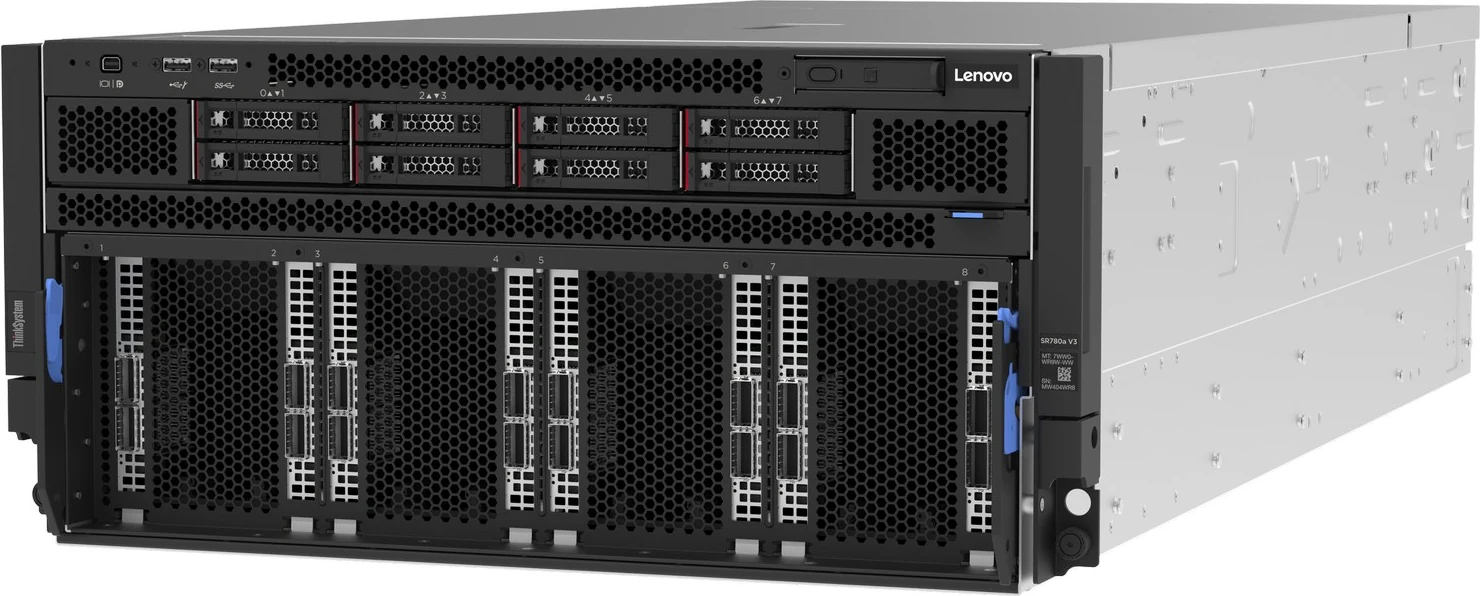
Eight hot-swap 2.5-inch bays sit at the front on one backplane, and a four-bay cage can be added at the rear in place of PCIe slot 10. Despite the AnyBay label on both backplanes, only NVMe drives are supported, each on a PCIe 5.0 x4 link from onboard ports. Boot drives are M.2 22110 NVMe modules stacked in a connector on the system board.

Headline layouts

front panel view

Front panel

Rear module

The maximum: the front C2ET 8-bay backplane plus the C4E3 rear backplane and C4HL rear storage assembly, replacing slot 10. With 15.36 TB front drives and 12.8 TB rear drives, Lenovo quotes 174.08 TB.

SAS/SATANVMeSAS/SATA + NVMe

Controllers & boot

  • Onboard PCIe 5.0 x4 NVMe ports - JBOD, no RAID (no VROC on 2.5-inch drives) — HBA. onboard
  • Intel VROC (VMD NVMe RAID) Standard for M.2 (BS7M) — Software RAID. M.2 boot drives only
  • 2 x M.2 22110 NVMe in onboard connector (stacked); optional Intel VROC (VMD NVMe RAID) Standard for M.2 (BS7M) — boot
  • Front bays take PM1745 Mixed Use (1.6–12.8 TB) or PM1743 Read Intensive (1.92–15.36 TB) U.3 PCIe 5.0 SSDs.
  • The rear bays list a single drive: the VA 12.8 TB U.2 PCIe 4.0 Mixed Use SSD, up to four.
  • The 2.5-inch drives run as JBOD: there is no RAID and no VROC for them.
  • M.2: one or two 22110 NVMe drives (PM9A3 960 GB or 1.92 TB); SATA and other M.2 lengths are not supported, and RAID is optional via Intel VROC Standard (BS7M).
  • Lenovo offers no field upgrade for the rear backplane; drives are numbered 0–7 at the front and 8–11 at the rear.

Every documented backplane

2 with drive bays
ThinkSystem 8x2.5-inch PCIe Gen5 AnyBay Storage Ba…ThinkSystem 8x2.5-inch PCIe Gen5 AnyBay Storage Backplane (C2ET) - NVMe only8ThinkSystem SR780a V3 4x2.5-inch PCIe Gen5 AnyBay …ThinkSystem SR780a V3 4x2.5-inch PCIe Gen5 AnyBay Rear Storage Backplane (C4E3) + Rear Storage Assembly (C4HL) - NVMe only, replaces rear slot 104Bays · solid = front · dashed = rear · brighter = NVMe-only
2.5-inch3.5-inchEDSFF (E1.S / E3.S)
05 — Accelerators & I/O

GPUs, PCIe and networking

One liquid-cooled HGX board (CTO only, maximum one) sits in the lower half of the chassis, matched to the base feature code: C4E1 for the NVIDIA HGX H100 80GB 700W board or C695 for the HGX B200 1000W 180GB board. The front four GPUs, the rear four GPUs and the NVLink switches each have their own water loop, separate from the CPU loop. Lenovo quotes 8 TB/s of memory bandwidth per B200 against 3.35 TB/s per H100, and FP8 of 4.5 petaFLOPS (9 with sparsity) against 1,979 teraFLOPS (3,958). Its table gives both GPUs 900 GB/s NVLink and 128 GB/s PCIe Gen5, and up to seven MIG instances — 23 GB on B200, 10 GB on H100. One HGX board: 8 × B200 SXM6 (1,440 GB HBM3e) or 8 × H100 SXM5 (640 GB HBM3), water-cooled.

NVIDIA HGX H100 80GB 700W 8-GPU Liquid Cooled Board (SXM5)

80GB HBM3 · 8

NVIDIA HGX B200 180GB 1000W 8-GPU Liquid-Cooled Board (SXM6)

180GB HBM3e · 8

I/O topology

80 lanes per CPU
CPU 180 × PCIe 5.08 ch · 16 DIMMCPU 280 × PCIe 5.08 ch · 16 DIMMUPI · up to 4 links · 20 GT/s8 × front x16 GPU Directslots 1–4 CPU 1 · 5–8 CPU 23 rear FHHL slotsx16 + x16, or x8 + x8 + x16No OCP slotmanagement NIC in a rear slotXCC2 · rear 1GbE portAST2600 · Platinum · power capping

Eight front PCIe 5.0 x16 slots carry GPU Direct networking through PCIe switches — slots 1–4 on CPU 1, 5–8 on CPU 2. The rear has up to three full-height half-length slots: slot 9 (CPU 2) is x16, or x8 when slot 11 is fitted; slot 10 (CPU 1) is x16 unless the rear drive cage replaces it; slot 11 (CPU 2) is x8. Each processor provides 80 PCIe 5.0 lanes, eight memory channels and up to four UPI links at 20 GT/s.

Network adapters Lenovo lists

7 options
AdapterPortsForm
ThinkSystem Broadcom 57508 100GbE QSFP56 2-Port PCIe 4 Ethernet Adapter (GPU Direct, front 1-8, qty 4 or 8)2 × 100GbEPCIe
ThinkSystem NVIDIA ConnectX-7 NDR200/200GbE QSFP112 2-port PCIe Gen5 x16 InfiniBand Adapter (GPU Direct, qty 4 or 8)2 × 200GbE/NDR200PCIe
ThinkSystem NVIDIA BlueField-3 B3140H VPI QSFP112 1P 400G PCIe Gen5 x16 Adapter (GPU Direct, qty 4 or 8)1 × 400GbE/NDRPCIe
ThinkSystem NVIDIA ConnectX-7 NDR400 OSFP 1-port PCIe Gen5 VPI Adapter (GPU Direct, qty 4 or 8)1 × 400GbE/NDRPCIe
ThinkSystem NVIDIA BlueField-3 B3220 VPI QSFP112 2P 200G PCIe Gen5 x16 with Tin Plating Connector (User/Control plane, rear 9/10, max 2)2 × 200GbE/NDR200PCIe
ThinkSystem Mellanox ConnectX-6 Lx 10/25GbE SFP28 2-port PCIe Ethernet Adapter (Management, rear 9/10/11, max 3)2 × 25GbEPCIe
ThinkSystem Mellanox ConnectX-6 Dx 100GbE QSFP56 2-port PCIe Ethernet Adapter (Management, rear 9/10, max 2)2 × 100GbEPCIe
  • Front GPU Direct adapters come in sets of four or eight identical cards: Broadcom 57508 2 × 100GbE, ConnectX-7 NDR200 2-port, BlueField-3 B3140H 1 × 400G or ConnectX-7 NDR400 1-port.
  • For the user/control plane, up to two BlueField-3 B3220 2 × 200G DPUs go in rear slots 9 and 10.
  • Management networking uses a ConnectX-6 Lx 2 × 25GbE (up to three, slots 9–11) or ConnectX-6 Dx 2 × 100GbE (up to two, slots 9–10).
  • Rear combinations are fixed by Lenovo’s table and risers: C2EX (x16, slots 9 and 10), C70Q (x8, slot 9) and C70R (x8 middle, slot 11).
  • Fibre Channel HBAs are special-bid only.
06 — Power & cooling

3 power supplies, 2,600–3,200 W

Eight identical hot-swap Titanium supplies are standard, arranged N+N. Lenovo’s table offers three models, all with C19 inlets and a 220 V AC requirement (no 110 V): the 2600W 230V Titanium Gen2 v4 and two 3200 W CRPS Premium units (230V, and 230V/115V — though 110 V is marked unsupported for both). The standard-specification table mentions only the 2600 W supply.

05001000150020002500300035002600 W Titanium — ThinkSystem 2600W 230V Titanium Gen2 v4 (C4HK); qty 8, N+N; C19; 220V only2600Titanium3200 W Titanium — ThinkSystem 3200W 230V Titanium CRPS Premium (C0UD); qty 8; C19; 220V3200Titanium3200 W Titanium — ThinkSystem 3200W 230V/115V Titanium CRPS Premium (CBAF); qty 8; C19; table lists 220V AC only3200TitaniumWatts · dashed line = output at 100–120 V low line
AC
  • Inlet current is published for the 2600 W model only — 13.2 A on a 200 V feed, 13 A on 220 V and 11.9 A on 240 V DC. The DC input range (180–300 V) is for China only.
  • Air still cools the rest of the server: six internal 60 mm and five rear 80 mm hot-swap dual-rotor fans, both at 21K RPM peak and N+1 rotor-redundant, plus a fan in each supply (28.5K RPM).
  • XCC2 offers a zero-output (standby) policy that idles a supply at low load and wakes it as demand rises; the policy can be switched off.
  • Power capping is part of the built-in XCC2 Platinum feature set, with an XClarity Energy Manager licence included.
  • The environment is ASHRAE A2 for air (10–35 °C, derated above 900 m) and W45 for water.
07 — Management, security & OS

Run it, secure it, choose the OS

Management

  • XClarity Controller 2 (XCC2) on an ASPEED AST2600 BMC, on a DC-SCM System I/O Board
  • XCC2 Platinum features built in per the management section (the specification table calls it optional)
  • Rear 10/100/1000 RJ45 management port · no OCP NC-SI option
  • IPMI 2.0 (IPMI-over-LAN off by default), SNMPv3, CIM-XML, Redfish, HTML5 web UI
  • MicroSD port (up to 4 GB of RDOC storage) · no physical NMI button
  • Integrated diagnostics panel with pull-out LCD · light path LEDs for DIMMs, drives and PSUs
  • XClarity One, Integrator plug-ins and Energy Manager

Security

  • Platform Firmware Resiliency hardware Root of Trust (NIST SP 800-193)
  • Integrated TPM 2.0 · Secure Boot factory-enabled (BPKQ) or left off (BPKR)
  • Intel TDX, SGX, TME-MK, CET and Boot Guard (CBnT)
  • System Guard component-change detection
  • SED drives with KMIP key managers (IBM SKLM, Thales KeySecure)
  • NIST SP 800-147B compliant

Operating systems

  • Red Hat Enterprise Linux 9.4, 9.5 and 9.6
  • Ubuntu 22.04 LTS and 24.04 LTS
  • VMware ESXi 8.0 U3
08 — Compare

How the SR780a V3 compares with its family

The SR780a V3 is the water-cooled member of Lenovo’s eight-GPU line. It shares its Intel host generation with the air-cooled 8U SR680a V3; the SR680a V4 moves to Xeon 6 and HGX B300, and the SR685a V3 uses AMD EPYC with MI300X or H200. PCIe-GPU alternatives are the SR675 V3 and SR650a V4. Bars in the matrix come from each model’s verified spec file.

SR780a V3SR680a V3 with B200SR680a V4SR685a V3SR675 V3SR650a V4Cores / CPUSR780a V3: 6464SR680a V3 with B200: 6464SR680a V4: 8686SR685a V3: 128128SR675 V3: 160160SR650a V4: 8686DIMM slotsSR780a V3: 3232SR680a V3 with B200: 3232SR680a V4: 3232SR685a V3: 2424SR675 V3: 2424SR650a V4: 3232Max memorySR780a V3: 4 TB4SR680a V3 with B200: 4 TB4SR680a V4: 4 TB4SR685a V3: 3 TB3SR675 V3: 6 TB6SR650a V4: 8 TB8Max drive baysSR780a V3: 1212SR680a V3 with B200: 1616SR680a V4: 88SR685a V3: 1616SR675 V3: 88SR650a V4: 88Max GPUsSR780a V3: 88SR680a V3 with B200: 88SR680a V4: 88SR685a V3: 88SR675 V3: 88SR650a V4: 88Largest PSUSR780a V3: 3,200 W3,200SR680a V3 with B200: 3,200 W3,200SR680a V4: 3,800 W3,800SR685a V3: 2,600 W2,600SR675 V3: 2,600 W2,600SR650a V4: 3,200 W3,200
This modelSiblings and successorEach value from that model’s own verified spec file · bars scale per column

Head-to-head comparisons

Every figure on this page, set against the machines buyers weigh it up with.

09 — Use cases

Three builds that suit the SR780a V3

Three SR780a V3 builds, each made only from parts our configurator allows for this model. The HGX board, water loops and front backplane are fixed; the decisions are GPU generation, memory population, adapters and supplies. M.2 boot drives (960 GB or 1.92 TB, 22110), the number of identical front adapters and the rack water kit are specified at quotation.

AI training

Rack-dense B200 training node

Eight B200s give 1,440 GB of HBM3e per server, and because Lenovo allows nine SR780a V3s in a 48U rack, one cabinet can hold 72 GPUs. Two 64-core 8592+ processors with 4 TB of RAM feed the board, and 400G BlueField-3 adapters in the front slots carry GPU Direct traffic.

  • 2 × Xeon Platinum 8592+ — 64 cores @ 1.9 GHz, 350 W each
  • NVIDIA HGX B200 liquid-cooled board — eight B200 GPUs, 180 GB HBM3e each
  • 32 × 128 GB TruDDR5 RDIMM — 4 TB at 4400 MHz
  • 8 × 7.68 TB 2.5-inch NVMe (front) — 61.44 TB raw
  • NVIDIA BlueField-3 B3140H 1 × 400G adapters in the front GPU Direct slots
  • 8 × 3200 W Titanium CRPS Premium supplies, N+N
  • Ubuntu 24.04 LTS

Each B200 server needs at least 12 litres per minute of water at up to 45 °C and no more than 4.4 bar. Front adapters come in sets of four or eight identical cards, and nine per rack applies to 48U cabinets only.

Open this build in the configurator →
AI inference

H100 inference with full-speed memory

Sixteen 96 GB RDIMMs keep one DIMM per channel, so 1.5 TB of host memory runs at 5600 MHz. The 32-core 8562Y+ has the lowest TDP in the list (300 W, 2.8 GHz base), and the H100 board’s minimum water flow is lower than B200’s: 10 rather than 12 litres per minute per chassis.

  • 2 × Xeon Platinum 8562Y+ — 32 cores @ 2.8 GHz, 300 W each
  • NVIDIA HGX H100 liquid-cooled board — eight H100 GPUs, 80 GB HBM3 each
  • 16 × 96 GB TruDDR5 RDIMM — 1.5 TB, one per channel at 5600 MHz
  • 4 × 3.84 TB 2.5-inch NVMe (front)
  • NVIDIA ConnectX-7 NDR200/200GbE 2-port adapters in the front GPU Direct slots
  • 8 × 2600 W Titanium supplies, N+N
  • Red Hat Enterprise Linux 9

Lenovo lists RHEL 9.4, 9.5 and 9.6. The 8562Y+ has three UPI links rather than four.

Open this build in the configurator →
Virtualised AI

vSphere-standardised GPU host

Unlike the SR680a V4 and SR685a V3, the SR780a V3 lists VMware ESXi 8.0 U3 among its supported systems, and it supports memory mirroring. Two 48-core 8568Y+ processors and 2 TB of RAM suit a team that runs its AI platform alongside other vSphere workloads.

  • 2 × Xeon Platinum 8568Y+ — 48 cores @ 2.3 GHz, 350 W each
  • NVIDIA HGX B200 liquid-cooled board
  • 32 × 64 GB TruDDR5 RDIMM — 2 TB at 4400 MHz
  • 8 × 3.84 TB 2.5-inch NVMe (front) — 30.72 TB raw
  • Broadcom 57508 2 × 100GbE adapters in the front GPU Direct slots
  • 8 × 3200 W Titanium CRPS Premium supplies, N+N
  • VMware ESXi 8.0

Lenovo’s list names ESXi 8.0 U3 specifically; confirm the GPU driver stack for your release before ordering. Mirroring halves the memory the hypervisor can use.

Open this build in the configurator →
10 — Full specifications

Lenovo ThinkSystem SR780a V3 specifications

Chassis & cooling

Form factor5U rack server
Machine type7DJ5 (3-year warranty) · base CTO model 7DJ5CTO1WW
Dimensions (W × H × D)447 × 219 × 942 mm · 483 mm across the EIA flanges
Weight90 kg with H100 · 92 kg with B200
Liquid cooling6th Gen Lenovo Neptune · 4 loops: CPUs, front GPUs, rear GPUs, NVLink switches · up to 75% of heat
Fans6 internal 60 mm + 5 rear 80 mm dual-rotor, N+1, plus one per PSU
ChipsetIntel C741 “Emmitsburg”

Processor

SocketsTwo (one-socket builds not supported)
Family5th Gen Intel Xeon Scalable Platinum (“Emerald Rapids”)
Cores per processor32 to 64
TDP300 W or 350 W
Interconnect3 or 4 UPI links at 20 GT/s
PCIe lanes80 × PCIe 5.0 per processor

Memory

Slots32 DDR5 · 16 per processor · 8 channels × 2 DIMMs
Populations16 DIMMs at 5600 MHz or 32 DIMMs at 4400 MHz, all identical
TypeTruDDR5 RDIMM — 64 GB and 96 GB 10x4, 128 GB
Maximum4 TB (32 × 128 GB)
ProtectionECC, SDDC, ADDDC, memory mirroring

GPU complex

Board optionsNVIDIA HGX B200 180GB 1000W or HGX H100 80GB 700W, liquid-cooled 8-GPU
B200SXM6 · 180 GB HBM3e · 8 TB/s · 1000 W
H100SXM5 · 80 GB HBM3 · 3.35 TB/s · 700 W
SelectionFixed by base feature code (C695 or C4E1)

Storage

Front bays8 × 2.5-inch hot-swap NVMe, PCIe 5.0 x4
Rear baysOptional 4 × 2.5-inch NVMe, replacing slot 10
ControllerOnboard NVMe, JBOD — no RAID
Maximum174.08 TB (8 × 15.36 TB + 4 × 12.8 TB)
Boot1–2 M.2 22110 NVMe on the system board · optional VROC RAID

Expansion & networking

Front slots8 × PCIe 5.0 x16 FHHL, GPU Direct via PCIe switch
Rear slotsUp to 3 FHHL: x16 + x16, or x8 + x8 + x16
OCPNone
GPU Direct adapters100, 200 or 400Gb Ethernet/InfiniBand · 4 or 8 identical

Power

Supplies8 identical hot-swap Titanium, N+N, C19, 220 V AC
Models2600 W Gen2 v4 · 3200 W CRPS Premium (two versions)
Inlet current (2600 W)200 V: 13.2 A · 220 V: 13 A · 240 V DC: 11.9 A

Ports & management

FrontUSB 3.2 Gen 1 · USB 2.0 (also XCC) · Mini DisplayPort
Rear2 × USB 3.2 Gen 1 · VGA · 1GbE XCC RJ45
Video16 MB in XCC2 · both ports usable at once · 1920 × 1200 at 60 Hz
ManagementXCC2 (AST2600) · LCD diagnostics panel · light path

Environment, water & warranty

AirASHRAE A2: 10–35 °C · up to 3,050 m
WaterASHRAE W45 (≤ 45 °C inlet) · ≤ 4.4 bar · 10 L/min (H100) or 12 L/min (B200) per chassis
RackSlide rail with in-rack service · no CMA · 9 per 48U, 8 per 42U (7 with in-rack CDU)
Warranty3 years (7DJ5), CRU and onsite, 9 × 5 next business day
11 — FAQ

SR780a V3 questions, answered from the documentation

Which GPUs does the Lenovo ThinkSystem SR780a V3 support?

A liquid-cooled NVIDIA HGX board with eight GPUs: either B200 (SXM6, 180 GB HBM3e, 1000 W each) or H100 (SXM5, 80 GB HBM3, 700 W each). The board is chosen with the server’s base feature code — C695 for B200, C4E1 for H100 — and only one can be fitted.

What cooling infrastructure does the SR780a V3 need?

A warm-water loop. Lenovo specifies its 42U or 48U heavy-duty rack, a 38-port Neptune manifold at the rear, a coolant distribution unit in the rack or in the row, and matching hose kits. Inlet water may be up to 45 °C (ASHRAE W45) at up to 4.4 bar, with at least 10 L/min per server for H100 or 12 L/min for B200.

How many SR780a V3 servers fit in a rack?

Up to nine in a 48U rack. In a 42U rack the limit is eight, or seven when the coolant distribution unit is installed in the same rack. At eight GPUs per server, a full 48U rack holds 72 GPUs.

What is the maximum memory of the SR780a V3?

Four terabytes, from 32 × 128 GB RDIMMs running at 4400 MHz with two DIMMs per channel. The only other supported population is 16 identical DIMMs, one per channel, which run at 5600 MHz and top out at 2 TB.

Which processors can go in the SR780a V3?

Two 5th Gen Xeon Platinum processors from a list of five: the 8562Y+ (32 cores, 300 W) and the 350 W 8558P, 8568Y+ (48 cores each), 8570 (56 cores) and 8592+ (64 cores). All are factory-installed, and single-processor builds are not supported. Lenovo’s standard-specification row mentions only a 56-core, 2.7 GHz part, so its processor table is the fuller list.

How much storage does the SR780a V3 have?

Eight front 2.5-inch NVMe bays, plus an optional rear cage of four that replaces PCIe slot 10, for 12 in all and up to 174.08 TB. The drives run as JBOD with no RAID; boot uses one or two M.2 22110 NVMe drives, and a pair can be mirrored with optional Intel VROC.

How does the SR780a V3 connect to a GPU fabric?

It uses four or eight identical adapters in the front PCIe 5.0 x16 slots, which PCIe switches tie to the GPUs; the fastest options are the 400Gb/s BlueField-3 B3140H and ConnectX-7 NDR400. The rear offers up to three more slots for a BlueField-3 B3220 DPU and a management NIC; there is no OCP slot.

What power supplies does the SR780a V3 use?

Eight identical Titanium hot-swap supplies in an N+N arrangement, chosen from a 2600 W Gen2 v4 unit or two 3200 W CRPS Premium models. All use C19 inlets and require 220 V AC; 110 V is not supported.

Should I choose the SR780a V3 or the air-cooled SR680a V3?

Both host eight NVIDIA SXM GPUs on 5th Gen Xeon. The SR780a V3 needs a water loop but occupies 5U and allows nine per 48U rack; the SR680a V3 is an 8U air-cooled server with 16 NVMe bays that needs no facility water. Choose by the cooling your data centre can supply.

Is the Lenovo ThinkSystem SR780a V3 end of life?

No. The 15 July 2026 revision of Lenovo’s guide gives no end-of-service date for the SR780a V3 and still shows orderable GPU boards, processors and drives. Cover follows each server’s warranty or support contract; our end-of-life checker will list official dates once Lenovo announces them.

Sources & verification

Where these figures come from

  • Lenovo ThinkSystem SR780a V3 Server Product Guide (July 15, 2026) — Key features, MLPerf table (Table 1), standard specifications (Table 2), models (Tables 3–4), processors (Tables 5–7), memory (Table 8), GPUs (Tables 9–10), storage (Tables 11–16), I/O and network adapters (Tables 18–20), cooling (Table 21), power (Tables 22 and 31), management, security, rack installation, OS support, dimensions (Table 30), operating environment, water requirements and infrastructure (Table 32) and warranty.
  • Lenovo ThinkSystem SR680a V3 with B200 Product Guide — SR680a V3 form factor, cooling and drive bays quoted in the family intro and FAQ.

Specifications are extracted from Lenovo’s published documents and independently re-checked line by line. Configurations are quote-based; availability and exact options are confirmed at quotation. Last reviewed 2026-09-11.

Get a quote for the Lenovo ThinkSystem SR780a V3

Tell us the workload and we’ll spec and price it — or build it in the configurator first.

Business enquiries only — please use your company email. Gmail, Hotmail and other personal addresses are not accepted.

We only ship hardware to the countries in the dropdown. Software and maintenance services are global.

We use these details to reply to your enquiry and prepare any quote. No marketing emails without your consent. Privacy Policy

Enquiring about: Lenovo ThinkSystem SR780a V3

Response within 4 business hours · No obligation

Quote for
Lenovo ThinkSystem SR780a V3
0800 987 4111

Talk to a UK specialist

Get expert advice or a no-obligation quote — servers, storage, networking, maintenance, finance and cloud. We reply the same working day.

or call 0800 987 4111