UK’s trusted IT infrastructure partner since 2003
Servnet
FinanceToolsConfiguratorGet in Touch
Technical data sheet · ThinkSystem V3 · 8U dual-socket AMD EPYC, 8-GPU

Lenovo ThinkSystem SR685a V3Specifications, configurations & comparisons

The ThinkSystem SR685a V3 is an air-cooled 8U server that pairs two AMD EPYC processors with a factory-fitted eight-GPU board — AMD Instinct MI300X or NVIDIA HGX H200, chosen when the server is ordered. This data sheet sets the two boards side by side and maps the fixed memory population, the ten PCIe 5.0 slots (eight of them for GPU Direct networking), storage, power and rack rules.

8U Rack2 socketsAMD EPYC 9005AMD EPYC 9004XClarity Controller 2
192GBHBM3 per MI300X1,536 GB across eight OAM GPUs
141GBmemory per H200HBM3e (HBM3 in the spec table)
128cores per processorEPYC 9745 · two required
3TBDDR5 maximum24 × 128 GB · all slots filled
16NVMe drive baysPCIe 5.0 x4 · 245.76 TB max
8 × 2600WTitanium suppliesN+N · 200–240 V AC, no 110 V

Every figure checked against the Lenovo ThinkSystem SR685a V3 Server Product Guide (July 15, 2026)

Form factor
8U Rack · 2 sockets
Processors
AMD EPYC 9005 · AMD EPYC 9004
Memory
24 × DDR5 RDIMM · up to 3 TB
Drive bays
Up to 16 · 1 backplane option
Expansion
10 × PCIe · 1 × OCP 3.0
GPUs
Up to 8 · 2 listed
Boot
ThinkSystem M.2 NVMe 2-Bay RAID Adapter
Management
XClarity Controller 2
01 — Overview

The SR685a V3 at a glance

Our read of Lenovo’s documentation: where the SR685a V3 is strong, and the limits worth knowing before you spec one.

Strengths

  • One chassis, two GPU ecosystems: eight AMD MI300X OAM GPUs (192 GB HBM3, 5.3 TB/s, 750 W each) or eight NVIDIA H200 SXM5 GPUs (141 GB, listed as HBM3e in the GPU table, 4.8 TB/s, 700 W each).
  • Every listed processor works with either GPU board — seven 5th Gen EPYC 9005 parts up to 128 cores and 400 W, and five 4th Gen EPYC 9004 parts up to 96 cores.
  • Eight front PCIe 5.0 x16 slots are set aside for GPU Direct adapters of up to 400Gb/s, reached through PCIe switches, with two more x16 positions at the rear for user/control-plane or management networking.
  • Sixteen PCIe 5.0 x4 NVMe bays hold up to 245.76 TB of local data, plus up to two M.2 boot drives that the adapter can mirror.
  • Lenovo lists a #1 MLPerf Inference v4.1 result among available 8-GPU configurations on the RetinaNet object-detection offline test (Closed Datacenter division, current as of 1 September 2026).

Watch-outs

  • The GPU vendor is fixed by the base feature code chosen at order (C1EJ for MI300X, C1EX for H200); the guide offers no conversion path.
  • Memory is all-or-nothing: exactly 24 identical DIMMs, so capacity comes only as 1.5, 2.25 or 3 TB, and 5th Gen servers run their 6400 MHz-rated DIMMs at 6000 MHz.
  • Supported operating systems are Linux only — RHEL 9.4 and 9.6 and Ubuntu 22.04 and 24.04 LTS — and the standard-specification row names Ubuntu alone.
  • XClarity Energy Manager cannot power-cap or apply policies on this model, and the backplanes and M.2 adapter have no field upgrades.
  • Up to 109.4 kg with MI300X, on a fixed shelf rail with no cable arm; Lenovo limits a rack to five, and handles GPU-related onsite service on a commercially reasonable endeavours basis rather than to its NBD or 4-hour targets.
Processors12 SKUs
Cores / CPU48–128
DIMM slots24
Backplanes1
Max bays16
GPUsup to 8
PSU options1 · to 2,600 W
02 — Processors

12 supported processors, mapped

Two AMD EPYC processors are required. Lenovo lists seven 5th Gen EPYC 9005 “Turin” parts — six Zen 5 and the Zen 5c 9745 — and five 4th Gen EPYC 9004 “Genoa” parts, all ordered as factory options with a quantity of two. Every model brings a dozen DDR5 memory channels and 128 lanes of PCIe 5.0, half of them left for adapters and NVMe drives.

Processor landscape — cores × TDP

12 SKUs · 2 families
Lenovo ThinkSystem SR685a V3: every supported processor by cores and TDP081624324048566472808896104112120128250 W300 W350 W400 WCores per processorAMD EPYC 9745 — 128 cores / 256 threads · 400 W · 2.4 GHz base · 256 MB cache · DDR5-6400AMD EPYC 9655 — 96 cores / 192 threads · 400 W · 2.6 GHz base · 384 MB cache · DDR5-6400AMD EPYC 9575F — 64 cores / 128 threads · 400 W · 3.3 GHz base · 256 MB cache · DDR5-6400AMD EPYC 9555 — 64 cores / 128 threads · 360 W · 3.2 GHz base · 256 MB cache · DDR5-6400AMD EPYC 9535 — 64 cores / 128 threads · 300 W · 2.4 GHz base · 256 MB cache · DDR5-6400AMD EPYC 9475F — 48 cores / 96 threads · 400 W · 3.65 GHz base · 256 MB cache · DDR5-6400AMD EPYC 9455 — 48 cores / 96 threads · 300 W · 3.15 GHz base · 256 MB cache · DDR5-6400AMD EPYC 9654 — 96 cores / 192 threads · 360 W · 2.4 GHz base · 384 MB cache · DDR5-4800AMD EPYC 9554 — 64 cores / 128 threads · 360 W · 3.1 GHz base · 256 MB cache · DDR5-4800AMD EPYC 9534 — 64 cores / 128 threads · 280 W · 2.45 GHz base · 256 MB cache · DDR5-4800AMD EPYC 9474F — 48 cores / 96 threads · 360 W · 3.6 GHz base · 256 MB cache · DDR5-4800AMD EPYC 9454 — 48 cores / 96 threads · 290 W · 2.75 GHz base · 256 MB cache · DDR5-4800EPYC 9745128 cores · 3.1 W/core — top SKU and most efficient
AMD EPYC 9005 7AMD EPYC 9004 5Bubble size = L3 cache · hover a bubble for the full SKU

Processor explorer

filter · sort · compare
ProcessorCores / threadsBaseL3 cacheTDPW / coreMemory
AMD EPYC 9745128 / 2562.4 GHz256 MB400 W3.1DDR5-6400
AMD EPYC 965596 / 1922.6 GHz384 MB400 W4.2DDR5-6400
AMD EPYC 965496 / 1922.4 GHz384 MB360 W3.8DDR5-4800
AMD EPYC 9575F64 / 1283.3 GHz256 MB400 W6.3DDR5-6400
AMD EPYC 955564 / 1283.2 GHz256 MB360 W5.6DDR5-6400
AMD EPYC 953564 / 1282.4 GHz256 MB300 W4.7DDR5-6400
AMD EPYC 955464 / 1283.1 GHz256 MB360 W5.6DDR5-4800
AMD EPYC 953464 / 1282.45 GHz256 MB280 W4.4DDR5-4800
AMD EPYC 9475F48 / 963.65 GHz256 MB400 W8.3DDR5-6400
AMD EPYC 945548 / 963.15 GHz256 MB300 W6.3DDR5-6400
AMD EPYC 9474F48 / 963.6 GHz256 MB360 W7.5DDR5-4800
AMD EPYC 945448 / 962.75 GHz256 MB290 W6.0DDR5-4800
  • The 5th Gen range runs from the 48-core 300 W 9455 to the 128-core 400 W 9745; the 9475F has the highest base clock at 3.65 GHz and the 9575F the highest boost at 5 GHz.
  • The 4th Gen range spans the 48-core 290 W 9454 to the 96-core 360 W 9654, with the 9474F highest-clocked at a 3.6 GHz base.
  • L3 cache is 256 MB on every listed part except the 96-core 9655 and 9654, which carry 384 MB.
  • Lenovo lists no restriction pairing processors with GPU boards: any supported CPU goes with either the MI300X or the H200 board.
  • Two factory UEFI presets are offered: Maximum Efficiency (BFYA), which Lenovo advises UK and EU buyers to select for ErP Lot 9, and Maximum Performance (BFYB).
03 — Memory

24 DIMM slots, 12 per processor

Each EPYC processor drives 12 channels with one DIMM per channel, giving 24 slots — and the SR685a V3 insists that all 24 are filled with identical DIMMs. Memory tables differ by processor generation: 5th Gen servers take 64, 96 or 128 GB RDIMMs rated at 6400 MHz, which operate at 6000 MHz; 4th Gen servers take 64 or 96 GB 10x4 RDIMMs at 4800 MHz or a 128 GB 5600 MHz-rated RDIMM that also runs at 4800 MHz.

Capacity with every slot filled

by DIMM size
64 GB1.5 TB96 GB2.3 TB128 GB3 TB24 slots · 12 per processor · each tick = one DIMM

Rated memory speed

from the processor table
Processor familyUp to
AMD EPYC 90056400 MT/s
AMD EPYC 90044800 MT/s
  • Because the population is fixed at 24, the only capacities are 1.5 TB (24 × 64 GB), 2.25 TB (24 × 96 GB) and 3 TB (24 × 128 GB).
  • 6400 MHz-rated DIMMs are supported only with 5th Gen processors; 4800 and 5600 MHz-rated DIMMs only with 4th Gen.
  • 5th Gen memory options are factory-installed (CTO) only; the 4th Gen parts also have option part numbers.
  • Lenovo’s summary mentions 3DS RDIMMs, but neither memory table lists one.
  • Speed is stated two ways: the feature list and specification table quote memory up to 6400 MHz with 5th Gen EPYC, while the memory section and its rules say 6400 MHz DIMMs run at 6000 MHz in this server.
  • Protection includes ECC, Bounded Fault, SDDC on x4 DIMMs, patrol/demand scrubbing, DRAM address command parity with replay, on-die ECC, ECS and Post Package Repair. Lenovo does not support mirroring or rank sparing on this server.
  • Persistent memory is not supported.
04 — Storage

1 backplane option, up to 16 bays

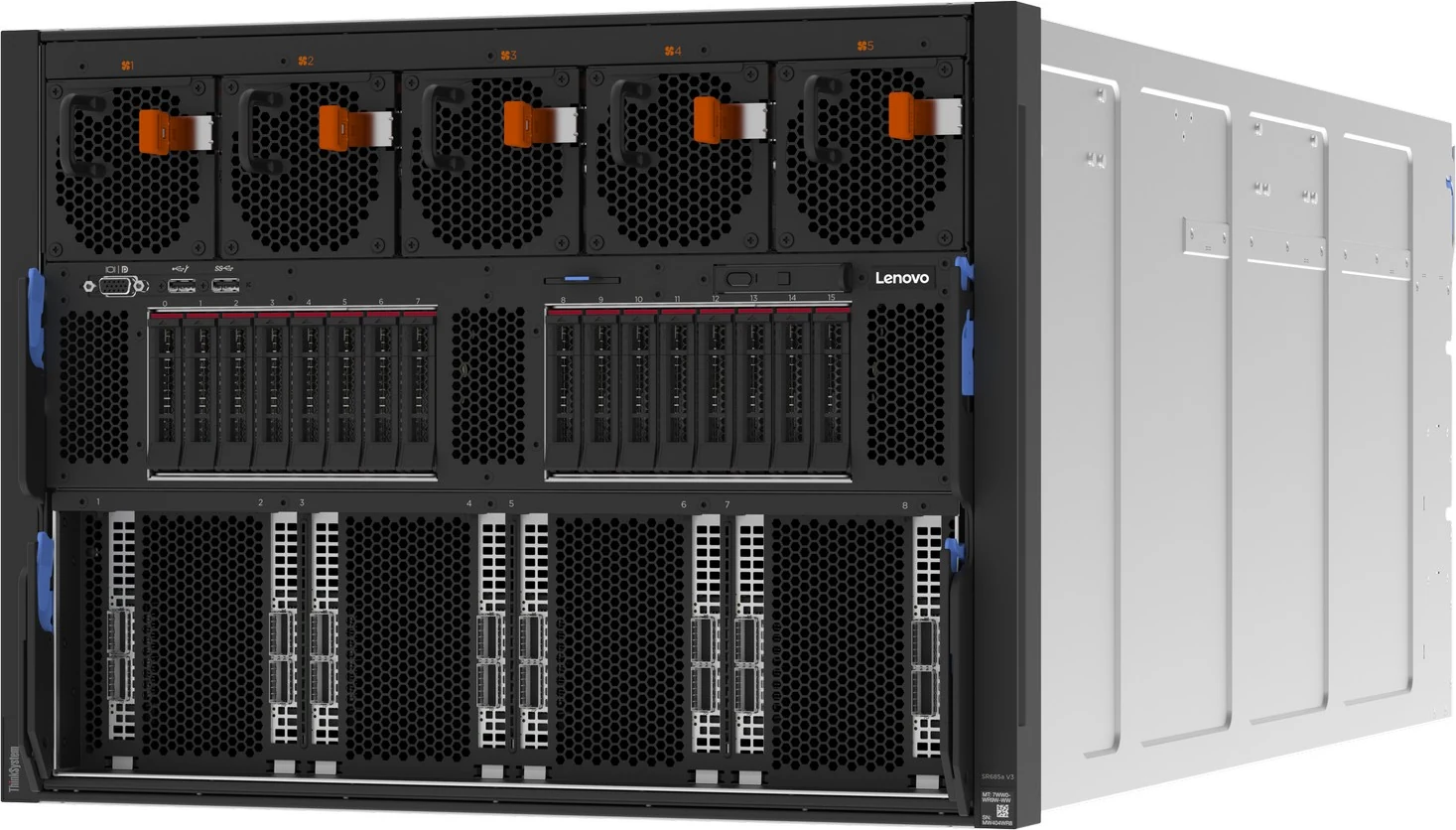
All sixteen drive bays are at the front, on two 8-bay backplanes that must both be fitted. The backplanes carry an AnyBay name but support NVMe only, and each drive gets its own PCIe 5.0 x4 link from the processors’ onboard NVMe ports. A separate two-bay M.2 RAID adapter sits on a tray between the processors for boot.

Headline layouts

front panel view

Front panel

The single layout: two BT3B 8-bay backplanes, both mandatory, on onboard PCIe 5.0 x4 ports (JBOD, no RAID). Sixteen 15.36 TB drives give 245.76 TB. The M.2 boot pair is internal and not drawn.

SAS/SATANVMeSAS/SATA + NVMe

Controllers & boot

  • Onboard PCIe 5.0 x4 NVMe ports - JBOD, no RAID — HBA. onboard; VROC not offered for 2.5-inch drives
  • ThinkSystem M.2 NVMe 2-Bay RAID Adapter (Marvell) - M.2 boot RAID 0/1 — Boot. M.2 only
  • ThinkSystem M.2 NVMe 2-Bay RAID Adapter (B8P9) - Marvell 88NR2241 RAID-0/1, PCIe 3.0 x2, no SED; no field upgrade — boot
  • Drive options are PM1745 Mixed Use (1.6, 3.2, 6.4 and 12.8 TB) and PM1743 Read Intensive (1.92, 3.84, 7.68 and 15.36 TB) U.3 PCIe 5.0 SSDs, each SED-capable and allowed in all 16 bays.
  • The onboard NVMe controller runs drives as JBOD; there is no hardware or VROC RAID for the 2.5-inch bays.
  • The M.2 NVMe 2-Bay RAID Adapter (Marvell 88NR2241) takes 2242 to 22110 drives over PCIe 3.0 — x2 to the host, x1 per drive — and offers RAID 0 or 1, but no SED encryption.
  • M.2 drive choices are PM9A3 960 GB and 1.92 TB NVMe; neither the M.2 adapter nor the backplanes are offered as field upgrades.
05 — Accelerators & I/O

GPUs, PCIe and networking

The eight GPUs sit on one board in the lower half of the chassis, selected with the server’s base feature code: the ThinkSystem AMD MI300X 192GB 750W 8-GPU Board or the ThinkSystem NVIDIA HGX H200 141GB 700W 8-GPU Board, each CTO only with a maximum of one. The MI300X GPUs are fully interconnected over Infinity Fabric at 128 GB/s between each pair, 896 GB/s in total; the H200 GPUs use 900 GB/s NVLink plus 128 GB/s PCIe Gen5. Lenovo’s GPU table and feature list give the H200 141 GB of HBM3e, whereas its standard-specification table calls it HBM3. For FP8, Lenovo lists 2,610 teraFLOPS per MI300X and 1,979 per H200 without sparsity (5,220 and 3,958 with it). MI300X divides into eight partitions and H200 into up to seven 16.5 GB MIG instances. One 8-GPU board: 8 × MI300X OAM (1,536 GB HBM3) or 8 × H200 SXM5 (1,128 GB; HBM3e per the GPU table), air-cooled.

AMD Instinct MI300X 192GB 750W 8-GPU Board (OAM)

192GB HBM3 · 8

NVIDIA HGX H200 141GB 700W 8-GPU Board (SXM5)

141GB HBM3e · 8

I/O topology

2 sockets
CPU 1PCIe 5.012 ch · 12 DIMMCPU 2PCIe 5.012 ch · 12 DIMM8 × front x16 GPU Directslots 1–4 CPU 2 · 5–8 CPU 12 × rear x16 FHHLslot 9 (or OCP) CPU 1 · 10 CPU 2OCP 3.0 · PCIe 5.0 x16slot 11 · takes slot 9’s lanesXCC2 · rear 1GbE portAST2600 · no power capping

Ten PCIe 5.0 x16 positions in total. PCIe switches link the eight front FHHL slots to the GPUs as well as the processors — slots 1–4 on CPU 2 and 5–8 on CPU 1. At the rear, slot 10 (CPU 2) is always available, while CPU 1’s lanes feed either slot 9 or the OCP 3.0 slot (slot 11). Each processor has 12 memory channels and 64 lanes left for PCIe and NVMe.

Network adapters Lenovo lists

12 options
AdapterPortsForm
ThinkSystem Broadcom 57508 100GbE QSFP56 2-Port PCIe 4 Ethernet Adapter (GPU Direct, front slots 1-8)2 × 100GbEPCIe
ThinkSystem Mellanox ConnectX-6 Dx 100GbE QSFP56 2-port PCIe Ethernet Adapter (front 8 / rear 2)2 × 100GbEPCIe
ThinkSystem Broadcom 57608 2x200/1x400GbE QSFP112 PCIe Ethernet Adapter (GPU Direct)2 × 200/400GbEPCIe
ThinkSystem NVIDIA BlueField-3 B3140H VPI QSFP112 1P 400G PCIe Gen5 x16 Adapter (GPU Direct)1 × 400GbE/NDRPCIe
ThinkSystem NVIDIA ConnectX-7 NDR400 OSFP 1-port PCIe Gen5 VPI Adapter (GPU Direct)1 × 400GbE/NDRPCIe
ThinkSystem NVIDIA ConnectX-7 NDR200/200GbE QSFP112 2-port PCIe Gen5 x16 InfiniBand Adapter (front 8 / rear 2)2 × 200GbE/NDR200PCIe
ThinkSystem Mellanox ConnectX-6 Lx 10/25GbE SFP28 2-port PCIe Ethernet Adapter (User/Control plane, rear slots 9/10)2 × 25GbEPCIe
ThinkSystem Intel X710-T2L 10GBASE-T 2-port OCP Ethernet Adapter2 × 10GbEOCP 3.0
ThinkSystem Intel X710-T4L 10GBase-T 4-Port OCP Ethernet Adapter4 × 10GbEOCP 3.0
ThinkSystem Broadcom 57414 10/25GbE SFP28 2-Port OCP Ethernet Adapter2 × 25GbEOCP 3.0
ThinkSystem Mellanox ConnectX-6 Lx 10/25GbE SFP28 2-port OCP Ethernet Adapter2 × 25GbEOCP 3.0
ThinkSystem Broadcom 57508 100GbE QSFP56 2-Port OCP Ethernet Adapter2 × 100GbEOCP 3.0
  • GPU Direct adapters for the front slots: Broadcom 57508 2 × 100GbE, ConnectX-6 Dx 2 × 100GbE, Broadcom 57608 2 × 200GbE, BlueField-3 B3140H 1 × 400G, ConnectX-7 NDR400 1-port and ConnectX-7 NDR200 2-port.
  • Front adapters may be any quantity up to eight, but all must be the same model.
  • The rear slots are intended for the user/control plane: ConnectX-6 Lx 25GbE, ConnectX-6 Dx 100GbE or ConnectX-7 NDR200, two at most.
  • Lenovo’s feature summary and specification table mention a BlueField-3 2-port 200Gb DPU for the user/control plane, yet the adapter table offers no BlueField-3 for the rear slots — confirm at quotation.
  • Rear layout is set with risers: two C1EP risers for two PCIe slots, or one C1EP plus the BK1E enablement kit for one slot and the OCP slot.
  • OCP choices: Intel X710-T2L or X710-T4L 10GBASE-T, Broadcom 57414 25GbE, ConnectX-6 Lx 25GbE or Broadcom 57508 100GbE; one port can be shared with XCC for NC-SI and Wake-on-LAN.
  • Fibre Channel HBAs are special-bid only.
06 — Power & cooling

1 power supply, 2,600 W

Eight ThinkSystem 2600W 230V Titanium Hot-Swap Gen2 v4 supplies come as standard, in an N+N redundant arrangement. They take C19 inlets and need a 200–240 V AC feed — Lenovo lists no 110 V support — or 180–300 V DC in China only.

0500100015002000250030002600 W Titanium — ThinkSystem 2600W 230V Titanium Gen2 v4 (C4HK); 8 standard, N+N; C19; 220V only2600TitaniumWatts · dashed line = output at 100–120 V low line
AC
  • Maximum inlet current per supply: 13.2 A at 200 V AC, 13 A at 220 V AC and 11.9 A at 240 V DC.
  • Cooling uses fifteen hot-swap 80 mm dual-rotor fans, N+1 rotor-redundant: five at the front (16.3K RPM peak) for the CPU shuttle and ten at the rear (19.5K RPM) for GPUs, drives and PCIe switches. Each supply adds its own fan, peaking at 28.5K RPM.
  • Maximum airflow with fans at full speed is 1417 CFM with MI300X and 1457 CFM with H200.
  • The server meets ASHRAE A2 in most configurations and, depending on hardware, A3, A4 or H1; performance may drop outside A2.
  • XCC2 on this model does not support power capping, and Energy Manager’s capping and policy functions are unavailable.
07 — Management, security & OS

Run it, secure it, choose the OS

Management

  • XClarity Controller 2 (XCC2) on an ASPEED AST2600 BMC
  • Lenovo’s management section says XCC2 Platinum is built in; the specification table calls it optional
  • Rear 10/100/1000 RJ45 management port · optional NC-SI port sharing through the OCP adapter
  • IPMI 2.0 (IPMI-over-LAN off by default), SNMPv3, CIM-XML, Redfish, HTML5 web UI
  • System I/O Board with MicroSD port (32 GB card option; up to 4 GB RDOC)
  • Integrated diagnostics panel with pull-out LCD · light path LEDs for DIMMs, drives and PSUs
  • XClarity One and Energy Manager (licence included; no power capping or policies)

Security

  • Platform Firmware Resiliency hardware Root of Trust (NIST SP 800-193)
  • Integrated TPM 2.0 · UEFI Secure Boot factory option (BPKQ)
  • AMD Platform Secure Boot, SEV, SEV-ES, SEV-SNP and TSME
  • System Guard component-change detection
  • SED drives with KMIP key managers (IBM SKLM, Thales KeySecure)
  • NIST SP 800-147B compliant

Operating systems

  • Red Hat Enterprise Linux 9.4 and 9.6
  • Ubuntu 22.04 LTS and 24.04 LTS
  • No Windows Server or VMware ESXi in Lenovo’s support list
08 — Compare

How the SR685a V3 compares with its family

The SR685a V3 is the AMD-hosted member of Lenovo’s eight-GPU line and the only one offering an AMD Instinct board. Its air-cooled 8U Intel siblings are the SR680a V3 (HGX B200) and SR680a V4 (HGX B300); the SR780a V3 fits an HGX board into 5U with Neptune water cooling. The SR675 V3 and SR650a V4 use PCIe GPUs. Each bar reflects that model’s verified spec file.

SR685a V3SR680a V3 with B200SR680a V4SR780a V3SR675 V3SR650a V4Cores / CPUSR685a V3: 128128SR680a V3 with B200: 6464SR680a V4: 8686SR780a V3: 6464SR675 V3: 160160SR650a V4: 8686DIMM slotsSR685a V3: 2424SR680a V3 with B200: 3232SR680a V4: 3232SR780a V3: 3232SR675 V3: 2424SR650a V4: 3232Max memorySR685a V3: 3 TB3SR680a V3 with B200: 4 TB4SR680a V4: 4 TB4SR780a V3: 4 TB4SR675 V3: 6 TB6SR650a V4: 8 TB8Max drive baysSR685a V3: 1616SR680a V3 with B200: 1616SR680a V4: 88SR780a V3: 1212SR675 V3: 88SR650a V4: 88Max GPUsSR685a V3: 88SR680a V3 with B200: 88SR680a V4: 88SR780a V3: 88SR675 V3: 88SR650a V4: 88Largest PSUSR685a V3: 2,600 W2,600SR680a V3 with B200: 3,200 W3,200SR680a V4: 3,800 W3,800SR780a V3: 3,200 W3,200SR675 V3: 2,600 W2,600SR650a V4: 3,200 W3,200
This modelSiblings and successorEach value from that model’s own verified spec file · bars scale per column

Head-to-head comparisons

Every figure on this page, set against the machines buyers weigh it up with.

09 — Use cases

Three builds that suit the SR685a V3

Three SR685a V3 builds, each assembled only from parts our configurator allows for this server. The GPU board, both drive backplanes and all 24 DIMMs are mandatory, so the choices are the GPU vendor, processor generation, DIMM size, drives and the adapter family for the front slots; the number of identical front adapters is agreed at quotation.

Large-model inference

MI300X node for models that need HBM capacity

Eight MI300X GPUs give 1,536 GB of HBM3, about 36% more than the H200 board’s 1,128 GB, so larger models fit across one server’s GPUs. A pair of 64-core, 3.2 GHz EPYC 9555 processors and 2.25 TB of RAM handle the host side, and sixteen NVMe drives stage model files locally.

  • 2 × AMD EPYC 9555 — 64 cores @ 3.2 GHz, 360 W each
  • AMD Instinct MI300X 8-GPU board — 192 GB HBM3 per GPU, 1,536 GB in total
  • 24 × 96 GB TruDDR5 RDIMM — 2.25 TB, operating at 6000 MHz
  • 16 × 7.68 TB 2.5-inch NVMe across both backplanes — 122.88 TB raw
  • Broadcom 57608 2 × 200GbE / 1 × 400GbE adapters in the front GPU Direct slots
  • 8 × 2600 W Titanium supplies, N+N
  • Ubuntu 24.04 LTS

The MI300X base (feature C1EJ) is fixed at order. MI300X systems are the heavier option — up to 109.4 kg against 104.4 kg with H200 — and Lenovo requires a material lift for single-person service.

Open this build in the configurator →
AI training

HGX H200 training and fine-tuning node

The H200 board links its eight GPUs with 900 GB/s NVLink. Two 96-core EPYC 9655 processors and the 3 TB memory maximum give data loading plenty of headroom, and a 400G BlueField-3 in each front slot used carries GPU Direct traffic.

  • 2 × AMD EPYC 9655 — 96 cores @ 2.6 GHz, 400 W each
  • NVIDIA HGX H200 8-GPU board — 141 GB HBM3e per GPU, NVLink 900 GB/s
  • 24 × 128 GB TruDDR5 RDIMM — 3 TB, the server maximum
  • 16 × 3.84 TB 2.5-inch NVMe — 61.44 TB raw
  • NVIDIA BlueField-3 B3140H 1 × 400G adapters in the front GPU Direct slots
  • 8 × 2600 W Titanium supplies, N+N
  • Ubuntu 24.04 LTS

The H200 base (feature C1EX) is fixed at order, and all front adapters must be identical. Lenovo’s onsite NBD and 4-hour targets do not cover GPU-related faults, so onsite spares are worth considering.

Open this build in the configurator →
Computer vision

Object-detection inference on 4th Gen EPYC

Lenovo lists a #1 MLPerf Inference v4.1 result for this server among available 8-GPU configurations on RetinaNet object detection. A 4th Gen build with two 48-core EPYC 9454s and 1.5 TB of 4800 MHz memory keeps host costs in proportion while the H200 board does the inference work.

  • 2 × AMD EPYC 9454 — 48 cores @ 2.75 GHz, 290 W each
  • NVIDIA HGX H200 8-GPU board
  • 24 × 64 GB TruDDR5 RDIMM — 1.5 TB at 4800 MHz
  • 8 × 1.92 TB 2.5-inch NVMe (both backplanes fitted)
  • Broadcom 57508 2 × 100GbE adapters in the front GPU Direct slots
  • 8 × 2600 W Titanium supplies, N+N
  • Ubuntu 22.04 LTS

4th Gen processors accept only the 4800 MHz-rated DIMMs or the 128 GB 5600 MHz-rated part, all running at 4800 MHz. Both backplanes are mandatory even with eight drives. The MLPerf entry does not say which GPU board it used.

Open this build in the configurator →
10 — Full specifications

Lenovo ThinkSystem SR685a V3 specifications

Chassis & cooling

Form factor8U rack server, air-cooled
Machine type7DHC (3-year warranty) · CTO models 7DHCCTO1WW and 7DHCCTOLWW
Dimensions (W × H × D)447 × 351 × 924 mm · 483 mm across the EIA flanges
Weight104.4 kg with H200 · 109.4 kg with MI300X
Fans15 hot-swap 80 mm dual-rotor (5 front, 10 rear), N+1 rotor-redundant, plus one per PSU
Airflow1417 CFM (MI300X) · 1457 CFM (H200) at full fan speed

Processor

SocketsTwo (one-socket builds not supported)
Families5th Gen EPYC 9005 (Zen 5, Zen 5c) · 4th Gen EPYC 9004 “Genoa”
Cores per processor48 to 128 (5th Gen) · 48 to 96 (4th Gen)
TDP280 W to 400 W
PCIe lanes128 × PCIe 5.0 per processor · 64 for PCIe and NVMe

Memory

Slots24 DDR5 · 12 channels × 1 DIMM per processor · all 24 required
TypeTruDDR5 x4 RDIMM — 64, 96 or 128 GB, all identical
Speed5th Gen: 6000 MHz (6400-rated DIMMs) · 4th Gen: 4800 MHz
Maximum3 TB (24 × 128 GB)
ProtectionECC, SDDC (x4), Bounded Fault, scrubbing, PPR · no mirroring or sparing

GPU complex

Board optionsAMD MI300X 192GB 750W 8-GPU · NVIDIA HGX H200 141GB 700W 8-GPU
MI300XOAM · 192 GB HBM3 · 5.3 TB/s · Infinity Fabric 128 GB/s per link
H200SXM5 · 141 GB HBM3e (spec table: HBM3) · 4.8 TB/s · NVLink 900 GB/s
SelectionFixed by base feature code (C1EJ or C1EX)

Storage

Drive bays16 × 2.5-inch hot-swap NVMe, PCIe 5.0 x4, front
ControllerOnboard NVMe, JBOD — no RAID
Maximum245.76 TB (16 × 15.36 TB)
BootM.2 NVMe 2-Bay RAID Adapter (Marvell) · 1–2 drives · RAID 0/1

Expansion & networking

Front slots8 × PCIe 5.0 x16 FHHL, GPU Direct via PCIe switch
Rear slotsSlot 10 x16 + slot 9 x16 or OCP 3.0 (PCIe 5.0 x16)
GPU Direct adapters100, 200 or 400Gb Ethernet/InfiniBand · identical, up to 8
Fibre ChannelSpecial bid only

Power

Supplies8 × 2600 W Titanium hot-swap, standard, N+N
Input200–240 V AC (no 110 V) · 180–300 V DC in China only · C19
Inlet current13.2 A at 200 V · 13 A at 220 V · 11.9 A at 240 V DC

Ports & management

FrontUSB 3.2 Gen 1 · USB 2.0 (also XCC) · VGA
Rear3 × USB 3.2 Gen 1 · VGA · 1GbE XCC RJ45
Video16 MB in XCC · 1920 × 1200 at 60 Hz · front VGA disables rear
ManagementXCC2 (AST2600) · LCD diagnostics panel · light path

Environment & warranty

ASHRAEA2 in most configurations; A3, A4 or H1 depending on hardware
RackFixed L-shelf rail · no CMA · up to 5 per 42U or 48U rack
Warranty3 years (7DHC), CRU and onsite, 9 × 5 next business day
11 — FAQ

SR685a V3 questions, answered from the documentation

Which GPUs can the Lenovo ThinkSystem SR685a V3 use?

Either eight AMD Instinct MI300X OAM GPUs with 192 GB of HBM3 each, or eight NVIDIA H200 SXM5 GPUs with 141 GB each (HBM3e in Lenovo’s GPU table, HBM3 in its specification table), supplied as a single 8-GPU board. The choice is set by the base feature code when the server is ordered: C1EJ for MI300X, C1EX for H200.

How do the MI300X and H200 boards compare in the SR685a V3?

Per GPU, Lenovo lists 192 GB of HBM3 at 5.3 TB/s and 750 W for MI300X against 141 GB of HBM3e at 4.8 TB/s and 700 W for H200. MI300X GPUs are fully interconnected over Infinity Fabric at 128 GB/s per link; the H200s use 900 GB/s NVLink. Across eight GPUs that is 1,536 GB versus 1,128 GB of GPU memory.

What is the maximum memory of the SR685a V3?

Three terabytes, from 24 × 128 GB RDIMMs. The server must have all 24 slots filled with identical DIMMs, so the only other sizes are 1.5 TB and 2.25 TB. With 5th Gen EPYC the 6400 MHz-rated DIMMs operate at 6000 MHz; with 4th Gen the memory runs at 4800 MHz.

Which processors does the SR685a V3 support?

Two are required, from seven 5th Gen EPYC 9005 models (9455, 9475F, 9535, 9555, 9575F, 9655 and the 128-core 9745) or five 4th Gen EPYC 9004 models (9454, 9474F, 9534, 9554 and 9654). Every one is supported with either GPU board.

How much storage does the SR685a V3 hold?

Sixteen 2.5-inch PCIe 5.0 NVMe bays on two mandatory 8-bay backplanes, up to 245.76 TB with 15.36 TB SSDs, run as JBOD without RAID. A Marvell-based M.2 adapter between the processors holds one or two NVMe boot drives in RAID 0 or 1.

How is the SR685a V3 networked into a GPU cluster?

Through adapters in eight front PCIe 5.0 x16 slots that reach the GPUs via PCIe switches for GPU Direct — up to 400Gb/s per adapter with BlueField-3 B3140H or ConnectX-7 NDR400, all identical. Two rear positions take user/control-plane adapters, or one rear slot plus an OCP 3.0 card for management.

What power does the SR685a V3 need?

Eight 2600 W Titanium hot-swap supplies are standard and run N+N. Each needs a 200–240 V AC feed through a C19 inlet (110 V is not supported) and draws up to 13.2 A at 200 V. DC input from 180 to 300 V is listed for China only.

How big and heavy is the SR685a V3?

It is an 8U server measuring 447 × 351 × 924 mm, weighing up to 104.4 kg with H200 or 109.4 kg with MI300X. Lenovo supplies a static toolless shelf kit rather than slides, rules out a cable arm, allows five servers per 42U or 48U cabinet and requires a material lift for single-person service.

Which operating systems run on the SR685a V3?

Lenovo’s operating-system section lists Red Hat Enterprise Linux 9.4 and 9.6 and Ubuntu 22.04 and 24.04 LTS. Its standard-specification table mentions only Ubuntu Server, so check the Lenovo OS interoperability guide for the exact release before ordering. Windows Server and VMware ESXi are not listed.

Is the Lenovo ThinkSystem SR685a V3 end of life?

No end-of-service date appears in Lenovo’s product guide, last updated on 15 July 2026, and it still lists orderable processors, GPU boards and drives. Support runs with each unit’s warranty or service contract; our end-of-life checker will add official dates once Lenovo publishes them.

Sources & verification

Where these figures come from

  • Lenovo ThinkSystem SR685a V3 Server Product Guide (July 15, 2026) — Key features, MLPerf table (Table 1), standard specifications (Table 2), models (Tables 3–4), processors (Tables 5–9), memory (Tables 10–11), GPUs (Tables 12–13), storage (Tables 14–18), I/O and network adapters (Tables 20–22), cooling (Table 23), power (Tables 24 and 34), management, security, rack installation, OS support, dimensions (Table 33), operating environment and warranty.

Specifications are extracted from Lenovo’s published documents and independently re-checked line by line. Configurations are quote-based; availability and exact options are confirmed at quotation. Last reviewed 2026-09-11.

Get a quote for the Lenovo ThinkSystem SR685a V3

Tell us the workload and we’ll spec and price it — or build it in the configurator first.

Business enquiries only — please use your company email. Gmail, Hotmail and other personal addresses are not accepted.

We only ship hardware to the countries in the dropdown. Software and maintenance services are global.

We use these details to reply to your enquiry and prepare any quote. No marketing emails without your consent. Privacy Policy

Enquiring about: Lenovo ThinkSystem SR685a V3

Response within 4 business hours · No obligation

Quote for
Lenovo ThinkSystem SR685a V3
0800 987 4111

Talk to a UK specialist

Get expert advice or a no-obligation quote — servers, storage, networking, maintenance, finance and cloud. We reply the same working day.

or call 0800 987 4111