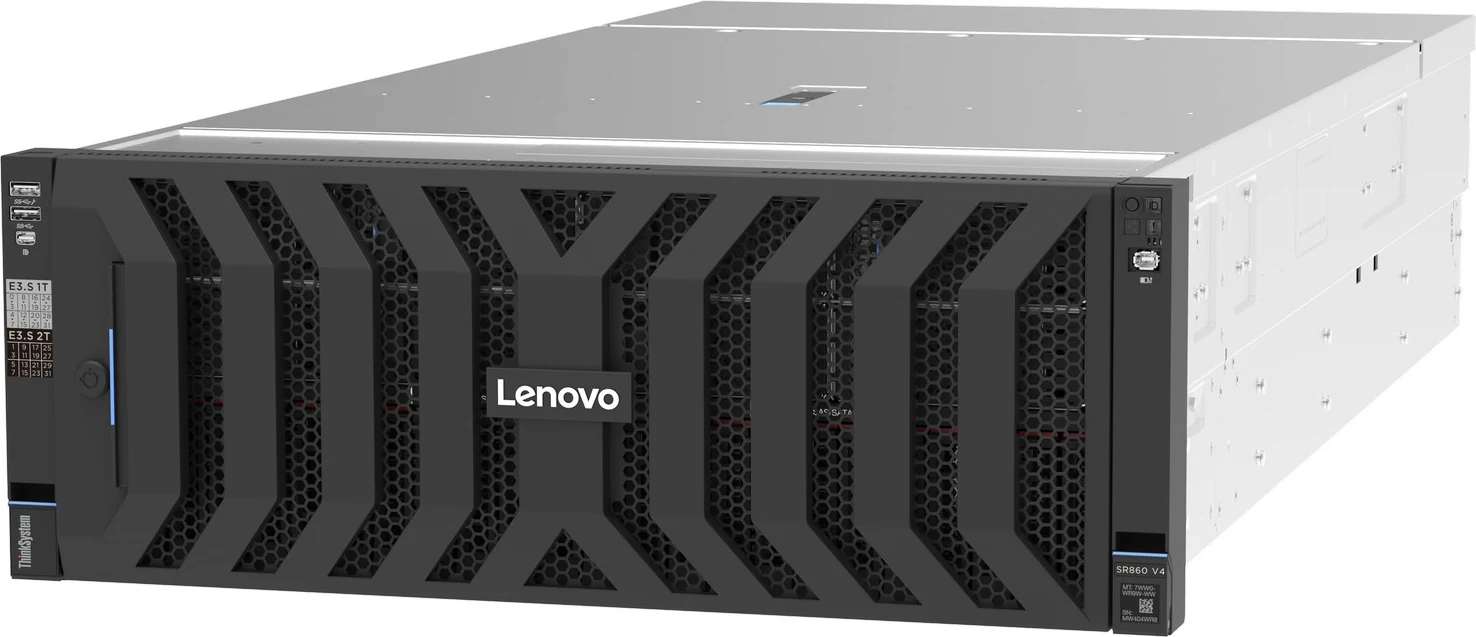
The ThinkSystem SR860 V4 is Lenovo’s 4U four-socket Xeon 6 server: the same processors and 16 TB memory ceiling as the 2U SR850 V4, with room for 56 front drives, 18 PCIe slots, four double-wide GPUs and four power supplies. This data sheet sets out those limits and the thermal, slot and drive-count rules Lenovo attaches to them, so a build can be planned before it is quoted.
4U Rack2 or 4 socketsXeon 6 P-coreXClarity Controller 3
Our read of Lenovo’s documentation: where the SR860 V4 is strong, and the limits worth knowing before you spec one.
Strengths
+Fifty-six front drives in one chassis: 32 E3.S 1T NVMe bays over 24 × 2.5-inch SAS/SATA bays, or 48 × 2.5-inch with up to 24 of them NVMe.
+Eighteen PCIe slots — 16 at Gen5 and 2 at Gen4 — plus two Gen5 OCP 3.0 slots, four more Gen5 slots than Lenovo lists for the SR860 V3.
+Room for four double-wide GPUs (slots 4, 6, 16, 18) or eight low-profile L4s: twice the SR850 V4’s GPU limit.
+Up to four hot-swap supplies set up as N+1 or N+N, with −48 V DC and HVAC/HVDC units on the list.
+Three RAID 940-16i adapters and four supercaps are allowed, so a 48-bay SAS/SATA array keeps flash-backed hardware RAID.
Watch-outs
!Air-cooled at the full 16 TB, it is a 24-drive server: Lenovo’s ambient table permits 256 GB RDIMMs only with Ultra fans, 25 °C inlet air and no more than 24 × 2.5-inch drives.
!Lenovo’s ambient table for the E3.S 1T chassis lists only Ultra fans and DIMMs of up to 128 GB, with no 256 GB row, so on those figures an E3.S build reaches 8 TB (64 × 128 GB) rather than 16 TB.
!Six or eight E3.S backplanes take away slots 6 and 18 — two of the four double-wide GPU positions.
!Only 24 of the 48 2.5-inch bays can be NVMe, and a two-processor server stops at eight NVMe drives, eight PCIe slots and two double-wide GPUs.
!The guide gives two maximum weights, 64 kg in its specifications table and 42 kg in the physical section, so plan rack loading and lifting for the higher one.
Processors7 SKUs
Cores / CPU8–86
DIMM slots64
Backplanes5
Max bays56
GPUsup to 8
PSU options10 · to 3,200 W
02 — Processors
7 supported processors, mapped
The processor list matches the SR850 V4 part for part: seven Xeon 6700P-series SKUs from 8 cores at 4.0 GHz base to 86 cores at 2.0 GHz, rated 165 W to 350 W. Each brings 88 PCIe 5.0 lanes and an eight-channel memory controller, and the SR860 V4 runs either two or four of them, linked over UPI 2.0.
Processor landscape — cores × TDP
7 SKUs · 1 family
Xeon 6 P-core 7Bubble size = L3 cache · hover a bubble for the full SKU
Processor explorer
filter · sort · compare
Processor
Cores / threads
Base
L3 cache
TDP
W / core
Memory
Intel Xeon 6 6788P
86 / 172
2 GHz
336 MB
350 W
4.1
DDR5-6400
Intel Xeon 6 6768P
64 / 128
2.4 GHz
336 MB
330 W
5.2
DDR5-6400
Intel Xeon 6 6748P
48 / 96
2.5 GHz
192 MB
300 W
6.3
DDR5-6400
Intel Xeon 6 6738P
32 / 64
2.9 GHz
144 MB
270 W
8.4
DDR5-6400
Intel Xeon 6 6728P
24 / 48
2.7 GHz
144 MB
210 W
8.8
DDR5-6400
Intel Xeon 6 6724P
16 / 32
3.6 GHz
72 MB
210 W
13.1
DDR5-6400
Intel Xeon 6 6714P
8 / 16
4 GHz
48 MB
165 W
20.6
DDR5-6400
Die types: the 6768P and 6788P are XCC parts with 336 MB of L3 cache, the 6728P, 6738P and 6748P are HCC, and the 6714P and 6724P are LCC with half the QAT, DLB, DSA and IAA engine count.
Lower-TDP chips use standard heatsinks in all four sockets; higher-TDP chips add winged performance heatsinks in the rear pair. Servers with double-wide GPUs need 2U performance heatsinks on processors 1 and 2.
The Neptune Core open-loop module (factory-fit only) water-cools the processors, with two or four fitted, and lets them run in inlet air up to 45 °C, but GPUs and NICs keep their air-cooled limits and slot 14 is lost to the water pipes.
In the air-cooled tables, Standard fans are listed only for processors of 270 W or less; 300 W to 350 W parts need Performance or Ultra fans.
LCC processors cannot use CXL heterogeneous mode, and the factory can preset only the Power Efficiency UEFI profile for them.
03 — Memory
64 DIMM slots, 16 per processor
Sixty-four DDR5 slots — 16 per processor across eight channels — hold up to 16 TB with 256 GB 3DS RDIMMs, while two processors enable 32 slots and 8 TB. The five TruDDR5 parts are all 6400 MHz, must be identical, and are sold only in the quantities Lenovo tables for two- and four-processor servers.
Capacity with every slot filled
by DIMM size
Operating speed
per Lenovo memory tables
Processor
1 DIMM / channel
2 DIMMs / channel
Xeon 6700P-series
6400 MHz
5200 MHz*
* One DIMM per channel runs at up to 6400 MHz; filling both slots of a channel with RDIMMs lowers that to 5200 MHz. The guide does not give a separate two-per-channel speed for 3DS RDIMMs.
Four-processor quantities: 4, 32 or 64 × 32 GB; 4, 16, 32 or 64 × 64 GB; 32 or 64 of the 96 GB, 128 GB and 256 GB parts. Forty-eight 256 GB DIMMs (12 per processor) are listed as planned for November 2026.
The DIMM flags come from Lenovo’s air-cooled ambient table for 2.5-inch fronts; the E3.S table lists DIMMs of up to 128 GB only.
CXL 2.0 takes exactly 16 E3.S 2T modules of 96 GB or 128 GB, matched by 32 RDIMMs of the same size, with four processors (two by special bid) and eight 2x2T backplanes. They are not hot-swap, and Windows Server and VMware ESXi do not support them.
Unlike the SR850 V4, whose CXL layout (config 17-2) leaves no other front bays, the SR860 V4 can keep 8, 16 or 24 SAS/SATA bays below the 16 CXL bays (configs 43 to 45), which is at most half the 48 bays of the 2.5-inch chassis.
Mirroring halves usable capacity and cannot be combined with either CXL memory mode.
04 — Storage
5 backplane options, up to 56 bays
Two chassis bases are offered: a 2.5-inch front with up to six 8-bay backplanes (48 bays), and an E3.S front that places up to eight 4-bay E3.S backplanes above three 8-bay 2.5-inch backplanes. Each headline layout below matches a numbered entry in Lenovo’s configuration tables, and the kit-by-kit chart follows them.
Headline layouts
front panel view
Front panel
Config 42-10: eight E3.S 1T backplanes (32 NVMe drives on the onboard ports) above three SAS/SATA backplanes — 56 drives in all. The 24-bay 2.5-inch row below the E3.S cage is not drawn.
SAS/SATANVMeSAS/SATA + NVMe
Controllers & boot
Onboard NVMe (PCIe 5.0) - Non RAID NVMe (BC4V) — Software RAID. Onboard NVMe ports; optional RAID via Intel VROC; max qty 1
ThinkSystem 440-16i SAS/SATA PCIe Gen4 12Gb HBA — HBA. PCIe slot; max qty 3; no supercap
ThinkSystem RAID 545-8i PCIe Gen4 12Gb Adapter — RAID. RAID 0/1/10; max qty 1; no supercap
ThinkSystem 440-16e SAS/SATA PCIe Gen4 12Gb HBA — HBA. External SAS HBA (JBOD to external enclosures/tape), part 4Y37A09724 feature B8P7 - lp2231 L2654
Rear M.2 RAID B540p-2HS SATA/NVMe Enablement Kit (rear hot-swap, 2 x SATA or NVMe M.2, Broadcom RAID) — boot
Each 2.5-inch NVMe bay has a dedicated PCIe 5.0 x4 link — four drives each on CPUs 1 and 2, eight each on CPUs 3 and 4 — adding up to the 24-drive 2.5-inch NVMe ceiling; E3.S bays get eight per processor.
Controller limits are three 440-16i HBAs, three RAID 940-16i, one RAID 940-8i and one RAID 545-8i, and the air baffle holds four supercaps, which caps the number of flash-backed adapters.
The processors provide no SATA ports, which puts every SATA drive behind a RAID adapter or HBA; E3.S drives run from the onboard NVMe ports under Intel VROC.
AnyBay backplanes are still documented as NVMe-only until SAS/SATA support arrives (planned for early 4Q/2025); Tri-Mode on RAID 940 adapters (feature CH5Z) adds U.3 NVMe drives over single PCIe lanes.
Rear hot-swap M.2 replaces slot 20 in the 18-slot layout or sits in Riser 3 in the 4-slot layout, and config 41-10 (32 E3.S + 16 SAS/SATA) supports no M.2 at all.
The guide is inconsistent on E3.S with two processors: its two-processor rules say every E3.S 1T and 2T configuration needs four, while its configuration table marks config 17-2 and the mixed configs 40 to 45 as valid with two or four. Confirm with Lenovo before planning a two-processor E3.S build.
Every documented backplane
4 with drive bays
2.5-inch3.5-inchEDSFF (E1.S / E3.S)
05 — Accelerators & I/O
GPUs, PCIe and networking
Two GPU types are listed: the low-profile NVIDIA L4, up to eight in slots 3–6 and 15–18 (slots 3, 5, 15 and 17 are x8), and the double-wide L40S, up to four in slots 4, 6, 16 and 18 with auxiliary power. All installed GPUs have to match, both are Controlled GPUs, and field-fitting a full-length card needs the SR860 V4 Full Length GPU Thermal Option Kit. Up to 8 × single-wide or 4 × double-wide; 4 single-wide or 2 double-wide with two processors.
NVIDIA L4 24GB PCIe Gen4 Passive GPU
single-wide
24GB · up to 8
NVIDIA L40S 48GB PCIe Gen4 Passive GPU
double-wide
48GB · up to 4
I/O topology
88 lanes per CPU
Three risers carry the slots. Full-height cards go in Riser 1 (3–8) or Riser 3 (15–20), Riser 2 (9–14) holds six half-height x8 slots, and the slots are spread across all four processors, with OCP slot 1 on CPU 1 and OCP slot 2 on CPU 2. Each processor contributes 88 PCIe 5.0 lanes and eight memory channels.
Six or eight E3.S backplanes make slots 6 and 18 unavailable, the Neptune module takes slot 14, and rear hot-swap M.2 takes slot 20.
Lenovo marks slots 3, 5, 15 and 17 unusable when double-wide GPUs are fitted; its slot list ties all four to a double-wide card in slot 4.
Usable PCIe positions with two processors: 3, 6, 8, 11, 14, 15, 18, 20 — both OCP positions stay in service.
The 100GbE and 200GbE PCIe adapters are limited to slots 4, 6, 7, 8, 16, 18, 19 and 20 (eight at most); the single-port NDR400 card to six of those.
Riser 2 is all Gen5 x8, every x8 slot has a physical x16 connector, and the optional serial port has its own rear position rather than a PCIe slot.
The CPUs carry four UPI 2.0 links at 24 GT/s each in Lenovo’s processor table; the server description says three links join them in a mesh.
Both OCP slots are PCIe 5.0 x16 in the specification table and slot list, while the network-adapter section says each has an x8 or x16 host interface.
06 — Power & cooling
10 power supplies, 1,300–3,200 W
Up to four hot-swap CRPS supplies can be fitted, all of one model, in N+1 or N+N redundancy. Lenovo lists Titanium units of 1300, 2000, 2700 and 3200 W, Platinum units of 1300 and 2700 W, and 1300 W HVAC/HVDC and −48 V DC units.
AC277 VAC / HVDC−48 V DC
The specifications table says 115 V is not supported, yet the supply table rates the three 1300 W AC units at 1000 W on 115 V; confirm with Lenovo before planning a low-voltage installation. Low-range 1300 W installs also need power cords rated above 10 A.
Zero-output mode is limited to the CRPS Premium supplies — the Titanium, HVAC/HVDC and −48 V units.
Inlets: C14 on the 1300 W and 2000 W AC units, C20 on the 2700 W and 3200 W units; the 3200 W Titanium draws up to 16 A at 200 V AC.
For the −48 V supply, the voltage list under the supply table gives −44 to −54 V DC while the electrical specifications say −48 to −60 V DC; its inlet current is 29.8 A.
In China every supply also accepts 240 V DC; the HVAC/HVDC unit covers 200–277 V AC and 240–380 V DC.
07 — Management, security & OS
Run it, secure it, choose the OS
Management
XClarity Controller 3 (OpenBMC on an ASPEED AST2600), with the Premier feature level included
Premier: remote console for up to six users, virtual media, power capping, System Guard, Neighbor Group
Rear RJ-45 management port (10/100/1000 Mbps) · shared NC-SI port on each OCP adapter
Redfish, IPMI 2.0 (IPMI-over-LAN disabled by default), SNMPv3 and CIM-XML
XClarity Provisioning Manager via F1 · XClarity One (per-endpoint licence)
XClarity Essentials OneCLI 5.x, UpdateXpress 5.x and BOMC 14.x or later
XClarity Energy Manager licence included · Lenovo Capacity Planner
Optional External Diagnostics Handset port · XClarity One Mobile through the front USB port
Security
Platform Firmware Resiliency Root of Trust to NIST SP 800-193
TPM 2.0 · Nationz TPM 2.0 module in China
UEFI Secure Boot, factory-enabled or left for the customer
Intel TDX, SGX and Total Memory Encryption (single and multi-key)
CNSA Suite 1.0 and FIPS 140-3 (in progress) cryptography for XCC
Self-encrypting drives with KMIP key management (IBM SKLM, Thales KeySecure)
NIST SP 800-147B compliant
Optional intrusion switch and lockable 4U security bezel
Operating systems
Microsoft Windows Server 2022 and 2025
Red Hat Enterprise Linux 9.6 to 9.8 and 10.0 to 10.2
SUSE Linux Enterprise Server 15 SP7 and 16
Ubuntu 22.04, 24.04 and 26.04 LTS
VMware ESXi 9.1
08 — Compare
SR860 V3 → SR860 V4
Lenovo’s guide compares the SR860 V4 with the SR860 V3. Both are 4U four-socket servers with 64 DIMM slots, 16 TB and four power supplies; the V4 adds Xeon 6 processors, faster memory, CXL, an E3.S front option and more Gen5 slots, and raises the double-wide GPU rating.
4 × 4th Gen Xeon Scalable · up to 60 cores · 350 W
4 × Xeon 6700P-series · up to 86 cores · 350 W
PCIe lanes per CPU
80 × PCIe 5.0
88 × PCIe 5.0
Memory speed
4800 MHz (1 DPC) · 4400 MHz (2 DPC)
6400 MHz (1 DPC) · 5200 MHz (2 DPC)
Maximum memory
16 TB · 64 DIMMs · incl. 9x4 RDIMMs
16 TB · 64 DIMMs · plus 16 CXL 2.0 modules
Front drive bays
48 × 2.5" (24 NVMe)
48 × 2.5" (24 NVMe) or 32 × E3.S 1T + 24 × 2.5"
Boot
2 × internal M.2 · 2 × rear 7mm
2 × internal M.2 · 2 × rear hot-swap M.2
PCIe slots
Up to 16 (12 × Gen5 + 4 × Gen4) or 18 × Gen4
Up to 18 (16 × Gen5 + 2 × Gen4)
GPUs
8 × single-wide 75 W or 4 × double-wide 350 W
8 × single-wide 75 W or 4 × double-wide 400 W
Management
XClarity Controller 2
XClarity Controller 3 (OpenBMC)
Cooling
12 hot-swap fans, N+1 rotor
12 hot-swap fans · optional Neptune Core water
Power supplies
4 · 1100–2600 W AC
4 · 1300–3200 W AC · −48 V DC and HVAC/HVDC
Source: Lenovo Press LP2231 (SR860 V4 product guide), Table 2 — Comparing the SR860 V4 to the previous generation SR860 V3.
The SR860 V4 family side by side
The SR860 V4 is the 4U half of Lenovo’s V4 four-socket pair. The 2U SR850 V4 shares its processors, 16 TB memory ceiling and backplane kits but tops out at 32 bays, nine slots, two double-wide GPUs and two supplies. The SR860 V3 came before it, the SR950 V3 scales to eight sockets, and the SR650 V4 covers two-socket Xeon 6 needs. Bars use each model’s spec file.
This modelSiblings and successorEach value from that model’s own verified spec file · bars scale per column
Head-to-head comparisons
Every figure on this page, set against the machines buyers weigh it up with.
Five SR860 V4 builds made only from parts our configurator offers for this model. Each opens with two power supplies; add the third and fourth in the configurator for N+1 or N+N, and we confirm Lenovo’s thermal and slot rules at quotation.
Databases
Tiered-flash database server
E3.S Gen5 NVMe for hot data and 2.5-inch SAS SSDs for everything else, in the E3.S chassis that keeps SAS/SATA bays beneath its EDSFF cage. Four 86-core processors with 4 TB at one DIMM per channel keep memory at 6400 MHz.
8 × 3.84 TB 2.5-inch SAS SSD behind a RAID 940-16i (8 GB flash)
2 × 480 GB M.2 NVMe boot
NVIDIA ConnectX-6 Dx 2 × 100GbE OCP 3.0
2 × 2700 W Titanium CRPS Premium
Red Hat Enterprise Linux 9
Lenovo allows 2, 4, 6 or 8 E3.S 1T backplanes, so the smallest real E3.S cage has eight bays; config 40-4 pairs two of them with one SAS/SATA backplane. Lenovo’s two-processor rules require four processors for any E3.S front, although its configuration table lists config 40 for two or four. The E3.S ambient table lists Ultra fans only, DIMMs of 128 GB or less and 35 °C inlet air (30 °C with rear M.2 or GPUs).
Four L40S accelerators — double-wide, 48 GB apiece — occupy slots 4, 6, 16 and 18, double the SR850 V4’s limit, with eight Gen4 NVMe drives for model storage, while 100GbE runs from an OCP adapter so the risers stay free for the cards.
4 × Xeon 6 6748P — 48 cores @ 2.5 GHz, 300 W each
4 × NVIDIA L40S 48 GB, double-wide
32 × 64 GB TruDDR5 RDIMM — 2 TB
8 × 7.68 TB NVMe U.3 on an AnyBay backplane (onboard NVMe)
2 × 480 GB M.2 NVMe boot
NVIDIA ConnectX-6 Dx 2 × 100GbE OCP 3.0
2 × 3200 W Titanium CRPS Premium (the chassis takes four)
Ubuntu Server 24.04 LTS
The L40S is a Controlled GPU. Lenovo’s air-cooled tables list GPUs only at 30 °C inlet or below and call for 2U performance heatsinks on processors 1 and 2 with double-wide cards; slots 3, 5, 15 and 17 are then unusable. Keep a 2.5-inch front: six or more E3.S backplanes would take slots 6 and 18.
All 64 slots filled with 256 GB 3DS RDIMMs for the full 16 TB, four 86-core processors, and eight NVMe drives for persistence and logs. SAP HANA configurations ship under their own machine type, 7DJR.
4 × Xeon 6 6788P — 86 cores @ 2 GHz, 350 W each
64 × 256 GB TruDDR5 3DS RDIMM — 16 TB, two per channel
8 × 3.84 TB NVMe U.3 on onboard ports
2 × 480 GB M.2 NVMe boot
Broadcom 57504 4 × 25GbE OCP 3.0
2 × 3200 W Titanium CRPS Premium
Red Hat Enterprise Linux 9
Air-cooled, Lenovo lists 256 GB RDIMMs only with Ultra fans, a 25 °C maximum inlet and 24 or fewer 2.5-inch drives. The Neptune Core module raises the processor limit to 45 °C, but Lenovo says GPUs and NICs still follow the air-cooled figures.
An entry point with two 32-core processors: eight 2.4 TB SAS disks under hardware RAID and four NVMe drives on an AnyBay backplane, with the second pair of sockets, 32 more DIMM slots and ten more PCIe slots available when the workload grows.
2 × Xeon 6 6738P — 32 cores @ 2.9 GHz, 270 W each
16 × 64 GB TruDDR5 RDIMM — 1 TB, one per channel
8 × 2.4 TB 10K SAS HDD behind a RAID 940-16i (8 GB flash)
4 × 3.84 TB NVMe U.3 in an 8-bay AnyBay backplane
2 × 480 GB M.2 NVMe boot
Intel E810-DA2 2 × 25GbE OCP 3.0
2 × 2000 W Titanium CRPS Premium
Windows Server 2025
Config 7-2 allows only four NVMe drives on this backplane pair while two processors are fitted; two processors also mean eight PCIe slots and at most 8 TB of memory. Lenovo’s two-processor rules also exclude E3.S bays, though its configuration table lists the mixed E3.S layouts for two or four processors.
For big-data analytics or a data-lake node that has to move data quickly: a dual-port 200GbE / NDR200 ConnectX-7 in a Gen5 x16 slot, 3 TB of memory at the full 6400 MHz, and most of the 18 slots still free for further adapters.
Lenovo supports the ConnectX-7 200GbE card in slots 4, 6, 7, 8, 16, 18, 19 and 20, up to eight per server, and Lenovo’s ambient tables list NIC adapters only in rows of 35 °C or below.
Our refurbished configurator doesn’t cover Lenovo ThinkSystem, and it has no four-socket models. For storage-heavy or core-heavy jobs that two sockets can handle, these re-certified Dell and HPE 2U servers are the closest alternatives.
14G · re-certified
Dell PowerEdge R740xd
2U · two Xeon Scalable sockets
24 DIMM slots · up to 3 TB DDR4
Up to 24 × 2.5" or 12 × 3.5"
Up to 24 NVMe · iDRAC9
Capacity tiers, backup targets and software-defined storage that need a lot of bays rather than four processors.
1966.08 TB with 32 × 61.44 TB E3.S · 1474.56 TB with 48 × 30.72 TB SAS SSDs
Expansion & networking
PCIe slots
18 (16 × Gen5 + 2 × Gen4) or an entry set of 4 × Gen4
OCP
2 × OCP 3.0 SFF, PCIe 5.0 x16, up to 400GbE
Serial
Optional DB-9 COM port in a dedicated rear position
External storage
440-16e SAS HBA · 32 Gb and 64 Gb Fibre Channel HBAs (up to 18 each)
Accelerators
GPUs
Up to 8 × NVIDIA L4 or 4 × NVIDIA L40S
Double-wide slots
4, 6, 16 and 18
Power
Supplies
Up to 4, hot-swap, N+1 or N+N; all identical
AC Titanium
1300, 2000, 2700 and 3200 W
AC Platinum
1300 W (v1.5 or v2.4) and 2700 W (v2.3 or v2.4)
Other
1300 W HVAC/HVDC · 1300 W −48 V DC
Ports & video
Front
External diagnostics port · optional 2 × USB 3 (5 Gb/s) and Mini DisplayPort
Rear
2 × USB 3 (5 Gb/s) · VGA · optional DB-9 serial · 1GbE XCC port
Internal
Optional USB 3 port for OS or licence keys
Video
16 MB, integrated in XCC3 · up to 1920 × 1200 at 60 Hz
Environment & warranty
ASHRAE
Class A2 in most configurations; A3, A4 or H1 depending on the build
Operating temperature
10–35 °C (A2) · per-configuration limits in Lenovo’s ambient tables
Maximum altitude
3,050 m
Noise
Up to 72 dBA at the bystander position, 100% CPU TDP, maximum configuration
Warranty
1 or 3 years by machine type · customer-replaceable units and onsite, 9 × 5 next business day
12 — FAQ
SR860 V4 questions, answered from the documentation
What is the maximum memory of the Lenovo ThinkSystem SR860 V4?
Sixteen terabytes from 64 × 256 GB 3DS RDIMMs with four processors; two processors give 32 slots and 8 TB. In an air-cooled server Lenovo allows 256 GB DIMMs only with Ultra fans, 25 °C inlet air and 24 or fewer 2.5-inch drives. Sixteen CXL 2.0 modules can be added in the E3.S chassis.
Which processors does the SR860 V4 support?
The same seven Xeon 6700P-series parts as the SR850 V4 — 6714P, 6724P, 6728P, 6738P, 6748P, 6768P and 6788P — with core counts from 8 to 86 and TDPs between 165 W and 350 W. A server needs two or four of them; one- and three-processor builds are not supported.
How many drives does the SR860 V4 hold?
Up to 56 front drives: 32 × E3.S 1T NVMe plus 24 × 2.5-inch SAS/SATA in the E3.S chassis, or 48 × 2.5-inch in the 2.5-inch chassis, of which up to 24 can be NVMe. Two M.2 boot drives fit internally or in a rear hot-swap cage.
How many GPUs does the SR860 V4 support?
Eight low-profile NVIDIA L4 or four double-wide NVIDIA L40S cards, all identical. A two-processor server takes four L4s or two L40S cards, and E3.S layouts with six or eight backplanes lose double-wide slots 6 and 18.
How many PCIe slots does the SR860 V4 have?
Eighteen (16 Gen5 and 2 Gen4) plus two Gen5 x16 OCP 3.0 slots in the main riser layout, or an entry layout of four Gen4 x8 slots. With two processors eight slots work; Neptune water cooling removes slot 14 and rear hot-swap M.2 replaces slot 20.
What power supplies does the SR860 V4 use?
As many as four hot-swap units, redundant as N+1 or N+N and all one model: Titanium 1300, 2000, 2700 or 3200 W, Platinum 1300 or 2700 W, or a 1300 W HVAC/HVDC or −48 V DC unit. The supply table rates the 1300 W AC units at 1000 W on 115 V, although the specifications table says 230 V only.
How big and heavy is the SR860 V4?
It is 447 mm wide, 175 mm (4U) high and 906 mm deep, or 946 mm with the E3.S front, and needs 903 mm or 943 mm from the rack flange to the PSU handles. Lenovo states the maximum weight as 64 kg in one table and 42 kg in another.
How does the SR860 V4 differ from the SR850 V4?
They share processors, the 16 TB memory ceiling, backplane kits and XCC3 management. The SR860 V4 doubles the height to 4U and adds 24 more front bays, nine more PCIe slots, twice the GPU count and four power supplies instead of two; the SR850 V4 suits racks where density matters more than expansion.
What changed from the SR860 V3 to the SR860 V4?
The V4 moves to Xeon 6700P processors (86 cores maximum, 88 PCIe 5.0 lanes per socket), 6400 MHz memory with CXL 2.0, an E3.S front option and rear hot-swap M.2. It has 16 Gen5 slots where the V3 had 12, rates double-wide GPUs at 400 W rather than 350 W, and uses XClarity Controller 3.
Is the Lenovo ThinkSystem SR860 V4 end of life?
No end-of-service date appears in Lenovo’s product guide for the SR860 V4, last updated on 7 September 2026. Warranty is one or three years according to machine type (7DJQ, 7DJN or 7DJR), and Lenovo Services can extend it by one or two years. Our end-of-life checker tracks dates once Lenovo publishes them.
Sources & verification
Where these figures come from
Lenovo ThinkSystem SR860 V4 Server (September 7, 2026) — Standard specifications (Table 3), SR860 V4 vs SR860 V3 (Table 2), processors (Tables 6–9), memory and CXL (Tables 11–13), backplanes and storage configurations (Tables 14, 16 and 17), controllers (Table 27), risers and slots (Table 40 and I/O expansion), network adapters (Table 44), GPUs (Tables 46–47), fans (Table 51), power supplies (Table 52), dimensions (Table 69), inlet current (Table 70), ambient temperature (Tables 71–72), security and OS support.
Specifications are extracted from Lenovo’s published documents and independently re-checked line by line. Configurations are quote-based; availability and exact options are confirmed at quotation. Last reviewed 2026-09-11.